Currently the OCI PaaS DB doesn't have a way of changing its shape once created. For example if the DB is doing more load than initially anticipated and require more CPU power to be added then there's no simple way to increase the CPU count, which may be available on other cloud platforms. However, Oracle does provide the ability to change the shape of the host sever indirectly. This is done by creating a new DB using an existing backup.
The details of the existing DB is shown below. This post shows the steps for changing the DB host shape from VM2.1 to VM2.2.
It is possible to create a database using the backups created by the automatic backup service.
However, this would mean any new data written to the database since the backup was taken won't be included in the newly created database. To avoid that stop any write activity to the database (this would mean down time for the application) and create a manual backup. The process of creating a backup nor database from backup doesn't require the existing database to be shutdown. But to keep the data consistent between the two DB instances it would require a stop to all writes by the application. Once the user initiated backup completes, write click on the backup and select create database.
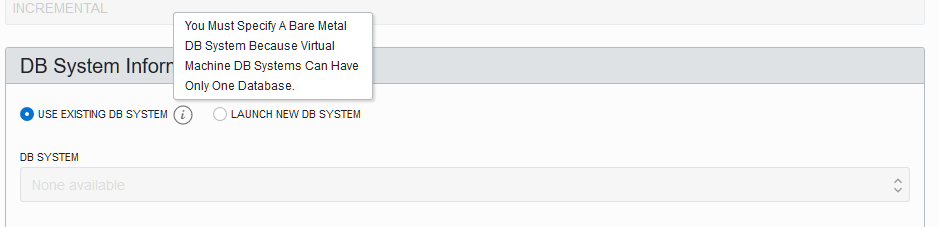
If there's an existing bare metal DB system then it could be used to create the new database (from backup). But if it is a virtual machine then only option is to create a new DB system.
Another thing to look out for is that, if the new DB system is created on the same subnet then it cannot have the same hostname as the original DB's hostname. This would mean either creating the new DB system on a different subnet or with a different hostname in the same subnet. For this post the later approach was chosen. It is also possible to create the database with same name or different name (in the post the new database has a different name). Depending on which option chosen may require some reconfiguration work on the application such as changing the DB connection string.
When the new DB system option is selected it allows to specify a new shape, which in this case was set as VM2.2, whereas the original DB was on a shape of VM2.1.
As mentioned earlier it also allows to create the new DB system on a different subnet and specify a new database name as well.
The final outcome is two database system with same data but different shapes.
If this was done as a scale up activity then once data consistency is verified the original database system could be terminated.
Related Posts
Duplicate Database Without Target Connection or Catalog Connection
Showing posts with label duplicate. Show all posts
Tuesday, July 9, 2019
Tuesday, October 1, 2013
Duplicate Database Without Target Connection or Catalog Connection
There are many techniques for database duplication. There's an earlier post which lists step for duplicating RAC database to a single instance using active database. This post list the steps for duplicating a source database without connecting to the target nor rman catalog. For more information on this refer Backup-Based Duplication Without a Target and a Recovery Catalog Connection in the Oracle documentation
Since no connectivity from source database is required for this technique of duplicating , there's no need to create static listener configuration in the duplicate host nor adding tns entry to the source tnsnames.ora file.
But a default listener is needed for the database.
The source database is called ent11g2 and the duplicated database will be named dupdb.
1. On the source database create a full database backup and copy the backup to the host where duplicate database will be created. The backup location need not be same as in the source location. For this post the backups will be copied to location "/home/oracle/backup" in the host used for the duplicate database. The source database is using OMF names and using recovery destination for the backups. If auto backup of control file is enabled copy the auto backup control file and the backup sets to the host where the duplicate database will be created.
2. Create password file for the duplicate database. This is not a must for the duplication (this method of duplication will work even without a password file) but may be required later on when the duplicate database is in use.
Full output of the duplicate command is given below.
Related Post
RAC to Single Instance Active Database Duplication
Useful Metalink Notes
Oracle10G RMAN Database Duplication [ID 259694.1]
Creating a Duplicate Database on a New Host. [ID 388431.1]
RMAN 'Duplicate Database' Feature in Oracle9i / 10G and 11.1 [ID 228257.1]
Performing duplicate database with ASM/OMF/RMAN [ID 340848.1]
RMAN 11GR2 : DUPLICATE WITHOUT CONNECTING TO TARGET DATABASE [ID 874352.1]
RMAN Duplicate Database From RAC ASM To RAC ASM [ID 461479.1]
Update 17 August 2015
Duplicating a database from ASM to FS with OMF. The db_name is asangapu and the db_unique_name is asangauat. db_name could only be 8 characters long and duplication fails if db_name is set longer than that. Set ORACLE_SID to db_unique_name value and also the directories will contain the db_unique_name.
Since no connectivity from source database is required for this technique of duplicating , there's no need to create static listener configuration in the duplicate host nor adding tns entry to the source tnsnames.ora file.
But a default listener is needed for the database.
The source database is called ent11g2 and the duplicated database will be named dupdb.
1. On the source database create a full database backup and copy the backup to the host where duplicate database will be created. The backup location need not be same as in the source location. For this post the backups will be copied to location "/home/oracle/backup" in the host used for the duplicate database. The source database is using OMF names and using recovery destination for the backups. If auto backup of control file is enabled copy the auto backup control file and the backup sets to the host where the duplicate database will be created.
cd /data/flash_recovery/ENT11G2 ls archivelog autobackup backupset controlfile flashback onlinelog cd autobackup/2013_10_01/ ls o1_mf_s_827667431_94o9gqww_.bkp <==== auto backup of control file scp -C o1_mf_s_827667431_94o9gqww_.bkp 192.168.0.99:/home/oracle/backup o1_mf_s_827667431_94o9gqww_.bkp 100% 10MB 10.2MB/s cd backupset/2013_10_01 $ scp -C * 192.168.0.99:/home/oracle/backup o1_mf_annnn_TAG20131001T113643_94o9fw2g_.bkp 100% 14MB 6.9MB/s 00:02 o1_mf_annnn_TAG20131001T113710_94o9gpnp_.bkp 100% 11KB 10.5KB/s 00:00 o1_mf_nnndf_TAG20131001T113645_94o9fxjn_.bkp 100% 2170MB 13.2MB/s 02:45That's the only time the source database is involved. Rest of the steps happen in the host used for the duplication.
2. Create password file for the duplicate database. This is not a must for the duplication (this method of duplication will work even without a password file) but may be required later on when the duplicate database is in use.
orapwd file=orapwdupdb password=password ignorecase=y3. Create the directory for the audit files. Without this duplication would fail with audit trail set to OS.
mkdir -p /opt/app/oracle/admin/dupdb/adump4. Create an init file with the db_name parameter set in it.
cat initdupdb.ora db_name='dupdb'5. Start the duplicate database in the nomount mode.
export ORACLE_SID=dupdb SQL> startup nomount;6. Connect to the duplicate database using an rman auxiliary connection
[oracle@hpc5 dbs]$ rman auxiliary / Recovery Manager: Release 11.2.0.3.0 - Production on Tue Oct 1 12:58:49 2013 Copyright (c) 1982, 2011, Oracle and/or its affiliates. All rights reserved. connected to auxiliary database: DUPDB (not mounted)and run the duplicate command
DUPLICATE TARGET DATABASE TO dupdb SPFILE PARAMETER_VALUE_CONVERT 'ent11g2', 'dupdb', '/data/oradata', '/opt/app/oracle/oradata', '/data/flash_recovery','/opt/app/oracle/flash_recovery_area','ENT11G2','DUPDB' set db_create_file_dest='/opt/app/oracle/oradata' set db_recovery_file_dest='/opt/app/oracle/flash_recovery_area' BACKUP LOCATION '/home/oracle/backup';When data files use OMF names rather than using *file_name_convert parameter duplication must use create_file_dest. Refer Specifying OMF or ASM Alternative Names for Duplicate Database Files section on Oracle documentation.
Full output of the duplicate command is given below.
RMAN> DUPLICATE TARGET DATABASE
2> TO dupdb
3> SPFILE PARAMETER_VALUE_CONVERT 'ent11g2', 'dupdb', '/data/oradata', '/opt/app/oracle/oradata', '/data/flash_recovery','/opt/app/oracle/flash_recovery_area','ENT11G2','DUPDB'
4> set db_create_file_dest='/opt/app/oracle/oradata'
5> set db_recovery_file_dest='/opt/app/oracle/flash_recovery_area'
6> BACKUP LOCATION '/home/oracle/backup';
Starting Duplicate Db at 01-OCT-13
contents of Memory Script:
{
restore clone spfile to '/opt/app/oracle/product/11.2.0/ent11.2.0.3/dbs/spfiledupdb.ora' from
'/home/oracle/backup/o1_mf_s_827667431_94o9gqww_.bkp';
sql clone "alter system set spfile= ''/opt/app/oracle/product/11.2.0/ent11.2.0.3/dbs/spfiledupdb.ora''";
}
executing Memory Script
Starting restore at 01-OCT-13
allocated channel: ORA_AUX_DISK_1
channel ORA_AUX_DISK_1: SID=216 device type=DISK
channel ORA_AUX_DISK_1: restoring spfile from AUTOBACKUP /home/oracle/backup/o1_mf_s_827667431_94o9gqww_.bkp
channel ORA_AUX_DISK_1: SPFILE restore from AUTOBACKUP complete
Finished restore at 01-OCT-13
sql statement: alter system set spfile= ''/opt/app/oracle/product/11.2.0/ent11.2.0.3/dbs/spfiledupdb.ora''
contents of Memory Script:
{
sql clone "alter system set db_name =
''DUPDB'' comment=
''duplicate'' scope=spfile";
sql clone "alter system set audit_file_dest =
''/opt/app/oracle/admin/dupdb/adump'' comment=
'''' scope=spfile";
sql clone "alter system set control_files =
''/opt/app/oracle/oradata/DUPDB/controlfile/o1_mf_696xsob5_.ctl'', ''/opt/app/oracle/flash_recovery_area/DUPDB/controlfile/o1_mf_696xsoc9_.ctl'' comment=
'''' scope=spfile";
sql clone "alter system set dispatchers =
''(PROTOCOL=TCP) (SERVICE=dupdbXDB)'' comment=
'''' scope=spfile";
sql clone "alter system set db_create_file_dest =
''/opt/app/oracle/oradata'' comment=
'''' scope=spfile";
sql clone "alter system set db_recovery_file_dest =
''/opt/app/oracle/flash_recovery_area'' comment=
'''' scope=spfile";
shutdown clone immediate;
startup clone nomount;
}
executing Memory Script
sql statement: alter system set db_name = ''DUPDB'' comment= ''duplicate'' scope=spfile
sql statement: alter system set audit_file_dest = ''/opt/app/oracle/admin/dupdb/adump'' comment= '''' scope=spfile
sql statement: alter system set control_files = ''/opt/app/oracle/oradata/DUPDB/controlfile/o1_mf_696xsob5_.ctl'', ''/opt/app/oracle/flash_recovery_area/DUPDB/controlfile/o1_mf_696xsoc9_.ctl'' comment= '''' scope=spfile
sql statement: alter system set dispatchers = ''(PROTOCOL=TCP) (SERVICE=dupdbXDB)'' comment= '''' scope=spfile
sql statement: alter system set db_create_file_dest = ''/opt/app/oracle/oradata'' comment= '''' scope=spfile
sql statement: alter system set db_recovery_file_dest = ''/opt/app/oracle/flash_recovery_area'' comment= '''' scope=spfile
Oracle instance shut down
connected to auxiliary database (not started)
Oracle instance started
Total System Global Area 3758010368 bytes
Fixed Size 2233960 bytes
Variable Size 738199960 bytes
Database Buffers 2986344448 bytes
Redo Buffers 31232000 bytes
contents of Memory Script:
{
sql clone "alter system set control_files =
''/opt/app/oracle/oradata/DUPDB/controlfile/o1_mf_696xsob5_.ctl'', ''/opt/app/oracle/flash_recovery_area/DUPDB/controlfile/o1_mf_696xsoc9_.ctl'' comment=
''Set by RMAN'' scope=spfile";
sql clone "alter system set db_name =
''ENT11G2'' comment=
''Modified by RMAN duplicate'' scope=spfile";
sql clone "alter system set db_unique_name =
''DUPDB'' comment=
''Modified by RMAN duplicate'' scope=spfile";
shutdown clone immediate;
startup clone force nomount
restore clone primary controlfile from '/home/oracle/backup/o1_mf_s_827667431_94o9gqww_.bkp';
alter clone database mount;
}
executing Memory Script
sql statement: alter system set control_files = ''/opt/app/oracle/oradata/DUPDB/controlfile/o1_mf_696xsob5_.ctl'', ''/opt/app/oracle/flash_recovery_area/DUPDB/controlfile/o1_mf_696xsoc9_.ctl'' comment= ''Set by RMAN'' scope=spfile
sql statement: alter system set db_name = ''ENT11G2'' comment= ''Modified by RMAN duplicate'' scope=spfile
sql statement: alter system set db_unique_name = ''DUPDB'' comment= ''Modified by RMAN duplicate'' scope=spfile
Oracle instance shut down
Oracle instance started
Total System Global Area 3758010368 bytes
Fixed Size 2233960 bytes
Variable Size 738199960 bytes
Database Buffers 2986344448 bytes
Redo Buffers 31232000 bytes
Starting restore at 01-OCT-13
allocated channel: ORA_AUX_DISK_1
channel ORA_AUX_DISK_1: SID=958 device type=DISK
channel ORA_AUX_DISK_1: restoring control file
channel ORA_AUX_DISK_1: restore complete, elapsed time: 00:00:02
output file name=/opt/app/oracle/oradata/DUPDB/controlfile/o1_mf_696xsob5_.ctl
output file name=/opt/app/oracle/flash_recovery_area/DUPDB/controlfile/o1_mf_696xsoc9_.ctl
Finished restore at 01-OCT-13
database mounted
released channel: ORA_AUX_DISK_1
allocated channel: ORA_AUX_DISK_1
channel ORA_AUX_DISK_1: SID=958 device type=DISK
contents of Memory Script:
{
set until scn 51111288;
set newname for clone datafile 1 to new;
set newname for clone datafile 2 to new;
set newname for clone datafile 3 to new;
set newname for clone datafile 4 to new;
set newname for clone datafile 5 to new;
set newname for clone datafile 6 to new;
set newname for clone datafile 7 to new;
set newname for clone datafile 8 to new;
set newname for clone datafile 9 to new;
set newname for clone datafile 10 to new;
set newname for clone datafile 11 to new;
set newname for clone datafile 12 to new;
set newname for clone datafile 13 to new;
set newname for clone datafile 14 to new;
restore
clone database
;
}
executing Memory Script
executing command: SET until clause
executing command: SET NEWNAME
Starting restore at 01-OCT-13
using channel ORA_AUX_DISK_1
channel ORA_AUX_DISK_1: starting datafile backup set restore
channel ORA_AUX_DISK_1: specifying datafile(s) to restore from backup set
channel ORA_AUX_DISK_1: restoring datafile 00001 to /opt/app/oracle/oradata/DUPDB/datafile/o1_mf_system_%u_.dbf
channel ORA_AUX_DISK_1: restoring datafile 00002 to /opt/app/oracle/oradata/DUPDB/datafile/o1_mf_sysaux_%u_.dbf
channel ORA_AUX_DISK_1: restoring datafile 00003 to /opt/app/oracle/oradata/DUPDB/datafile/o1_mf_undotbs1_%u_.dbf
channel ORA_AUX_DISK_1: restoring datafile 00004 to /opt/app/oracle/oradata/DUPDB/datafile/o1_mf_users_%u_.dbf
channel ORA_AUX_DISK_1: restoring datafile 00005 to /opt/app/oracle/oradata/DUPDB/datafile/o1_mf_example_%u_.dbf
channel ORA_AUX_DISK_1: restoring datafile 00006 to /opt/app/oracle/oradata/DUPDB/datafile/o1_mf_velbo_%u_.dbf
channel ORA_AUX_DISK_1: restoring datafile 00007 to /opt/app/oracle/oradata/DUPDB/datafile/o1_mf_datatbs_%u_.dbf
channel ORA_AUX_DISK_1: restoring datafile 00008 to /opt/app/oracle/oradata/DUPDB/datafile/o1_mf_index_%u_.dbf
channel ORA_AUX_DISK_1: restoring datafile 00009 to /opt/app/oracle/oradata/DUPDB/datafile/o1_mf_lobs_%u_.dbf
channel ORA_AUX_DISK_1: restoring datafile 00010 to /opt/app/oracle/oradata/DUPDB/datafile/o1_mf_test_%u_.dbf
channel ORA_AUX_DISK_1: restoring datafile 00011 to /opt/app/oracle/oradata/DUPDB/datafile/o1_mf_test_%u_.dbf
channel ORA_AUX_DISK_1: restoring datafile 00012 to /opt/app/oracle/oradata/DUPDB/datafile/o1_mf_lobtbs_%u_.dbf
channel ORA_AUX_DISK_1: restoring datafile 00013 to /opt/app/oracle/oradata/DUPDB/datafile/o1_mf_lobtbs11_%u_.dbf
channel ORA_AUX_DISK_1: restoring datafile 00014 to /opt/app/oracle/oradata/DUPDB/datafile/o1_mf_2ktbs_%u_.dbf
channel ORA_AUX_DISK_1: reading from backup piece /home/oracle/backup/o1_mf_nnndf_TAG20131001T113645_94o9fxjn_.bkp
channel ORA_AUX_DISK_1: piece handle=/home/oracle/backup/o1_mf_nnndf_TAG20131001T113645_94o9fxjn_.bkp tag=TAG20131001T113645
channel ORA_AUX_DISK_1: restored backup piece 1
channel ORA_AUX_DISK_1: restore complete, elapsed time: 00:02:15
Finished restore at 01-OCT-13
contents of Memory Script:
{
switch clone datafile all;
}
executing Memory Script
datafile 1 switched to datafile copy
input datafile copy RECID=15 STAMP=827672497 file name=/opt/app/oracle/oradata/DUPDB/datafile/o1_mf_system_94og8tfx_.dbf
datafile 2 switched to datafile copy
input datafile copy RECID=16 STAMP=827672497 file name=/opt/app/oracle/oradata/DUPDB/datafile/o1_mf_sysaux_94og8tf6_.dbf
datafile 3 switched to datafile copy
input datafile copy RECID=17 STAMP=827672497 file name=/opt/app/oracle/oradata/DUPDB/datafile/o1_mf_undotbs1_94og8tdb_.dbf
datafile 4 switched to datafile copy
input datafile copy RECID=18 STAMP=827672497 file name=/opt/app/oracle/oradata/DUPDB/datafile/o1_mf_users_94og8tgf_.dbf
datafile 5 switched to datafile copy
input datafile copy RECID=19 STAMP=827672497 file name=/opt/app/oracle/oradata/DUPDB/datafile/o1_mf_example_94og8tgo_.dbf
datafile 6 switched to datafile copy
input datafile copy RECID=20 STAMP=827672497 file name=/opt/app/oracle/oradata/DUPDB/datafile/o1_mf_velbo_94og8tfg_.dbf
datafile 7 switched to datafile copy
input datafile copy RECID=21 STAMP=827672497 file name=/opt/app/oracle/oradata/DUPDB/datafile/o1_mf_datatbs_94og939j_.dbf
datafile 8 switched to datafile copy
input datafile copy RECID=22 STAMP=827672497 file name=/opt/app/oracle/oradata/DUPDB/datafile/o1_mf_index_94og8tfp_.dbf
datafile 9 switched to datafile copy
input datafile copy RECID=23 STAMP=827672497 file name=/opt/app/oracle/oradata/DUPDB/datafile/o1_mf_lobs_94og8wxx_.dbf
datafile 10 switched to datafile copy
input datafile copy RECID=24 STAMP=827672497 file name=/opt/app/oracle/oradata/DUPDB/datafile/o1_mf_test_94og91sh_.dbf
datafile 11 switched to datafile copy
input datafile copy RECID=25 STAMP=827672497 file name=/opt/app/oracle/oradata/DUPDB/datafile/o1_mf_test_94og93d0_.dbf
datafile 12 switched to datafile copy
input datafile copy RECID=26 STAMP=827672497 file name=/opt/app/oracle/oradata/DUPDB/datafile/o1_mf_lobtbs_94og8yhj_.dbf
datafile 13 switched to datafile copy
input datafile copy RECID=27 STAMP=827672497 file name=/opt/app/oracle/oradata/DUPDB/datafile/o1_mf_lobtbs11_94og8zw0_.dbf
datafile 14 switched to datafile copy
input datafile copy RECID=28 STAMP=827672497 file name=/opt/app/oracle/oradata/DUPDB/datafile/o1_mf_2ktbs_94og8tg5_.dbf
contents of Memory Script:
{
set until scn 51111288;
recover
clone database
delete archivelog
;
}
executing Memory Script
executing command: SET until clause
Starting recover at 01-OCT-13
using channel ORA_AUX_DISK_1
starting media recovery
channel ORA_AUX_DISK_1: starting archived log restore to default destination
channel ORA_AUX_DISK_1: restoring archived log
archived log thread=1 sequence=503
channel ORA_AUX_DISK_1: reading from backup piece /home/oracle/backup/o1_mf_annnn_TAG20131001T113710_94o9gpnp_.bkp
channel ORA_AUX_DISK_1: piece handle=/home/oracle/backup/o1_mf_annnn_TAG20131001T113710_94o9gpnp_.bkp tag=TAG20131001T113710
channel ORA_AUX_DISK_1: restored backup piece 1
channel ORA_AUX_DISK_1: restore complete, elapsed time: 00:00:01
archived log file name=/opt/app/oracle/flash_recovery_area/DUPDB/archivelog/2013_10_01/o1_mf_1_503_94ogf2sd_.arc thread=1 sequence=503
channel clone_default: deleting archived log(s)
archived log file name=/opt/app/oracle/flash_recovery_area/DUPDB/archivelog/2013_10_01/o1_mf_1_503_94ogf2sd_.arc RECID=1 STAMP=827672498
media recovery complete, elapsed time: 00:00:01
Finished recover at 01-OCT-13
Oracle instance started
Total System Global Area 3758010368 bytes
Fixed Size 2233960 bytes
Variable Size 738199960 bytes
Database Buffers 2986344448 bytes
Redo Buffers 31232000 bytes
contents of Memory Script:
{
sql clone "alter system set db_name =
''DUPDB'' comment=
''Reset to original value by RMAN'' scope=spfile";
sql clone "alter system reset db_unique_name scope=spfile";
shutdown clone immediate;
startup clone nomount;
}
executing Memory Script
sql statement: alter system set db_name = ''DUPDB'' comment= ''Reset to original value by RMAN'' scope=spfile
sql statement: alter system reset db_unique_name scope=spfile
Oracle instance shut down
connected to auxiliary database (not started)
Oracle instance started
Total System Global Area 3758010368 bytes
Fixed Size 2233960 bytes
Variable Size 738199960 bytes
Database Buffers 2986344448 bytes
Redo Buffers 31232000 bytes
sql statement: CREATE CONTROLFILE REUSE SET DATABASE "DUPDB" RESETLOGS ARCHIVELOG
MAXLOGFILES 16
MAXLOGMEMBERS 3
MAXDATAFILES 100
MAXINSTANCES 8
MAXLOGHISTORY 584
LOGFILE
GROUP 1 SIZE 50 M ,
GROUP 2 SIZE 50 M ,
GROUP 3 SIZE 50 M
DATAFILE
'/opt/app/oracle/oradata/DUPDB/datafile/o1_mf_system_94og8tfx_.dbf'
CHARACTER SET AL32UTF8
contents of Memory Script:
{
set newname for clone tempfile 1 to new;
set newname for clone tempfile 2 to new;
set newname for clone tempfile 3 to new;
switch clone tempfile all;
catalog clone datafilecopy "/opt/app/oracle/oradata/DUPDB/datafile/o1_mf_sysaux_94og8tf6_.dbf",
"/opt/app/oracle/oradata/DUPDB/datafile/o1_mf_undotbs1_94og8tdb_.dbf",
"/opt/app/oracle/oradata/DUPDB/datafile/o1_mf_users_94og8tgf_.dbf",
"/opt/app/oracle/oradata/DUPDB/datafile/o1_mf_example_94og8tgo_.dbf",
"/opt/app/oracle/oradata/DUPDB/datafile/o1_mf_velbo_94og8tfg_.dbf",
"/opt/app/oracle/oradata/DUPDB/datafile/o1_mf_datatbs_94og939j_.dbf",
"/opt/app/oracle/oradata/DUPDB/datafile/o1_mf_index_94og8tfp_.dbf",
"/opt/app/oracle/oradata/DUPDB/datafile/o1_mf_lobs_94og8wxx_.dbf",
"/opt/app/oracle/oradata/DUPDB/datafile/o1_mf_test_94og91sh_.dbf",
"/opt/app/oracle/oradata/DUPDB/datafile/o1_mf_test_94og93d0_.dbf",
"/opt/app/oracle/oradata/DUPDB/datafile/o1_mf_lobtbs_94og8yhj_.dbf",
"/opt/app/oracle/oradata/DUPDB/datafile/o1_mf_lobtbs11_94og8zw0_.dbf",
"/opt/app/oracle/oradata/DUPDB/datafile/o1_mf_2ktbs_94og8tg5_.dbf";
switch clone datafile all;
}
executing Memory Script
executing command: SET NEWNAME
renamed tempfile 1 to /opt/app/oracle/oradata/DUPDB/datafile/o1_mf_temp_%u_.tmp in control file
renamed tempfile 2 to /opt/app/oracle/oradata/DUPDB/datafile/o1_mf_txtemp_%u_.tmp in control file
renamed tempfile 3 to /opt/app/oracle/oradata/DUPDB/datafile/o1_mf_temp5m_%u_.tmp in control file
cataloged datafile copy
datafile copy file name=/opt/app/oracle/oradata/DUPDB/datafile/o1_mf_sysaux_94og8tf6_.dbf RECID=1 STAMP=827672513
cataloged datafile copy
datafile copy file name=/opt/app/oracle/oradata/DUPDB/datafile/o1_mf_undotbs1_94og8tdb_.dbf RECID=2 STAMP=827672513
cataloged datafile copy
datafile copy file name=/opt/app/oracle/oradata/DUPDB/datafile/o1_mf_users_94og8tgf_.dbf RECID=3 STAMP=827672513
cataloged datafile copy
datafile copy file name=/opt/app/oracle/oradata/DUPDB/datafile/o1_mf_example_94og8tgo_.dbf RECID=4 STAMP=827672513
cataloged datafile copy
datafile copy file name=/opt/app/oracle/oradata/DUPDB/datafile/o1_mf_velbo_94og8tfg_.dbf RECID=5 STAMP=827672513
cataloged datafile copy
datafile copy file name=/opt/app/oracle/oradata/DUPDB/datafile/o1_mf_datatbs_94og939j_.dbf RECID=6 STAMP=827672513
cataloged datafile copy
datafile copy file name=/opt/app/oracle/oradata/DUPDB/datafile/o1_mf_index_94og8tfp_.dbf RECID=7 STAMP=827672513
cataloged datafile copy
datafile copy file name=/opt/app/oracle/oradata/DUPDB/datafile/o1_mf_lobs_94og8wxx_.dbf RECID=8 STAMP=827672513
cataloged datafile copy
datafile copy file name=/opt/app/oracle/oradata/DUPDB/datafile/o1_mf_test_94og91sh_.dbf RECID=9 STAMP=827672513
cataloged datafile copy
datafile copy file name=/opt/app/oracle/oradata/DUPDB/datafile/o1_mf_test_94og93d0_.dbf RECID=10 STAMP=827672513
cataloged datafile copy
datafile copy file name=/opt/app/oracle/oradata/DUPDB/datafile/o1_mf_lobtbs_94og8yhj_.dbf RECID=11 STAMP=827672513
cataloged datafile copy
datafile copy file name=/opt/app/oracle/oradata/DUPDB/datafile/o1_mf_lobtbs11_94og8zw0_.dbf RECID=12 STAMP=827672513
cataloged datafile copy
datafile copy file name=/opt/app/oracle/oradata/DUPDB/datafile/o1_mf_2ktbs_94og8tg5_.dbf RECID=13 STAMP=827672513
datafile 2 switched to datafile copy
input datafile copy RECID=1 STAMP=827672513 file name=/opt/app/oracle/oradata/DUPDB/datafile/o1_mf_sysaux_94og8tf6_.dbf
datafile 3 switched to datafile copy
input datafile copy RECID=2 STAMP=827672513 file name=/opt/app/oracle/oradata/DUPDB/datafile/o1_mf_undotbs1_94og8tdb_.dbf
datafile 4 switched to datafile copy
input datafile copy RECID=3 STAMP=827672513 file name=/opt/app/oracle/oradata/DUPDB/datafile/o1_mf_users_94og8tgf_.dbf
datafile 5 switched to datafile copy
input datafile copy RECID=4 STAMP=827672513 file name=/opt/app/oracle/oradata/DUPDB/datafile/o1_mf_example_94og8tgo_.dbf
datafile 6 switched to datafile copy
input datafile copy RECID=5 STAMP=827672513 file name=/opt/app/oracle/oradata/DUPDB/datafile/o1_mf_velbo_94og8tfg_.dbf
datafile 7 switched to datafile copy
input datafile copy RECID=6 STAMP=827672513 file name=/opt/app/oracle/oradata/DUPDB/datafile/o1_mf_datatbs_94og939j_.dbf
datafile 8 switched to datafile copy
input datafile copy RECID=7 STAMP=827672513 file name=/opt/app/oracle/oradata/DUPDB/datafile/o1_mf_index_94og8tfp_.dbf
datafile 9 switched to datafile copy
input datafile copy RECID=8 STAMP=827672513 file name=/opt/app/oracle/oradata/DUPDB/datafile/o1_mf_lobs_94og8wxx_.dbf
datafile 10 switched to datafile copy
input datafile copy RECID=9 STAMP=827672513 file name=/opt/app/oracle/oradata/DUPDB/datafile/o1_mf_test_94og91sh_.dbf
datafile 11 switched to datafile copy
input datafile copy RECID=10 STAMP=827672513 file name=/opt/app/oracle/oradata/DUPDB/datafile/o1_mf_test_94og93d0_.dbf
datafile 12 switched to datafile copy
input datafile copy RECID=11 STAMP=827672513 file name=/opt/app/oracle/oradata/DUPDB/datafile/o1_mf_lobtbs_94og8yhj_.dbf
datafile 13 switched to datafile copy
input datafile copy RECID=12 STAMP=827672513 file name=/opt/app/oracle/oradata/DUPDB/datafile/o1_mf_lobtbs11_94og8zw0_.dbf
datafile 14 switched to datafile copy
input datafile copy RECID=13 STAMP=827672513 file name=/opt/app/oracle/oradata/DUPDB/datafile/o1_mf_2ktbs_94og8tg5_.dbf
contents of Memory Script:
{
Alter clone database open resetlogs;
}
executing Memory Script
database opened
Finished Duplicate Db at 01-OCT-137. Verify the database open mode and roleSQL> select name,created,open_mode,database_role from v$database; NAME CREATED OPEN_MODE DATABASE_ROLE --------- --------- -------------------- ---------------- DUPDB 01-OCT-13 READ WRITE PRIMARYThis conclude the database duplication without target or catalog connections.
Related Post
RAC to Single Instance Active Database Duplication
Useful Metalink Notes
Oracle10G RMAN Database Duplication [ID 259694.1]
Creating a Duplicate Database on a New Host. [ID 388431.1]
RMAN 'Duplicate Database' Feature in Oracle9i / 10G and 11.1 [ID 228257.1]
Performing duplicate database with ASM/OMF/RMAN [ID 340848.1]
RMAN 11GR2 : DUPLICATE WITHOUT CONNECTING TO TARGET DATABASE [ID 874352.1]
RMAN Duplicate Database From RAC ASM To RAC ASM [ID 461479.1]
Update 17 August 2015
Duplicating a database from ASM to FS with OMF. The db_name is asangapu and the db_unique_name is asangauat. db_name could only be 8 characters long and duplication fails if db_name is set longer than that. Set ORACLE_SID to db_unique_name value and also the directories will contain the db_unique_name.
cat initasangauat.ora db_name='asangapu' export ORACLE_SID=asangauat mkdir -p /opt/app/oracle/admin/asangauat/adumpCreation of control files fails if the directory path doesn't exists.
RMAN-03015: error occurred in stored script Memory Script ORA-19870: error while restoring backup piece /opt/app/backup/full_c-4271488948-20150817-17.ctl ORA-19504: failed to create file "/opt/app/oracle/oradata/ASANGAUAT/controlfile/current.256.867683577" ORA-27040: file create error, unable to create fileOnce the directory paths are created no issue
mkdir -p /opt/app/oracle/oradata/ASANGAUAT/controlfile mkdir -p /opt/app/oracle/fast_recovery_area/ASANGAUAT/controlfile channel ORA_AUX_DISK_1: restoring control file channel ORA_AUX_DISK_1: restore complete, elapsed time: 00:00:01 output file name=/opt/app/oracle/oradata/ASANGAUAT/controlfile/current.256.867683577 output file name=/opt/app/oracle/fast_recovery_area/ASANGAUAT/controlfile/current.256.867683577 Finished restore at 17-AUG-15However no such problems for datafile restore.
channel ORA_AUX_DISK_1: specifying datafile(s) to restore from backup set channel ORA_AUX_DISK_1: restoring datafile 00001 to /opt/app/oracle/oradata/ASANGAUAT/datafile/o1_mf_system_%u_.dbf channel ORA_AUX_DISK_1: restoring datafile 00002 to /opt/app/oracle/oradata/ASANGAUAT/datafile/o1_mf_sysaux_%u_.dbfThe full duplication command is given below where source database is travelu.
DUPLICATE TARGET DATABASE TO asangapu SPFILE PARAMETER_VALUE_CONVERT 'travelu', 'ASANGAUAT', '+DATA', '/opt/app/oracle/oradata', '+FLASH','/opt/app/oracle/fast_recovery_area','TRAVELU','ASANGAUAT' set db_create_file_dest='/opt/app/oracle/oradata' set db_recovery_file_dest='/opt/app/oracle/fast_recovery_area' set diagnostic_dest='/opt/app/oracle' set db_unique_name='asangauat' set audit_file_dest='/opt/app/oracle/admin/asangapuat/adump' BACKUP LOCATION '/opt/app/backup';
Tuesday, November 30, 2010
RAC to Single Instance Physical Standby
Oracle 11g new feature of active database duplication could also be used for creating standby databases in data guard configurations. This blog uses the same RAC configuration used for active database duplication to create a single instance physical standby database.
RAC instances are
Physical standby database will have it's files in the local file system and will be referred to as stdby through out the blog.
1. Instance Oracle Enterprise Edition software on the host where physical standby will reside. In addition to this also create the necessary directory structures such as adump ($ORACLE_BASE/admin/sid name/adump) and directories for controlfiles, datafiles and onlinelogs, though the configuration uses OMF once the setup is completed, these directories are required in the beginning to complete the setup. (not required if instead of OMF, some other directory path is referenced). For this configuration following directories were created
4. Add a static listener entry to listener.ora
6. Add Data Guard related initialization parameters to primary. These include, information about the instances involved in the data guard configuration, redo transport parameters such SYNC,ASYNC, AFFIRM, NOAFFIRM, fetch archive log client and server values and datafile/logfile name conversions.
To further checks could be performed by creating a tablespace on primary and checking whether the changes get reflected appropriately only the standby.
The spfile created in this scenario will have the RAC instance level values similar to active duplication.
Alternately a pfile for the standby could be created with all the necessary parameter entries and use that to start the duplicate in nomount state. Then when running the duplicate command and omit the spfile clause.
In this scenario pfile created on step 8 would be
Not related to the title but for single-single physical standby through active database duplication, assuming primary is ent11g2, on primary
RAC instances are
olsnodes -n rac4 1 rac5 2Data files and logfiles are in two ASM diskgroups called +DATA and +FLASH.
Physical standby database will have it's files in the local file system and will be referred to as stdby through out the blog.
1. Instance Oracle Enterprise Edition software on the host where physical standby will reside. In addition to this also create the necessary directory structures such as adump ($ORACLE_BASE/admin/sid name/adump) and directories for controlfiles, datafiles and onlinelogs, though the configuration uses OMF once the setup is completed, these directories are required in the beginning to complete the setup. (not required if instead of OMF, some other directory path is referenced). For this configuration following directories were created
cd /data/oradata mkdir STDBY cd STDBY mkdir controlfile datafile onlinelog cd cd /data/flash_recovery mkdir STDBY cd STDBY mkdir onlinelog2. Create TNS entries on both RAC node's tnsnames.ora file
STDBYTNS =
(DESCRIPTION =
(ADDRESS = (PROTOCOL = TCP)(HOST = standby-host)(PORT = 1521))
(CONNECT_DATA =
(SERVER = DEDICATED)
(SID = stdby)
)
)3. Create TNS entry on the standby's tnsnames.ora filePRIMARYTNS =
(DESCRIPTION =
(ADDRESS = (PROTOCOL = TCP)(HOST = rac1-host)(PORT = 1521))
(CONNECT_DATA =
(SERVER = DEDICATED)
(SERVICE_NAME = rac11g2)
)
)In this case only one instance will be used to fetch archive log gaps and to send redo when the switch over happens. In a RAC standby multiple instances can receive but there can only be one applier. 4. Add a static listener entry to listener.ora
SID_LIST_LISTENER = (SID_LIST = (SID_DESC = (GLOBAL_DBNAME = stdby) (SID_NAME = stdby) (ORACLE_HOME = /opt/app/oracle/product/11.2.0/ent) ) )5. Enable force logging on the primary
SQL> alter database force logging;6. Create standby log files for each thread on primary. These should be same size as the online redo log files
SQL> alter database add standby logfile thread 1 size 52428800;or
SQL> alter database add standby logfile thread 1; SQL> alter database add standby logfile thread 2;There should be at least one more redo log group per thread than the online redo logs.
6. Add Data Guard related initialization parameters to primary. These include, information about the instances involved in the data guard configuration, redo transport parameters such SYNC,ASYNC, AFFIRM, NOAFFIRM, fetch archive log client and server values and datafile/logfile name conversions.
alter system set log_archive_config='dg_config=(rac11g2,stdby)' scope=both ; alter system set log_archive_dest_1='location=use_db_recovery_file_dest valid_for=(all_logfiles,all_roles) db_unique_name=rac11g2' scope=both; alter system set log_archive_dest_2='service=STDBYTNS LGWR ASYNC NOAFFIRM max_failure=10 max_connections=5 reopen=180 valid_for=(online_logfiles,primary_role) db_unique_name=stdby' scope=both; alter system set log_archive_dest_state_1='enable' scope=both; alter system set log_archive_dest_state_2='enable' scope=both; alter system set fal_server='STDBYTNS' scope=both; alter system set fal_client='PRIMARYTNS' scope=both; alter system set log_archive_max_processes=10 scope=both; alter system set db_file_name_convert='/data/oradata/STDBY','+DATA/rac11g2' scope=spfile; alter system set log_file_name_convert='/data/flash_recovery/STDBY','+FLASH/rac11g2' scope=spfile; alter system set standby_file_management='AUTO' scope=both;7. Copy the password file to standby host's ORACLE_HOME/dbs and rename the file. Assuming password file is copied to the standby host
mv orapwrac11g22 orapwstdby8. create a pfile with db_name as the only entry.
*.db_name='stdby'9. Start the standby instance using the above mentioned pfile in nomount mode
startup nomount pfile=initstdby.ora10. On the primary using rman connect to primary db as target and standby as the auxiliary and run the active duplication command to create the standby. Some of the RAC only parameters has been reset while others have been set to reflect the standby database after switch over.
rman target / auxiliary sys/rac11g2db@stdbytns duplicate target database for standby from active database spfile parameter_value_convert 'rac11g2','stdby','RAC11G2','stdby' set db_unique_name='stdby' set db_file_name_convert='+DATA/rac11g2','/data/oradata/STDBY','+DATA/rac11g2/tempfile','/data/oradata/STDBY' set log_file_name_convert='+FLASH/rac11g2','/data/flash_recovery/STDBY','+DATA/rac11g2','/data/flash_recovery/STDBY' set control_files='/data/oradata/stdby/controlfile/control01.ctl' set log_archive_max_processes='5' set fal_client='STDBYTNS' set fal_server='PRIMARYTNS' SET cluster_database='false' reset REMOTE_LISTENER reset local_listener set db_create_file_dest = '/data/oradata' set db_recovery_file_dest = '/data/flash_recovery' set standby_file_management='AUTO' set log_archive_config='dg_config=(rac11g2,stdby)' set log_archive_dest_2='service=PRIMARYTNS LGWR ASYNC NOAFFIRM max_failure=10 max_connections=5 reopen=180 valid_for=(online_logfiles,primary_role) db_unique_name=rac11g2' set log_archive_dest_1='location=use_db_recovery_file_dest valid_for=(all_logfiles,all_roles) db_unique_name=stdby';This will start the duplication and creation of the physical standby
Starting Duplicate Db at 30-NOV-10
using target database control file instead of recovery catalog
allocated channel: ORA_AUX_DISK_1
channel ORA_AUX_DISK_1: SID=10 device type=DISK
contents of Memory Script:
{
backup as copy reuse
targetfile '/opt/app/oracle/product/11.2.0/db_1/dbs/orapwrac11g22' auxiliary format
'/opt/app/oracle/product/11.2.0/ent/dbs/orapwstdby' ;
}
executing Memory Script
...
...
...
Finished Duplicate Db at 30-NOV-10If any parameter setting has some configuration mismatches and still referrers to ASM for files then the duplication process will terminate withERROR: slave communication error with ASM; terminating process 21416 Errors in file /opt/app/oracle/diag/rdbms/stdby/stdby/trace/stdby_lgwr_21416.trc: Mon Nov 29 17:40:49 2010 PMON (ospid: 21396): terminating the instance due to error 470 Instance terminated by PMON, pid = 2139611. Once successfully completed start redo apply on the standby with
ALTER DATABASE RECOVER MANAGED STANDBY DATABASE USING CURRENT LOGFILE DISCONNECT12. Force a log switch on the primary
alter system switch logfile;or
alter database archive log current;13. Check if the logs are applied on the standby with
select thread#,sequence#,applied from v$archived_log; THREAD# SEQUENCE# APPLIED ---------- ---------- --------- 1 108 YES 1 109 YES 1 110 YES 1 111 YES 2 98 YES 2 99 YES 2 100 YES 1 112 IN-MEMORY
To further checks could be performed by creating a tablespace on primary and checking whether the changes get reflected appropriately only the standby.
The spfile created in this scenario will have the RAC instance level values similar to active duplication.
Alternately a pfile for the standby could be created with all the necessary parameter entries and use that to start the duplicate in nomount state. Then when running the duplicate command and omit the spfile clause.
In this scenario pfile created on step 8 would be
*.audit_file_dest='/opt/app/oracle/admin/stdby/adump' *.audit_trail='OS' *.compatible='11.2.0.0.0' *.control_files='/data/oradata/STDBY/controlfile/control01.ctl' *.db_block_size=8192 *.db_create_file_dest='/data/oradata' *.db_domain='domain.net' *.db_name='rac11g2' *.db_unique_name='stdby' *.db_file_name_convert='+DATA/rac11g2','/data/oradata/STDBY','+DATA/rac11g2/tempfile','/data/oradata/STDBY' *.log_file_name_convert='+FLASH/rac11g2','/data/flash_recovery/STDBY','+DATA/rac11g2','/data/flash_recovery/STDBY' *.db_recovery_file_dest='/data/flash_recovery' *.db_recovery_file_dest_size=40705720320 *.diagnostic_dest='/opt/app/oracle' *.dispatchers='(PROTOCOL=TCP) (SERVICE=stdbyXDB)' *.log_archive_format='%t_%s_%r.dbf' *.log_archive_config='dg_config=(rac11g2,stdby)' *.log_archive_dest_2='service=PRIMARYTNS LGWR ASYNC NOAFFIRM max_failure=10 max_connections=5 reopen=180 valid_for=(online_logfiles,primary_role) db_unique_name=rac11g2' *.standby_file_management='AUTO' *.log_archive_dest_1='location=use_db_recovery_file_dest valid_for=(all_logfiles,all_roles) db_unique_name=stdby' *.open_cursors=300 *.pga_aggregate_target=1326448640 *.processes=150 *.remote_login_passwordfile='EXCLUSIVE' *.sga_target=3707764736 *.undo_tablespace='UNDOTBS1' *.fal_client='STDBYTNS' *.fal_server='PRIMARYTNS'Duplication command on step 10 would be
duplicate target database for standby from active database;This will not create a spfile for the standby and at the end of the duplication command a spfile should be created explicitly. Complete output for this last scenario is given below
rman target / auxiliary sys/rac11g2db@stdbytns
Recovery Manager: Release 11.2.0.1.0 - Production on Tue Nov 30 13:02:16 2010
Copyright (c) 1982, 2009, Oracle and/or its affiliates. All rights reserved.
connected to target database: RAC11G2 (DBID=371695083)
connected to auxiliary database: RAC11G2 (not mounted)
RMAN> duplicate target database for standby from active database;
Starting Duplicate Db at 30-NOV-10
using target database control file instead of recovery catalog
allocated channel: ORA_AUX_DISK_1
channel ORA_AUX_DISK_1: SID=10 device type=DISK
contents of Memory Script:
{
backup as copy reuse
targetfile '/opt/app/oracle/product/11.2.0/db_1/dbs/orapwrac11g22' auxiliary format
'/opt/app/oracle/product/11.2.0/ent/dbs/orapwstdby' ;
}
executing Memory Script
Starting backup at 30-NOV-10
allocated channel: ORA_DISK_1
channel ORA_DISK_1: SID=152 instance=rac11g22 device type=DISK
Finished backup at 30-NOV-10
contents of Memory Script:
{
backup as copy current controlfile for standby auxiliary format '/data/oradata/stdby/control01.ctl';
}
executing Memory Script
Starting backup at 30-NOV-10
using channel ORA_DISK_1
channel ORA_DISK_1: starting datafile copy
copying standby control file
output file name=/opt/app/oracle/product/11.2.0/db_1/dbs/snapcf_rac11g22.f tag=TAG20101130T130231 RECID=33 STAMP=736434151
channel ORA_DISK_1: datafile copy complete, elapsed time: 00:00:03
Finished backup at 30-NOV-10
contents of Memory Script:
{
sql clone 'alter database mount standby database';
}
executing Memory Script
sql statement: alter database mount standby database
contents of Memory Script:
{
set newname for tempfile 1 to
"/data/oradata/stdby/tempfile/temp.263.732796409";
switch clone tempfile all;
set newname for datafile 1 to
"/data/oradata/stdby/datafile/system.256.732796287";
set newname for datafile 2 to
"/data/oradata/stdby/datafile/sysaux.257.732796289";
set newname for datafile 3 to
"/data/oradata/stdby/datafile/undotbs1.258.732796289";
set newname for datafile 4 to
"/data/oradata/stdby/datafile/users.259.732796291";
set newname for datafile 5 to
"/data/oradata/stdby/datafile/undotbs2.264.732796603";
backup as copy reuse
datafile 1 auxiliary format
"/data/oradata/stdby/datafile/system.256.732796287" datafile
2 auxiliary format
"/data/oradata/stdby/datafile/sysaux.257.732796289" datafile
3 auxiliary format
"/data/oradata/stdby/datafile/undotbs1.258.732796289" datafile
4 auxiliary format
"/data/oradata/stdby/datafile/users.259.732796291" datafile
5 auxiliary format
"/data/oradata/stdby/datafile/undotbs2.264.732796603" ;
sql 'alter system archive log current';
}
executing Memory Script
executing command: SET NEWNAME
renamed tempfile 1 to /data/oradata/stdby/tempfile/temp.263.732796409 in control file
executing command: SET NEWNAME
Starting backup at 30-NOV-10
using channel ORA_DISK_1
channel ORA_DISK_1: starting datafile copy
input datafile file number=00001 name=+DATA/rac11g2/datafile/system.256.732796287
output file name=/data/oradata/stdby/datafile/system.256.732796287 tag=TAG20101130T130241
channel ORA_DISK_1: datafile copy complete, elapsed time: 00:01:05
channel ORA_DISK_1: starting datafile copy
input datafile file number=00002 name=+DATA/rac11g2/datafile/sysaux.257.732796289
output file name=/data/oradata/stdby/datafile/sysaux.257.732796289 tag=TAG20101130T130241
channel ORA_DISK_1: datafile copy complete, elapsed time: 00:00:55
channel ORA_DISK_1: starting datafile copy
input datafile file number=00003 name=+DATA/rac11g2/datafile/undotbs1.258.732796289
output file name=/data/oradata/stdby/datafile/undotbs1.258.732796289 tag=TAG20101130T130241
channel ORA_DISK_1: datafile copy complete, elapsed time: 00:00:15
channel ORA_DISK_1: starting datafile copy
input datafile file number=00005 name=+DATA/rac11g2/datafile/undotbs2.264.732796603
output file name=/data/oradata/stdby/datafile/undotbs2.264.732796603 tag=TAG20101130T130241
channel ORA_DISK_1: datafile copy complete, elapsed time: 00:00:15
channel ORA_DISK_1: starting datafile copy
input datafile file number=00004 name=+DATA/rac11g2/datafile/users.259.732796291
output file name=/data/oradata/stdby/datafile/users.259.732796291 tag=TAG20101130T130241
channel ORA_DISK_1: datafile copy complete, elapsed time: 00:00:01
Finished backup at 30-NOV-10
sql statement: alter system archive log current
contents of Memory Script:
{
switch clone datafile all;
}
executing Memory Script
datafile 1 switched to datafile copy
input datafile copy RECID=33 STAMP=736434316 file name=/data/oradata/stdby/datafile/system.256.732796287
datafile 2 switched to datafile copy
input datafile copy RECID=34 STAMP=736434316 file name=/data/oradata/stdby/datafile/sysaux.257.732796289
datafile 3 switched to datafile copy
input datafile copy RECID=35 STAMP=736434316 file name=/data/oradata/stdby/datafile/undotbs1.258.732796289
datafile 4 switched to datafile copy
input datafile copy RECID=36 STAMP=736434316 file name=/data/oradata/stdby/datafile/users.259.732796291
datafile 5 switched to datafile copy
input datafile copy RECID=37 STAMP=736434316 file name=/data/oradata/stdby/datafile/undotbs2.264.732796603
Finished Duplicate Db at 30-NOV-10Not related to the title but for single-single physical standby through active database duplication, assuming primary is ent11g2, on primary
alter system set log_archive_config='dg_config=(ent11g2,stdby)' scope=both; alter system set log_archive_dest_1='location=use_db_recovery_file_dest valid_for=(all_logfiles,all_roles) db_unique_name=ent11g2' scope=both; alter system set log_archive_dest_2='service=STDBYTNS LGWR ASYNC NOAFFIRM max_failure=10 max_connections=5 reopen=180 valid_for=(online_logfiles,primary_role) db_unique_name=stdby' scope=both; alter system set log_archive_dest_state_1='enable' scope=both; alter system set log_archive_dest_state_2='enable' scope=both; alter system set fal_server='STDBYTNS' scope=both; alter system set fal_client='PRIMARYTNS' scope=both; alter system set log_archive_max_processes=10 scope=both; alter system set db_file_name_convert='/data/oradata/stdby/','/data/oradata/ENT11G2' scope=spfile; alter system set log_file_name_convert='/data/flash_recovery/STDBY','/data/flash_recovery/ENT11G2' scope=spfile; alter system set standby_file_management='AUTO' scope=both;RMAN command for duplication for standby
duplicate target database for standby from active database spfile parameter_value_convert 'ent11g2','stdby','ENT11G2','stdby' set db_unique_name='stdby' set db_file_name_convert='/ENT11G2','/stdby' set log_file_name_convert='/ENT11G2','/stdby' set control_files='/data/oradata/stdby/controlfile/control01.ctl' set log_archive_max_processes='5' set fal_client='STDBYTNS' set fal_server='PRIMARYTNS' set standby_file_management='AUTO' set log_archive_config='dg_config=(ent11g2,stdby)' set log_archive_dest_2='service=PRIMARYTNS LGWR ASYNC NOAFFIRM max_failure=10 max_connections=5 reopen=180 valid_for=(online_logfiles,primary_role) db_unique_name=ent11g2';
Thursday, October 21, 2010
RAC to Single Instance Active Database Duplication
11g allows a database to be duplicated via Oracle Net without the use of backups. The source database must be open and in archive log mode or mounted after a clean shutdown.
This blog is about duplicating a RAC source database to a single instance in a different host. RAC is a 11.2 with two nodes
1. Install Oracle software (Enterprise or Standard, same as source edition) on the host where duplicate database will be created or clone from an existing single instance Oracle Home. Also create locations for audit trail (adump directory) and location to store the control files.
2. Create a static listener entry on the listener.ora in duplicate database Oracle Home.
3. Create a pfile that only contains the db_name entry
8. The command used will copy the spfile from source to duplicate while overriding parameter values set using various clauses (set and parameter_value_convert). In 11gR2 RAC remote listener is set to scan listener and local listener is set to VIP TNS entry, which is something not required in a single instance. These parameters will be reset.
Since db_create_file_dest and db_recovery_file_dest will be used in command data files will be created as OMF in these locations. But control file location doesn't get created automatically, so it is necessary to create them manually as mentioned on step 1.
During this step if the duplication process terminates due to an error, delete the spfile on the duplicate Oracle Home (if it was created by the duplicate process) and shutdown and start up the instance in nomount state. Correct the error and try again.
9. At the end of the successful execution of the command, duplicate process is complete. Single instance would have chosen one of the undo tablespace (UNDOTBS1) as the system undo tablespace, while other one (UNDOTBS2) will also be there as a tablespace. If needed some tablespaces could be skipped during the duplicate process but trying to skip undo tablespaces could result in the following error
The way to create a duplicate instance without the unwanted parameter entries is to create a pfile with all the necessary parameter entries and use that to start the duplicate in nomount state. Then when running the duplicate command omit the spfile clause.
Replace the pfile created on step 3 with a pfile with following entries (or more if needed)
Replace the above given duplicate command with
Related Post
Duplicate Database Without Target Connection or Catalog Connection
This blog is about duplicating a RAC source database to a single instance in a different host. RAC is a 11.2 with two nodes
olsnodes -nand two diskgroups for data (+DATA) and flash recovery (+FLASH).
rac4 1
rac5 2
1. Install Oracle software (Enterprise or Standard, same as source edition) on the host where duplicate database will be created or clone from an existing single instance Oracle Home. Also create locations for audit trail (adump directory) and location to store the control files.
2. Create a static listener entry on the listener.ora in duplicate database Oracle Home.
SID_LIST_LISTENER =stdaux is single instance name.
(SID_LIST =
(SID_DESC =
(GLOBAL_DBNAME = stdaux)
(SID_NAME = stdaux)
(ORACLE_HOME = /opt/app/oracle/product/11.2.0/ent)
)
)
3. Create a pfile that only contains the db_name entry
db_name='stdaux'4. Create a password file in the duplicate Oracle Home with the same sys password as the source database sys password
orapwd file=orapwstdaux password=password ignorecase=y5. Start the duplicate instance in nomount state startup nomount;6. Create a TNS entry in the tnsnames.ora file in the source database Oracle Home. Adding this to only one node's tnsnames.ora file is suffice, provided duplicate command is run from this node.
STDAUX =7. Connect to the target (source database) as well as the auxiliary (duplicate database) using rman
(DESCRIPTION =
(ADDRESS = (PROTOCOL = TCP)(HOST = duplicate-hostname)(PORT = 1521))
(CONNECT_DATA =
(SERVER = DEDICATED)
(SID = stdaux)
)
)
rman target / auxiliary sys/password@stdauxDuplication will fail if connection to the auxiliary instance is not through Oracle Net. 8. The command used will copy the spfile from source to duplicate while overriding parameter values set using various clauses (set and parameter_value_convert). In 11gR2 RAC remote listener is set to scan listener and local listener is set to VIP TNS entry, which is something not required in a single instance. These parameters will be reset.
Since db_create_file_dest and db_recovery_file_dest will be used in command data files will be created as OMF in these locations. But control file location doesn't get created automatically, so it is necessary to create them manually as mentioned on step 1.
During this step if the duplication process terminates due to an error, delete the spfile on the duplicate Oracle Home (if it was created by the duplicate process) and shutdown and start up the instance in nomount state. Correct the error and try again.
RMAN> DUPLICATE TARGET DATABASErac11g2 is the RAC database name which will appear on various dump file paths and will be replaced by stdaux. Any reference paths to ASM diskgroup will be replaces with directory paths.
2> TO stdaux
3> FROM ACTIVE DATABASE
4> SPFILE PARAMETER_VALUE_CONVERT 'rac11g2', 'stdaux', '+DATA', '/data/oradata', '+FLASH','/data/flash_recovery'
5> SET cluster_database='false'
6> reset REMOTE_LISTENER
7> reset local_listener
8> SET db_create_file_dest = '/data/oradata'
9> set db_recovery_file_dest = '/data/flash_recovery';
Starting Duplicate Db at 21-OCT-10
using target database control file instead of recovery catalog
allocated channel: ORA_AUX_DISK_1
channel ORA_AUX_DISK_1: SID=10 device type=DISK
contents of Memory Script:
{
backup as copy reuse
targetfile '+DATA/rac11g2/spfilerac11g2.ora' auxiliary format
'/opt/app/oracle/product/11.2.0/ent/dbs/spfilestdaux.ora' ;
sql clone "alter system set spfile= ''/opt/app/oracle/product/11.2.0/ent/dbs/spfilestdaux.ora''";
}
executing Memory Script
..
..
..
datafile 2 switched to datafile copy
input datafile copy RECID=1 STAMP=732970731 file name=/data/oradata/STDAUX/datafile/o1_mf_sysaux_12lr0eq9_.dbf
datafile 3 switched to datafile copy
input datafile copy RECID=2 STAMP=732970731 file name=/data/oradata/STDAUX/datafile/o1_mf_undotbs1_13lr0es0_.dbf
datafile 4 switched to datafile copy
input datafile copy RECID=3 STAMP=732970731 file name=/data/oradata/STDAUX/datafile/o1_mf_users_15lr0esj_.dbf
datafile 5 switched to datafile copy
input datafile copy RECID=4 STAMP=732970731 file name=/data/oradata/STDAUX/datafile/o1_mf_undotbs2_14lr0esf_.dbf
contents of Memory Script:
{
Alter clone database open resetlogs;
}
executing Memory Script
database opened
Finished Duplicate Db at 21-OCT-10
9. At the end of the successful execution of the command, duplicate process is complete. Single instance would have chosen one of the undo tablespace (UNDOTBS1) as the system undo tablespace, while other one (UNDOTBS2) will also be there as a tablespace. If needed some tablespaces could be skipped during the duplicate process but trying to skip undo tablespaces could result in the following error
RMAN-00571: ===========================================================10. Though the duplicate instance get created the spfile will still have parameters that were set at instance level.
RMAN-00569: =============== ERROR MESSAGE STACK FOLLOWS ===============
RMAN-00571: ===========================================================
RMAN-03002: failure of Duplicate Db command at 10/21/2010 16:46:01
RMAN-05514: Tablespace UNDOTBS2 has undo information, cannot skip
rac11g21.__db_cache_size=369098752These instance level settings could be reset on the duplicate instance or create a pfile and delete the unwanted entries and create a spfile out of the modified pfile.
rac11g22.__db_cache_size=339738624
stdaux.__db_cache_size=436207616
rac11g21.__java_pool_size=4194304
rac11g22.__java_pool_size=25165824
stdaux.__java_pool_size=4194304
rac11g21.__large_pool_size=8388608
rac11g22.__large_pool_size=8388608
stdaux.__large_pool_size=4194304
rac11g21.__oracle_base='/opt/app/oracle'#ORACLE_BASE set from environment
rac11g22.__oracle_base='/opt/app/orac
..
..
rac11g22.instance_number=2
rac11g21.instance_number=1
*.log_archive_format='%t_%s_%r.dbf'
*.open_cursors=300
*.pga_aggregate_target=209715200
*.processes=150
*.remote_login_passwordfile='exclusive'
*.sga_target=631242752
rac11g22.thread=2
rac11g21.thread=1
rac11g22.undo_tablespace='UNDOTBS2'
rac11g21.undo_tablespace='UNDOTBS1'
The way to create a duplicate instance without the unwanted parameter entries is to create a pfile with all the necessary parameter entries and use that to start the duplicate in nomount state. Then when running the duplicate command omit the spfile clause.
Replace the pfile created on step 3 with a pfile with following entries (or more if needed)
*.audit_file_dest='/opt/app/oracle/admin/stdaux/adump'Start the duplicate instance in nomount state and follow the rest of the steps unitl the execution of duplicate command.
*.audit_trail='db'
*.compatible='11.2.0.0.0'
*.control_files='/data/oradata/stdaux/controlfile/o1_mf_62n35l5c_.ctl','/data/flash_recovery/stdaux/controlfile/o1_mf_62n35lcp_.ctl'
*.db_block_size=8192
*.db_create_file_dest='/data/oradata'
*.db_domain='domain.net'
*.db_name='stdaux'
*.db_recovery_file_dest='/data/flash_recovery'
*.db_recovery_file_dest_size=40705720320
*.diagnostic_dest='/opt/app/oracle'
*.dispatchers='(PROTOCOL=TCP) (SERVICE=stdauxXDB)'
*.log_archive_format='%t_%s_%r.dbf'
*.open_cursors=300
*.pga_aggregate_target=1326448640
*.processes=150
*.remote_login_passwordfile='EXCLUSIVE'
*.sga_target=3707764736
*.undo_tablespace='UNDOTBS1'
Replace the above given duplicate command with
RMAN> DUPLICATE TARGET DATABASEThe duplicate instance's spfile will not contain any RAC instance specific entries, but unlike a spfile of a database created from the scratch it will show all the hidden Oracle parameters.
2> TO stdaux
3> FROM ACTIVE DATABASE;
Starting Duplicate Db at 21-OCT-10
using target database control file instead of recovery catalog
allocated channel: ORA_AUX_DISK_1
channel ORA_AUX_DISK_1: SID=10 device type=DISK
contents of Memory Script:
{
sql clone "create spfile from memory";
}
executing Memory Script
sql statement: create spfile from memory
contents of Memory Script:
{
shutdown clone immediate;
startup clone nomount;
}
executing Memory Script
..
..
contents of Memory Script:
{
Alter clone database open resetlogs;
}
executing Memory Script
database opened
Finished Duplicate Db at 21-OCT-10
Related Post
Duplicate Database Without Target Connection or Catalog Connection
Subscribe to:
Posts (Atom)