Showing posts with label database. Show all posts

Sunday, April 7, 2019

Installing 18c (18.3) RAC on RHEL 7 with Role Separation - Database

Following the 18c clusterware installation the next step is to install database software and create the database. The database software installation is not much different from that of 12.2 database software installation. Even though the oracle installation guides states gcc and gcc-c++ are not required for RHEL, the cluvfy still searches for gcc-c++.
1. Create the Oracle home for the database software and unzip the installer into the directory.
cd $ORACLE_BASE
mkdir -p product/18.x.0/dbhome_1
unzip LINUX.X64_180000_db_home.zip -d /opt/app/oracle/product/18.x.0/dbhome_1/
2. Run cluvfy to check the pre dbinst state. The failures related to shm could be ignored
cluvfy stage -pre dbinst -allnodes -r 18

Verifying Physical Memory ...PASSED
Verifying Available Physical Memory ...PASSED
Verifying Swap Size ...PASSED
Verifying Free Space: rhel72:/tmp ...PASSED
Verifying Free Space: rhel71:/tmp ...PASSED
Verifying User Existence: oracle ...
  Verifying Users With Same UID: 501 ...PASSED
Verifying User Existence: oracle ...PASSED
Verifying Group Existence: dba ...PASSED
Verifying Group Existence: oinstall ...PASSED
Verifying Group Membership: oinstall(Primary) ...PASSED
Verifying Group Membership: dba ...PASSED
Verifying Run Level ...PASSED
Verifying Hard Limit: maximum open file descriptors ...PASSED
Verifying Soft Limit: maximum open file descriptors ...PASSED
Verifying Hard Limit: maximum user processes ...PASSED
Verifying Soft Limit: maximum user processes ...PASSED
Verifying Soft Limit: maximum stack size ...PASSED
Verifying Architecture ...PASSED
Verifying OS Kernel Version ...PASSED
Verifying OS Kernel Parameter: semmsl ...PASSED
Verifying OS Kernel Parameter: semmns ...PASSED
Verifying OS Kernel Parameter: semopm ...PASSED
Verifying OS Kernel Parameter: semmni ...PASSED
Verifying OS Kernel Parameter: shmmax ...PASSED
Verifying OS Kernel Parameter: shmmni ...PASSED
Verifying OS Kernel Parameter: shmall ...PASSED
Verifying OS Kernel Parameter: file-max ...PASSED
Verifying OS Kernel Parameter: ip_local_port_range ...PASSED
Verifying OS Kernel Parameter: rmem_default ...PASSED
Verifying OS Kernel Parameter: rmem_max ...PASSED
Verifying OS Kernel Parameter: wmem_default ...PASSED
Verifying OS Kernel Parameter: wmem_max ...PASSED
Verifying OS Kernel Parameter: aio-max-nr ...PASSED
Verifying Package: binutils-2.23.52.0.1 ...PASSED
Verifying Package: compat-libcap1-1.10 ...PASSED
Verifying Package: libgcc-4.8.2 (x86_64) ...PASSED
Verifying Package: libstdc++-4.8.2 (x86_64) ...PASSED
Verifying Package: libstdc++-devel-4.8.2 (x86_64) ...PASSED
Verifying Package: sysstat-10.1.5 ...PASSED
Verifying Package: gcc-c++-4.8.2 ...PASSED
Verifying Package: ksh ...PASSED
Verifying Package: make-3.82 ...PASSED
Verifying Package: glibc-2.17 (x86_64) ...PASSED
Verifying Package: glibc-devel-2.17 (x86_64) ...PASSED
Verifying Package: libaio-0.3.109 (x86_64) ...PASSED
Verifying Package: libaio-devel-0.3.109 (x86_64) ...PASSED
Verifying Package: smartmontools-6.2-4 ...PASSED
Verifying Package: net-tools-2.0-0.17 ...PASSED
Verifying Package: compat-libstdc++-33-3.2.3 (x86_64) ...PASSED
Verifying Package: libxcb-1.11 (x86_64) ...PASSED
Verifying Package: libX11-1.6.3 (x86_64) ...PASSED
Verifying Package: libXau-1.0.8 (x86_64) ...PASSED
Verifying Package: libXi-1.7.4 (x86_64) ...PASSED
Verifying Package: libXtst-1.2.2 (x86_64) ...PASSED
Verifying Users With Same UID: 0 ...PASSED
Verifying Current Group ID ...PASSED
Verifying Root user consistency ...PASSED
Verifying Host name ...PASSED
Verifying Node Connectivity ...
  Verifying Hosts File ...PASSED
  Verifying Check that maximum (MTU) size packet goes through subnet ...PASSED
  Verifying subnet mask consistency for subnet "192.168.1.0" ...PASSED
  Verifying subnet mask consistency for subnet "192.168.0.0" ...PASSED
Verifying Node Connectivity ...PASSED
Verifying Multicast or broadcast check ...PASSED
Verifying User Mask ...PASSED
Verifying CRS Integrity ...
  Verifying Clusterware Version Consistency ...PASSED
Verifying CRS Integrity ...PASSED
Verifying Cluster Manager Integrity ...PASSED
Verifying Node Application Existence ...PASSED
Verifying Clock Synchronization ...PASSED
Verifying resolv.conf Integrity ...PASSED
Verifying Time zone consistency ...PASSED
Verifying Single Client Access Name (SCAN) ...
  Verifying DNS/NIS name service 'rac-scan.domain.net' ...
    Verifying Name Service Switch Configuration File Integrity ...PASSED
  Verifying DNS/NIS name service 'rac-scan.domain.net' ...PASSED
Verifying Single Client Access Name (SCAN) ...PASSED
Verifying VIP Subnet configuration check ...PASSED
Verifying Database Clusterware Version Compatibility ...PASSED
Verifying ASM storage privileges for the user: oracle ...
  Verifying Group Membership: asmdba ...PASSED
Verifying ASM storage privileges for the user: oracle ...PASSED
Verifying Daemon "proxyt" not configured and running ...PASSED
Verifying ACFS device special file ...PASSED
Verifying /dev/shm mounted as temporary file system ...FAILED (PRVE-0421)
Verifying Maximum locked memory check ...PASSED

Pre-check for database installation was unsuccessful on all the nodes.


Failures were encountered during execution of CVU verification request "stage -pre dbinst".

Verifying /dev/shm mounted as temporary file system ...FAILED
rhel72: PRVE-0421 : No entry exists in /etc/fstab for mounting /dev/shm

rhel71: PRVE-0421 : No entry exists in /etc/fstab for mounting /dev/shm
3. Execute runInstaller from the Oracle home and select software only install option.
Other steps are similar to 12.2. However, one noticeable change is that in 18c the space available for Oracle base is also checked as part of pre-reqs. Any warning raised for test system could be ignored.
4. Once the database software is installed proceed to creating the database. As this is a role separate setup, certain folders need write permission for the oinstall group so oracle user could write into them.
ls -l
total 0
drwxr-x---.  5 grid oinstall  45 Mar 20 11:50 admin
drwxr-x---.  2 grid oinstall   6 Mar 20 11:51 audit

[grid@rhel71 oracle]$ chmod 770 admin audit

[grid@rhel71 oracle]$ ls -l
total 0
drwxrwx---.  5 grid oinstall  45 Mar 20 11:50 admin
drwxrwx---.  2 grid oinstall   6 Mar 20 11:51 audit

chmod 770 $ORACLE_BASE/cfgtoollogs/dbca
5. Run cluvfy could to check pre-requisite for RAC DB (output is without verbose option).
cluvfy stage -pre dbcfg -allnodes -d /opt/app/oracle/product/18.x.0/dbhome_1

Verifying Physical Memory ...PASSED
Verifying Available Physical Memory ...PASSED
Verifying Swap Size ...PASSED
Verifying Free Space: rhel72:/tmp ...PASSED
Verifying Free Space: rhel71:/tmp ...PASSED
Verifying User Existence: oracle ...
  Verifying Users With Same UID: 501 ...PASSED
Verifying User Existence: oracle ...PASSED
Verifying Group Existence: dgdba ...PASSED
Verifying Group Existence: dba ...PASSED
Verifying Group Existence: racdba ...PASSED
Verifying Group Existence: backupdba ...PASSED
Verifying Group Existence: oper ...PASSED
Verifying Group Existence: oinstall ...PASSED
Verifying Group Membership: backupdba ...PASSED
Verifying Group Membership: racdba ...PASSED
Verifying Group Membership: dgdba ...PASSED
Verifying Group Membership: oinstall(Primary) ...PASSED
Verifying Group Membership: dba ...PASSED
Verifying Group Membership: oper ...PASSED
Verifying Run Level ...PASSED
Verifying Hard Limit: maximum open file descriptors ...PASSED
Verifying Soft Limit: maximum open file descriptors ...PASSED
Verifying Hard Limit: maximum user processes ...PASSED
Verifying Soft Limit: maximum user processes ...PASSED
Verifying Soft Limit: maximum stack size ...PASSED
Verifying Architecture ...PASSED
Verifying OS Kernel Version ...PASSED
Verifying OS Kernel Parameter: semmsl ...PASSED
Verifying OS Kernel Parameter: semmns ...PASSED
Verifying OS Kernel Parameter: semopm ...PASSED
Verifying OS Kernel Parameter: semmni ...PASSED
Verifying OS Kernel Parameter: shmmax ...PASSED
Verifying OS Kernel Parameter: shmmni ...PASSED
Verifying OS Kernel Parameter: shmall ...PASSED
Verifying OS Kernel Parameter: file-max ...PASSED
Verifying OS Kernel Parameter: ip_local_port_range ...PASSED
Verifying OS Kernel Parameter: rmem_default ...PASSED
Verifying OS Kernel Parameter: rmem_max ...PASSED
Verifying OS Kernel Parameter: wmem_default ...PASSED
Verifying OS Kernel Parameter: wmem_max ...PASSED
Verifying OS Kernel Parameter: aio-max-nr ...PASSED
Verifying Package: binutils-2.23.52.0.1 ...PASSED
Verifying Package: compat-libcap1-1.10 ...PASSED
Verifying Package: libgcc-4.8.2 (x86_64) ...PASSED
Verifying Package: libstdc++-4.8.2 (x86_64) ...PASSED
Verifying Package: libstdc++-devel-4.8.2 (x86_64) ...PASSED
Verifying Package: sysstat-10.1.5 ...PASSED
Verifying Package: gcc-c++-4.8.2 ...PASSED
Verifying Package: ksh ...PASSED
Verifying Package: make-3.82 ...PASSED
Verifying Package: glibc-2.17 (x86_64) ...PASSED
Verifying Package: glibc-devel-2.17 (x86_64) ...PASSED
Verifying Package: libaio-0.3.109 (x86_64) ...PASSED
Verifying Package: libaio-devel-0.3.109 (x86_64) ...PASSED
Verifying Package: smartmontools-6.2-4 ...PASSED
Verifying Package: net-tools-2.0-0.17 ...PASSED
Verifying Package: compat-libstdc++-33-3.2.3 (x86_64) ...PASSED
Verifying Package: libxcb-1.11 (x86_64) ...PASSED
Verifying Package: libX11-1.6.3 (x86_64) ...PASSED
Verifying Package: libXau-1.0.8 (x86_64) ...PASSED
Verifying Package: libXi-1.7.4 (x86_64) ...PASSED
Verifying Package: libXtst-1.2.2 (x86_64) ...PASSED
Verifying Current Group ID ...PASSED
Verifying CRS Integrity ...
  Verifying Clusterware Version Consistency ...PASSED
Verifying CRS Integrity ...PASSED
Verifying Node Application Existence ...PASSED
Verifying Time zone consistency ...PASSED
Verifying Single Client Access Name (SCAN) ...
  Verifying DNS/NIS name service 'rac-scan.domain.net' ...
    Verifying Name Service Switch Configuration File Integrity ...PASSED
  Verifying DNS/NIS name service 'rac-scan.domain.net' ...PASSED
Verifying Single Client Access Name (SCAN) ...PASSED
Verifying ASM Integrity ...
  Verifying Node Connectivity ...
    Verifying Hosts File ...PASSED
    Verifying Check that maximum (MTU) size packet goes through subnet ...PASSED
    Verifying subnet mask consistency for subnet "192.168.1.0" ...PASSED
    Verifying subnet mask consistency for subnet "192.168.0.0" ...PASSED
  Verifying Node Connectivity ...PASSED
Verifying ASM Integrity ...PASSED
Verifying Database Clusterware Version Compatibility ...PASSED
Verifying File system mount options for path ORACLE_HOME ...PASSED
Verifying /dev/shm mounted as temporary file system ...FAILED (PRVE-0421)

Pre-check for database configuration was unsuccessful on all the nodes.


Failures were encountered during execution of CVU verification request "stage -pre dbcfg".

Verifying /dev/shm mounted as temporary file system ...FAILED
rhel72: PRVE-0421 : No entry exists in /etc/fstab for mounting /dev/shm

rhel71: PRVE-0421 : No entry exists in /etc/fstab for mounting /dev/shm
6. Create the database using dbca.
7. Create PDBs are required and associate services with them so PDBs are auto started. Assuming PDB named pdb18c is created, add a database service associated with PDB with
srvctl add service -db ent18c -pdb pdb18c -service pdbsrv -preferred "ent18c1,ent18c2"
srvctl start service -db ent18c -s pdbsrv
8. Finally, the stopping of the ASM proxy instances has no relevance to the "flex" functioning of DB instances. If an ASM instances in one node goes down, these DB instances are able to use a remote ASM instance to access the disks. This could be verified with the following.
[grid@rhel71 ~]$  srvctl status asm -detail
ASM is running on rhel71,rhel72
ASM is enabled.
ASM instance +ASM1 is running on node rhel71
Number of connected clients: 2
Client names: ent18c1:ent18c:rhel7-cluster rhel71.domain.net:_OCR:rhel7-cluster
ASM instance +ASM2 is running on node rhel72
Number of connected clients: 3
Client names: -MGMTDB:_mgmtdb:rhel7-cluster ent18c2:ent18c:rhel7-cluster rhel72.domain.net:_OCR:rhel7-cluster
The above output shows the clients connected to each ASM instance on each node. Currently ASM1 has 2 clients while ASM2 has 3 clients, *OCR is available as client on both ASM instances.
Then an ASM instance is stopped.
srvctl stop asm  -node rhel72  -force
When one of the ASM instances is stopped forcefully those clients start using the service of the available ASM instance
srvctl status asm -detail
ASM is running on rhel71
ASM is enabled.
ASM instance +ASM1 is running on node rhel71
Number of connected clients: 4
Client names: -MGMTDB:_mgmtdb:rhel7-cluster ent18c1:ent18c:rhel7-cluster ent18c2:ent18c:rhel7-cluster rhel71.domain.net:_OCR:rhel7-cluster
As seen above, clients that previously clients of ASM2 instance are now using ASM1 instance to access ASM disks. (total client count is 4 not 5 due to not duplicating the OCR* client).
When ASM instance is restarted the clients automatically select the local ASM instance over remote ASM instances.
srvctl start asm  -node rhel72
srvctl status asm -detail
ASM is running on rhel71,rhel72
ASM is enabled.
ASM instance +ASM1 is running on node rhel71
Number of connected clients: 2
Client names: ent18c1:ent18c:rhel7-cluster rhel71.domain.net:_OCR:rhel7-cluster
ASM instance +ASM2 is running on node rhel72
Number of connected clients: 3
Client names: -MGMTDB:_mgmtdb:rhel7-cluster ent18c2:ent18c:rhel7-cluster rhel72.domain.net:_OCR:rhel7-cluster
This concludes the setting up RAC DB on 18c.

Related Posts
Installing 12cR2 (12.2.0.1) RAC on RHEL 6 with Role Separation - Database
Installing 12c (12.1.0.1) RAC on RHEL 6 with Role Separation - Database Software
Installing 12c (12.1.0.1) RAC on RHEL 6 with Role Separation - Creating CDB & PDB

Sunday, October 15, 2017

Upgrading RAC from 12.1.0.2 to 12.2.0.1 - Database (non-CDB and CDB)

After upgrading the GI from 12.1.0.2 to 12.2.0.1 the next phase is to upgrade the database software and the actual databases. This cluster has two standard edition 2 RAC databases. One is a non-CDB while other is a CDB with just one PDB. The post shows upgrade of them of both. First is the database software upgrade. This is done as an out of place upgrade. Before upgrade commence run cluvfy with database pre-upgrade option.
[oracle@rhel12c1 ~]$ /opt/app/12.2.0/grid/bin/cluvfy stage  -pre dbinst -upgrade -src_dbhome /opt/app/oracle/product/12.1.0/dbhome_2 -dest_dbhome /opt/app/oracle/product/12.2.0/dbhome_1 -dest_version 12.2.0.1.0
12.2 has introduced a new OS group for RAC management. Add the group to oracle user, keeping the user equivalence across all nodes.
# groupadd racdba
# usermod -g oinstall -G dba,oper,asmdba,asmoper,asmadmin,backupdba,dgdba,kmdba,racdba oracle
# id oracle
uid=500(oracle) gid=502(oinstall) groups=502(oinstall),501(dba),503(oper),504(asmoper),505(asmdba),506(asmadmin),507(backupdba),508(dgdba),509(kmdba),510(racdba)
Run 12.2 installer and select software only install option.

Upgrading non-CDB

As mentioned earlier this cluster has two databases, non-CDB and CDB. This section shows the upgrading of the non-CDB. Before the upgrade make sure the sga_target is at least 2068MB. This requirement is not flagged in orachk or any other pre-req checks. If sga_target is lower than this, the upgrade would fail.
The component version and status before the upgrade is given below
COMP_ID    COMP_NAME                           VERSION    STATUS
---------- ----------------------------------- ---------- --------
CATALOG    Oracle Database Catalog Views       12.1.0.2.0 VALID
CATPROC    Oracle Database Packages and Types  12.1.0.2.0 VALID
RAC        Oracle Real Application Clusters    12.1.0.2.0 VALID
XDB        Oracle XML Database                 12.1.0.2.0 VALID
OWM        Oracle Workspace Manager            12.1.0.2.0 VALID
CONTEXT    Oracle Text                         12.1.0.2.0 VALID


Run the preupgrade.jar, the new pre-upgrade check tool available with 12.2 for pre-upgrade checks.
[oracle@rhel12c1 ~]$ $ORACLE_HOME/jdk/bin/java -jar preupgrade.jar TERMINAL
Report generated by Oracle Database Pre-Upgrade Information Tool Version
12.2.0.1.0

Upgrade-To version: 12.2.0.1.0

=======================================
Status of the database prior to upgrade
=======================================

      Database Name:  STD12C1
     Container Name:  STD12C1
       Container ID:  0
            Version:  12.1.0.2.0
         Compatible:  12.1.0.2.0
          Blocksize:  8192
           Platform:  Linux x86 64-bit
      Timezone File:  18
  Database log mode:  NOARCHIVELOG
           Readonly:  FALSE
            Edition:  SE

  Oracle Component                       Upgrade Action    Current Status
  ----------------                       --------------    --------------
  Oracle Server                          [to be upgraded]  VALID
  Real Application Clusters              [to be upgraded]  VALID
  Oracle Workspace Manager               [to be upgraded]  VALID
  Oracle Text                            [to be upgraded]  VALID
  Oracle XML Database                    [to be upgraded]  VALID


==============
BEFORE UPGRADE
==============

  Run /preupgrade_fixups.sql to complete all
  of the BEFORE UPGRADE action items below marked with '(AUTOFIXUP)'.

  REQUIRED ACTIONS
  ================
   + Adjust TABLESPACE SIZES as needed.
                                                Auto      12.2.0.1.0
     Tablespace                        Size     Extend    Min Size    Action
     ----------                     ----------  --------  ----------  ------

     SYSAUX                             550 MB  ENABLED       667 MB  None
     SYSTEM                             700 MB  ENABLED       806 MB  None
     TEMP                                21 MB  ENABLED       150 MB  None
     UNDOTBS1                           230 MB  ENABLED       400 MB  None

     Note that 12.2.0.1.0 minimum sizes are estimates.
     If you plan to upgrade multiple pluggable databases concurrently,
     then you must ensure that the UNDO tablespace size is equal to at least
     the number of pluggable databases that you upgrade concurrently,
     multiplied by that minimum.  Failing to allocate sufficient space can
     cause the upgrade to fail.

   + (AUTOFIXUP) Empty the RECYCLEBIN immediately before database upgrade.

     The database contains 179 objects in the recycle bin.

     The recycle bin must be completely empty before database upgrade.

  RECOMMENDED ACTIONS
  ===================
   + Run 12.1.0.2.0 $ORACLE_HOME/rdbms/admin/utlrp.sql to recompile invalid
     objects.  You can view the individual invalid objects with

       SET SERVEROUTPUT ON;
       EXECUTE DBMS_PREUP.INVALID_OBJECTS;

     8 objects are INVALID.

     There should be no INVALID objects in SYS/SYSTEM or user schemas before
     database upgrade.

   + Review and remove any unnecessary EVENTS.

     The database contains events.

     There are events set that should be removed before upgrade, unless your
     application vendors and/or Oracle Support state differently.  Changes
     will need to be made in the spfile.

   + (AUTOFIXUP) Gather stale data dictionary statistics prior to database
     upgrade in off-peak time using:

      EXECUTE DBMS_STATS.GATHER_DICTIONARY_STATS;

     Dictionary statistics do not exist or are stale (not up-to-date).

     Dictionary statistics help the Oracle optimizer find efficient SQL
     execution plans and are essential for proper upgrade timing. Oracle
     recommends gathering dictionary statistics in the last 24 hours before
     database upgrade.

     For information on managing optimizer statistics, refer to the 12.1.0.2
     Oracle Database SQL Tuning Guide.

=============
AFTER UPGRADE
=============

  Run /postupgrade_fixups.sql to complete all
  of the AFTER UPGRADE action items below marked with '(AUTOFIXUP)'.

  REQUIRED ACTIONS
  ================
  None

  RECOMMENDED ACTIONS
  ===================
   + Upgrade the database time zone version using the DBMS_DST package.

     The database is using timezone datafile version 18 and the target
     12.2.0.1.0 database ships with timezone datafile version 26.

     Oracle recommends using the most recent timezone data.  For further
     information, refer to My Oracle Support Note 1585343.1.

   + (AUTOFIXUP) Gather dictionary statistics after the upgrade using the
     command:

       EXECUTE DBMS_STATS.GATHER_DICTIONARY_STATS;

     Oracle recommends gathering dictionary statistics after upgrade.

     Dictionary statistics provide essential information to the Oracle
     optimizer to help it find efficient SQL execution plans. After a
     database upgrade, statistics need to be re-gathered as there can now be
     tables that have significantly changed during the upgrade or new tables
     that do not have statistics gathered yet.


Preupgrade generated files:
    /opt/app/oracle/cfgtoollogs/std12c1/preupgrade/preupgrade_fixups.sql
    /opt/app/oracle/cfgtoollogs/std12c1/preupgrade/postupgrade_fixups.sql
Run the pre-upgrade fixup
SQL> @/opt/app/oracle/cfgtoollogs/std12c1/preupgrade/preupgrade_fixups.sql

Executing Oracle PRE-Upgrade Fixup Script

Auto-Generated by:       Oracle Preupgrade Script
                         Version: 12.2.0.1.0 Build: 1
Generated on:            2017-09-19 16:31:13

For Source Database:     STD12C1
Source Database Version: 12.1.0.2.0
For Upgrade to Version:  12.2.0.1.0

                          Fixup
Check Name                Status  Further DBA Action
----------                ------  ------------------
purge_recyclebin          Passed  None
invalid_objects_exist     Failed  Manual fixup recommended.
underscore_events         Failed  Manual fixup recommended.
dictionary_stats          Passed  None

PL/SQL procedure successfully completed.
Once the pre-ugprade checks are fixed run dbua from the 12.2 Oracle home. Select the database for upgrade, in this case the non-CDB is selected.
Timezone is upgraded at the same time as database.
Upgrade summary
Upgrade progress
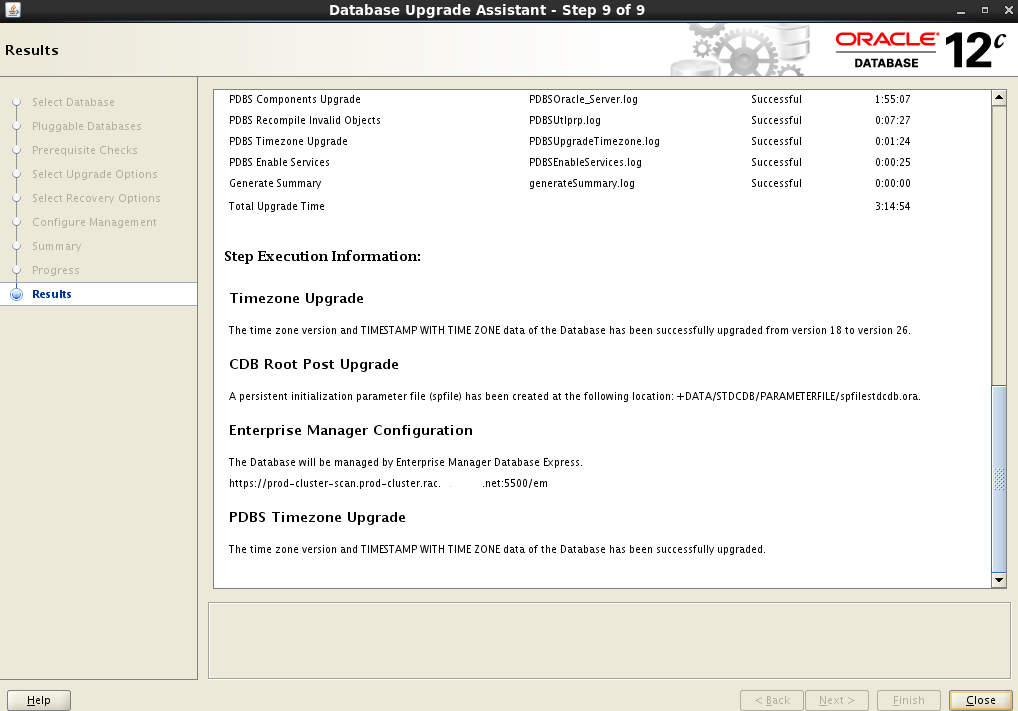
Upgrade completion summary
Run the postupgrade fixup script
SQL> @/opt/app/oracle/cfgtoollogs/std12c1/preupgrade/postupgrade_fixups.sql

Auto-Generated by:       Oracle Preupgrade Script
                         Version: 12.2.0.1.0 Build: 1
Generated on:            2017-09-19 16:35:42

For Source Database:     STD12C1
Source Database Version: 12.1.0.2.0
For Upgrade to Version:  12.2.0.1.0

                          Fixup
Check Name                Status  Further DBA Action
----------                ------  ------------------
old_time_zones_exist      Passed  None
post_dictionary           Passed  None
After the upgrade the DB components version and status
COMP_ID    COMP_NAME                           VERSION    STATUS
---------- ----------------------------------- ---------- --------
CATALOG    Oracle Database Catalog Views       12.2.0.1.0 VALID
CATPROC    Oracle Database Packages and Types  12.2.0.1.0 VALID
RAC        Oracle Real Application Clusters    12.2.0.1.0 VALID
XDB        Oracle XML Database                 12.2.0.1.0 VALID
OWM        Oracle Workspace Manager            12.2.0.1.0 VALID
CONTEXT    Oracle Text                         12.2.0.1.0 VALID
The database registry history added an entry for the upgrade
ACTION_TIME                    ACTION          NAMESPACE  VERSION            ID COMMENTS
------------------------------ --------------- ---------- ---------- ---------- ----------------------------------------
                               BOOTSTRAP       DATAPATCH  12.1.0.2              RDBMS_12.1.0.2.0DBPSU_LINUX.X64_161210
                               BOOTSTRAP       DATAPATCH  12.2.0.1              RDBMS_12.2.0.1.0_LINUX.X64_170125
19-SEP-17 05.18.47.947470 PM   VIEW INVALIDATE                          8289601 view invalidation
19-SEP-17 05.20.49.419414 PM   UPGRADE         SERVER     12.2.0.1.0            Upgraded from 12.1.0.2.0
Verify the timezone upgrade
SQL> select * from v$timezone_file;

FILENAME                VERSION     CON_ID
-------------------- ---------- ----------
timezlrg_26.dat              26          0
This SE2 DB had statspack installed. Upgrade the statspack to 12.2
SQL>@?/rdbms/admin/spup12102.sql
SQL>@?/rdbms/admin/spup12200.sql
The remote_listener parameter had the new scan name added to it automatically. It also included the old scan name as well.
remote_listener  string      prod-cluster-scan.rac.domain.net:1521, prod-cluster-scan.prod-cluster.rac.domain.net:1521
Finally upgrade the database compatibility parameter
SQL> alter system set compatible='12.2.0.1.0' scope=spfile sid='*';
Upgrading CDB

The component version and status on the CDB before the upgrade is as below
    CON_ID COMP_ID    COMP_NAME                           VERSION         STATUS
---------- ---------- ----------------------------------- --------------- ----------
         1 APEX       Oracle Application Express          4.2.5.00.08     VALID
         1 CATALOG    Oracle Database Catalog Views       12.1.0.2.0      VALID
         1 CATJAVA    Oracle Database Java Packages       12.1.0.2.0      VALID
         1 CATPROC    Oracle Database Packages and Types  12.1.0.2.0      VALID
         1 CONTEXT    Oracle Text                         12.1.0.2.0      VALID
         1 JAVAVM     JServer JAVA Virtual Machine        12.1.0.2.0      VALID
         1 ORDIM      Oracle Multimedia                   12.1.0.2.0      VALID
         1 OWM        Oracle Workspace Manager            12.1.0.2.0      VALID
         1 RAC        Oracle Real Application Clusters    12.1.0.2.0      VALID
         1 XDB        Oracle XML Database                 12.1.0.2.0      VALID
         1 XML        Oracle XDK                          12.1.0.2.0      VALID

         3 APEX       Oracle Application Express          4.2.5.00.08     VALID
         3 CATALOG    Oracle Database Catalog Views       12.1.0.2.0      VALID
         3 CATJAVA    Oracle Database Java Packages       12.1.0.2.0      VALID
         3 CATPROC    Oracle Database Packages and Types  12.1.0.2.0      VALID
         3 CONTEXT    Oracle Text                         12.1.0.2.0      VALID
         3 JAVAVM     JServer JAVA Virtual Machine        12.1.0.2.0      VALID
         3 ORDIM      Oracle Multimedia                   12.1.0.2.0      VALID
         3 OWM        Oracle Workspace Manager            12.1.0.2.0      VALID
         3 RAC        Oracle Real Application Clusters    12.1.0.2.0      VALID
         3 XDB        Oracle XML Database                 12.1.0.2.0      VALID
         3 XML        Oracle XDK                          12.1.0.2.0      VALID
Similar to CDB run the preupgrade.jar from console. The output will have a section for each container (root, pdb see and all the pdbs opened).
[oracle@rhel12c1 ~]$ $ORACLE_HOME/jdk/bin/java -jar preupgrade.jar TERMINAL
Report generated by Oracle Database Pre-Upgrade Information Tool Version
12.2.0.1.0

Upgrade-To version: 12.2.0.1.0

=======================================
Status of the database prior to upgrade
=======================================

      Database Name:  STDCDB
     Container Name:  CDB$ROOT
       Container ID:  1
            Version:  12.1.0.2.0
         Compatible:  12.1.0.2.0
          Blocksize:  8192
           Platform:  Linux x86 64-bit
      Timezone File:  18
  Database log mode:  NOARCHIVELOG
           Readonly:  FALSE
            Edition:  SE

  Oracle Component                       Upgrade Action    Current Status
  ----------------                       --------------    --------------
  Oracle Server                          [to be upgraded]  VALID
  JServer JAVA Virtual Machine           [to be upgraded]  VALID
  Oracle XDK for Java                    [to be upgraded]  VALID
  Real Application Clusters              [to be upgraded]  VALID
  Oracle Workspace Manager               [to be upgraded]  VALID
  Oracle Text                            [to be upgraded]  VALID
  Oracle XML Database                    [to be upgraded]  VALID
  Oracle Java Packages                   [to be upgraded]  VALID
  Oracle Multimedia                      [to be upgraded]  VALID
  Oracle Application Express             [to be upgraded]  VALID


==============
BEFORE UPGRADE
==============

  Run /preupgrade_fixups_CDB_ROOT.sql to complete all
  of the BEFORE UPGRADE action items below marked with '(AUTOFIXUP)'.

  REQUIRED ACTIONS
  ================
   + Adjust TABLESPACE SIZES as needed.
                                                Auto      12.2.0.1.0
     Tablespace                        Size     Extend    Min Size    Action
     ----------                     ----------  --------  ----------  ------

     SYSAUX                             850 MB  ENABLED      1690 MB  None
     SYSTEM                             780 MB  ENABLED      1274 MB  None
     TEMP                                72 MB  ENABLED       150 MB  None
     UNDOTBS2                           370 MB  ENABLED       400 MB  None

     Note that 12.2.0.1.0 minimum sizes are estimates.
     If you plan to upgrade multiple pluggable databases concurrently,
     then you must ensure that the UNDO tablespace size is equal to at least
     the number of pluggable databases that you upgrade concurrently,
     multiplied by that minimum.  Failing to allocate sufficient space can
     cause the upgrade to fail.


   + (AUTOFIXUP) Empty the RECYCLEBIN immediately before database upgrade.

     The database contains 62 objects in the recycle bin.

     The recycle bin must be completely empty before database upgrade.

  RECOMMENDED ACTIONS
  ===================
   + Run 12.1.0.2.0 $ORACLE_HOME/rdbms/admin/utlrp.sql to recompile invalid
     objects.  You can view the individual invalid objects with

       SET SERVEROUTPUT ON;
       EXECUTE DBMS_PREUP.INVALID_OBJECTS;

     7 objects are INVALID.

     There should be no INVALID objects in SYS/SYSTEM or user schemas before
     database upgrade.

   + (AUTOFIXUP) Gather stale data dictionary statistics prior to database
     upgrade in off-peak time using:

      EXECUTE DBMS_STATS.GATHER_DICTIONARY_STATS;

     Dictionary statistics do not exist or are stale (not up-to-date).

     Dictionary statistics help the Oracle optimizer find efficient SQL
     execution plans and are essential for proper upgrade timing. Oracle
     recommends gathering dictionary statistics in the last 24 hours before
     database upgrade.

     For information on managing optimizer statistics, refer to the 12.1.0.2
     Oracle Database SQL Tuning Guide.

  INFORMATION ONLY
  ================
   + Consider upgrading APEX manually, before the database upgrade.

     The database contains APEX version 4.2.5.00.08 and will need to be
     upgraded to at least version 5.0.4.00.12.

     To reduce database upgrade time, you can upgrade APEX manually before
     the database upgrade.  Refer to My Oracle Support Note 1088970.1 for
     information on APEX installation upgrades.

=============
AFTER UPGRADE
=============

  Run /postupgrade_fixups_CDB_ROOT.sql to complete all
  of the AFTER UPGRADE action items below marked with '(AUTOFIXUP)'.

  REQUIRED ACTIONS
  ================
  None

  RECOMMENDED ACTIONS
  ===================
   + Upgrade the database time zone version using the DBMS_DST package.

     The database is using timezone datafile version 18 and the target
     12.2.0.1.0 database ships with timezone datafile version 26.

     Oracle recommends using the most recent timezone data.  For further
     information, refer to My Oracle Support Note 1585343.1.

   + (AUTOFIXUP) Gather dictionary statistics after the upgrade using the
     command:

       EXECUTE DBMS_STATS.GATHER_DICTIONARY_STATS;

     Oracle recommends gathering dictionary statistics after upgrade.

     Dictionary statistics provide essential information to the Oracle
     optimizer to help it find efficient SQL execution plans. After a
     database upgrade, statistics need to be re-gathered as there can now be
     tables that have significantly changed during the upgrade or new tables
     that do not have statistics gathered yet.

Report generated by Oracle Database Pre-Upgrade Information Tool Version
12.2.0.1.0

Upgrade-To version: 12.2.0.1.0

=======================================
Status of the database prior to upgrade
=======================================

      Database Name:  STDCDB
     Container Name:  PDB$SEED
       Container ID:  2
            Version:  12.1.0.2.0
         Compatible:  12.1.0.2.0
          Blocksize:  8192
           Platform:  Linux x86 64-bit
      Timezone File:  18
  Database log mode:  NOARCHIVELOG
           Readonly:  TRUE
            Edition:  SE

  Oracle Component                       Upgrade Action    Current Status
  ----------------                       --------------    --------------
  Oracle Server                          [to be upgraded]  VALID
  JServer JAVA Virtual Machine           [to be upgraded]  VALID
  Oracle XDK for Java                    [to be upgraded]  VALID
  Real Application Clusters              [to be upgraded]  VALID
  Oracle Workspace Manager               [to be upgraded]  VALID
  Oracle Text                            [to be upgraded]  VALID
  Oracle XML Database                    [to be upgraded]  VALID
  Oracle Java Packages                   [to be upgraded]  VALID
  Oracle Multimedia                      [to be upgraded]  VALID
  Oracle Application Express             [to be upgraded]  VALID


==============
BEFORE UPGRADE
==============

  Run /preupgrade_fixups_PDB_SEED.sql to complete all
  of the BEFORE UPGRADE action items below marked with '(AUTOFIXUP)'.

  REQUIRED ACTIONS
  ================
   + Adjust TABLESPACE SIZES as needed.
                                                Auto      12.2.0.1.0
     Tablespace                        Size     Extend    Min Size    Action
     ----------                     ----------  --------  ----------  ------

     SYSAUX                             495 MB  ENABLED      1384 MB  None
     SYSTEM                             270 MB  ENABLED       759 MB  None
     TEMP                                62 MB  ENABLED       150 MB  None

     Note that 12.2.0.1.0 minimum sizes are estimates.
     If you plan to upgrade multiple pluggable databases concurrently,
     then you must ensure that the UNDO tablespace size is equal to at least
     the number of pluggable databases that you upgrade concurrently,
     multiplied by that minimum.  Failing to allocate sufficient space can
     cause the upgrade to fail.

  RECOMMENDED ACTIONS
  ===================
   + Run 12.1.0.2.0 $ORACLE_HOME/rdbms/admin/utlrp.sql to recompile invalid
     objects.  You can view the individual invalid objects with

       SET SERVEROUTPUT ON;
       EXECUTE DBMS_PREUP.INVALID_OBJECTS;

     11 objects are INVALID.

     There should be no INVALID objects in SYS/SYSTEM or user schemas before
     database upgrade.

   + (AUTOFIXUP) Gather stale data dictionary statistics prior to database
     upgrade in off-peak time using:

      EXECUTE DBMS_STATS.GATHER_DICTIONARY_STATS;

     Dictionary statistics do not exist or are stale (not up-to-date).

     Dictionary statistics help the Oracle optimizer find efficient SQL
     execution plans and are essential for proper upgrade timing. Oracle
     recommends gathering dictionary statistics in the last 24 hours before
     database upgrade.

     For information on managing optimizer statistics, refer to the 12.1.0.2
     Oracle Database SQL Tuning Guide.

  INFORMATION ONLY
  ================
   + Consider upgrading APEX manually, before the database upgrade.

     The database contains APEX version 4.2.5.00.08 and will need to be
     upgraded to at least version 5.0.4.00.12.

     To reduce database upgrade time, you can upgrade APEX manually before
     the database upgrade.  Refer to My Oracle Support Note 1088970.1 for
     information on APEX installation upgrades.

=============
AFTER UPGRADE
=============

  Run /postupgrade_fixups_PDB_SEED.sql to complete all
  of the AFTER UPGRADE action items below marked with '(AUTOFIXUP)'.

  REQUIRED ACTIONS
  ================
  None

  RECOMMENDED ACTIONS
  ===================
   + Upgrade the database time zone version using the DBMS_DST package.

     The database is using timezone datafile version 18 and the target
     12.2.0.1.0 database ships with timezone datafile version 26.

     Oracle recommends using the most recent timezone data.  For further
     information, refer to My Oracle Support Note 1585343.1.

   + (AUTOFIXUP) Gather dictionary statistics after the upgrade using the
     command:

       EXECUTE DBMS_STATS.GATHER_DICTIONARY_STATS;

     Oracle recommends gathering dictionary statistics after upgrade.

     Dictionary statistics provide essential information to the Oracle
     optimizer to help it find efficient SQL execution plans. After a
     database upgrade, statistics need to be re-gathered as there can now be
     tables that have significantly changed during the upgrade or new tables
     that do not have statistics gathered yet.


Report generated by Oracle Database Pre-Upgrade Information Tool Version
12.2.0.1.0

Upgrade-To version: 12.2.0.1.0

=======================================
Status of the database prior to upgrade
=======================================

      Database Name:  STDCDB
     Container Name:  STDPDB
       Container ID:  3
            Version:  12.1.0.2.0
         Compatible:  12.1.0.2.0
          Blocksize:  8192
           Platform:  Linux x86 64-bit
      Timezone File:  18
  Database log mode:  NOARCHIVELOG
           Readonly:  FALSE
            Edition:  SE

  Oracle Component                       Upgrade Action    Current Status
  ----------------                       --------------    --------------
  Oracle Server                          [to be upgraded]  VALID
  JServer JAVA Virtual Machine           [to be upgraded]  VALID
  Oracle XDK for Java                    [to be upgraded]  VALID
  Real Application Clusters              [to be upgraded]  VALID
  Oracle Workspace Manager               [to be upgraded]  VALID
  Oracle Text                            [to be upgraded]  VALID
  Oracle XML Database                    [to be upgraded]  VALID
  Oracle Java Packages                   [to be upgraded]  VALID
  Oracle Multimedia                      [to be upgraded]  VALID
  Oracle Application Express             [to be upgraded]  VALID


==============
BEFORE UPGRADE
==============

  Run /preupgrade_fixups_STDPDB.sql to complete all
  of the BEFORE UPGRADE action items below marked with '(AUTOFIXUP)'.

  REQUIRED ACTIONS
  ================
   + Adjust TABLESPACE SIZES as needed.
                                                Auto      12.2.0.1.0
     Tablespace                        Size     Extend    Min Size    Action
     ----------                     ----------  --------  ----------  ------

     SYSAUX                             525 MB  ENABLED      1411 MB  None
     SYSTEM                             290 MB  ENABLED       785 MB  None
     TEMP                                62 MB  ENABLED       150 MB  None

     Note that 12.2.0.1.0 minimum sizes are estimates.
     If you plan to upgrade multiple pluggable databases concurrently,
     then you must ensure that the UNDO tablespace size is equal to at least
     the number of pluggable databases that you upgrade concurrently,
     multiplied by that minimum.  Failing to allocate sufficient space can
     cause the upgrade to fail.

   + (AUTOFIXUP) Empty the RECYCLEBIN immediately before database upgrade.

     The database contains 16 objects in the recycle bin.

     The recycle bin must be completely empty before database upgrade.

  RECOMMENDED ACTIONS
  ===================
   + Run 12.1.0.2.0 $ORACLE_HOME/rdbms/admin/utlrp.sql to recompile invalid
     objects.  You can view the individual invalid objects with

       SET SERVEROUTPUT ON;
       EXECUTE DBMS_PREUP.INVALID_OBJECTS;

     85 objects are INVALID.

     There should be no INVALID objects in SYS/SYSTEM or user schemas before
     database upgrade.

   + (AUTOFIXUP) Gather stale data dictionary statistics prior to database
     upgrade in off-peak time using:

      EXECUTE DBMS_STATS.GATHER_DICTIONARY_STATS;

     Dictionary statistics do not exist or are stale (not up-to-date).

     Dictionary statistics help the Oracle optimizer find efficient SQL
     execution plans and are essential for proper upgrade timing. Oracle
     recommends gathering dictionary statistics in the last 24 hours before
     database upgrade.

     For information on managing optimizer statistics, refer to the 12.1.0.2
     Oracle Database SQL Tuning Guide.

  INFORMATION ONLY
  ================
   + Consider upgrading APEX manually, before the database upgrade.

     The database contains APEX version 4.2.5.00.08 and will need to be
     upgraded to at least version 5.0.4.00.12.

     To reduce database upgrade time, you can upgrade APEX manually before
     the database upgrade.  Refer to My Oracle Support Note 1088970.1 for
     information on APEX installation upgrades.

=============
AFTER UPGRADE
=============

  Run /postupgrade_fixups_STDPDB.sql to complete all
  of the AFTER UPGRADE action items below marked with '(AUTOFIXUP)'.

  REQUIRED ACTIONS
  ================
  None

  RECOMMENDED ACTIONS
  ===================
   + Upgrade the database time zone version using the DBMS_DST package.

     The database is using timezone datafile version 18 and the target
     12.2.0.1.0 database ships with timezone datafile version 26.

     Oracle recommends using the most recent timezone data.  For further
     information, refer to My Oracle Support Note 1585343.1.

   + (AUTOFIXUP) Gather dictionary statistics after the upgrade using the
     command:

       EXECUTE DBMS_STATS.GATHER_DICTIONARY_STATS;

     Oracle recommends gathering dictionary statistics after upgrade.

     Dictionary statistics provide essential information to the Oracle
     optimizer to help it find efficient SQL execution plans. After a
     database upgrade, statistics need to be re-gathered as there can now be
     tables that have significantly changed during the upgrade or new tables
     that do not have statistics gathered yet.


Preupgrade generated files:
    /opt/app/oracle/cfgtoollogs/stdcdb/preupgrade/preupgrade_fixups.sql
    /opt/app/oracle/cfgtoollogs/stdcdb/preupgrade/postupgrade_fixups.sql
As seen from output above each section has it's own pre and post upgrade script. However the final pre and post upgrade scripts (preupgrade_fixups.sql and postupgrade_fixups.sql) mentioned have the same content as those individual container specific scripts. Moreover they have container specif sections that will only run on the specified container. These *upgrade_fixups scripts could be run in all the containers using catcon.pl as below.
$ cd /opt/app/oracle/product/12.1.0/dbhome_2/rdbms/admin/
$  $ORACLE_HOME/perl/bin/perl catcon.pl -n 1 -e -b preupgrade_fixups /opt/app/oracle/cfgtoollogs/stdcdb/preupgrade/preupgrade_fixups.sql
catcon: ALL catcon-related output will be written to preupgrade_fixups_catcon_30484.lst
catcon: See preupgrade_fixups*.log files for output generated by scripts
catcon: See preupgrade_fixups_*.lst files for spool files, if any
catcon.pl: completed successfully
Once the preupgrade scripts have completed, run dbua to begin CDB upgrade.
Select the PDBs upgraded at the same time as CDB. As this is a SE2 only single PDB is allwoed and that single PDB is upgraded along with the CDB.
The other steps are similar to that of non-CDB. Below is the pre-upgrade summary
Upgrade progress
Post upgrade summary
Run the post upgrade script on all containers using catcon.pl
 $ORACLE_HOME/perl/bin/perl catcon.pl -n 1 -e -b postupgrade_fixups /opt/app/oracle/cfgtoollogs/stdcdb/preupgrade/postupgrade_fixups.sql
catcon: ALL catcon-related output will be written to [/opt/app/oracle/product/12.2.0/dbhome_1/rdbms/admin/postupgrade_fixups_catcon_11556.lst]
catcon: See [/opt/app/oracle/product/12.2.0/dbhome_1/rdbms/admin/postupgrade_fixups*.log] files for output generated by scripts
catcon: See [/opt/app/oracle/product/12.2.0/dbhome_1/rdbms/admin/postupgrade_fixups*.lst] files for spool files, if any

catcon.pl: completed successfully
Component status and version after the upgrade
    CON_ID COMP_ID         COMP_NAME                           STATUS   VERSION
---------- --------------- ----------------------------------- -------- ---------------
         1 CATALOG         Oracle Database Catalog Views       VALID    12.2.0.1.0
         1 CATPROC         Oracle Database Packages and Types  VALID    12.2.0.1.0
         1 JAVAVM          JServer JAVA Virtual Machine        VALID    12.2.0.1.0
         1 XML             Oracle XDK                          VALID    12.2.0.1.0
         1 CATJAVA         Oracle Database Java Packages       VALID    12.2.0.1.0
         1 RAC             Oracle Real Application Clusters    VALID    12.2.0.1.0
         1 XDB             Oracle XML Database                 VALID    12.2.0.1.0
         1 OWM             Oracle Workspace Manager            VALID    12.2.0.1.0
         1 CONTEXT         Oracle Text                         VALID    12.2.0.1.0
         1 ORDIM           Oracle Multimedia                   VALID    12.2.0.1.0
         1 APEX            Oracle Application Express          VALID    5.0.4.00.12

         3 CATALOG         Oracle Database Catalog Views       VALID    12.2.0.1.0
         3 CATPROC         Oracle Database Packages and Types  VALID    12.2.0.1.0
         3 JAVAVM          JServer JAVA Virtual Machine        VALID    12.2.0.1.0
         3 XML             Oracle XDK                          VALID    12.2.0.1.0
         3 CATJAVA         Oracle Database Java Packages       VALID    12.2.0.1.0
         3 RAC             Oracle Real Application Clusters    VALID    12.2.0.1.0
         3 XDB             Oracle XML Database                 VALID    12.2.0.1.0
         3 OWM             Oracle Workspace Manager            VALID    12.2.0.1.0
         3 CONTEXT         Oracle Text                         VALID    12.2.0.1.0
         3 ORDIM           Oracle Multimedia                   VALID    12.2.0.1.0
         3 APEX            Oracle Application Express          VALID    5.0.4.00.12
Database registry history for each container
    CON_ID ACTION          NAMESPACE  VERSION         COMMENTS
---------- --------------- ---------- --------------- ----------------------------------------
         1 BOOTSTRAP       DATAPATCH  12.1.0.2        RDBMS_12.1.0.2.0DBPSU_LINUX.X64_161210
         1 BOOTSTRAP       DATAPATCH  12.2.0.1        RDBMS_12.2.0.1.0_LINUX.X64_170125
         1 VIEW INVALIDATE                            view invalidation
         1 UPGRADE         SERVER     12.2.0.1.0      Upgraded from 12.1.0.2.0

         3 BOOTSTRAP       DATAPATCH  12.1.0.2        RDBMS_12.1.0.2.0DBPSU_LINUX.X64_161210
         3 BOOTSTRAP       DATAPATCH  12.2.0.1        RDBMS_12.2.0.1.0_LINUX.X64_170125
         3 VIEW INVALIDATE                            view invalidation
         3 UPGRADE         SERVER     12.2.0.1.0      Upgraded from 12.1.0.2.0
Check the timezone on root and PDB
SQL> select * from v$timezone_file;

FILENAME                VERSION     CON_ID
-------------------- ---------- ----------
timezlrg_26.dat              26          0

SQL> alter session set container=stdpdb;
SQL> select * from v$timezone_file;

FILENAME                VERSION     CON_ID
-------------------- ---------- ----------
timezlrg_26.dat              26          0
If statspack is configured on PDB then upgrade it 12.2. Change the line
connect perfstat/&&perfstat_password
to
connect perfstat/&&perfstat_password@&&tns_alias
in both spup12102.sql and spup12200.sql. Then create a script with below content (replace password and tns alias values as needed) and run with catcon.pl. (Refer 2020285.1 for more)
cat statup.sql
define perfstat_password='perfstat'
define tns_alias='stdpdb'
@?/rdbms/admin/spup12102.sql;
@?/rdbms/admin/spup12200.sql;

$ORACLE_HOME/perl/bin/perl catcon.pl -n 1 -e -b statup -c stdpdb statup.sql
Same as CDB the remote_listener parameter had the new scan name added to it automatically. It also had the old scan name as well.
remote_listener  string      prod-cluster-scan.rac.domain.net:1521, prod-cluster-scan.prod-cluster.rac.domain.net:1521
Finally upgrade the compatible parameter on the CDB.
SQL> alter system set compatible='12.2.0.1.0' scope=spfile sid='*';
That concludes the upgrading of the databases.

Now that all the databases in the cluster are upgraded, increase the ASM related compatible parameters to 12.2
alter diskgroup fra SET attribute 'compatible.asm'='12.2.0.1.0';
alter diskgroup DATA  SET attribute 'compatible.asm'='12.2.0.1.0';
alter diskgroup fra set attribute 'compatible.rdbms'='12.2.0.1.0';
alter diskgroup data set attribute 'compatible.rdbms'='12.2.0.1.0';
alter diskgroup clusfs  SET attribute 'compatible.asm'='12.2.0.1.0';
alter diskgroup clusfs set attribute 'compatible.rdbms'='12.2.0.1.0';
alter diskgroup GIMR  SET attribute 'compatible.asm'='12.2.0.1.0';
alter diskgroup GIMR set attribute 'compatible.rdbms'='12.2.0.1.0';

GROUP_NUMBER NAME                      VALUE
------------ ------------------------- ---------------
           1 compatible.asm            12.2.0.1.0
           1 compatible.rdbms          12.2.0.1.0
           2 compatible.asm            12.2.0.1.0
           2 compatible.rdbms          12.2.0.1.0
           3 compatible.asm            12.2.0.1.0
           3 compatible.rdbms          12.2.0.1.0
           4 compatible.asm            12.2.0.1.0
           4 compatible.rdbms          12.2.0.1.0
As mentioned in previous post, upgrade adds new oracle user accounts with default passwords. Change the default passwords.

Finally run
orachk -u -o post
to check post upgrade status.

Related Posts
Upgrading RAC from 11.2.0.4 to 12.2.0.1 - Database
Upgrading 11.2.0.3 (11gR2) Database to 12.1.0.1 (12c) Using DBUA
Upgrading from 11.2.0.3 to 12.1.0.1 RAC
Upgrade Oracle Database 12c1 from 12.1.0.1 to 12.1.0.2
Upgrading 12c CDB and PDB from 12.1.0.1 to 12.1.0.2
Upgrading RAC from 11.2.0.4 to 12.1.0.2 - Database
Upgrading RAC from 12.1.0.1 to 12.1.0.2 - Database
Upgrading RAC from 11.2.0.3 to 11.2.0.4 - Database

Thursday, September 21, 2017

Upgrading RAC from 11.2.0.4 to 12.2.0.1 - Database

After upgrading grid infrastructure from 11.2.0.4 to 12.2.0.1 the next step is the upgrade of RAC software and the database itself. There are earlier post which upgraded 11.2.0.4 to 12.1.0.1. The database is a non-CDB database. There are earlier posts upgraded in data guard configuration and with PDBs. These posts have useful metalink notes that could be beneficial in RAC environment as well. The database software upgrade is an out of place upgrade with role separation. Use orachk or cluvfy to check the pre upgrade status.
cluvfy stage  -pre dbinst -upgrade -src_dbhome /opt/app/oracle/product/11.2.0/dbhome_4 -dest_dbhome /opt/app/oracle/product/12.2.0/dbhome_1 -dest_version 12.2.0.1.0
Create additional user groups that were introduced as part of 12c
# groupadd backupdba
# groupadd dgdba
# groupadd kmdba
# groupadd racdba
# usermod -g oinstall -G dba,oper,asmoper,asmdba,asmadmin,backupdba,dgdba,kmdba,racdba oracle
Install the 12.2.0.1 binaries by selecting the software only installation option. This installation is done out of place to current 11.2.0.4 oracle home.
Once the 12.2 database software is installed the next step is to upgrade the database. This is done using DBUA. Before running DBUA check if oracle user has the write permission on the audit folder under $ORACLE_BASE if not grant write permission for oinstall group.
chmod 770 $ORACLE_BASE/audit
Also a default listener is needed for DBUA upgrade to complete (this setup has a non-default listener name and port). DBUA will complain if the default listener is missing.


12.2 has a new preupgrade check tool, a jar file which is available in 12.2 $ORACLE_HOME/rdbms/admin. This could be run as a standalone jar. Running this check the upgrade readiness of the database
cp /opt/app/oracle/product/12.2.0/dbhome_1/rdbms/admin/preupgrade.jar ~

[oracle@rhel6m1 ~]$ $ORACLE_HOME/jdk/bin/java -jar preupgrade.jar TERMINAL
Report generated by Oracle Database Pre-Upgrade Information Tool Version
12.2.0.1.0

Upgrade-To version: 12.2.0.1.0

=======================================
Status of the database prior to upgrade
=======================================

      Database Name:  STD11G2
     Container Name:  Not Applicable in Pre-12.1 database
       Container ID:  Not Applicable in Pre-12.1 database
            Version:  11.2.0.4.0
         Compatible:  11.2.0.4.0
          Blocksize:  8192
           Platform:  Linux x86 64-bit
      Timezone File:  14
  Database log mode:  ARCHIVELOG
           Readonly:  FALSE
            Edition:  R1

  Oracle Component                       Upgrade Action    Current Status
  ----------------                       --------------    --------------
  Oracle Server                          [to be upgraded]  VALID
  Real Application Clusters              [to be upgraded]  VALID
  Oracle Workspace Manager               [to be upgraded]  VALID
  Oracle XML Database                    [to be upgraded]  VALID


==============
BEFORE UPGRADE
==============

  Run /preupgrade_fixups.sql to complete all
  of the BEFORE UPGRADE action items below marked with '(AUTOFIXUP)'.

  REQUIRED ACTIONS
  ================
   + Adjust TABLESPACE SIZES as needed.
                                                Auto      12.2.0.1.0
     Tablespace                        Size     Extend    Min Size    Action
     ----------                     ----------  --------  ----------  ------

     SYSAUX                             600 MB  DISABLED      500 MB  None
     SYSTEM                             700 MB  ENABLED       914 MB  None
     TEMP                               100 MB  ENABLED       150 MB  None
     UNDOTBS1                           375 MB  ENABLED       400 MB  None

     Note that 12.2.0.1.0 minimum sizes are estimates.
     If you plan to upgrade multiple pluggable databases concurrently,
     then you must ensure that the UNDO tablespace size is equal to at least
     the number of pluggable databases that you upgrade concurrently,
     multiplied by that minimum.  Failing to allocate sufficient space can
     cause the upgrade to fail.

  RECOMMENDED ACTIONS
  ===================
   + Backup the existing ACLs and their assignments for reference. Use the
     new DBMS_NETWORK_ACL_ADMIN interfaces and dictionary views to administer
     network privileges after upgrade.

     The database contains network ACLs with privileges that will be migrated
     to a new format in 12c.

     Network access control list (ACL) privileges in 11g will be migrated to
     a new format in 12c. As part of the migration, new
     DBMS_NETWORK_ACL_ADMIN interfaces and dictionary views are provided, and
     privileges in the existing ACLs will be converted to the new format with
     new ACL names. The old ACL names, DBMS_NETWORK_ACL_ADMIN interfaces and
     dictionary views may continue to be used but are deprecated and their
     use is discouraged. For further information, refer to My Oracle Support
     note number 2078710.1.

   + Review and remove any unnecessary EVENTS.

     The database contains events.

     There are events set that should be removed before upgrade, unless your
     application vendors and/or Oracle Support state differently.  Changes
     will need to be made in the spfile.

=============
AFTER UPGRADE
=============

  Run /postupgrade_fixups.sql to complete all
  of the AFTER UPGRADE action items below marked with '(AUTOFIXUP)'.

  REQUIRED ACTIONS
  ================
  None

  RECOMMENDED ACTIONS
  ===================
   + Upgrade the database time zone version using the DBMS_DST package.

     The database is using timezone datafile version 14 and the target
     12.2.0.1.0 database ships with timezone datafile version 26.

     Oracle recommends using the most recent timezone data.  For further
     information, refer to My Oracle Support Note 1585343.1.

   + (AUTOFIXUP) Gather dictionary statistics after the upgrade using the
     command:

       EXECUTE DBMS_STATS.GATHER_DICTIONARY_STATS;

     Oracle recommends gathering dictionary statistics after upgrade.

     Dictionary statistics provide essential information to the Oracle
     optimizer to help it find efficient SQL execution plans. After a
     database upgrade, statistics need to be re-gathered as there can now be
     tables that have significantly changed during the upgrade or new tables
     that do not have statistics gathered yet.

   + Gather statistics on fixed objects two weeks after the upgrade using the
     command:

       EXECUTE DBMS_STATS.GATHER_FIXED_OBJECTS_STATS;

     This recommendation is given for all preupgrade runs.

     Fixed object statistics provide essential information to the Oracle
     optimizer to help it find efficient SQL execution plans.  Those
     statistics are specific to the Oracle Database release that generates
     them, and can be stale upon database upgrade.

Preupgrade generated files:
    /opt/app/oracle/cfgtoollogs/std11g2/preupgrade/preupgrade_fixups.sql
    /opt/app/oracle/cfgtoollogs/std11g2/preupgrade/postupgrade_fixups.sql

 
SQL> @/opt/app/oracle/cfgtoollogs/std11g2/preupgrade/preupgrade_fixups.sql
Executing Oracle PRE-Upgrade Fixup Script

Auto-Generated by:       Oracle Preupgrade Script
                         Version: 12.2.0.1.0 Build: 1
Generated on:            2017-05-04 13:24:32

For Source Database:     STD11G2
Source Database Version: 11.2.0.4.0
For Upgrade to Version:  12.2.0.1.0

                          Fixup
Check Name                Status  Further DBA Action
----------                ------  ------------------
network_acl_priv          Failed  Manual fixup recommended.
underscore_events         Failed  Manual fixup recommended.
dictionary_stats          Passed  None

PL/SQL procedure successfully completed.
Run the pre-upgrade fix script followed by the DBUA.
SQL> @/opt/app/oracle/cfgtoollogs/std11g2/preupgrade/preupgrade_fixups.sql
Executing Oracle PRE-Upgrade Fixup Script

Auto-Generated by:       Oracle Preupgrade Script
                         Version: 12.2.0.1.0 Build: 1
Generated on:            2017-05-04 13:24:32

For Source Database:     STD11G2
Source Database Version: 11.2.0.4.0
For Upgrade to Version:  12.2.0.1.0

                          Fixup
Check Name                Status  Further DBA Action
----------                ------  ------------------
network_acl_priv          Failed  Manual fixup recommended.
underscore_events         Failed  Manual fixup recommended.
dictionary_stats          Passed  None

PL/SQL procedure successfully completed.
Database registry component versions and status before the upgrade are shown below.
COMP_ID    COMP_NAME                                VERSION         STATUS
---------- ---------------------------------------- --------------- ----------
CATJAVA    Oracle Database Java Packages            11.2.0.3.0      REMOVED
XML        Oracle XDK                               11.2.0.3.0      REMOVED
JAVAVM     JServer JAVA Virtual Machine             11.2.0.3.0      REMOVED
RAC        Oracle Real Application Clusters         11.2.0.4.0      VALID
CATALOG    Oracle Database Catalog Views            11.2.0.4.0      VALID
OWM        Oracle Workspace Manager                 11.2.0.4.0      VALID
XDB        Oracle XML Database                      11.2.0.4.0      VALID
CATPROC    Oracle Database Packages and Types       11.2.0.4.0      VALID
Run the DBUA to begin the database upgrade.
Run the post upgrade fix script
SQL> @/opt/app/oracle/cfgtoollogs/std11g2/preupgrade/postupgrade_fixups.sql
Session altered.
PL/SQL procedure successfully completed.
Package created.
No errors.
Package body created.
No errors.
Package created.
No errors.
Package body created.
No errors.
Executing Oracle POST-Upgrade Fixup Script

Auto-Generated by:       Oracle Preupgrade Script
                         Version: 12.2.0.1.0 Build: 1
Generated on:            2017-05-04 13:27:35

For Source Database:     STD11G2
Source Database Version: 11.2.0.4.0
For Upgrade to Version:  12.2.0.1.0

                          Fixup
Check Name                Status  Further DBA Action
----------                ------  ------------------
old_time_zones_exist      Passed  None
post_dictionary           Passed  None
fixed_objects             Passed  None

PL/SQL procedure successfully completed.
Session altered.
The registry component status
COMP_ID    COMP_NAME                                VERSION         STATUS
---------- ---------------------------------------- --------------- ----------
XML        Oracle XDK                               11.2.0.3.0      REMOVED
CATJAVA    Oracle Database Java Packages            11.2.0.3.0      REMOVED
JAVAVM     JServer JAVA Virtual Machine             11.2.0.3.0      REMOVED
XDB        Oracle XML Database                      12.2.0.1.0      VALID
OWM        Oracle Workspace Manager                 12.2.0.1.0      VALID
RAC        Oracle Real Application Clusters         12.2.0.1.0      VALID
CATPROC    Oracle Database Packages and Types       12.2.0.1.0      VALID
CATALOG    Oracle Database Catalog Views            12.2.0.1.0      VALID
Registry history view shows upgrade to 12.2
ACTION_TIME                    ACTION               NAMESPAC VERSION            ID COMMENTS
------------------------------ -------------------- -------- ---------- ---------- -------------------------
10-JUL-17 03.10.52.412402 PM   APPLY                SERVER   11.2.0.4       161018 PSU 11.2.0.4.161018
14-JUL-17 01.49.21.603390 PM   VIEW INVALIDATE                             8289601 view invalidation
14-JUL-17 02.03.18.931179 PM   UPGRADE              SERVER   12.2.0.1.0            Upgraded from 11.2.0.4.0
Check the timezone file has been upgrade
SQL> select * from v$timezone_file;

FILENAME                VERSION     CON_ID
-------------------- ---------- ----------
timezlrg_26.dat              26          0
This is a SE database which had statspack installed. Upgrade the statspack to 12.2 (refer 394937.1).
SQL>@?/rdbms/admin/spup112
SQL>@?/rdbms/admin/spup12200.sql
If satisfied with the database upgrade set the compatibility parameter to 12.2. At the same time the compatibility values in disk group could also be set to 12.2.
SQL> alter system set compatible='12.2.0.1.0' scope=spfile sid='*';

srvctl stop database -d std11g2

alter diskgroup flash SET attribute 'compatible.asm'='12.2.0.1.0';
alter diskgroup DATA  SET attribute 'compatible.asm'='12.2.0.1.0';
alter diskgroup flash set attribute 'compatible.rdbms'='12.2.0.1.0';
alter diskgroup data set attribute 'compatible.rdbms'='12.2.0.1.0';
alter diskgroup CLUSTER_DG SET attribute 'compatible.asm'='12.2.0.1.0';
alter diskgroup CLUSTER_DG3  SET attribute 'compatible.asm'='12.2.0.1.0';
alter diskgroup CLUSTER_DG set attribute 'compatible.rdbms'='12.2.0.1.0';
alter diskgroup CLUSTER_DG3 set attribute 'compatible.rdbms'='12.2.0.1.0';
alter diskgroup GIMR  SET attribute 'compatible.asm'='12.2.0.1.0';
alter diskgroup GIMR set attribute 'compatible.rdbms'='12.2.0.1.0';

select group_number,name,value from v$asm_attribute where name like 'compat%';

GROUP_NUMBER NAME                                     VALUE
------------ ---------------------------------------- ------------------------------
           1 compatible.asm                           12.2.0.1.0
           1 compatible.rdbms                         12.2.0.1.0
           2 compatible.asm                           12.2.0.1.0
           2 compatible.rdbms                         12.2.0.1.0
           3 compatible.asm                           12.2.0.1.0
           3 compatible.rdbms                         12.2.0.1.0
           4 compatible.asm                           12.2.0.1.0
           4 compatible.rdbms                         12.2.0.1.0

srvctl start database -d std11g2
Upgrade also adds new oracle user accounts that are with default passwords to the database. Change the default passwords of these accounts
GSMCATUSER
REMOTE_SCHEDULER_AGENT
DBSFWUSER
SYSBACKUP
GGSYS
SYSRAC
AUDSYS
GSMADMIN_INTERNAL
SYSKM
SYS$UMF
SYSDG
GSMUSER
Finally run
orachk -u -o post
to check post upgrade status.

Related Posts
Upgrading 11.2.0.3 (11gR2) Database to 12.1.0.1 (12c) Using DBUA
Upgrading from 11.2.0.3 to 12.1.0.1 RAC
Upgrade Oracle Database 12c1 from 12.1.0.1 to 12.1.0.2
Upgrading 12c CDB and PDB from 12.1.0.1 to 12.1.0.2
Upgrading RAC from 11.2.0.4 to 12.1.0.2 - Database
Upgrading RAC from 12.1.0.1 to 12.1.0.2 - Database
Upgrading RAC from 11.2.0.3 to 11.2.0.4 - Database

Thursday, June 1, 2017

Installing 12cR2 (12.2.0.1) RAC on RHEL 6 with Role Separation - Database

Following the clusterware installation the next step is to install database software and create the database. The database software isn't much different from that of 12.1 database software installation. Even though the oracle installation guides states gcc and gcc-c++ are not required for RHEL, the cluvfy still searches for them.
$ cluvfy stage -pre dbinst -n rhel6m1,rhel6m2 -r 12.2 -verbose

Verifying Physical Memory ...
  Node Name     Available                 Required                  Status
  ------------  ------------------------  ------------------------  ----------
  rhel6m2       7.6865GB (8059836.0KB)    1GB (1048576.0KB)         passed
  rhel6m1       7.6865GB (8059836.0KB)    1GB (1048576.0KB)         passed
Verifying Physical Memory ...PASSED
Verifying Available Physical Memory ...
  Node Name     Available                 Required                  Status
  ------------  ------------------------  ------------------------  ----------
  rhel6m2       6.1648GB (6464272.0KB)    50MB (51200.0KB)          passed
  rhel6m1       5.0643GB (5310272.0KB)    50MB (51200.0KB)          passed
Verifying Available Physical Memory ...PASSED
Verifying Swap Size ...
  Node Name     Available                 Required                  Status
  ------------  ------------------------  ------------------------  ----------
  rhel6m2       4GB (4194296.0KB)         7.6865GB (8059836.0KB)    failed
  rhel6m1       4GB (4194296.0KB)         7.6865GB (8059836.0KB)    failed
Verifying Swap Size ...FAILED (PRVF-7573)
Verifying Free Space: rhel6m2:/tmp ...
  Path              Node Name     Mount point   Available     Required      Status
  ----------------  ------------  ------------  ------------  ------------  ------------
  /tmp              rhel6m2       /             23.0566GB     1GB           passed
Verifying Free Space: rhel6m2:/tmp ...PASSED
Verifying Free Space: rhel6m1:/tmp ...
  Path              Node Name     Mount point   Available     Required      Status
  ----------------  ------------  ------------  ------------  ------------  ------------
  /tmp              rhel6m1       /             19.7646GB     1GB           passed
Verifying Free Space: rhel6m1:/tmp ...PASSED
Verifying User Existence: grid ...
  Node Name     Status                    Comment
  ------------  ------------------------  ------------------------
  rhel6m2       passed                    exists(502)
  rhel6m1       passed                    exists(502)

  Verifying Users With Same UID: 502 ...PASSED
Verifying User Existence: grid ...PASSED
Verifying Group Existence: dba ...
  Node Name     Status                    Comment
  ------------  ------------------------  ------------------------
  rhel6m2       passed                    exists
  rhel6m1       passed                    exists
Verifying Group Existence: dba ...PASSED
Verifying Group Existence: oinstall ...
  Node Name     Status                    Comment
  ------------  ------------------------  ------------------------
  rhel6m2       passed                    exists
  rhel6m1       passed                    exists
Verifying Group Existence: oinstall ...PASSED
Verifying Group Membership: dba ...
  Node Name         User Exists   Group Exists  User in Group  Status
  ----------------  ------------  ------------  ------------  ----------------
  rhel6m2           yes           yes           yes           passed
  rhel6m1           yes           yes           yes           passed
Verifying Group Membership: dba ...PASSED
Verifying Group Membership: oinstall(Primary) ...
  Node Name         User Exists   Group Exists  User in Group  Primary       Status
  ----------------  ------------  ------------  ------------  ------------  ------------
  rhel6m2           yes           yes           yes           yes           passed
  rhel6m1           yes           yes           yes           yes           passed
Verifying Group Membership: oinstall(Primary) ...PASSED
Verifying Run Level ...
  Node Name     run level                 Required                  Status
  ------------  ------------------------  ------------------------  ----------
  rhel6m2       3                         3,5                       passed
  rhel6m1       3                         3,5                       passed
Verifying Run Level ...PASSED
Verifying Hard Limit: maximum open file descriptors ...
  Node Name         Type          Available     Required      Status
  ----------------  ------------  ------------  ------------  ----------------
  rhel6m2           hard          65536         65536         passed
  rhel6m1           hard          65536         65536         passed
Verifying Hard Limit: maximum open file descriptors ...PASSED
Verifying Soft Limit: maximum open file descriptors ...
  Node Name         Type          Available     Required      Status
  ----------------  ------------  ------------  ------------  ----------------
  rhel6m2           soft          1024          1024          passed
  rhel6m1           soft          1024          1024          passed
Verifying Soft Limit: maximum open file descriptors ...PASSED
Verifying Hard Limit: maximum user processes ...
  Node Name         Type          Available     Required      Status
  ----------------  ------------  ------------  ------------  ----------------
  rhel6m2           hard          16384         16384         passed
  rhel6m1           hard          16384         16384         passed
Verifying Hard Limit: maximum user processes ...PASSED
Verifying Soft Limit: maximum user processes ...
  Node Name         Type          Available     Required      Status
  ----------------  ------------  ------------  ------------  ----------------
  rhel6m2           soft          2047          2047          passed
  rhel6m1           soft          2047          2047          passed
Verifying Soft Limit: maximum user processes ...PASSED
Verifying Soft Limit: maximum stack size ...
  Node Name         Type          Available     Required      Status
  ----------------  ------------  ------------  ------------  ----------------
  rhel6m2           soft          10240         10240         passed
  rhel6m1           soft          10240         10240         passed
Verifying Soft Limit: maximum stack size ...PASSED
Verifying Architecture ...
  Node Name     Available                 Required                  Status
  ------------  ------------------------  ------------------------  ----------
  rhel6m2       x86_64                    x86_64                    passed
  rhel6m1       x86_64                    x86_64                    passed
Verifying Architecture ...PASSED
Verifying OS Kernel Version ...
  Node Name     Available                 Required                  Status
  ------------  ------------------------  ------------------------  ----------
  rhel6m2       2.6.32-358.el6.x86_64     2.6.32                    passed
  rhel6m1       2.6.32-358.el6.x86_64     2.6.32                    passed
Verifying OS Kernel Version ...PASSED
Verifying OS Kernel Parameter: semmsl ...
  Node Name         Current       Configured    Required      Status        Comment
  ----------------  ------------  ------------  ------------  ------------  ------------
  rhel6m1           3010          3010          250           passed
  rhel6m2           3010          3010          250           passed
Verifying OS Kernel Parameter: semmsl ...PASSED
Verifying OS Kernel Parameter: semmns ...
  Node Name         Current       Configured    Required      Status        Comment
  ----------------  ------------  ------------  ------------  ------------  ------------
  rhel6m1           385280        385280        32000         passed
  rhel6m2           385280        385280        32000         passed
Verifying OS Kernel Parameter: semmns ...PASSED
Verifying OS Kernel Parameter: semopm ...
  Node Name         Current       Configured    Required      Status        Comment
  ----------------  ------------  ------------  ------------  ------------  ------------
  rhel6m1           3010          3010          100           passed
  rhel6m2           3010          3010          100           passed
Verifying OS Kernel Parameter: semopm ...PASSED
Verifying OS Kernel Parameter: semmni ...
  Node Name         Current       Configured    Required      Status        Comment
  ----------------  ------------  ------------  ------------  ------------  ------------
  rhel6m1           128           128           128           passed
  rhel6m2           128           128           128           passed
Verifying OS Kernel Parameter: semmni ...PASSED
Verifying OS Kernel Parameter: shmmax ...
  Node Name         Current       Configured    Required      Status        Comment
  ----------------  ------------  ------------  ------------  ------------  ------------
  rhel6m1           68719476736   68719476736   4126636032    passed
  rhel6m2           68719476736   68719476736   4126636032    passed
Verifying OS Kernel Parameter: shmmax ...PASSED
Verifying OS Kernel Parameter: shmmni ...
  Node Name         Current       Configured    Required      Status        Comment
  ----------------  ------------  ------------  ------------  ------------  ------------
  rhel6m1           4096          4096          4096          passed
  rhel6m2           4096          4096          4096          passed
Verifying OS Kernel Parameter: shmmni ...PASSED
Verifying OS Kernel Parameter: shmall ...
  Node Name         Current       Configured    Required      Status        Comment
  ----------------  ------------  ------------  ------------  ------------  ------------
  rhel6m1           4294967296    4294967296    805983        passed
  rhel6m2           4294967296    4294967296    805983        passed
Verifying OS Kernel Parameter: shmall ...PASSED
Verifying OS Kernel Parameter: file-max ...
  Node Name         Current       Configured    Required      Status        Comment
  ----------------  ------------  ------------  ------------  ------------  ------------
  rhel6m1           6815744       6815744       6815744       passed
  rhel6m2           6815744       6815744       6815744       passed
Verifying OS Kernel Parameter: file-max ...PASSED
Verifying OS Kernel Parameter: ip_local_port_range ...
  Node Name         Current       Configured    Required      Status        Comment
  ----------------  ------------  ------------  ------------  ------------  ------------
  rhel6m1           between 9000 & 65500  between 9000 & 65500  between 9000 & 65535  passed
  rhel6m2           between 9000 & 65500  between 9000 & 65500  between 9000 & 65535  passed
Verifying OS Kernel Parameter: ip_local_port_range ...PASSED
Verifying OS Kernel Parameter: rmem_default ...
  Node Name         Current       Configured    Required      Status        Comment
  ----------------  ------------  ------------  ------------  ------------  ------------
  rhel6m1           4194304       4194304       262144        passed
  rhel6m2           4194304       4194304       262144        passed
Verifying OS Kernel Parameter: rmem_default ...PASSED
Verifying OS Kernel Parameter: rmem_max ...
  Node Name         Current       Configured    Required      Status        Comment
  ----------------  ------------  ------------  ------------  ------------  ------------
  rhel6m1           4194304       4194304       4194304       passed
  rhel6m2           4194304       4194304       4194304       passed
Verifying OS Kernel Parameter: rmem_max ...PASSED
Verifying OS Kernel Parameter: wmem_default ...
  Node Name         Current       Configured    Required      Status        Comment
  ----------------  ------------  ------------  ------------  ------------  ------------
  rhel6m1           1048576       1048576       262144        passed
  rhel6m2           1048576       1048576       262144        passed
Verifying OS Kernel Parameter: wmem_default ...PASSED
Verifying OS Kernel Parameter: wmem_max ...
  Node Name         Current       Configured    Required      Status        Comment
  ----------------  ------------  ------------  ------------  ------------  ------------
  rhel6m1           2097152       2097152       1048576       passed
  rhel6m2           2097152       2097152       1048576       passed
Verifying OS Kernel Parameter: wmem_max ...PASSED
Verifying OS Kernel Parameter: aio-max-nr ...
  Node Name         Current       Configured    Required      Status        Comment
  ----------------  ------------  ------------  ------------  ------------  ------------
  rhel6m1           3145728       3145728       1048576       passed
  rhel6m2           3145728       3145728       1048576       passed
Verifying OS Kernel Parameter: aio-max-nr ...PASSED
Verifying Package: binutils-2.20.51.0.2 ...
  Node Name     Available                 Required                  Status
  ------------  ------------------------  ------------------------  ----------
  rhel6m2       binutils-2.20.51.0.2-5.36.el6  binutils-2.20.51.0.2      passed
  rhel6m1       binutils-2.20.51.0.2-5.36.el6  binutils-2.20.51.0.2      passed
Verifying Package: binutils-2.20.51.0.2 ...PASSED
Verifying Package: compat-libcap1-1.10 ...
  Node Name     Available                 Required                  Status
  ------------  ------------------------  ------------------------  ----------
  rhel6m2       compat-libcap1-1.10-1     compat-libcap1-1.10       passed
  rhel6m1       compat-libcap1-1.10-1     compat-libcap1-1.10       passed
Verifying Package: compat-libcap1-1.10 ...PASSED
Verifying Package: compat-libstdc++-33-3.2.3 (x86_64) ...
  Node Name     Available                 Required                  Status
  ------------  ------------------------  ------------------------  ----------
  rhel6m2       compat-libstdc++-33(x86_64)-3.2.3-69.el6  compat-libstdc++-33(x86_64)-3.2.3  passed
  rhel6m1       compat-libstdc++-33(x86_64)-3.2.3-69.el6  compat-libstdc++-33(x86_64)-3.2.3  passed
Verifying Package: compat-libstdc++-33-3.2.3 (x86_64) ...PASSED
Verifying Package: libgcc-4.4.7 (x86_64) ...
  Node Name     Available                 Required                  Status
  ------------  ------------------------  ------------------------  ----------
  rhel6m2       libgcc(x86_64)-4.4.7-3.el6  libgcc(x86_64)-4.4.7      passed
  rhel6m1       libgcc(x86_64)-4.4.7-3.el6  libgcc(x86_64)-4.4.7      passed
Verifying Package: libgcc-4.4.7 (x86_64) ...PASSED
Verifying Package: libstdc++-4.4.7 (x86_64) ...
  Node Name     Available                 Required                  Status
  ------------  ------------------------  ------------------------  ----------
  rhel6m2       libstdc++(x86_64)-4.4.7-3.el6  libstdc++(x86_64)-4.4.7   passed
  rhel6m1       libstdc++(x86_64)-4.4.7-3.el6  libstdc++(x86_64)-4.4.7   passed
Verifying Package: libstdc++-4.4.7 (x86_64) ...PASSED
Verifying Package: libstdc++-devel-4.4.7 (x86_64) ...
  Node Name     Available                 Required                  Status
  ------------  ------------------------  ------------------------  ----------
  rhel6m2       libstdc++-devel(x86_64)-4.4.7-3.el6  libstdc++-devel(x86_64)-4.4.7  passed
  rhel6m1       libstdc++-devel(x86_64)-4.4.7-3.el6  libstdc++-devel(x86_64)-4.4.7  passed
Verifying Package: libstdc++-devel-4.4.7 (x86_64) ...PASSED
Verifying Package: sysstat-9.0.4 ...
  Node Name     Available                 Required                  Status
  ------------  ------------------------  ------------------------  ----------
  rhel6m2       sysstat-9.0.4-20.el6      sysstat-9.0.4             passed
  rhel6m1       sysstat-9.0.4-20.el6      sysstat-9.0.4             passed
Verifying Package: sysstat-9.0.4 ...PASSED
Verifying Package: gcc-4.4.7 ...
  Node Name     Available                 Required                  Status
  ------------  ------------------------  ------------------------  ----------
  rhel6m2       gcc-4.4.7-3.el6           gcc-4.4.7                 passed
  rhel6m1       gcc-4.4.7-3.el6           gcc-4.4.7                 passed
Verifying Package: gcc-4.4.7 ...PASSED
Verifying Package: gcc-c++-4.4.7 ...
  Node Name     Available                 Required                  Status
  ------------  ------------------------  ------------------------  ----------
  rhel6m2       gcc-c++-4.4.7-3.el6       gcc-c++-4.4.7             passed
  rhel6m1       gcc-c++-4.4.7-3.el6       gcc-c++-4.4.7             passed
Verifying Package: gcc-c++-4.4.7 ...PASSED
Verifying Package: ksh ...
  Node Name     Available                 Required                  Status
  ------------  ------------------------  ------------------------  ----------
  rhel6m2       ksh                       ksh                       passed
  rhel6m1       ksh                       ksh                       passed
Verifying Package: ksh ...PASSED
Verifying Package: make-3.81 ...
  Node Name     Available                 Required                  Status
  ------------  ------------------------  ------------------------  ----------
  rhel6m2       make-3.81-20.el6          make-3.81                 passed
  rhel6m1       make-3.81-20.el6          make-3.81                 passed
Verifying Package: make-3.81 ...PASSED
Verifying Package: glibc-2.12 (x86_64) ...
  Node Name     Available                 Required                  Status
  ------------  ------------------------  ------------------------  ----------
  rhel6m2       glibc(x86_64)-2.12-1.107.el6  glibc(x86_64)-2.12        passed
  rhel6m1       glibc(x86_64)-2.12-1.107.el6  glibc(x86_64)-2.12        passed
Verifying Package: glibc-2.12 (x86_64) ...PASSED
Verifying Package: glibc-devel-2.12 (x86_64) ...
  Node Name     Available                 Required                  Status
  ------------  ------------------------  ------------------------  ----------
  rhel6m2       glibc-devel(x86_64)-2.12-1.107.el6  glibc-devel(x86_64)-2.12  passed
  rhel6m1       glibc-devel(x86_64)-2.12-1.107.el6  glibc-devel(x86_64)-2.12  passed
Verifying Package: glibc-devel-2.12 (x86_64) ...PASSED
Verifying Package: libaio-0.3.107 (x86_64) ...
  Node Name     Available                 Required                  Status
  ------------  ------------------------  ------------------------  ----------
  rhel6m2       libaio(x86_64)-0.3.107-10.el6  libaio(x86_64)-0.3.107    passed
  rhel6m1       libaio(x86_64)-0.3.107-10.el6  libaio(x86_64)-0.3.107    passed
Verifying Package: libaio-0.3.107 (x86_64) ...PASSED
Verifying Package: libaio-devel-0.3.107 (x86_64) ...
  Node Name     Available                 Required                  Status
  ------------  ------------------------  ------------------------  ----------
  rhel6m2       libaio-devel(x86_64)-0.3.107-10.el6  libaio-devel(x86_64)-0.3.107  passed
  rhel6m1       libaio-devel(x86_64)-0.3.107-10.el6  libaio-devel(x86_64)-0.3.107  passed
Verifying Package: libaio-devel-0.3.107 (x86_64) ...PASSED
Verifying Package: smartmontools-5.43-1 ...
  Node Name     Available                 Required                  Status
  ------------  ------------------------  ------------------------  ----------
  rhel6m2       smartmontools-5.43-1.el6  smartmontools-5.43-1      passed
  rhel6m1       smartmontools-5.43-1.el6  smartmontools-5.43-1      passed
Verifying Package: smartmontools-5.43-1 ...PASSED
Verifying Package: net-tools-1.60-110 ...
  Node Name     Available                 Required                  Status
  ------------  ------------------------  ------------------------  ----------
  rhel6m2       net-tools-1.60-110.el6_2  net-tools-1.60-110        passed
  rhel6m1       net-tools-1.60-110.el6_2  net-tools-1.60-110        passed
Verifying Package: net-tools-1.60-110 ...PASSED
Verifying Users With Same UID: 0 ...PASSED
Verifying Current Group ID ...PASSED
Verifying Root user consistency ...
  Node Name                             Status
  ------------------------------------  ------------------------
  rhel6m2                               passed
  rhel6m1                               passed
Verifying Root user consistency ...PASSED
Verifying Node Connectivity ...
  Verifying Hosts File ...
  Node Name                             Status
  ------------------------------------  ------------------------
  rhel6m1                               passed
  rhel6m2                               passed
  Verifying Hosts File ...PASSED

Interface information for node "rhel6m2"

 Name   IP Address      Subnet          Gateway         Def. Gateway    HW Address        MTU
 ------ --------------- --------------- --------------- --------------- ----------------- ------
 eth0   192.168.0.94    192.168.0.0     0.0.0.0         192.168.0.100   08:00:27:7E:61:A9 1500
 eth0   192.168.0.125   192.168.0.0     0.0.0.0         192.168.0.100   08:00:27:7E:61:A9 1500
 eth0   192.168.0.98    192.168.0.0     0.0.0.0         192.168.0.100   08:00:27:7E:61:A9 1500
 eth1   192.168.1.88    192.168.1.0     0.0.0.0         192.168.0.100   08:00:27:69:2C:B6 1500

Interface information for node "rhel6m1"

 Name   IP Address      Subnet          Gateway         Def. Gateway    HW Address        MTU
 ------ --------------- --------------- --------------- --------------- ----------------- ------
 eth0   192.168.0.93    192.168.0.0     0.0.0.0         192.168.0.100   08:00:27:AC:F3:CC 1500
 eth0   192.168.0.97    192.168.0.0     0.0.0.0         192.168.0.100   08:00:27:AC:F3:CC 1500
 eth0   192.168.0.145   192.168.0.0     0.0.0.0         192.168.0.100   08:00:27:AC:F3:CC 1500
 eth0   192.168.0.135   192.168.0.0     0.0.0.0         192.168.0.100   08:00:27:AC:F3:CC 1500
 eth1   192.168.1.87    192.168.1.0     0.0.0.0         192.168.0.100   08:00:27:A3:C4:6F 1500

Check: MTU consistency on the private interfaces of subnet "192.168.1.0"

  Node              Name          IP Address    Subnet        MTU
  ----------------  ------------  ------------  ------------  ----------------
  rhel6m2           eth1          192.168.1.88  192.168.1.0   1500
  rhel6m1           eth1          192.168.1.87  192.168.1.0   1500

Check: MTU consistency of the subnet "192.168.0.0".

  Node              Name          IP Address    Subnet        MTU
  ----------------  ------------  ------------  ------------  ----------------
  rhel6m2           eth0          192.168.0.94  192.168.0.0   1500
  rhel6m2           eth0          192.168.0.125  192.168.0.0   1500
  rhel6m2           eth0          192.168.0.98  192.168.0.0   1500
  rhel6m1           eth0          192.168.0.93  192.168.0.0   1500
  rhel6m1           eth0          192.168.0.97  192.168.0.0   1500
  rhel6m1           eth0          192.168.0.145  192.168.0.0   1500
  rhel6m1           eth0          192.168.0.135  192.168.0.0   1500

  Source                          Destination                     Connected?
  ------------------------------  ------------------------------  ----------------
  rhel6m1[eth1:192.168.1.87]      rhel6m2[eth1:192.168.1.88]      yes

  Source                          Destination                     Connected?
  ------------------------------  ------------------------------  ----------------
  rhel6m1[eth0:192.168.0.93]      rhel6m2[eth0:192.168.0.125]     yes
  rhel6m1[eth0:192.168.0.93]      rhel6m2[eth0:192.168.0.98]      yes
  rhel6m1[eth0:192.168.0.93]      rhel6m2[eth0:192.168.0.94]      yes
  rhel6m1[eth0:192.168.0.93]      rhel6m1[eth0:192.168.0.97]      yes
  rhel6m1[eth0:192.168.0.93]      rhel6m1[eth0:192.168.0.145]     yes
  rhel6m1[eth0:192.168.0.93]      rhel6m1[eth0:192.168.0.135]     yes
  rhel6m2[eth0:192.168.0.125]     rhel6m2[eth0:192.168.0.98]      yes
  rhel6m2[eth0:192.168.0.125]     rhel6m2[eth0:192.168.0.94]      yes
  rhel6m2[eth0:192.168.0.125]     rhel6m1[eth0:192.168.0.97]      yes
  rhel6m2[eth0:192.168.0.125]     rhel6m1[eth0:192.168.0.145]     yes
  rhel6m2[eth0:192.168.0.125]     rhel6m1[eth0:192.168.0.135]     yes
  rhel6m2[eth0:192.168.0.98]      rhel6m2[eth0:192.168.0.94]      yes
  rhel6m2[eth0:192.168.0.98]      rhel6m1[eth0:192.168.0.97]      yes
  rhel6m2[eth0:192.168.0.98]      rhel6m1[eth0:192.168.0.145]     yes
  rhel6m2[eth0:192.168.0.98]      rhel6m1[eth0:192.168.0.135]     yes
  rhel6m2[eth0:192.168.0.94]      rhel6m1[eth0:192.168.0.97]      yes
  rhel6m2[eth0:192.168.0.94]      rhel6m1[eth0:192.168.0.145]     yes
  rhel6m2[eth0:192.168.0.94]      rhel6m1[eth0:192.168.0.135]     yes
  rhel6m1[eth0:192.168.0.97]      rhel6m1[eth0:192.168.0.145]     yes
  rhel6m1[eth0:192.168.0.97]      rhel6m1[eth0:192.168.0.135]     yes
  rhel6m1[eth0:192.168.0.145]     rhel6m1[eth0:192.168.0.135]     yes
  Verifying Check that maximum (MTU) size packet goes through subnet ...PASSED
  Verifying subnet mask consistency for subnet "192.168.1.0" ...PASSED
  Verifying subnet mask consistency for subnet "192.168.0.0" ...PASSED
Verifying Node Connectivity ...PASSED
Verifying Multicast check ...
Checking subnet "192.168.1.0" for multicast communication with multicast group "224.0.0.251"
Verifying Multicast check ...PASSED
Verifying User Mask ...
  Node Name     Available                 Required                  Comment
  ------------  ------------------------  ------------------------  ----------
  rhel6m2       0022                      0022                      passed
  rhel6m1       0022                      0022                      passed
Verifying User Mask ...PASSED
Verifying CRS Integrity ...
  Verifying Clusterware Version Consistency ...PASSED
Verifying CRS Integrity ...PASSED
Verifying Cluster Manager Integrity ...
  Node Name                             Status
  ------------------------------------  ------------------------
  rhel6m1                               running
  rhel6m2                               running
Verifying Cluster Manager Integrity ...PASSED
Verifying Node Application Existence ...

Checking existence of VIP node application (required)

  Node Name     Required                  Running?                  Comment
  ------------  ------------------------  ------------------------  ----------
  rhel6m2       yes                       yes                       passed
  rhel6m1       yes                       yes                       passed


Checking existence of NETWORK node application (required)

  Node Name     Required                  Running?                  Comment
  ------------  ------------------------  ------------------------  ----------
  rhel6m2       yes                       yes                       passed
  rhel6m1       yes                       yes                       passed


Checking existence of ONS node application (optional)

  Node Name     Required                  Running?                  Comment
  ------------  ------------------------  ------------------------  ----------
  rhel6m2       no                        yes                       passed
  rhel6m1       no                        yes                       passed
Verifying Node Application Existence ...PASSED
Verifying Clock Synchronization ...
  Node Name                             Status
  ------------------------------------  ------------------------
  rhel6m1                               passed
  rhel6m2                               passed

  Node Name                             State
  ------------------------------------  ------------------------
  rhel6m2                               Active
  rhel6m1                               Active

  Node Name     Time Offset               Status
  ------------  ------------------------  ------------------------
  rhel6m2       0.0                       passed
  rhel6m1       0.0                       passed
Verifying Clock Synchronization ...PASSED
Verifying resolv.conf Integrity ...
  Verifying (Linux) resolv.conf Integrity ...
  Node Name                             Status
  ------------------------------------  ------------------------
  rhel6m2                               passed
  rhel6m1                               passed

  checking response for name "rhel6m2" from each of the name servers specified
  in "/etc/resolv.conf"

  Node Name     Source                    Comment                   Status
  ------------  ------------------------  ------------------------  ----------
  rhel6m2       192.168.0.66              IPv4                      passed

  checking response for name "rhel6m1" from each of the name servers specified
  in "/etc/resolv.conf"

  Node Name     Source                    Comment                   Status
  ------------  ------------------------  ------------------------  ----------
  rhel6m1       192.168.0.66              IPv4                      passed
  Verifying (Linux) resolv.conf Integrity ...PASSED
Verifying resolv.conf Integrity ...PASSED
Verifying Time zone consistency ...PASSED
Verifying Single Client Access Name (SCAN) ...
  SCAN Name         Node          Running?      ListenerName  Port          Running?
  ----------------  ------------  ------------  ------------  ------------  ------------
  rac-scan          rhel6m2       true          LISTENER_SCAN1  1521          true
  rac-scan          rhel6m1       true          LISTENER_SCAN2  1521          true
  rac-scan          rhel6m1       true          LISTENER_SCAN3  1521          true

Checking TCP connectivity to SCAN listeners...

  Node          ListenerName              TCP connectivity?
  ------------  ------------------------  ------------------------
  rhel6m2       LISTENER_SCAN1            yes
  rhel6m2       LISTENER_SCAN2            yes
  rhel6m2       LISTENER_SCAN3            yes

  Verifying DNS/NIS name service 'rac-scan' ...
    Verifying Name Service Switch Configuration File Integrity ...PASSED

  SCAN Name     IP Address                Status                    Comment
  ------------  ------------------------  ------------------------  ----------
  rac-scan      192.168.0.145             passed
  rac-scan      192.168.0.125             passed
  rac-scan      192.168.0.135             passed
  Verifying DNS/NIS name service 'rac-scan' ...PASSED
Verifying Single Client Access Name (SCAN) ...PASSED
Verifying VIP Subnet configuration check ...PASSED
Verifying Database Clusterware Version Compatibility ...PASSED
Verifying ASM storage privileges for the user: grid ...
  Verifying Group Membership: asmdba ...
  Node Name         User Exists   Group Exists  User in Group  Status
  ----------------  ------------  ------------  ------------  ----------------
  rhel6m2           yes           yes           yes           passed
  rhel6m1           yes           yes           yes           passed
  Verifying Group Membership: asmdba ...PASSED
Verifying ASM storage privileges for the user: grid ...PASSED
Verifying Daemon "proxyt" not configured and running ...
  Node Name     Configured                Status
  ------------  ------------------------  ------------------------
  rhel6m2       no                        passed
  rhel6m1       no                        passed

  Node Name     Running?                  Status
  ------------  ------------------------  ------------------------
  rhel6m2       no                        passed
  rhel6m1       no                        passed
Verifying Daemon "proxyt" not configured and running ...PASSED
Verifying ACFS device special file ...PASSED
Verifying /dev/shm mounted as temporary file system ...PASSED
Verifying Maximum locked memory check ...FAILED (PRVE-0059)

Pre-check for database installation was unsuccessful on all the nodes.


Failures were encountered during execution of CVU verification request "stage -pre dbinst".

Verifying Swap Size ...FAILED
rhel6m2: PRVF-7573 : Sufficient swap size is not available on node "rhel6m2"
         [Required = 7.6865GB (8059836.0KB) ; Found = 4GB (4194296.0KB)]

rhel6m1: PRVF-7573 : Sufficient swap size is not available on node "rhel6m1"
         [Required = 7.6865GB (8059836.0KB) ; Found = 4GB (4194296.0KB)]

Verifying Maximum locked memory check ...FAILED
rhel6m2: PRVE-0059 : no default entry or entry specific to user "grid" was
         found in the configuration file "/etc/security/limits.conf" when
         checking the maximum locked memory limit on node "rhel6m2.domain.net"

rhel6m1: PRVE-0059 : no default entry or entry specific to user "grid" was
         found in the configuration file "/etc/security/limits.conf" when
         checking the maximum locked memory limit on node "rhel6m1.domain.net"


CVU operation performed:      stage -pre dbinst
Date:                         May 17, 2017 12:36:35 PM
CVU home:                     /opt/app/12.2.0/grid/
User:                         grid
Execute runInstaller to commence the database software installation.
As mentioned earlier a new user group for RAC management has been introduced in 12.2. This could be specified as the RAC administrative group when specifying privilege OS groups.
Summary


Once the database software is installed next step is to create the database. Before running DBCA make sure oracle user has write permission on $ORACLE_BASE/cfgtoollogs, $ORACLE_BASE/cfgtoollogs/dbca and $ORACLE_BASE/cfgtoollogs/sqlpatch directories on the local node. Cluvfy could be used to check pre-requisite for RAC DB (output is without verbose option).
cluvfy stage -pre dbcfg -n rhel6m1,rhel6m2 -d /opt/app/oracle/product/12.2.0/dbhome_1

Verifying Physical Memory ...PASSED
Verifying Available Physical Memory ...PASSED
Verifying Swap Size ...FAILED (PRVF-7573)
Verifying Free Space: rhel6m2:/tmp ...PASSED
Verifying Free Space: rhel6m1:/tmp ...PASSED
Verifying User Existence: oracle ...
  Verifying Users With Same UID: 501 ...PASSED
Verifying User Existence: oracle ...PASSED
Verifying Group Existence: dgdba ...PASSED
Verifying Group Existence: dba ...PASSED
Verifying Group Existence: racdba ...PASSED
Verifying Group Existence: backupdba ...PASSED
Verifying Group Existence: oper ...PASSED
Verifying Group Existence: oinstall ...PASSED
Verifying Group Membership: backupdba ...PASSED
Verifying Group Membership: racdba ...PASSED
Verifying Group Membership: dgdba ...PASSED
Verifying Group Membership: oinstall(Primary) ...PASSED
Verifying Group Membership: dba ...PASSED
Verifying Group Membership: oper ...PASSED
Verifying Run Level ...PASSED
Verifying Hard Limit: maximum open file descriptors ...PASSED
Verifying Soft Limit: maximum open file descriptors ...PASSED
Verifying Hard Limit: maximum user processes ...PASSED
Verifying Soft Limit: maximum user processes ...PASSED
Verifying Soft Limit: maximum stack size ...PASSED
Verifying Architecture ...PASSED
Verifying OS Kernel Version ...PASSED
Verifying OS Kernel Parameter: semmsl ...PASSED
Verifying OS Kernel Parameter: semmns ...PASSED
Verifying OS Kernel Parameter: semopm ...PASSED
Verifying OS Kernel Parameter: semmni ...PASSED
Verifying OS Kernel Parameter: shmmax ...PASSED
Verifying OS Kernel Parameter: shmmni ...PASSED
Verifying OS Kernel Parameter: shmall ...PASSED
Verifying OS Kernel Parameter: file-max ...PASSED
Verifying OS Kernel Parameter: ip_local_port_range ...PASSED
Verifying OS Kernel Parameter: rmem_default ...PASSED
Verifying OS Kernel Parameter: rmem_max ...PASSED
Verifying OS Kernel Parameter: wmem_default ...PASSED
Verifying OS Kernel Parameter: wmem_max ...PASSED
Verifying OS Kernel Parameter: aio-max-nr ...PASSED
Verifying Package: binutils-2.20.51.0.2 ...PASSED
Verifying Package: compat-libcap1-1.10 ...PASSED
Verifying Package: compat-libstdc++-33-3.2.3 (x86_64) ...PASSED
Verifying Package: libgcc-4.4.7 (x86_64) ...PASSED
Verifying Package: libstdc++-4.4.7 (x86_64) ...PASSED
Verifying Package: libstdc++-devel-4.4.7 (x86_64) ...PASSED
Verifying Package: sysstat-9.0.4 ...PASSED
Verifying Package: gcc-4.4.7 ...PASSED
Verifying Package: gcc-c++-4.4.7 ...PASSED
Verifying Package: ksh ...PASSED
Verifying Package: make-3.81 ...PASSED
Verifying Package: glibc-2.12 (x86_64) ...PASSED
Verifying Package: glibc-devel-2.12 (x86_64) ...PASSED
Verifying Package: libaio-0.3.107 (x86_64) ...PASSED
Verifying Package: libaio-devel-0.3.107 (x86_64) ...PASSED
Verifying Package: smartmontools-5.43-1 ...PASSED
Verifying Package: net-tools-1.60-110 ...PASSED
Verifying Current Group ID ...PASSED
Verifying CRS Integrity ...
  Verifying Clusterware Version Consistency ...PASSED
Verifying CRS Integrity ...PASSED
Verifying Node Application Existence ...PASSED
Verifying Time zone consistency ...PASSED
Verifying Single Client Access Name (SCAN) ...
  Verifying DNS/NIS name service 'rac-scan' ...
    Verifying Name Service Switch Configuration File Integrity ...PASSED
  Verifying DNS/NIS name service 'rac-scan' ...PASSED
Verifying Single Client Access Name (SCAN) ...PASSED
Verifying ASM Integrity ...
  Verifying Node Connectivity ...
    Verifying Hosts File ...PASSED
    Verifying Check that maximum (MTU) size packet goes through subnet ...PASSED
    Verifying subnet mask consistency for subnet "192.168.1.0" ...PASSED
    Verifying subnet mask consistency for subnet "192.168.0.0" ...PASSED
  Verifying Node Connectivity ...PASSED
Verifying ASM Integrity ...PASSED
Verifying Database Clusterware Version Compatibility ...PASSED
Verifying File system mount options for path ORACLE_HOME ...PASSED
Verifying /dev/shm mounted as temporary file system ...PASSED

Pre-check for database configuration was unsuccessful on all the nodes.

Failures were encountered during execution of CVU verification request "stage -pre dbcfg".

Verifying Swap Size ...FAILED
As this is a test system, the failure due to insufficient SWAP size is ignorable. The DBCA interfaces are different on 12.2 compared to earlier version of 12.1.
The database created here is a non-CDB. Though this is depreciated, it it still possible to create non-CDB on 12.2.
Select ASM for storage
Select / de-select DB options as required.
Set configuration options. On 12.2 the database character set defaults to AL2UTF8.
Customize Storage, including control file options.
Create the database, generate template or scripts.
DBCA runs a pre-requisite check.
Summary
Completion
This concludes the creation of non-CDB on 12.2. One notable difference on 12.2 DB creation compared to 12.1 is when creating CDBs. Unlike in 12.1, in the 12.2 DBCA it is allowed to select subset of DB options during the database creation. In 12.1 this had to be done using scripts (Refer 2001512.1 and 1616554.1).
The database is created as CDB.
DBCA allows selecting subset of options similar to non-CDB.
Summary page showing database is container DB.
Create the pluggable database
Querying the registry shows the subset of options being installed.
SQL> show con_name

CON_NAME
------------------------------
PDB12C2
SQL> select comp_id,comp_name,status,version from dba_registry;

COMP_ID    COMP_NAME                                STATUS   VERSION
---------- ---------------------------------------- -------- ---------------
CATALOG    Oracle Database Catalog Views            VALID    12.2.0.1.0
CATPROC    Oracle Database Packages and Types       VALID    12.2.0.1.0
RAC        Oracle Real Application Clusters         VALID    12.2.0.1.0
XDB        Oracle XML Database                      VALID    12.2.0.1.0
OWM        Oracle Workspace Manager                 VALID    12.2.0.1.0
As mentioned in the previous post the standalone cluster mode is flex. This allows database instance to function even when the ASM instance on the node fails. This could be tested using the same steps listed in converting standard cluster to flex cluster post. Following is the status before ASM is shutdown on node 2. This shows ASM instance up on both instances and DB as a client.
[grid@rhel6m1 ~]$ srvctl status asm -detail
ASM is running on rhel6m2,rhel6m1
ASM is enabled.
ASM instance +ASM1 is running on node rhel6m1
Number of connected clients: 3
Client names: -MGMTDB:_mgmtdb:ora12c2-cluster cdb12c21:cdb12c2:ora12c2-cluster rhel6m1.domain.net:_OCR:ora12c2-cluster
ASM instance +ASM2 is running on node rhel6m2
Number of connected clients: 2
Client names: cdb12c22:cdb12c2:ora12c2-cluster rhel6m2.domain.net:_OCR:ora12c2-cluster
Stop the ASM on node 2 with
[grid@rhel6m1 ~]$ srvctl stop asm -node rhel6m2 -force
The database instance on node two would be running by becoming a client of ASM1.
[grid@rhel6m1 ~]$ srvctl status database -d cdb12c2
Instance cdb12c21 is running on node rhel6m1
Instance cdb12c22 is running on node rhel6m2

[grid@rhel6m1 ~]$ srvctl status asm -detail
ASM is running on rhel6m1
ASM is enabled.
ASM instance +ASM1 is running on node rhel6m1
Number of connected clients: 4
Client names: -MGMTDB:_mgmtdb:ora12c2-cluster cdb12c21:cdb12c2:ora12c2-cluster cdb12c22:cdb12c2:ora12c2-cluster rhel6m1.domain.net:_OCR:ora12c2-cluster
Starting the ASM instance on node 2 again will relocate the database instance to local ASM instance.
[grid@rhel6m2 ~]$ srvctl start asm -node rhel6m2

[grid@rhel6m1 ~]$ srvctl status asm -detail
ASM is running on rhel6m2,rhel6m1
ASM is enabled.
ASM instance +ASM1 is running on node rhel6m1
Number of connected clients: 3
Client names: -MGMTDB:_mgmtdb:ora12c2-cluster cdb12c21:cdb12c2:ora12c2-cluster rhel6m1.domain.net:_OCR:ora12c2-cluster
ASM instance +ASM2 is running on node rhel6m2
Number of connected clients: 2
Client names: cdb12c22:cdb12c2:ora12c2-cluster rhel6m2.domain.net:_OCR:ora12c2-cluster
Unlike in 12.1 where relocation had to be done manually, on 12.2 the relocation process happens automatically. Following could be observed on alert logs of node 1 and node 2. From node 1 ASM alert log
2017-05-31T10:13:05.648771+01:00
NOTE: relocating client cdb12c22:cdb12c2:ora12c2-cluster (reg:2404143953) to its local instance; Message from node 2 - ASM Instance +ASM2 is up
NOTE: cleaned up ASM client cdb12c22:cdb12c2:ora12c2-cluster connection state (reg:2404143953)
From node 2 ASM alert log
NOTE: registered owner id 0x10006 for cdb12c22:cdb12c2:ora12c2-cluster (reconnecting)
NOTE: Flex client cdb12c22:cdb12c2:ora12c2-cluster re-registered, osid 22652, mbr 0x0, asmb 28041 (reg:163318476)
Related Posts
Installing 12c (12.1.0.1) RAC on RHEL 6 with Role Separation - Database Software
Installing 12c (12.1.0.1) RAC on RHEL 6 with Role Separation - Creating CDB & PDB