Showing posts with label JDBC. Show all posts

Tuesday, March 11, 2025

23ai JDBC Driver Does Not Consider RETRY_COUNT and RETRY_DELAY

RETRY_COUNT and RETRY_DELAY are key to setting up JDBC client failover setup. Adjusting these parameters allow connection pool to wait for the duration planned outtage without issuing an error message.
However, 23ai JDBC driver has change in behaviour that by default it ignores these two parameters (3073421.1). Instead connection wait time needs to be set at the UCP using the
setConnectionWaitTimeout
method. So if moving into 23ai driver set Connection Wait Timeout equal to or slightly higher than the total outtage time (which use to be RETRY_COUNT x RETRY_DELAY).
Above may require code changes depending on how UCP pool is used in the application. If old behaviour of using RETRY_COUNT and RETRY_DELAY is perfered then it could be enabled on 23ai JDBC driver by setting the following JVM parameter
-Doracle.ucp.createConnectionInBorrowThread=true
Useful metalink notes
Universal Connection Pool Times Out Prematurely During A Data Guard Switchover Test [ID 3073421.1]

Related Post
JDBC Client Failover in Data Guard Configuration with PDBs

Friday, October 22, 2021

KeyStore / TrustStore Password and '?' is interpreted as $ORACLE_HOME

One way to connect to ATP using JDBC thin is to load key/trust store password and locations using an ojdbc.properties file.
While atempting to connect to a customer ATP using given crednetails resulted in an error similar to below.
java.sql.SQLException: the connection properties file contains an invalid expression in the value of: javax.net.ssl.keyStorePassword

The customer given credentail for the ATP wallet (which is also the passwords for key/trust store) contained the character "?".
After some investigations it was found out that the JDBC driver treats the "?" as a subtitue for $ORACLE_HOME and complains that this is not set.
Caused by: java.io.IOException: Environment variable is not set: ORACLE_HOME. ('?' is interpreted as $ORACLE_HOME)
	at oracle.jdbc.driver.PropertiesFileUtil$Interpreter.readQuestionMark(PropertiesFileUtil.java:702)
	at oracle.jdbc.driver.PropertiesFileUtil$Interpreter.interpret(PropertiesFileUtil.java:669)
	at oracle.jdbc.driver.PropertiesFileUtil$Interpreter.access$000(PropertiesFileUtil.java:622)
	at oracle.jdbc.driver.PropertiesFileUtil.processExpressions(PropertiesFileUtil.java:591)

Similar to keystore, the truststore also result in an error. Since JDBC driver code load keystore password first and as it result in an error the trusture password doesn't get picked. But if truststore password contains ? and keystore didn't then error would indicate the same with regard to truststore.
java.sql.SQLException: the connection properties file contains an invalid expression in the value of: javax.net.ssl.trustStorePassword

This could affect not just ATP but any DB. Infact to recreate the problem don't even need a DB to connect to. Simply loading a ojdbc.properties file with either keystore or truststore password containing "?" character in them would result in the error. Below is an example java class with minimum number of lines of code needed to recreate the issue. The DB URL need not be valid as error occurs before URL is validated.
public class KeyStorePwd2 {

    public static void main(String[] args) throws Exception {

        PoolDataSource ds = PoolDataSourceFactory.getPoolDataSource();
        ds.setConnectionFactoryClassName("oracle.jdbc.pool.OracleDataSource");
        ds.setURL("jdbc:oracle:thin:@test:1512/test");
        Connection con = ds.getConnection();

    }

}

The ojdbc.properties contain the following
javax.net.ssl.trustStore=C:\\Asanga\\java\\keystoretest\\truststore.jks
javax.net.ssl.trustStorePassword=test_123?4_ABC
javax.net.ssl.keyStore=C:\\Asanga\\java\\keystoretest\\keystore.jks
javax.net.ssl.keyStorePassword=test_123?4_ABC
Compile and run giving the ojdbc.properties file location in the tns_admin JVM option.
java -Doracle.net.tns_admin=. KeyStorePwd2
This result in a run time error and stack trace is shown below.
Exception in thread "main" java.sql.SQLException: Unable to start the Universal Connection Pool: oracle.ucp.UniversalConnectionPoolException: Cannot get Connection from Datasource: java.sql.SQLException: the connection properties file contains an invalid expression in the value of: javax.net.ssl.keyStorePassword
	at oracle.ucp.util.UCPErrorHandler.newSQLException(UCPErrorHandler.java:456)
	at oracle.ucp.util.UCPErrorHandler.throwSQLException(UCPErrorHandler.java:133)
	at oracle.ucp.jdbc.PoolDataSourceImpl.startPool(PoolDataSourceImpl.java:928)
	at oracle.ucp.jdbc.PoolDataSourceImpl.getConnection(PoolDataSourceImpl.java:1961)
	at oracle.ucp.jdbc.PoolDataSourceImpl.access$400(PoolDataSourceImpl.java:201)
	at oracle.ucp.jdbc.PoolDataSourceImpl$31.build(PoolDataSourceImpl.java:4279)
	at oracle.ucp.jdbc.PoolDataSourceImpl.getConnection(PoolDataSourceImpl.java:1917)
	at oracle.ucp.jdbc.PoolDataSourceImpl.getConnection(PoolDataSourceImpl.java:1880)
	at oracle.ucp.jdbc.PoolDataSourceImpl.getConnection(PoolDataSourceImpl.java:1865)
	at KeyStorePwd2.main(KeyStorePwd2.java:18)
Caused by: oracle.ucp.UniversalConnectionPoolException: Cannot get Connection from Datasource: java.sql.SQLException: the connection properties file contains an invalid expression in the value of: javax.net.ssl.keyStorePassword
	at oracle.ucp.util.UCPErrorHandler.newUniversalConnectionPoolException(UCPErrorHandler.java:336)
	at oracle.ucp.util.UCPErrorHandler.throwUniversalConnectionPoolException(UCPErrorHandler.java:59)
	at oracle.ucp.jdbc.oracle.OracleDataSourceConnectionFactoryAdapter.createConnection(OracleDataSourceConnectionFactoryAdapter.java:134)
	at oracle.ucp.common.Database.createPooledConnection(Database.java:256)
	at oracle.ucp.common.Topology.start(Topology.java:247)
	at oracle.ucp.common.Core.start(Core.java:2361)
	at oracle.ucp.common.UniversalConnectionPoolBase.start(UniversalConnectionPoolBase.java:690)
	at oracle.ucp.jdbc.oracle.OracleJDBCConnectionPool.start(OracleJDBCConnectionPool.java:129)
	at oracle.ucp.jdbc.PoolDataSourceImpl.startPool(PoolDataSourceImpl.java:924)
	... 7 more
Caused by: java.sql.SQLException: the connection properties file contains an invalid expression in the value of: javax.net.ssl.keyStorePassword
	at oracle.jdbc.driver.PropertiesFileUtil.processExpressions(PropertiesFileUtil.java:596)
	at oracle.jdbc.driver.PropertiesFileUtil.loadDefaultFiles(PropertiesFileUtil.java:221)
	at oracle.jdbc.driver.PropertiesFileUtil.loadPropertiesFromFile(PropertiesFileUtil.java:139)
	at oracle.jdbc.driver.PhysicalConnection.getConnectionPropertiesFromFile(PhysicalConnection.java:10210)
	at oracle.jdbc.driver.PhysicalConnection.readConnectionProperties(PhysicalConnection.java:1049)
	at oracle.jdbc.driver.PhysicalConnection.init>(PhysicalConnection.java:747)
	at oracle.jdbc.driver.T4CConnection.<init>(T4CConnection.java:502)
	at oracle.jdbc.driver.T4CDriverExtension.getConnection(T4CDriverExtension.java:56)
	at oracle.jdbc.driver.OracleDriver.connect(OracleDriver.java:747)
	at oracle.jdbc.pool.OracleDataSource.getPhysicalConnection(OracleDataSource.java:413)
	at oracle.jdbc.pool.OracleDataSource.getConnection(OracleDataSource.java:298)
	at oracle.jdbc.pool.OracleDataSource$1.build(OracleDataSource.java:1730)
	at oracle.jdbc.pool.OracleDataSource$1.build(OracleDataSource.java:1716)
	at oracle.ucp.jdbc.oracle.OracleDataSourceConnectionFactoryAdapter.createConnection(OracleDataSourceConnectionFactoryAdapter.java:103)
	... 13 more
Caused by: java.io.IOException: Environment variable is not set: ORACLE_HOME. ('?' is interpreted as $ORACLE_HOME)
	at oracle.jdbc.driver.PropertiesFileUtil$Interpreter.readQuestionMark(PropertiesFileUtil.java:702)
	at oracle.jdbc.driver.PropertiesFileUtil$Interpreter.interpret(PropertiesFileUtil.java:669)
	at oracle.jdbc.driver.PropertiesFileUtil$Interpreter.access$000(PropertiesFileUtil.java:622)
	at oracle.jdbc.driver.PropertiesFileUtil.processExpressions(PropertiesFileUtil.java:591)
	... 26 more

It makes no sense to treat "?" in a password field as a directory location i.e $ORACLE_HOME.


The issue is not there if the password doesn't contain "?". In case of ATP its just a matter of downloading a new wallet and giving it a password that doesn't contain "?" character in it.
However, if this is not possible there are several workarounds to overcome this.
One solution is to specify the keystore and trusttore password as JVM options instead of using ojdbc.properties file (key/trust sotre file location could still be loaded from ojdbc.properteis). Taking the previous example this would look like as below (it's assume password related lines are commented in the ojdbc.properties)
java -Doracle.net.tns_admin=. -Djavax.net.ssl.keyStorePassword=test_123?4_ABC -Djavax.net.ssl.trustStorePassword=test_123?4_ABC KeyStorePwd2

Other solution is to specify it as a connection pool property. Example sinppet shown below.
	PoolDataSource ds = PoolDataSourceFactory.getPoolDataSource();
        ds.setConnectionFactoryClassName("oracle.jdbc.pool.OracleDataSource");

        Properties p = new Properties();
        p.put(CONNECTION_PROPERTY_THIN_JAVAX_NET_SSL_TRUSTSTOREPASSWORD, "hello_DB?A_1234");
        p.put(CONNECTION_PROPERTY_THIN_JAVAX_NET_SSL_KEYSTOREPASSWORD, "hello_DB?A_1234");
        ds.setConnectionProperties(p);

SR has resulted in intenral bug 33473422.

Saturday, July 31, 2021

Getting DB Passwords from Vault Secrets for OKE Deployments

OCI allows storing of DB passwords as secrets in the vault. These secrets could be retreived using various SDKs, CLI and etc. This post shows how DB password could be retreived from a vault for JDBC Connection pools when a java application is deployed in OKE.
1. In order to retreivew the secrets from vault the user making the request must be authenticated. Instance principal is used to avoid using a password based authentication for this. OCI allows dynamic group be created based compartment, instance id, tag and tag value. As a first step create a dynamic group specifying the compartment where OKE worker node resides and some qualifying tags. The dynamic group is called "test dynamic group".

Compartment is used instead of instance ID in the dynamic group creation. This is due the fact that new worker nodes could be created and old ones destroyed as part of the life cycle of the OKE cluster. Tag values have been used to further reduce the number of instances that qualify for the dynamic group. All worker nodes would have "oke" as the created-by tag value. So this tag could be used to distinguish between OKE cluster service created instances vs other compute instnaces. Further reduction could be made based on project, enviornment and etc.
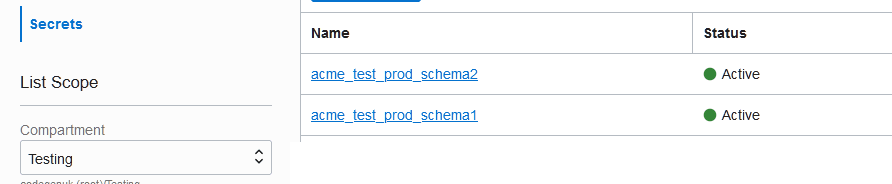
2. Create the secrets in the vault. Secrets could be created with a prefix which would allow writing of policy capturing only the secrets with the specified prefix text. Below two secrets have been created both with prefix "acme_test_prod".

3. Write a policy allowing dynamic group to access the secret bundles. Use the vault id and prefix of the secret to restrict the dynamic group to specific set of secrets and vaults. Below policy would allow test_dynamic_group to get all the secret bundles with names begining with "acme_test_prod" in the specified vault id.

Policy is written for secret bundles as that's what the java API expect. If this is done for OCI CLI then policy could be written for secrets instead of secret bundles. Java API access fails when policy only allow access to secrets instead of secret bundles.


4. Final step set is to write the java code that would be deployed as part of the application into OKE cluster. Download the java SDK from the link here. Below is an example java code that uses instance principal provider to create a secrets client that could be used to retreive the secrets from the vault.
final InstancePrincipalsAuthenticationDetailsProvider provider;
        try {
            provider = InstancePrincipalsAuthenticationDetailsProvider.builder().build();
        } catch (Exception e) {
            
            throw e;
        }
    
        SecretsClient secretsDpClient  = new SecretsClient(provider);
                
        GetSecretBundleByNameResponse getSecretBundleByNameResponse = secretsDpClient.getSecretBundleByName(GetSecretBundleByNameRequest.builder()
        .secretName("acme_test_prod_schema1").vaultId("ocid1.vault.oc1.vault id here...").build());
        
        Base64SecretBundleContentDetails details = (Base64SecretBundleContentDetails) getSecretBundleByNameResponse.getSecretBundle().getSecretBundleContent();
        byte[] content = Base64.getDecoder().decode(details.getContent());
        //System.out.println("Password : "new String(content));
        
        PoolDataSource ds = PoolDataSourceFactory.getPoolDataSource();
        ds.setConnectionFactoryClassName("oracle.jdbc.pool.OracleDataSource");
        ds.setURL("jdbc:oracle:thin:@test");
        ds.setUser("asanga");
        ds.setPassword(new String(content));

Saturday, July 3, 2021

Enabling SSL_DH_anon_WITH_3DES_EDE_CBC_SHA to work with TCPS/SSL for JDBC Thin Drvier

While testing out "Connect to the database through TCPS for SSL with Encryption Only" on 762286.1 encournted the following error.
java -Doracle.net.tns_admin=. JDBCSSLTester2 test2.properties
Start: Wed Jun 23 12:50:02 UTC 2021
SQL Exception occurred:
java.sql.SQLRecoverableException: IO Error: No appropriate protocol (protocol is disabled or cipher suites are inappropriate), Authentication lapse 0 ms.
        at oracle.jdbc.driver.T4CConnection.logon(T4CConnection.java:894)
        at oracle.jdbc.driver.PhysicalConnection.connect(PhysicalConnection.java:807)
        at oracle.jdbc.driver.T4CDriverExtension.getConnection(T4CDriverExtension.java:77)
        at oracle.jdbc.driver.OracleDriver.connect(OracleDriver.java:767)
        at oracle.jdbc.pool.OracleDataSource.getPhysicalConnection(OracleDataSource.java:450)
        at oracle.jdbc.pool.OracleDataSource.getConnection(OracleDataSource.java:324)
        at oracle.jdbc.pool.OracleDataSource.getConnection(OracleDataSource.java:234)
        at oracle.jdbc.pool.OracleDataSource.getConnection(OracleDataSource.java:212)
        at JDBCSSLTester2.getConnection(JDBCSSLTester2.java:74)
        at JDBCSSLTester2.run(JDBCSSLTester2.java:34)
        at JDBCSSLTester2.main(JDBCSSLTester2.java:88)
Caused by: java.io.IOException: No appropriate protocol (protocol is disabled or cipher suites are inappropriate), Authentication lapse 0 ms.
        at oracle.jdbc.driver.T4CConnection.logon(T4CConnection.java:890)
        ... 10 more
Caused by: javax.net.ssl.SSLHandshakeException: No appropriate protocol (protocol is disabled or cipher suites are inappropriate)
        at sun.security.ssl.HandshakeContext.<init>(HandshakeContext.java:171)
        at sun.security.ssl.ClientHandshakeContext.<init>(ClientHandshakeContext.java:101)
        at sun.security.ssl.TransportContext.kickstart(TransportContext.java:221)
        at sun.security.ssl.SSLEngineImpl.beginHandshake(SSLEngineImpl.java:98)
        at oracle.net.nt.SSLSocketChannel.doSSLHandshake(SSLSocketChannel.java:430)
        at oracle.net.nt.SSLSocketChannel.write(SSLSocketChannel.java:130)
        at oracle.net.ns.NIOPacket.writeToSocketChannel(NIOPacket.java:355)
        at oracle.net.ns.NIOConnectPacket.writeToSocketChannel(NIOConnectPacket.java:247)
        at oracle.net.ns.NSProtocolNIO.negotiateConnection(NSProtocolNIO.java:122)
        at oracle.net.ns.NSProtocol.connect(NSProtocol.java:364)
        at oracle.jdbc.driver.T4CConnection.connect(T4CConnection.java:1625)
        at oracle.jdbc.driver.T4CConnection.logon(T4CConnection.java:606)
        ... 10 more
Ended: Wed Jun 23 12:50:03 UTC 2021

This was intresting as the SQLPlus connection worked fine. So the issue is localized to java. For SSL_DH_anon_WITH_3DES_EDE_CBC_SHA to work with JDBC the cipher suite must be added to both sqlnet.ora and listener.ora (2621754.1, 1434966.1). As these were already in place in both those files missing chipher suite cannot be the reason for this.

The intersting part from error stack was "protocol is disabled or cipher suites are inappropriate". Seems cipher suite SSL_DH_anon_WITH_3DES_EDE_CBC_SHA is not available for java. It's available on Oracle as per security guide. Oracle advices not to use these cipher suites to protect sensitive data. But they are useful in situatation where only encryption of traffic is needed not authentication or if communicating parties want to remain anonymous.

MOS doc 2288489.1 listed similar issue with regard to using Diffie-Hellman on JDK 1.7. It did have a link to external doc which listed enchancements on JDK 1.8 but did not help in resolving this issue.

However, it seems the DH_anon cipher suites used in 762286.1 for encryption only test case (SSL_DH_anon_WITH_3DES_EDE_CBC_SHA, SSL_DH_anon_WITH_RC4_128_MD5,SSL_DH_anon_WITH_DES_CBC_SHA) seem to be indeed disable by default on 1.8. It is mentioned here "For users of Oracle 11g, the SSL_DH_anon_WITH_3DES_EDE_CBC_SHA, SSL_DH_anon_WITH_RC4_128_MD5, and SSL_DH_anon_WITH_DES_CBC_SHA cipher suites are disabled by default in Java 8. To allow these cipher suites, see the Test or Revert changes to Oracle's JDK and JRE Cryptographic Algorithms section of the Java documentation".

The test case was run using JDK1.8 and 19.11.0.0.0 driver. Using SSLServerSocketFactory is possible to iterate over available cipher suites and default cipher suites.
SSLServerSocketFactory ssf = (SSLServerSocketFactory) SSLServerSocketFactory.getDefault();
String[] defaultCiphers = ssf.getDefaultCipherSuites();
String[] availableCiphers = ssf.getSupportedCipherSuites();
This showed following list of cipher suites available by default
TLS_AES_128_GCM_SHA256
TLS_AES_256_GCM_SHA384
TLS_DHE_DSS_WITH_AES_128_CBC_SHA
TLS_DHE_DSS_WITH_AES_128_CBC_SHA256
TLS_DHE_DSS_WITH_AES_128_GCM_SHA256
TLS_DHE_DSS_WITH_AES_256_CBC_SHA
TLS_DHE_DSS_WITH_AES_256_CBC_SHA256
TLS_DHE_DSS_WITH_AES_256_GCM_SHA384
TLS_DHE_RSA_WITH_AES_128_CBC_SHA
TLS_DHE_RSA_WITH_AES_128_CBC_SHA256
TLS_DHE_RSA_WITH_AES_128_GCM_SHA256
TLS_DHE_RSA_WITH_AES_256_CBC_SHA
TLS_DHE_RSA_WITH_AES_256_CBC_SHA256
TLS_DHE_RSA_WITH_AES_256_GCM_SHA384
TLS_ECDHE_ECDSA_WITH_AES_128_CBC_SHA
TLS_ECDHE_ECDSA_WITH_AES_128_CBC_SHA256
TLS_ECDHE_ECDSA_WITH_AES_128_GCM_SHA256
TLS_ECDHE_ECDSA_WITH_AES_256_CBC_SHA
TLS_ECDHE_ECDSA_WITH_AES_256_CBC_SHA384
TLS_ECDHE_ECDSA_WITH_AES_256_GCM_SHA384
TLS_ECDHE_RSA_WITH_AES_128_CBC_SHA
TLS_ECDHE_RSA_WITH_AES_128_CBC_SHA256
TLS_ECDHE_RSA_WITH_AES_128_GCM_SHA256
TLS_ECDHE_RSA_WITH_AES_256_CBC_SHA
TLS_ECDHE_RSA_WITH_AES_256_CBC_SHA384
TLS_ECDHE_RSA_WITH_AES_256_GCM_SHA384
TLS_ECDH_ECDSA_WITH_AES_128_CBC_SHA
TLS_ECDH_ECDSA_WITH_AES_128_CBC_SHA256
TLS_ECDH_ECDSA_WITH_AES_128_GCM_SHA256
TLS_ECDH_ECDSA_WITH_AES_256_CBC_SHA
TLS_ECDH_ECDSA_WITH_AES_256_CBC_SHA384
TLS_ECDH_ECDSA_WITH_AES_256_GCM_SHA384
TLS_ECDH_RSA_WITH_AES_128_CBC_SHA
TLS_ECDH_RSA_WITH_AES_128_CBC_SHA256
TLS_ECDH_RSA_WITH_AES_128_GCM_SHA256
TLS_ECDH_RSA_WITH_AES_256_CBC_SHA
TLS_ECDH_RSA_WITH_AES_256_CBC_SHA384
TLS_ECDH_RSA_WITH_AES_256_GCM_SHA384
TLS_EMPTY_RENEGOTIATION_INFO_SCSV
TLS_RSA_WITH_AES_128_CBC_SHA
TLS_RSA_WITH_AES_128_CBC_SHA256
TLS_RSA_WITH_AES_128_GCM_SHA256
TLS_RSA_WITH_AES_256_CBC_SHA
TLS_RSA_WITH_AES_256_CBC_SHA256
TLS_RSA_WITH_AES_256_GCM_SHA384


SSL_DH_anon_WITH_3DES_EDE_CBC_SHA was missing from the list.


Document here shows how to add algorithm to disable list. So to enable then it must be taken out of the disabled list. By deafult $JAVA_HOME/jre/lib/security/java.security has the following for jdk.tls.disabledAlgorithms entry.
jdk.tls.disabledAlgorithms=SSLv3, RC4, DES, MD5withRSA, DH keySize < 1024, \
    EC keySize < 224, 3DES_EDE_CBC, anon, NULL, \
    include jdk.disabled.namedCurves
To enable DH_anon remove "3DES_EDE_CBC, anon". So the udpate entry looks like below.
jdk.tls.disabledAlgorithms=SSLv3, RC4, DES, MD5withRSA, DH keySize < 1024, \
    EC keySize < 224, NULL, \
    include jdk.disabled.namedCurves
The new cipher suite list is shown below
SSL_DHE_DSS_WITH_3DES_EDE_CBC_SHA
SSL_DHE_RSA_WITH_3DES_EDE_CBC_SHA
SSL_DH_anon_WITH_3DES_EDE_CBC_SHA
SSL_RSA_WITH_3DES_EDE_CBC_SHA
TLS_AES_128_GCM_SHA256
TLS_AES_256_GCM_SHA384
TLS_DHE_DSS_WITH_AES_128_CBC_SHA
TLS_DHE_DSS_WITH_AES_128_CBC_SHA256
TLS_DHE_DSS_WITH_AES_128_GCM_SHA256
TLS_DHE_DSS_WITH_AES_256_CBC_SHA
TLS_DHE_DSS_WITH_AES_256_CBC_SHA256
TLS_DHE_DSS_WITH_AES_256_GCM_SHA384
TLS_DHE_RSA_WITH_AES_128_CBC_SHA
TLS_DHE_RSA_WITH_AES_128_CBC_SHA256
TLS_DHE_RSA_WITH_AES_128_GCM_SHA256
TLS_DHE_RSA_WITH_AES_256_CBC_SHA
TLS_DHE_RSA_WITH_AES_256_CBC_SHA256
TLS_DHE_RSA_WITH_AES_256_GCM_SHA384
TLS_DH_anon_WITH_AES_128_CBC_SHA
TLS_DH_anon_WITH_AES_128_CBC_SHA256
TLS_DH_anon_WITH_AES_128_GCM_SHA256
TLS_DH_anon_WITH_AES_256_CBC_SHA
TLS_DH_anon_WITH_AES_256_CBC_SHA256
TLS_DH_anon_WITH_AES_256_GCM_SHA384
TLS_ECDHE_ECDSA_WITH_3DES_EDE_CBC_SHA
TLS_ECDHE_ECDSA_WITH_AES_128_CBC_SHA
TLS_ECDHE_ECDSA_WITH_AES_128_CBC_SHA256
TLS_ECDHE_ECDSA_WITH_AES_128_GCM_SHA256
TLS_ECDHE_ECDSA_WITH_AES_256_CBC_SHA
TLS_ECDHE_ECDSA_WITH_AES_256_CBC_SHA384
TLS_ECDHE_ECDSA_WITH_AES_256_GCM_SHA384
TLS_ECDHE_RSA_WITH_3DES_EDE_CBC_SHA
TLS_ECDHE_RSA_WITH_AES_128_CBC_SHA
TLS_ECDHE_RSA_WITH_AES_128_CBC_SHA256
TLS_ECDHE_RSA_WITH_AES_128_GCM_SHA256
TLS_ECDHE_RSA_WITH_AES_256_CBC_SHA
TLS_ECDHE_RSA_WITH_AES_256_CBC_SHA384
TLS_ECDHE_RSA_WITH_AES_256_GCM_SHA384
TLS_ECDH_ECDSA_WITH_3DES_EDE_CBC_SHA
TLS_ECDH_ECDSA_WITH_AES_128_CBC_SHA
TLS_ECDH_ECDSA_WITH_AES_128_CBC_SHA256
TLS_ECDH_ECDSA_WITH_AES_128_GCM_SHA256
TLS_ECDH_ECDSA_WITH_AES_256_CBC_SHA
TLS_ECDH_ECDSA_WITH_AES_256_CBC_SHA384
TLS_ECDH_ECDSA_WITH_AES_256_GCM_SHA384
TLS_ECDH_RSA_WITH_3DES_EDE_CBC_SHA
TLS_ECDH_RSA_WITH_AES_128_CBC_SHA
TLS_ECDH_RSA_WITH_AES_128_CBC_SHA256
TLS_ECDH_RSA_WITH_AES_128_GCM_SHA256
TLS_ECDH_RSA_WITH_AES_256_CBC_SHA
TLS_ECDH_RSA_WITH_AES_256_CBC_SHA384
TLS_ECDH_RSA_WITH_AES_256_GCM_SHA384
TLS_ECDH_anon_WITH_3DES_EDE_CBC_SHA
TLS_ECDH_anon_WITH_AES_128_CBC_SHA
TLS_ECDH_anon_WITH_AES_256_CBC_SHA
TLS_EMPTY_RENEGOTIATION_INFO_SCSV
TLS_KRB5_WITH_3DES_EDE_CBC_MD5
TLS_KRB5_WITH_3DES_EDE_CBC_SHA
TLS_RSA_WITH_AES_128_CBC_SHA
TLS_RSA_WITH_AES_128_CBC_SHA256
TLS_RSA_WITH_AES_128_GCM_SHA256
TLS_RSA_WITH_AES_256_CBC_SHA
TLS_RSA_WITH_AES_256_CBC_SHA256
TLS_RSA_WITH_AES_256_GCM_SHA384

SSL_DH_anon_WITH_3DES_EDE_CBC_SHA is available now. The other two *DH_anon_* cipher suite listed on 762286.1 seem to be missing from 19c (as it is not listed on security guide, possibly desupported in newer versions). Only SSL_DH_anon_WITH_3DES_EDE_CBC_SHA is listed on security guide as a possible cipher suite for encryption only. So getting SSL_DH_anon_WITH_3DES_EDE_CBC_SHA available is enough to run the test case mentioned on 762286.1.
java -Doracle.net.tns_admin=. JDBCSSLTester2 test2.properties
Start: Wed Jun 23 13:47:47 UTC 2021
Conncted as DATABASE USER ASANGA
Ended: Wed Jun 23 13:47:49 UTC 2021
There's a good reason why certain cipher suits are disabled by default. Enabling and using them must be carefully considerd inline with security policies being used.

Wednesday, September 30, 2020

JDBC Thin Connections to Autonomous Transaction Processing DB

There are two methods for connecting to ATP using a JDBC thin client. One is using Oracle wallet and the other is using java keystore. This post gives a summary of setting up JDBC thin connections using these methods. It is assume that the client credentials zip file is dowloaded from the ATP DB console.

Using Java KeyStore for JDBC Thin Connections

Using java keystore (JKS) is the simplest method for connecting a JDBC thin client to ATP. It requires no new libraries to be added to the classpath and if existing class conforms to using TNS entries then require no code changes either.
1. To use this method to connect to ATP DB following files are needed which are included in the client credentials zip file downloaded from the ATP DB console. 

  •  truststore.jks
  • keystore.jks
  • ojdbc.properties
  • tnsnames.ora
2. Modify the ojdbc.properties file to include JKS related entries (The original file in the client credentail zip will have additonal entries). This include specifying the locations of the two JKS files and their passwords. Password is the same password given when client credentials zip was downloaded from ATP DB console. Below is an example of ojdbc.properties file used in this method.
javax.net.ssl.trustStore=C:\\Asanga\\java\\atpjdbc\\Wallet_ATPFree\\truststore.jks
javax.net.ssl.trustStorePassword=<wallet password here>
javax.net.ssl.keyStore=C:\\Asanga\\java\\atpjdbc\\Wallet_ATPFree\\keystore.jks
javax.net.ssl.keyStorePassword=<wallet password here>
3. Next the location of the tnsnames.ora and ojdbc.properties files must be specified to the java app. This could be done by specifying the oracle.net.tns_admin system property, which could be passed on through the JVM options.
-Doracle.net.tns_admin=./Wallet_ATPFree
This would require no code changes. Other methods of specifying this location includes using the TNS_ADMIN in the JDBC URL (requies driver 18.3 or above) or using connection property OracleConnection.CONNECTION_PROPERTY_TNS_ADMIN. In this example location "./Wallet_ATPFree" containes tnsnames.ora and ojdbc.properties files.

4. With these files and enties in place create a JDBC thin connection using UCP as below. In this case the tpurgent service is used in the URL.
        PoolDataSource ds = PoolDataSourceFactory.getPoolDataSource();
        ds.setConnectionFactoryClassName("oracle.jdbc.pool.OracleDataSource");
        ds.setConnectionPoolName("ATP_Pool");
        ds.setURL("jdbc:oracle:thin:@atpfree_tpurgent");
        ds.setUser("asanga");
        ds.setPassword("pwd_here");


Using Oracle Wallet for JDBC Thin Connections


1. Using this method requires following files and library jars. 

  •  ewallet.p12 and cwallet.sso
  • ojdbc.properties
  • tnsnames.ora
  • oraclepki.jar, osdt_cert.jar and osdt_core.jar (not included in client credential zip file)

2. The wallet file is doesn't contain any passwords.
mkstore -wrl . -listCredential
Oracle Secret Store Tool Release 21.0.0.0.0 - Production
Version 21.0.0.0.0
Copyright (c) 2004, 2020, Oracle and/or its affiliates. All rights reserved.

Enter wallet password:
List credential (index: connect_string username)
However, it is possible to add a password to the wallet and use it for passwordless login. What is contains is the certificate which allows to make TCPS connections. These certificates could be listed with following (redacted output shown).
orapki wallet display -wallet . -complete
Oracle PKI Tool Release 21.0.0.0.0 - Production
Version 21.0.0.0.0
Copyright (c) 2004, 2020, Oracle and/or its affiliates. All rights reserved.

Requested Certificates:
User Certificates:
Subject:        CN=............................,DNQ=V1
Issuer:         C=US,ST=California,L=Redwood Shores,O=Oracle Corporation Autonomous Data Warehouse Cloud Self-signed CA,CN=Autonomous Data Warehouse Cloud CA
Serial Number:  00
Key Length      2048
MD5 digest:     ....
SHA digest:     ....

Trusted Certificates:
Subject:        CN=DigiCert Global Root CA,OU=www.digicert.com,O=DigiCert Inc,C=US
Issuer:         CN=DigiCert Global Root CA,OU=www.digicert.com,O=DigiCert Inc,C=US
Serial Number:  ....
Key Length      2048
MD5 digest:     ...
SHA digest:     ...

Subject:        C=US,ST=California,L=Redwood Shores,O=Oracle Corporation Autonomous Data Warehouse Cloud Self-signed CA,CN=Autonomous Data Warehouse Cloud CA
Issuer:         C=US,ST=California,L=Redwood Shores,O=Oracle Corporation Autonomous Data Warehouse Cloud Self-signed CA,CN=Autonomous Data Warehouse Cloud CA
Serial Number:  ...
Key Length      2048
MD5 digest:     ...
SHA digest:     ...

Subject:        CN=DigiCert SHA2 Secure Server CA,O=DigiCert Inc,C=US
Issuer:         CN=DigiCert Global Root CA,OU=www.digicert.com,O=DigiCert Inc,C=US
Serial Number:  ...
Key Length      2048
MD5 digest:     ...
SHA digest:     ...
As by default no password contains in the wallet, it must be specified in the JDBC connection. Secondly the auto login wallte included in the downloaded wallet zip file is not a auto login local wallet. For added security a new auto login local wallet could be created. Password of the wallet is the same password given when client credentials zip was downloaded from ATP DB console

3. Modify the ojdbc.properties file to contain the following entry which specify the wallet file location.
oracle.net.wallet_location=(SOURCE=(METHOD=FILE)(METHOD_DATA=(DIRECTORY=C:\\Asanga\\java\\atpjdbc\\Wallet_ATPFree))))
4. Similar to JKS method, specify the location of the tnsnames.ora and ojdbc.properties files. This could be done by specifying the oracle.net.tns_admin system property, which could be passed on through the JVM options.
-Doracle.net.tns_admin=./Wallet_ATPFree
This would require no code changes. Other methods of specifying this location includes using the TNS_ADMIN in the JDBC URL (requies driver 18.3 or above) or using connection property OracleConnection.CONNECTION_PROPERTY_TNS_ADMIN. In this example location "./Wallet_ATPFree" containes tnsnames.ora and ojdbc.properties files.

5. Include the oraclepki.jar, osdt_cert.jar and osdt_core.jar files in the classpath of the java application.

6. With these files and entries in place same JDBC Connection code as shown above in JKS method could be used to make JDBC thin connections to the ATP DB. Example below shows password explicity being specified in the java code rathe than rely on password stoed in wallet.
        PoolDataSource ds = PoolDataSourceFactory.getPoolDataSource();
        ds.setConnectionFactoryClassName("oracle.jdbc.pool.OracleDataSource");
        ds.setConnectionPoolName("ATP_Pool");
        ds.setURL("jdbc:oracle:thin:@atpfree_tpurgent");
        ds.setUser("asanga");
        ds.setPassword("pwd_here");
Thursday, May 14, 2020

UCP Connection Not Releasing Resources Immediately When Closed

JDBC connection created from a UCP pool does not release database resources immediately when close method is called. Java spec states calling close method "releases this Connection object's database and JDBC resources immediately instead of waiting for them to be automatically released. Calling the method close on a Connection object that is already closed is a no-op. It is strongly recommended that an application explicitly commits or rolls back an active transaction prior to calling the close method. If the close method is called and there is an active transaction, the results are implementation-defined."
It seems the implementation differ between implicit connection caching (ICC) pools and and UCP.
In particular UCP connections holds on to DML related locks of uncommitted transactions. Not releasing of DML related locks when close is called leads to locking and misleading error reporting such as number of rows inserted/updated. DML related locks get released only during a rollback or a commit. Connections out of an implicit connection caching (ICC) pools release the DML locks after call to close method. Issue was recreated using ojdbc10.jar (version 19.7).
The test case (code given at the end of the post) insert a single row to a table with a primary key and close the connection (without commit or rollback as those releases the locks). Then connection is checked out of the pool and it will report unique key violation even though no rows were inserted during the previous step. Querying v$lock shows table (TM) and row locks (TX) still being held by the session.
If a commit is called on connection checked out second time from the pool the previous transaction commits. It seems the transaction span connection close.
Connection out of a ICC pool doesn't exhibit this behaviour. These connections only old the TM and TX locks until connections is closed (if commit or rollback is not called before that). Once close method is called all table and row level locks are released.
Below is the output explanation of the test code given for UCP test case.
The connection pool is created with a single connection. There's no difference if more connections are the pool behaviour is the same. Only difference would be instead of unique constraint violation the second session would hang until first one is commit or rollback. First up the session id and serial# is printed. This is in case want to query the DB to verify the session locks held by the particular session..
Getting Session ID
SID 592 Serial# 54115
Test code runs to insert a single row to an empty table (table DML is given in the java code). The connection close without commit or rollback.
Insert a row and close connection without commit
Verify connection is closed. This stage the connection is returned to the pool.
Is Closed? true
Check out the connection from the pool and check the resources held by the connection. Since pool only has 1 connection it would be the same physical connection checked out previously. As seen from the output it is still holding on the table (TM) and row level (TX) locks.
Getting the connection from the pool

Resource Locks held by the previously closed session

SID TYPE ID1 ID2 LMODE Request CTime BLOCK
592 AE 100 0 4 0 1 2
592 TM 1838626 0 3 0 0 2
592 TX 29229081 62458 6 0 0 2
Moreover the connection states it had inserted one row even though it was closed and checked out again

Number of rows inserted

Rows inserted : 1
Running the same insert again results in unique key violation. Even though no rows were committed to the database. Querying the table will show 0 rows.
 Running insert again will error due to locks held by previously closed session

Getting Session ID
SID 592 Serial# 54115
Exception in thread "main" java.sql.SQLIntegrityConstraintViolationException: ORA-00001: unique constraint (ASANGA.SYS_C003916184) violated


Running the ICC pool test case doesn't result in any errors and shows 0 rows inserted for connection when checked out second time from the pool. No table and row level locks are held after connection close. Output for ICC pool test case is shown below.
Getting Session ID
SID 400 Serial# 18301

Insert a row and close connection without commit

Is Closed? true

Getting the connection from the pool


Resource Locks held by the previously closed session

SID TYPE ID1 ID2 LMODE Request CTime BLOCK
400 AE 100 0 4 0 2 2

Number of rows inserted

Rows inserted : 0

 Running insert again will error due to locks held by previously closed session

Getting Session ID
SID 400 Serial# 18301
When a SR was raised Oracle responded that this is tracked under unpublished bug 28281115. There seem to be patch available but need to be ported to 19c version. Post will be updated once the solution is provided. In mean time make note of this behaviour change when moving from ICC to UCP.

Related Posts
Auto Commit State Persists After Connection Close on UCP
java.sql.SQLException: Could not commit with auto-commit set on When Using 12c JDBC Driver
Change in 12c JDBC Behavior - setDate & getDate Does Not Truncate Timestamp
JDBC Auto Commit and Log File Sync
UCP Connections Fail to Connect to DB in Mount Mode With ORA-12504 TNS:listener was not given the SID in CONNECT_DATA
TimesTen JDBC Connection Pool Using UCP (Universal Connection Pool)
Using Oracle Connection Pools with ActiveMQ
JDBC Client Failover in Data Guard Configuration with PDBs

Update on 2020-06-01

Patch for bug 28281115 (pending transaction is not committed implicitly on conn return) is now available for 18.3 and 19.3 - 19.6 (19.7 has been requested). This fixed the issue of not releasing table locks. However, still there's a difference in behaviour between ICC and UCP. The UCP does an implicit commit when closing the connection while ICC does an implicit rollback. Make note of these differences when migrating from ICC to UCP.

Java Test Case
import java.sql.*;
import java.util.Properties;
import oracle.ucp.jdbc.PoolDataSource;
import oracle.ucp.jdbc.PoolDataSourceFactory;
import javax.sql.DataSource;
import oracle.jdbc.pool.OracleConnectionCacheManager;
import oracle.jdbc.pool.OracleDataSource;

/**
 *
 * @author Asanga
 */
// table used for test case
//create table ucptest (a number, b varchar2(100), primary key (a));
public class UCPLockTest {

    static int MINVALUE = 1;
    static int MAXVALUE = 1;
    static int INITIALVALUE = 1;
    static String URL = "jdbc:oracle:thin:@192.168.1.100:1521:cgenlt1";
    static String username = "asanga";
    static String password = "asanga321";

    static int INACTIVE_TIMEOUT = 60;
    static int ABANDON_TIMEOUT = 60;
    static int PROPCHECK=45;

    static int SID;

    static DataSource ds;
    
    public static void main(String[] args) throws SQLException {

        ds = getUCPDS(); // UCP test case
//        ds = getICCDS(); //ICC test case
      

        Connection con = ds.getConnection();
        con.setAutoCommit(false);

        System.out.println("Getting Session ID");
        getSessionID(con);

        System.out.println("\nInsert a row and close connection without commit\n");
        runInsertWithoutCommit(con);
        System.out.println("Is Closed? "+con.isClosed());

        System.out.println("\nGetting the connection from the pool\n");
        con = ds.getConnection();
        con.setAutoCommit(false);
        

        System.out.println("\nResource Locks held by the previously closed session\n");
        listLocksHeldBySession(con);

        System.out.println("\nNumber of rows inserted\n");
        getRowCount(con);

        System.out.println("\n Running insert again will error due to locks held by previously closed session\n");

        System.out.println("Getting Session ID");
        getSessionID(con);

        runInsertWithoutCommit(con);

    }

    static DataSource getUCPDS() throws SQLException {

        PoolDataSource ds = PoolDataSourceFactory.getPoolDataSource();
        ds.setConnectionFactoryClassName("oracle.jdbc.pool.OracleDataSource");
        ds.setURL(URL);
        ds.setUser(username);
        ds.setPassword(password);
        ds.setInitialPoolSize(INITIALVALUE);
        ds.setMinPoolSize(MINVALUE);
        ds.setMaxPoolSize(MAXVALUE);

        ds.setInactiveConnectionTimeout(INACTIVE_TIMEOUT);
        ds.setAbandonedConnectionTimeout(ABANDON_TIMEOUT);
        ds.setPropertyCycle(PROPCHECK);

        return ds;

    }

    static DataSource getICCDS() throws SQLException {

        OracleDataSource ds = new OracleDataSource();
        ds.setURL(URL);
        ds.setUser(username);
        ds.setPassword(password);

        Properties properties = new Properties();
        properties.setProperty("MinLimit", MINVALUE+"");
        properties.setProperty("MaxLimit", MAXVALUE+"");
        properties.setProperty("InitialLimit", INITIALVALUE+"");
        properties.setProperty("InactivityTimeout", INACTIVE_TIMEOUT+"");
        properties.setProperty("AbandonedConnectionTimeout", ABANDON_TIMEOUT+"");
        properties.setProperty("PropertyCheckInterval", PROPCHECK+"");

        ds.setConnectionCachingEnabled(true);

        OracleConnectionCacheManager cache = OracleConnectionCacheManager.getConnectionCacheManagerInstance();
        cache.createCache("asa", ds, properties);
        
        return ds;
    }

    static void getSessionID(Connection con) throws SQLException {

        PreparedStatement pr = con.prepareStatement("select sid,serial# from v$session where sid=sys_context('USERENV','SID')");
        ResultSet rs = pr.executeQuery();
        while (rs.next()) {
            System.out.println("SID " + rs.getInt(1) + " Serial# " + rs.getInt(2));
            SID = rs.getInt(1);
        }
        rs.close();
        pr.close();

    }

    static void runInsertWithoutCommit(Connection con) throws SQLException {

        PreparedStatement pr = con.prepareStatement("insert into ucptest values (?,?)");
        pr.setInt(1, 1);
        pr.setString(2, "test " + new Date(System.currentTimeMillis()).toString());
        pr.execute();

        con.close();

    }

    static void listLocksHeldBySession(Connection con) throws SQLException {

        PreparedStatement pr = con.prepareStatement("select sid,type,id1,id2,lmode,request,ctime,block from v$lock where sid=?");
        pr.setInt(1, SID);
        ResultSet rs = pr.executeQuery();
        System.out.println("SID\tTYPE\tID1\tID2\tLMODE\tRequest\tCTime\tBLOCK");

        while (rs.next()) {
            int i = 0;
            System.out.print(rs.getInt(++i) + "\t");
            System.out.print(rs.getString(++i) + "\t");
            System.out.print(rs.getInt(++i) + "\t");
            System.out.print(rs.getInt(++i) + "\t");
            System.out.print(rs.getInt(++i) + "\t");
            System.out.print(rs.getInt(++i) + "\t");
            System.out.print(rs.getInt(++i) + "\t");
            System.out.println(rs.getInt(++i));
        }
        rs.close();
        pr.close();

    }

    static void getRowCount(Connection con) throws SQLException {

        PreparedStatement pr = con.prepareStatement("select count(*) from ucptest");
        ResultSet rs = pr.executeQuery();

        while (rs.next()) {

            System.out.println("Rows inserted : " + rs.getInt(1));
        }

        rs.close();
        pr.close();
    }

}

Wednesday, April 15, 2020

Auto Commit State Persists After Connection Close on UCP

By default connections checked out of universal connection pool (UCP) will have a auto commit state of true. This could be changed by setting the auto commit state on the connection. Another way to change is to change the connection pool's default setting for auto commit.
Comparing implicit connection cache (ICC) pools and UCP it appears that in UCP the auto commit state persist even after connection is closed. This means if a connection changes the auto commit state and return it to the pool and same connection is checked out later, it will have the changed auto commit state and not the default value.
This behaviour was not seen on ICC pools (ICC is considered deprecated). Once the connection is returned to the pool and checked out again, it will have the default behaviour.
The test cases is given at the end of the post. Comment/uncomment either getUCPDS or getICCDS methods to run the desired test case. The pool size is set to 1 to keep things simple. But even if it's increased the test case would work. Below is an explanation of the output seen.

UCP test case output
First up is checking the default state of auto commit
Auto commit status after checking out of the pool 

0 true
Next up the auto commit state is changed to opposite of the default. If default is true, then set to false and vice versa. Afterwards verify if the changed state is reflected on the connection. Since default auto commit state was true the opposite was false. As such now the auto commit state is reflected as false.
Setting auto commit to opposite

0 false
Following the auto commit state change the connection is closed and returned to the pool.
Connections closed and returned to the pool
Finally the connection is checked out of the pool again and auto commit state is verified. In UCP the connection will have changed state of auto commit rather than the default value, even though this is a "new" connection checked out of the pool (pools never close the underlying physical connection. So new is a logical new rather than an actual new physical connection).
Auto commit status after checking out of the pool 

0 : false

ICC test case output
The ICC test case output is same except for last step. It will also have a true state for default auto commit setting. The default state is changed to false and connection is returned to the pool.
Auto commit status after checking out of the pool 

0 true

 Setting auto commit to opposite 

0 false

Connections closed and returned to the pool 
When the connection is checked out next time from the pool it will have the default state instead of the previously changed state (unlike UCP).
Auto commit status after checking out of the pool 

0 : true
These test were carried out using ojdbc10.jar and ucp.jar versions 19.6.


The behaviour seen on UCP is same even if the default auto commit state is changed on the pool level by setting the OracleConnection.CONNECTION_PROPERTY_AUTOCOMMIT to false. In such a case the connection checked out of the pool will have auto commit set to false. But any change to this will persist same as shown above.
Auto commit status after checking out of the pool 

0 false

 Setting auto commit to opposite 

0 true

Connections closed and returned to the pool 

Auto commit status after checking out of the pool 

0 : true
When a SR was raised with regard to the difference in behaviour, Oracle support stated "When connections are created and placed in the UCP pool the connection properties that are associated with each connection remain for the duration of the connection". However, this fact is not reflected on the UCP documentation but Oracle support insisted this has always been the case. Following that the same test case was tested against ojdbc6.jar and ucp.jar of 11.2.0.1 and showed the same test output. It seems rightly or wrongly the UCP had the same behaviour throughout.
However, this difference between ICC and UCP is not listed anywhere on the documentation. Any migration from ICC to UCP should watch out for this change in behaviour.

Related Posts
java.sql.SQLException: Could not commit with auto-commit set on When Using 12c JDBC Driver
Change in 12c JDBC Behavior - setDate & getDate Does Not Truncate Timestamp
JDBC Auto Commit and Log File Sync
UCP Connections Fail to Connect to DB in Mount Mode With ORA-12504 TNS:listener was not given the SID in CONNECT_DATA
TimesTen JDBC Connection Pool Using UCP (Universal Connection Pool)
Using Oracle Connection Pools with ActiveMQ
JDBC Client Failover in Data Guard Configuration with PDBs

Java Test Case
import java.sql.Connection;
import java.sql.SQLException;
import java.util.Properties;
import javax.sql.DataSource;
import oracle.jdbc.OracleConnection;
import oracle.jdbc.pool.OracleConnectionCacheManager;
import oracle.jdbc.pool.OracleDataSource;
import oracle.ucp.UniversalConnectionPoolException;
import oracle.ucp.jdbc.PoolDataSource;
import oracle.ucp.jdbc.PoolDataSourceFactory;

/**
 *
 * @author Asanga
 */
public class TestUCPAutoCommit {

    static String URL = "jdbc:oracle:thin:@192.168.1.100:1521:enlt1";
    static String username = "asanga";
    static String password = "asanga";
    static int POOL_SIZE = 1;

    static DataSource ds;

    public static void main(String[] args) throws SQLException, UniversalConnectionPoolException, InterruptedException {

        ds = getUCPDS(); // UCP test case

//        ds = getICCDS(); // ICC test case
        
        Connection[] cons = new Connection[POOL_SIZE];

        System.out.println("Auto commit status after checking out of the pool \n");
        for (int i = 0; i < cons.length; i++) {

            cons[i] = ds.getConnection();
            System.out.println(i + " " + cons[i].getAutoCommit());

        }

        System.out.println("\n Setting auto commit to opposite \n");
        for (int i = 0; i < cons.length; i++) {

            cons[i].setAutoCommit(!cons[i].getAutoCommit());
            System.out.println(i + " " + cons[i].getAutoCommit());

        }
        System.out.println("\nConnections closed and returned to the pool \n");
        for (Connection conn : cons) {
            conn.close();
        }

        System.out.println("Auto commit status after checking out of the pool \n");
        for (int i = 0; i < cons.length; i++) {

            cons[i] = ds.getConnection();
            System.out.println(i + " : " + cons[i].getAutoCommit());

        }

    }

    static DataSource getUCPDS() throws SQLException {

        PoolDataSource ds = PoolDataSourceFactory.getPoolDataSource();
        ds.setConnectionFactoryClassName("oracle.jdbc.pool.OracleDataSource");
        ds.setURL(URL);
        ds.setUser(username);
        ds.setPassword(password);
        ds.setInitialPoolSize(POOL_SIZE);
        ds.setMinPoolSize(POOL_SIZE);
        ds.setMaxPoolSize(POOL_SIZE);

        /* uncomment below to set default state of auto commit to false */ 
        
//        Properties connProps = new Properties();
//        connProps.put(OracleConnection.CONNECTION_PROPERTY_AUTOCOMMIT, "false");
//        ds.setConnectionProperties(connProps);


        return ds;

    }

    static DataSource getICCDS() throws SQLException {

        OracleDataSource ds = new OracleDataSource();
        ds.setURL(URL);
        ds.setUser(username);
        ds.setPassword(password);

        Properties properties = new Properties();
        properties.setProperty("MinLimit", POOL_SIZE + "");
        properties.setProperty("MaxLimit", POOL_SIZE + "");
        properties.setProperty("InitialLimit", POOL_SIZE + "");

        ds.setConnectionCachingEnabled(true);

        OracleConnectionCacheManager cache = OracleConnectionCacheManager.getConnectionCacheManagerInstance();
        cache.createCache("asa", ds, properties);

        return ds;
    }

}

Thursday, October 25, 2018

UCP Connections Fail to Connect to DB in Mount Mode With ORA-12504 TNS:listener was not given the SID in CONNECT_DATA

Trying to connect to a database (non-CDB, CDB or PDB) in mount mode as sysdba using a UCP JDBC connection fails with
Exception in thread "main" java.sql.SQLException: Exception occurred while getting connection: oracle.ucp.UniversalConnectionPoolException: Cannot get Connection from Datasource: java.sql.SQLException: Listener refused the connection with the following error:
ORA-12504, TNS:listener was not given the SID in CONNECT_DATA
However there's no failure when OracleDataSource is used instead of UCP. Issue with UCP only appears in JDBC Driver versions 18.3.0.0.0 and 12.2.0.1.0.
No issue in connecting to database in mount mode with driver versions 12.1.0.2.0 and 11.2.0.4.0. This appears to be a bug on later version of JDBC drivers. After an SR this is been investigated under bug# 28780778.

Follow Java code could be used to recreate the issue. Change the ojdbc*.jar and ucp.jar as needed to try different drivers.
import java.io.File;
import java.sql.Connection;
import java.sql.DatabaseMetaData;
import java.sql.PreparedStatement;
import java.sql.ResultSet;
import java.sql.SQLException;
import java.util.Properties;
import java.util.StringTokenizer;
import oracle.jdbc.pool.OracleDataSource;
import oracle.ucp.jdbc.PoolDataSource;
import oracle.ucp.jdbc.PoolDataSourceFactory;

/**
 *
 * @author Asanga
 */
public class ConnectToMount {

    public static void main(String[] args) throws SQLException {

        String username = "sys";
        String password = "xxxxx";
        boolean isSysdba = true;
        String URL = "jdbc:oracle:thin:@192.168.0.79:1521/pdb";

        System.out.println("Driver Info");
        Connection con = usingODS(username, password, URL, isSysdba);
        printDriverInfo(con);
        
        System.out.println("\nusing ODS");
        runQuery(con);

        System.out.println("\nusing UCP");
        runQuery(usingUCP(username, password, URL, isSysdba));

    }

    static void runQuery(Connection con) throws SQLException {

        PreparedStatement pr = con.prepareStatement("select db_unique_name from v$database");

        ResultSet rs = pr.executeQuery();
        while (rs.next()) {

            System.out.println(rs.getString(1));
        }

        rs.close();
        pr.close();
        con.close();
    }

    static Connection usingUCP(String username, String password, String URL, boolean isSysDBA) throws SQLException {

        PoolDataSource ds = PoolDataSourceFactory.getPoolDataSource();
        ds.setConnectionFactoryClassName("oracle.jdbc.pool.OracleDataSource");
        ds.setUser(username);
        ds.setPassword(password);
        ds.setURL(URL);

        if (isSysDBA) {
            Properties p = new Properties();
            p.put("internal_logon", "sysdba");

            ds.setConnectionProperties(p);
        }

        return ds.getConnection();

    }

    static Connection usingODS(String username, String password, String URL, boolean isSysDBA) throws SQLException {

        OracleDataSource ds = new OracleDataSource();
        ds.setUser(username);
        ds.setPassword(password);
        ds.setURL(URL);

        if (isSysDBA) {

            Properties p = new Properties();
            p.put("internal_logon", "sysdba");

            ds.setConnectionProperties(p);
        }

        return ds.getConnection();

    }

    static void printDriverInfo(Connection con) throws SQLException {

        DatabaseMetaData meta = con.getMetaData();

        System.out.println("Driver Name " + meta.getDriverName());
        System.out.println("Driver Version " + meta.getDriverVersion());
        System.out.println("Driver Major Version " + meta.getDriverMajorVersion());
        System.out.println("Driver Minor Version " + meta.getDriverMinorVersion());
        System.out.println("Database Major Version " + meta.getDatabaseMajorVersion());
        System.out.println("Database Minor Version " + meta.getDatabaseMinorVersion());

        java.util.Properties props = System.getProperties();
        System.out.println("\nJVM\n===");
        System.out.println(props.getProperty("java.vm.vendor"));
        System.out.println(props.getProperty("java.vm.name"));
        System.out.println(props.getProperty("java.vm.version"));
        System.out.println(props.getProperty("java.version"));
    }
}

Sunday, July 1, 2018

JDBC Client Failover in Data Guard Configuration with PDBs

This post gives the highlights of setting up JDBC client failover in a data guard configuration with PDBs. For comprehensive set of steps refer the following white papers for 12c and for 11g.
The post shows how JDBC could be setup in an application that connects to single instance database in an Oracle restart such that JDBC connection failover to standby when a switchover or failover happens. The data guard setup used for this case is the same setup mentioned in the earlier post oracle Data Guard on 12.2 CDB with Oracle Restart.
1. By default ONS is disabled and offline in Oracle restart. In order to send FAN events ONS must be enabled and started in Oracle restart. This should be done in both primary and standby nodes.
srvctl enable ons
srvctl start ons
Once done check ONS status on both primary and standby.
crsctl stat res ora.ons
NAME=ora.ons
TYPE=ora.ons.type
TARGET=ONLINE
STATE=ONLINE on city7

crsctl stat res ora.ons
NAME=ora.ons
TYPE=ora.ons.type
TARGET=ONLINE
STATE=ONLINE on city7s
When ONS is enabled, stopping HAS throws up following error
crsctl stop has
...
CRS-2673: Attempting to stop 'ora.ons' on 'city7s'
CRS-5014: Agent "ORAAGENT" timed out starting process "/opt/app/oracle/product/12.2.0/grid/opmn/bin/onsctli" for action "stop": details at "(:CLSN00009:)" in "/opt/app/oracle/diag/crs/city7s/crs/trace/ohasd_oraagent_grid.trc"
CRS-2675: Stop of 'ora.ons' on 'city7s' failed
CRS-2679: Attempting to clean 'ora.ons' on 'city7s'
CRS-2681: Clean of 'ora.ons' on 'city7s' succeeded
This only happens during stopping of HAS and no such issue during start up of HAS and ONS service gets started along with other services. This appear to be a known issue in other version relating to RAC but nothing could be found on MOS with regard to 12.2 Oracle restart. SR was raised and this is being investigated under bug 28134413. In spite of this issue the failover works as expected.
Update: 2020-01-28 - As a result of the SR raised Oracle has created MOS doc 2631403.1 which now states this is expected behavior on SIHA.

2. Create a service and associate it with a PDB for application to connect. It's important that application connect to the database using the service for failover to work in the event of role transition. When a service is created for PDB, the PDB could be brought up by starting the service. However, stopping the service doesn't bring down the PDB but only the service is stopped. Following service was created on primary PDB.
srvctl add service -db prodcdb -pdb pdbapp1 -service devsrv -role PRIMARY -notification TRUE -failovertype NONE -failovermethod NONE -failoverdelay 0 -failoverretry 0 

srvctl config service -d prodcdb -s devsrv

Service name: devsrv
Cardinality: SINGLETON
Service role: PRIMARY
Management policy: AUTOMATIC
DTP transaction: false
AQ HA notifications: true
Global: false
Commit Outcome: false
Failover type: NONE
Failover method: NONE
TAF failover retries: 0
TAF failover delay: 0
Failover restore: NONE
Connection Load Balancing Goal: LONG
Runtime Load Balancing Goal: NONE
TAF policy specification: NONE
Edition:
Pluggable database name: pdbapp1
Maximum lag time: ANY
SQL Translation Profile:
Retention: 86400 seconds
Replay Initiation Time: 300 seconds
Drain timeout:
Stop option:
Session State Consistency: DYNAMIC
GSM Flags: 0
Service is enabled
Following service was created on standby PDB to be active when standby becomes primary. The service name must be same as the service created in the primary.
srvctl add service -db stbycdb -pdb pdbapp1 -service devsrv -role PRIMARY -notification TRUE -failovertype NONE -failovermethod NONE -failoverdelay 0 -failoverretry 0

srvctl config service -d stbycdb -s devsrv
Service name: devsrv
Cardinality: SINGLETON
Service role: PRIMARY
Management policy: AUTOMATIC
DTP transaction: false
AQ HA notifications: true
Global: false
Commit Outcome: false
Failover type: NONE
Failover method: NONE
TAF failover retries: 0
TAF failover delay: 0
Failover restore: NONE
Connection Load Balancing Goal: LONG
Runtime Load Balancing Goal: NONE
TAF policy specification: NONE
Edition:
Pluggable database name: pdbapp1
Maximum lag time: ANY
SQL Translation Profile:
Retention: 86400 seconds
Replay Initiation Time: 300 seconds
Drain timeout:
Stop option:
Session State Consistency: DYNAMIC
GSM Flags: 0
Service is enabled
Once service is created make sure patch for bug 26439462 (Doc ID 26439462.8) is applied. This bug prevents the bringing up of the PDB service automatically after role transition. Applying the latest RU for 12.2 (at the time of the testing it was 12.2.0.1.180417) resolved this issue. If the PDB service doesn't automatically starts then the JDBC failover will fail. This could be tested by carrying out a switchover and checking if the PDB service automatically comes up after role transition.

3. Configure the JDBC client to use UCP and enable FCF by setting ONS configuration settings. Details of this could be found on the 12c1 white paper and high availability best practice guide.


4. Create a TNS entry containing both primary and standby hosts and the service name created earlier. Use this TNS entry to connect to the database. To avoid ORA-12514 set (RETRY_COUNT x RETRY_DELAY) such that it is slightly higher than the total time for the switchover and to start the service.
DGTNS =
  (DESCRIPTION =
    (FAILOVER = on)(CONNECT_TIMEOUT=60)(RETRY_COUNT=40)(RETRY_DELAY=2)(TRANSPORT_CONNECT_TIMEOUT=1)
    (ADDRESS_LIST =
      (LOAD_BALANCE = yes)
      (ADDRESS = (PROTOCOL = TCP)(HOST = city7.domain.net)(PORT = 1581))
      (ADDRESS = (PROTOCOL = TCP)(HOST = city7s.domain.net)(PORT = 1581))
    )
    (CONNECT_DATA =
      (SERVER = DEDICATED)
      (SERVICE_NAME = devsrv)
    )
  )
5. Start the application and verify application server IP is listed in the ONS subscription list in each database server.

6. Do a switchover and check the application connectivity. For testing purpose a java application was created to output the connected database. The output below shows that initially it was connected to the PDB in the stbycdb CDB which was primary at that time. During the switchover time period while the standby DB is made primary and PDB and associated service is started connection could error. Once the service is up the JDBC connections succeeds.
Connected to stbycdb DB Server hpc1.domain.net Application Server on Mon May 21 09:55:50 BST 2018
Connected to stbycdb DB Server hpc1.domain.net Application Server on Mon May 21 09:55:51 BST 2018
Connected to stbycdb DB Server hpc1.domain.net Application Server on Mon May 21 09:55:52 BST 2018
Connected to prodcdb DB Server hpc1.domain.net Application Server on Mon May 21 09:56:10 BST 2018
Connected to prodcdb DB Server hpc1.domain.net Application Server on Mon May 21 09:56:11 BST 2018
Connected to prodcdb DB Server hpc1.domain.net Application Server on Mon May 21 09:56:13 BST 2018

Related Post
23ai JDBC Driver Does Not Consider RETRY_COUNT and RETRY_DELAY

Sunday, June 24, 2018

Using Oracle Connection Pools with ActiveMQ

Following bean entries could be used for creating pooled JDBC connections from an activemq conflagration.
To use Oracle data source add the following to activemq.xml.
 <bean id="oracle-ds" class="oracle.jdbc.pool.OracleDataSource" destroy-method="close">
    <property name="uRL" value="jdbc:oracle:thin:@192.168.0.86:1521/testdb"/>
    <property name="user" value="asanga"/>
    <property name="password" value="asa"/>
    <property name="connectionCachingEnabled" value="true"/>
<!--    <property name="fastConnectionFailoverEnabled" value="true"/> -->
<!--    <property name="oNSConfiguration" value="nodes=xxx:6200"/> -->
    <property name="connectionCacheProperties">
         <props>
              <prop key="InitialLimit">5</prop>
              <prop key="MinLimit">5</prop>
              <prop key="MaxLimit">10</prop>
        </props>
    </property>
  </bean>
Any other data source property could be added by following the camel casing the method name without "set". For example "setONSConfiguration" becomes "oNSConfiguration" as shown above.


To use Oracle Universal Connection Pool use the following
  <bean id="oracle-ds" class="oracle.ucp.jdbc.PoolDataSourceFactory" factory-method="getPoolDataSource">
    <property name="connectionFactoryClassName" value="oracle.jdbc.pool.OracleDataSource"/>
    <property name="uRL" value="jdbc:oracle:thin:@192.168.0.86:1521/testdb"/>
    <property name="user" value="asanga"/>
    <property name="password" value="asa"/>
<!--     <property name="fastConnectionFailoverEnabled" value="true"/> -->
<!--     <property name="oNSConfiguration" value="nodes=xxxx:6200"/> -->
    <property name="minPoolSize" value="5"/>
    <property name="initialPoolSize" value="5"/>
    <property name="maxPoolSize" value="10"/>
    <property name="connectionProperties">
         <props>
              <prop key="oracle.jdbc.thinForceDNSLoadBalancing">true</prop>
        </props>
    </property>
  </bean>
Enable the persistency with
        <persistenceAdapter>
            <jdbcPersistenceAdapter dataSource="#oracle-ds" lockKeepAlivePeriod="5000">
                 <locker>
                     <lease-database-locker lockAcquireSleepInterval="10000"/>
                </locker>
            </jdbcPersistenceAdapter>
         </persistenceAdapter>

Friday, February 9, 2018

JDBC Auto Commit and Log File Sync

By default when a connection is checked out of a JDBC connection pool (either Oracle Data Source or UCP), it has auto commit set to true. This means for DMLs, after each statement execution a commit happens implicitly. Effect of this is high log file sync (foreground) and log file parallel write (background waits) on the database.
The Java test case at the end of the post count the log file sync waits and user commits for inserting 10,000 rows into a single column table (create table x (a number)). The table below shows summary for running test with auto commit on and off. The database used was a standard edition 11.2.0.4.
MeasurementAuto Commit OnAuto Commit Off
Log File Sync Waits100001
User commits100001
Elapsed Time (sec)5023
Ideally, JDBC batching should be used when multiples rows are inserted like this (which requires setting auto commit to false anyway). However if this not possible then changing the auto commit property on the connection is the next best thing. Below output is from APConsole which gives a comparison of the wait times associated with having auto commit on and off. Log file sync wait is implicitly shown on the wait class graph as it's the only wait event in commit wait class.


Below java code could be used for testing for other DML events.
import java.sql.Connection;
import java.sql.PreparedStatement;
import java.sql.ResultSet;
import java.sql.SQLException;
import java.util.HashMap;
import oracle.ucp.jdbc.PoolDataSource;
import oracle.ucp.jdbc.PoolDataSourceFactory;

public class CMTest {

    private final HashMap valueMap = new HashMap<>();
    private final PoolDataSource ds;

    public CMTest() throws SQLException {

        ds = PoolDataSourceFactory.getPoolDataSource();
        ds.setConnectionFactoryClassName("oracle.jdbc.pool.OracleDataSource");
        ds.setUser("asanga");
        ds.setPassword("xxx");
        ds.setURL("jdbc:oracle:thin:@192.168.0.66:1521:std11g4");

    }

    public Connection getConnection() throws SQLException {

        return ds.getConnection();
    }

    public static void main(String[] args) throws SQLException {

        CMTest test = new CMTest();
        Connection con = test.getConnection();
        con.setAutoCommit(false); // comment to make auto auto commit true

        test.printStat(con, 1);
        test.runTest(con);
        test.printStat(con, 2);
    }

    public void printStat(Connection con, int i) throws SQLException {

        String SQL = "select st.name,s.value from v$statname st, v$sesstat s where st.STATISTIC#=s.STATISTIC# and s.sid=SYS_CONTEXT ('USERENV', 'SID') and st.name='user commits' "
                + "union "
                + "select e.event,TOTAL_WAITS from v$session_event e where e.event='log file sync' and e.sid=SYS_CONTEXT ('USERENV', 'SID')";
//                + "union "
//                + "select e.event,TIME_WAITED_MICRO from v$session_event e where e.event='log file sync' and e.sid=SYS_CONTEXT ('USERENV', 'SID')";

        PreparedStatement pr = con.prepareStatement(SQL);
        ResultSet rs = pr.executeQuery();
        while (rs.next()) {
            if (i == 1) {

                valueMap.put(rs.getString(1), rs.getInt(2));

            } else {
                Integer x = valueMap.get(rs.getString(1));
                x = (x == null) ? 0 : x;

                System.out.println(rs.getString(1) + " " + (rs.getInt(2) - x));

            }
        }
        rs.close();
        pr.close();

    }

    public void runTest(Connection con) throws SQLException {

        String sql = "insert into x values (?)";
//        String sql = "delete from x where a = ?";

        PreparedStatement pr = con.prepareStatement(sql);
        for (int i = 0; i < 10000; i++) {

            pr.setInt(1, i);
            pr.execute();
        }
        con.commit();
        pr.close();
    }
}
Related Posts
java.sql.SQLException: Could not commit with auto-commit set on When Using 12c JDBC Driver

Saturday, October 15, 2016

Change in 12c JDBC Behavior - setDate & getDate Does Not Truncate Timestamp

The 12c driver (12.1.0.2, ojdbc7.jar) certified for JDK7 and JDK8 does not truncate or set to "00:00:00" the time component when called with setDate and getDate methods. Same could be observed for 12c driver for JDK 6 as well (ojdbc6.jar). The test code given at the end of the post could be used to demonstrate this change in behavior compared to 11g2 (11.2.0.4, ojdbc6.jar certified for JDK6, JDK7 and JDK8) driver. Various driver/database/JDK compatible matrix could be found here.
The test java code runs on JDK 8 and database is a 12.1.0.2 CDB. The only thing changes between tests is the JDBC driver.
First the test is run with 11.2 (11.2.0.4) driver. The output (truncated here) will have no time component on the values inserted or returned by setDate and getDate methods. Timestamp method is used to check what is stored in the table. The output is of the following form: the method (getDate or getTimestamp) used, the driver used to insert the value and value returned by get method used.
Date 11.2.0.4.0 2016-10-12 00:00:00
Timestamp 11.2.0.4.0 2016-10-12 00:00:00.0
There's no issues to reading these values with a 12.1 (12.1.0.2, ojdbc7.jar) driver, the output will be the same (run the test commenting calls to delete and insert methods)
Date 11.2.0.4.0 2016-10-12 00:00:00
Timestamp 11.2.0.4.0 2016-10-12 00:00:00.0
Changing the driver to 12c results in date being inserted with a time component (run test by un-commenting the previously commented methods).
Date 12.1.0.2.0 2016-10-12 12:26:12
Timestamp 12.1.0.2.0 2016-10-12 12:26:12.0
Depending on the application logic upgrade to 12c driver could cause issues due to this change in behavior. In such cases going back to 11.2 driver may work in some cases, as getDate would truncate the time component. But the actual value stored has the time component, shown here in the getTimestamp method, so the behavior is not entirely reversible by reverting to the 11.2 driver.
Date 12.1.0.2.0 2016-10-12 00:00:00
Timestamp 12.1.0.2.0 2016-10-12 12:26:12.0
There's few bug reports on MOS related this issue (Bug 19297927, Bug 20551186, 1944845.1). But the final outcome seem to be that this deliberate (Bug 17766200) and expected behavior in 12c driver (2177909.1) and that oracle documentation isn't reflecting it (Bug 18124680).


Therefore, if the use of 12c driver is a must then oracle has few workarounds and patches for this. One option is to use a calendar object and set the time components to 0 (1944845.1). Other is to apply patch 21161279 (2177909.1). The patch 21161279 supersedes patch 19297927 which only patched the setDate method. So getDate will return values inserted with time component. Once the patch 21161279 is applied following JVM option must be set in order for the set/get Date method to behave as 11.2 driver's methods. Patch has no effect unless this option is set
-Doracle.jdbc.DateZeroTime=true
Once patched and JVM option is set the run the test with 12.1 driver. The time components will be set to 0.
Date 12.1.0.2.0 2016-10-12 00:00:00
Timestamp 12.1.0.2.0 2016-10-12 00:00:00.0
This behavior and output values are same as 11.2 driver.
Same patch and JVM option could be used for 12.1 driver for JDK 6 as well (ojdbc6.jar).

Useful metalink notes
getDate() Gets Time After Upgrading To 12c [ID 2177909.1]
JDBC 12c Adds Timestamp to java.sql.Date After Upgrading From 11.2.0.4 [ID 1944845.1]
Bug 19297927 : CHANGE OF BEHAVIOR IN JDBC 12.1 DUE TO BUG 14389749 CAUSES QUERIES TO FAIL
Bug 17766200 : GETDATE AND SETDATE DO NOT TRUNCATE TIME IN JDBC 12C
Bug 20551186 : GETDATE DIFFERS WITH THE JDBC DRIVER VERSION 11G AND 12C
Bug 18124680 : GETDATE AND SETDATE DO NOT TRUNCATE TIME IN JDBC 12C BUT DOC STATES OTHERWISE
Bug 17228297 : JDBC DRIVER OJDBC*.JAR 12.1.0.1.0 SPECIFICATION VIOLATION REGRESSION

Related Post
java.sql.SQLException: Could not commit with auto-commit set on When Using 12c JDBC Driver

Update 29 March 2017
Same behavior is observed with 12.2.0.1 driver. To remove the time portion the JVM option (-Doracle.jdbc.DateZeroTime=true) is required. No patch is needed.

Test Table DDL
create table datetest (version varchar2(20), indate date);
Java Test Code
public class OJDBC7DateTest {

    public static void main(String[] args) throws SQLException {

        OracleDataSource ds = new OracleDataSource();
        ds.setUser("asanga");
        ds.setPassword("asa");
        ds.setURL("jdbc:oracle:thin:@192.168.0.66:1521/onepdb");

        Connection con = ds.getConnection();
        con.setAutoCommit(false);

        System.out.println("Auto commit status : " + con.getAutoCommit());
        DatabaseMetaData meta = con.getMetaData();

        System.out.println("Driver Name " + meta.getDriverName());
        System.out.println("Driver Version " + meta.getDriverVersion());
        System.out.println("Driver Major Version " + meta.getDriverMajorVersion());
        System.out.println("Driver Minor Version " + meta.getDriverMinorVersion());
        System.out.println("Database Major Version " + meta.getDatabaseMajorVersion());
        System.out.println("Database Minor Version " + meta.getDatabaseMinorVersion());

        System.out.println("delete");
        delete(con);
        
        System.out.println("insert");
        insert(con,meta.getDriverVersion());
        
        System.out.println("select");
        select(con);
              
        con.close();
    }

    public static void select(Connection con) throws SQLException {

        SimpleDateFormat sdf = new SimpleDateFormat("yyyy-MM-dd HH:mm:ss");

        PreparedStatement ps = con.prepareStatement("select * from datetest order by 1");
        ResultSet rs = ps.executeQuery();
        while (rs.next()) {

            System.out.println("Date " + rs.getString(1) + " " + sdf.format(rs.getDate(2)));
            System.out.println("Timestamp " + rs.getString(1) + " " + rs.getTimestamp(2));
        }
        rs.close();
        ps.close();

    }

    public static void insert(Connection con, String version) throws SQLException {

        PreparedStatement ps = con.prepareStatement("insert into datetest values(?, ?)");
        Date cd = new Date(System.currentTimeMillis());
        ps.setString(1, version);;
        ps.setDate(2, cd);
        ps.execute();
        con.commit();
        ps.close();

    }
    
    public static void delete(Connection con) throws SQLException {

        PreparedStatement ps = con.prepareStatement("delete from datetest");
        ps.execute();
        con.commit();
        ps.close();

    }
}
Related Posts
java.sql.SQLException: Could not commit with auto-commit set on When Using 12c JDBC Driver
getBoolean in 12c JDBC Driver and java.sql.SQLException: Fail to convert to internal representation

Friday, October 24, 2014

APPEND_VALUES Hint and JDBC

APPEND_VALUE hint was introduced in 11gR2 for direct path inserts with values clause. Append hint is only useful when doing direct path loading with a select sub-query. On Oracle documentation mention append_value hint is useful in enhnacing performance and list OCI program and PL/SQL as example. There's no mention of JDBC. Is there a performance gain when using append_value hint when the inserts are issued through JDBC?
This is a simple test case that tried to answer this question. The test case involves inserting 50000 rows to a single column table. The insert statement is issued with and without (conventional insert) the hint. Also the table is created with and without logging enabled. Append* hints generate less redo when the table has nologging enabled. But this is not entirely dependent on table but also other factors as well. The test measures redo size, cpu used by session and the total elapsed time to insert the rows (this is measured on the side of the java test code) statistics. Test is repeated for above combination employing JDBC batching as well. The java code used for the test case is given at the end of the post. The tests were carried out on 11.2.0.3 EE database. (update 2014/10/24: Same test was done on 12.1.0.2 EE DB. The results more or less the same. In 12.1.0.2 even nologging + batching with append hint didn't out perform same test without the hint)
First comparison is the size of the redo generated during the inserts.
The first graph shows the redo generated without batching inserts. There's no surprise that when the table is in nologging mode the amount of redo generated is less than when table is in logging mode. But not having the append hint (in this post append hint means append_value hint) seems to generate less redo than having the append hint. This is true when table is logging and nologging mode. On the other hand when the inserts are batched and when table is in nologging having the append hint results in minimum redo being generated and this amount is less than the redo generated without the append hint (in both logging and nologging modes). If the table is in logging mode then batching without the append hint results in less redo generated compared to using the append hint.
The next statistic is the CPU used for completing the inserts. The CPU used by this session statistics is used to calculate this by capturing CPU statistics value before and after inserts.
Batching the inserts results in minimum CPU being consumed for inserts compared to not batching. There's no great deal difference in the CPU consumption when the append hint is used compared to it not being used. However when inserts are not batched the amount of CPU consumed is doubled and tripled when append hint is used compared to without the hint. So in terms of CPU consumption, having the append hint and not batching the inserts will result in performance degradation.
Final statistics is the total elapsed time to insert the rows. This is roughly the total execution time for the test code. The time is measured in milliseconds.
Similar to CPU usage, batching results in lowest elapsed time. This is no surprise as CPU is a component of the overall elapsed time. However when inserts are not batched then having the append hint results in high elapsed time compared to inserting without the append hint.
From this limited test case it seems that only time that's beneficial to use append hint with JDBC is when inserts are batched and table is in nologging mode. Other times the non batched inserts and batched inserts out perform the effects of append hint. But having nologging table may not be an option in a production system and even if it is possible have a nologging table, highly concurrent inserts into a nologging table could results high number of control file related wait events.
Furthermore there few other points to consider before deciding to use append hint in the application. When append_value is used to insert to a table another session cannot insert until first session commits. The second session will hang and it will be waiting on a enq: TM - contention wait event which is usually associated with unindexed foreign key related issues. So the concurrent nature of the inserts must be considered. If the inserts are highly concurrent then having the append hint may not be a good idea.
Within the same session after one insert another cannot be made without first committing the previous insert.
SQL> set auto off
SQL>  insert /*+ append_values */ into append_hint_test values ('abc');

1 row created.

SQL> insert /*+ append_values */ into append_hint_test values ('def');
insert /*+ append_values */ into append_hint_test values ('def')
                                 *
ERROR at line 1:
ORA-12838: cannot read/modify an object after modifying it in parallel
Therefore java codes that's been written to reuses the cursors and have auto commit set to false will encounter following error
Exception in thread "main" java.sql.SQLException: ORA-12838: cannot read/modify an object after modifying it in parallel
Also the append hint results in direct loading of data to the end of the table. This results in continuous growth of the table even if there's free space available (which may or may not be a problem in some cases). Therefore it maybe better to use traditional batching with JDBC than using append hint as the negative consequence of using it seem to out weigh the gains.


On the other hand in PL/SQL with batch inserts (using FORALL) the append hint seem to out perform the conventional inserts. PL/SQL code used is also given at the end of the post. Below graph shows the redo size generated for inserting 50000 rows with and without append hint.


Create table for the test cases.
create table append_hint_test(value varchar2(50));
create table append_hint_plsql_test(value varchar2(50));
Java Code Used.
public class AppendHintTest {

    public static void main(String[] args) throws Exception {

        OracleDataSource dataSource = new OracleDataSource();
        dataSource.setURL("jdbc:oracle:thin:@192.168.0.66:1521:ent11g2");
        dataSource.setUser("asanga");
        dataSource.setPassword("asa");

        Connection con = dataSource.getConnection();
//               con.setAutoCommit(false);  
        DBStats stats = new DBStats();
        stats.initStats(con);

        String SQL = "insert /*+ APPEND_VALUES */ into append_hint_test values (?)";
//               String SQL = "insert into append_hint_test values (?)"; 

        PreparedStatement pr = con.prepareStatement(SQL);


        long t1 = System.currentTimeMillis();

        for (int i = 0; i < 50000; i++) {
            pr.setString(1, "akhgaipghapga " + i);
            pr.execute();

//                   pr.addBatch();
//                   if(i%1000==0){
//                       pr.executeBatch();

//                   }
        }

//               pr.executeBatch();
        con.commit();
        pr.close();

        long t2 = System.currentTimeMillis();
        String[][] statsValues = stats.getStatsDiff(con);
        con.close();
        System.out.println("time taken " + (t2 - t1));

        for (String[] x : statsValues) {

            System.out.println(x[0] + " : " + x[1]);
        }

    }
}

public class DBStats {

    private HashMap stats = new HashMap<>();
    private String SQL = "select name,value " + "from v$mystat,v$statname " + "where v$mystat.statistic#=v$statname.statistic# "
            + "and v$statname.name in ('CPU used when call started','CPU used by this session','db block gets',"
            + "'db block gets from cache','db block gets from cache (fastpath)','db block gets direct',"
            + "'consistent gets','consistent gets from cache','consistent gets from cache (fastpath)',"
            + "'consistent gets - examination','consistent gets direct','physical reads',"
            + "'physical reads direct','physical read IO requests','physical read bytes',"
            + "'consistent changes','physical writes','physical writes direct',"
            + "'physical write IO requests','physical writes from cache','redo size')";

    public void initStats(Connection con) {
        try {
            PreparedStatement pr = con.prepareStatement(SQL);

            ResultSet rs = pr.executeQuery();


            while (rs.next()) {

                stats.put(rs.getString(1), rs.getLong(2));
            }

            rs.close();
            pr.close();
        } catch (SQLException ex) {
            ex.printStackTrace();
        }

    }

    public String[][] getStatsDiff(Connection con) {
        
        String[][] statDif = new String[stats.size()][2];

        try {
            PreparedStatement pr = con.prepareStatement(SQL);

            ResultSet rs = pr.executeQuery();

            int i = 0;
            while (rs.next()) {
               Long val = rs.getLong(2) - stats.get(rs.getString(1));
               statDif[i][0] = rs.getString(1);
               statDif[i][1] = val.toString();
               i++;
            }

            rs.close();
            pr.close();
        } catch (SQLException ex) {
            ex.printStackTrace();
        }


        return statDif;


    }
}
PL/SQL code used. Before running the PL/SQL test populate the Append_Hint_Test table with rows using java code above.
SET serveroutput ON
DECLARE
Type Arry_Type
IS
  TABLE OF Loadt%Rowtype INDEX BY PLS_INTEGER;
  Loadtable Arry_Type;
  redosize1 NUMBER;
  redosize2 NUMBER;
  t1        NUMBER;
  t2        NUMBER;
Begin
  EXECUTE immediate 'truncate table append_hint_plsql_test';
  Select * Bulk Collect Into Loadtable From Append_Hint_Test ;
  
  Dbms_Output.Put_Line(Loadtable.Count);
  
  SELECT Value
  INTO Redosize1
  FROM V$mystat,
    V$statname
  Where V$mystat.Statistic#=V$statname.Statistic#
  AND V$statname.Name      = 'redo size';
  
  Dbms_Output.Put_Line('redo size 1 '||Redosize1);
  T1          := Dbms_Utility.Get_Time;
  
  Forall Indx IN 1 .. Loadtable.Count
--  INSERT /*+ APPEND_VALUES */
--  INTO append_hint_plsql_test VALUES
--    (Loadtable(Indx).A
--    );
  Insert Into Append_Hint_Plsql_Test Values   (Loadtable(Indx).A   );

  Commit;
  
  T2 := Dbms_Utility.Get_Time;
  
  SELECT Value
  INTO Redosize2
  FROM V$mystat,
    V$statname
  WHERE V$mystat.Statistic#=V$statname.Statistic#
  AND V$statname.Name      = 'redo size';
  Dbms_Output.Put_Line('redo size 2 '||Redosize2);
  Dbms_Output.Put_Line('redo generated : '||(Redosize2-Redosize1)|| ' Time taken : '||(t2-t1));
END;
/

