Showing posts with label autoupgrade. Show all posts

Wednesday, June 14, 2023

Upgrading 11.2.0.4 to 19c Using AutoUpgrade

There is an earlier post which shows how to upgrade 11.2 Oracle restart to 19c. However, in that post the database was upgraded using DBUA and left as a non-CDB. Autoupgrade (AU) could also be used to convert a non-CDB to CDB. This post shows how to do these two steps in one step using AU.
Below is the configuraiton file used in this case.
global.autoupg_log_dir=/home/oracle/upgr_log

# ----- NonCDB to PDB conversion -----
# To upgrade and convert an existing NonCDB database into a PDB of a target CDB,
# use the target_cdb parameter to specify the destination CDB.
# The target_pdb_name and target_pdb_copy_option parameters can be used
# to determine how each PDB is created on the target CDB.
#
# When neither of these options are used, a full upgrade of the source DB/CDB is performed.
#

upg1.sid=testupg
upg1.source_home=/opt/app/oracle/product/11.2.0/dbhome_1
upg1.target_home=/opt/app/oracle/product/19.x.0/dbhome_1
upg1.run_utlrp=yes
upg1.timezone_upg=yes

### NonCDB to PDB parameters ###
upg1.target_cdb=testcdb
upg1.target_pdb_name=devpdb
upg1.target_pdb_copy_option=file_name_convert=NONE
The 11.2 DB is called testupg and it's Oracle home is the source_home. The configuration already has a 19c CDB and its Oracle home is the target_home. This CDB is the target_cdb and called testcdb.
The 11.2 DB will be upgraded and plugged into the target CDB as a PDB named devpdb. The target_pdb_copy_option parameter is set to NONE so that upgraded PDB's data files are copied under the target CDB's data file structure.
The 11.2 DB has the final patch set update applied on it and 19c CDB has 19.19 RU applied.
As the first step run the AU in analyze mode to identify any issues.
java -jar autoupgrade.jar -config noncdb11g2_cdb.cfg -mode analyze

Some prechecks may require manual intervention to fix. For others AU provides a fixup mode.
java -jar autoupgrade.jar -config noncdb11g2_cdb.cfg -mode fixups


When all the fixups are done and prechceks have passed, run the AU in deploy mode to begin the upgrade and plugin as a PDB.
java -jar autoupgrade.jar -config noncdb11g2_cdb.cfg -mode deploy

The 11.2 DB is now a PDB inside the target CDB. If there was a database service associated with it then this has to be manaully created using srvctl.
One of the things noticed during this upgrade test is with regard to timezone. The 19c CDB had timezone file 32 as the current timezone file. However, the 19.19 RU has newer timezone files but they are simply copied to Oracle home and not applied. This is mentioned in the RU readme.html.
Applying this Release Update (RU) does not change the DST version in any of your databases.
The DST patches are only copied into $ORACLE_HOME/oracore/zoneinfo and no DST upgrade is performed. 
You can decide to upgrade the DST version in your database to a newer DST version independently of 
applying the RU at any time.
During the upgrade, as timezone_upg is set to yes the 11.2 DB's timezone is upgraded to 41. When this is plugged into the CDB then the PDB will have a higher timezone than the CDB. To avoid this from happening, either upgrade the CDB to latest timezone before the upgrade or set timezone_upg to no in the config file. Then run the timezone upgrade in the PDB by setting the timezone value used by the CDB.

The copies of the 11.2 datafiles remains in their original location after the upgrade. This database could be opened as a 19c non-CDB from a 19c home. On the otherhand it could be mounted using the 11.2 home and flashback to 11.2 using the restore point created by AU. In the later case (flashback to 11.2) following error may occur when archivelog clean up is initiated using rman
ORA-19633: control file record 25 is out of sync with recovery catalog
This is due to mismatch in letter cases (upper cases vs lower case use in 11.2 and 19c) in archivelog file paths. More on this is on MOS 1105924.1. To fix this recreate the controlfile from trace
ALTER DATABASE BACKUP CONTROLFILE TO TRACE;

Related Posts
Unplug-Plug-Upgrade from 19c to 21c Using Autoupgrade
Plugging non-CDB as a PDB - Manual vs Autoupgrade
Upgrading Oracle Single Instance with ASM (Oracle Restart) from 11.2.0.4 to 19c (19.6) on RHEL 7

Wednesday, May 31, 2023

Upgrade from 19c to 21c Using Autoupgrade

This post shows the steps for upgrading a 19c database (CDB + PDB) with autoupgrade tool. There's an earlier post which shows upgrading PDB form 19c to 21 using unplug-plug-upgrade method.
If any privileges were reovked from public due to security reason (CIS standard recommendations) then grant those privileges back before starting the ugprade process. Once the upgrade is completed then those privilges could be revoked again.
Generate a sample upgrade config file with
java -jar autoupgrade.jar -create_sample_file config normalupgrade.cfg
and customize the "Full DB/CDB upgrade" section.
global.autoupg_log_dir=/home/oracle/autoupgrade

#
# Database number 1 - Full DB/CDB upgrade
#
upg1.log_dir=/home/oracle/autoupgrade/testcdb             # Path of the log directory for the upgrade job
upg1.sid=testcdb                                              # ORACLE_SID of the source DB/CDB
upg1.source_home=/opt/app/oracle/product/19.x.0/dbhome_2  # Path of the source ORACLE_HOME
upg1.target_home=/opt/app/oracle/product/21.x.0/dbhome_1  # Path of the target ORACLE_HOME
upg1.start_time=NOW                                       # Optional. [NOW | +XhYm (X hours, Y minutes after launch) | dd/mm/yyyy hh:mm:ss]
upg1.upgrade_node=ip-172-31-10-91.eu-west-1.compute.internal                                # Optional. To find out the name of your node, run the hostname utility. Default is 'localhost'
upg1.run_utlrp=yes                                  # Optional. Whether or not to run utlrp after upgrade
upg1.timezone_upg=yes                               # Optional. Whether or not to run the timezone upgrade
upg1.target_version=21                      # Oracle version of the target ORACLE_HOME.  Only required when the target Oracle database version is 12.2
The databae being upgraded is called testcdb. The source home is the 19c home and the target home is the 21c home. DB timezone is also upgraded the same time.
Run the autoupgrade mode in analyze mode to check the ugprade readiness of the database.
java -jar autoupgrade.jar -config normalupgrade.cfg -mode analyze
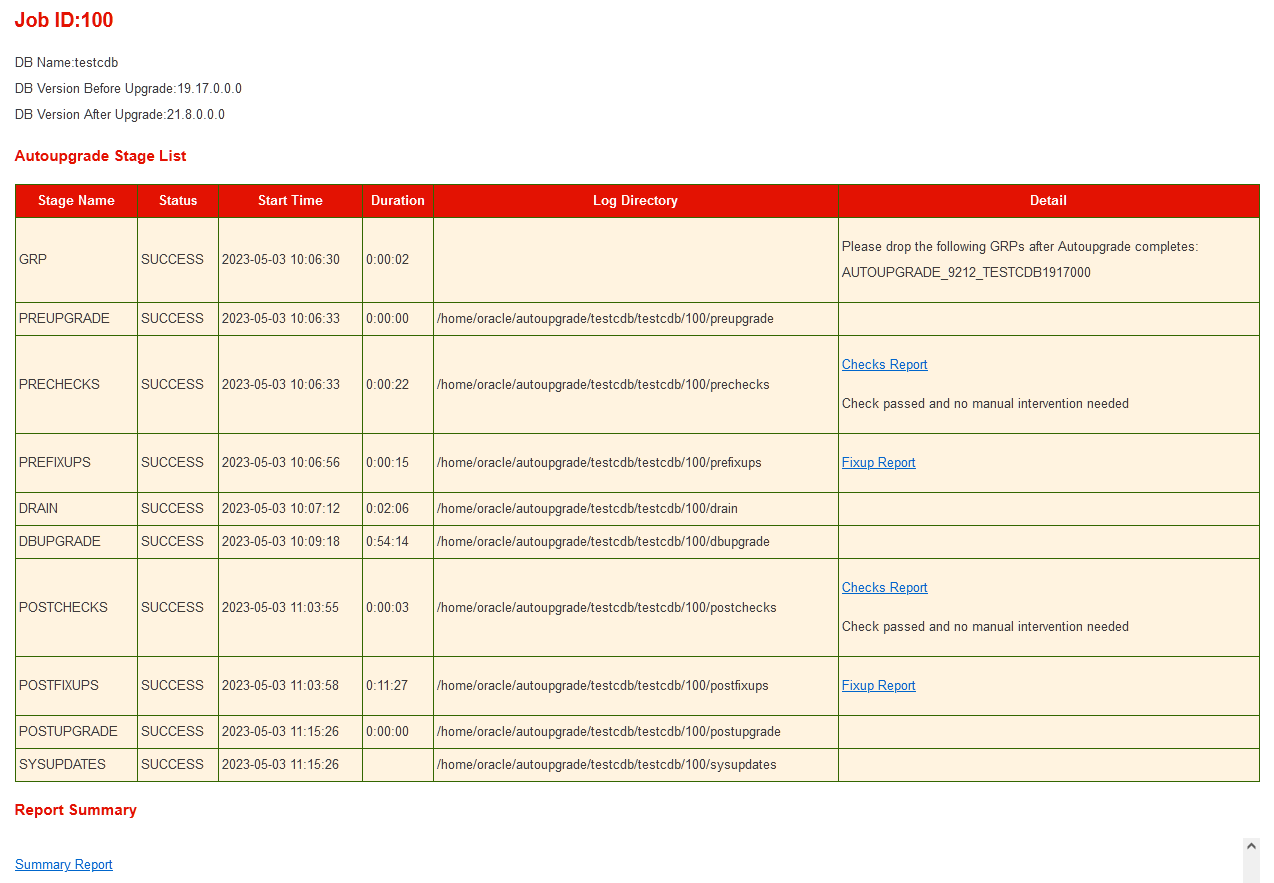
This will generate a status report (status.html) at the end. Cheeck for any pre-req work that need to be carried out manually before the upgrade.

Run autougprade in fixup mode to execute preupgrade fixes.
java -jar autoupgrade.jar -config normalupgrade.cfg -mode fixups

Finally run the autoupgrade in deploy mode to commence the upgrade.
java -jar autoupgrade.jar -config normalupgrade.cfg -mode deploy

If upgrade is successful then drop the GRP associated with it. It is important that GRP is dropped before increasing the compatibility.
To change the compatibility update the compatibility parameter and restart the database.
SQL> alter system set compatible='21.0.0' scope=spfile;
Following will be shown in the alert log.
ALERT: Compatibility of the database is changed from 19.0.0.0.0 to 21.0.0.0.0.
Increased the record size of controlfile section 15 to 104 bytes
Control file expanded from 1156 blocks to 1158 blocks
One of the postupgrade tasks is to run the $ORACLE_HOME/rdbms/admin/auditpostupgrade.sql script (mentioned in 2659172.1 as well). However, this script is not available in 21c home (checked on 21.7 and 21.8 the last RU at the time of this post). After raising an SR oracle support confirmed that script is there on 23c and at the moment not avialable on 21c. So for the time being to ignore the execution of auditpostupgrade.sql script.

Related Posts
Upgrading Oracle Restart from 19c to 21c on RHEL 7
Unplug-Plug-Upgrade from 19c to 21c Using Autoupgrade

Tuesday, March 14, 2023

Unplug-Plug-Upgrade from 19c to 21c Using Autoupgrade

This post shows the steps for upgrading a 19c PDB with autoupgrade tool using the unplug-plug-uprade method. The 21c CDB is called cdb21c and 19c CDB is called testcdb. The PDB that will be unpluged from 19c and plugged into 21c and upgraded is called testpdb2. Both 19c and 21c CDBs reside in the same Oracle restart configuration and the PDB has service dbxrw associated with it.
Resource Name             Type                      Target             State              Host
-------------             ------                    -------            --------           ----------
ora.cdb21c.db             ora.database.type         ONLINE             ONLINE             ip-172-31-10-91
ora.testcdb.db            ora.database.type         ONLINE             ONLINE             ip-172-31-10-91
ora.testcdb.dbxrw.svc     ora.service.type          ONLINE             ONLINE             ip-172-31-10-91

If any privileges were reovked from public due to security reason (CIS standard recommendations) then grant those privileges back before starting the ugprade process. Once the upgrade is completed then those privilges could be revoked again.
Generate a sample upgrade config file with
java -jar autoupgrade.jar -create_sample_file config sample_config.cfg
and customize the "Unplug/Plug upgrade" section.
global.autoupg_log_dir=/home/oracle/upgradelogs
global.keystore=/home/oracle/upgtde

#
# Database number 1 - Unplug/Plug upgrade
#
upg1.log_dir=/home/oracle/autoupgrade/cdb21c
upg1.sid=testcdb
upg1.source_home=/opt/app/oracle/product/19.x.0/dbhome_2
upg1.target_cdb=cdb21c
upg1.target_home=/opt/app/oracle/product/21.x.0/dbhome_1
upg1.pdbs=testpdb2                    # Comma delimited list of pdb names that will be upgraded and moved to the target CDB
upg1.run_utlrp=yes                   # Optional. Whether or not to run utlrp after upgrade
upg1.timezone_upg=yes                # Optional. Whether or not to run the timezone upgrade
upg1.target_version=21       # Oracle version of the target ORACLE_HOME.  Only required when the target Oracle database version is 12.2


# copies the pdb to inside target cdb directory structure. default is nocopy where datafiles remains in 19c cdb directory strcuture in ASM. 
upg1.target_pdb_copy_option=file_name_convert=NONE
global.keystore is used to give the location for the autoupgrade key store. Since both target and source CDBs use TDE, it helps to create a autoupgrade keystore and save the respective CDBs key store passowrd in it.
Secondly the "upg1.target_pdb_copy_option=file_name_convert=NONE" copies the data files inside the target CDB datafile directory structure. If not the PDB datafile will remain where they are (under the source CDB's directory structure).
To create autoupgrade keystore run the autoupgrade with load_password option.
java -jar autoupgrade.jar -config unplug_plug.cfg -load_password
Processing config file ...

Starting AutoUpgrade Password Loader - Type help for available options
Creating new AutoUpgrade keystore - Password required
Enter password:
Enter password again:
AutoUpgrade keystore was successfully created

TDE> list
+----------+----------------+------------------+-----------+------------------+
|ORACLE_SID| Action Required|      TDE Password|SEPS Status|Active Wallet Type|
+----------+----------------+------------------+-----------+------------------+
|    cdb21c|Add TDE password|No password loaded|   Inactive|               Any|
|   testcdb|Add TDE password|No password loaded|   Inactive|               Any|
+----------+----------------+------------------+-----------+------------------+
It detects the databases that are up and running in the host and could be listed with list command. Next add the each database's keystore password to autoupgrade keystore.
TDE> add testcdb
Enter your secret/Password:
Re-enter your secret/Password:
TDE> add cdb21c
Enter your secret/Password:
Re-enter your secret/Password:
TDE> list
+----------+---------------+------------+-----------+------------------+
|ORACLE_SID|Action Required|TDE Password|SEPS Status|Active Wallet Type|
+----------+---------------+------------+-----------+------------------+
|    cdb21c|               |    Verified|   Inactive|               Any|
|   testcdb|               |    Verified|   Inactive|               Any|
+----------+---------------+------------+-----------+------------------+
TDE> save
Convert the AutoUpgrade keystore to auto-login [YES|NO] ? YES
It helps to have a auto-login keystore so the upgrade could run smoothly without waiting for password to be entered.
Next run the preuprage checks. This is done using the analyze option.
java -jar autoupgrade.jar -config unplug_plug.cfg -mode analyze
AutoUpgrade 22.4.220712 launched with default internal options
Processing config file ...
Loading AutoUpgrade keystore
AutoUpgrade keystore was successfully loaded
+--------------------------------+
| Starting AutoUpgrade execution |
+--------------------------------+
1 PDB(s) will be analyzed
Type 'help' to list console commands
upg> lsj -a 10
upg> +----+-------+---------+---------+-------+----------+-------+----------------------------+
|Job#|DB_NAME|    STAGE|OPERATION| STATUS|START_TIME|UPDATED|                     MESSAGE|
+----+-------+---------+---------+-------+----------+-------+----------------------------+
| 100|testcdb|PRECHECKS|EXECUTING|RUNNING|  13:58:20| 7s ago|Loading database information|
+----+-------+---------+---------+-------+----------+-------+----------------------------+
Total jobs 1

The command lsj is running every 10 seconds. PRESS ENTER TO EXIT
Job 100 completed
------------------- Final Summary --------------------
Number of databases            [ 1 ]

Jobs finished                  [1]
Jobs failed                    [0]

Please check the summary report at:
/home/oracle/upgradelogs/cfgtoollogs/upgrade/auto/status/status.html
/home/oracle/upgradelogs/cfgtoollogs/upgrade/auto/status/status.log
Check the status html for any of the precheck failed. In this case there was no failures.

If any fixup are needed then run the autoupgrade with fixup option.
java -jar autoupgrade.jar -config unplug_plug.cfg -mode fixups
This will generate a fixup report.


Finally run the autoupgrade with deploy option to begin the upgrade.
java -jar autoupgrade.jar -config unplug_plug.cfg -mode deploy
When this is run on the source CDB alert log the PDB unplug could noticed.
2023-03-09T14:13:16.820993+00:00
Completed: alter pluggable database TESTPDB2 unplug into '/home/oracle/upgtde/testcdb-TESTPDB2.xml' encrypt using *
drop pluggable database TESTPDB2 keep datafiles
2023-03-09T14:13:17.607648+00:00
Deleted Oracle managed file +DATA/TESTCDB/9CBA2DF91A8C7012E053F4071FAC36E9/TEMPFILE/temp.329.1131016147
2023-03-09T14:13:17.635197+00:00
Stopped service testpdb2
Completed: drop pluggable database TESTPDB2 keep datafiles
On the target CDB's alert log the PDB plug-ing couldbe noticed.
2023-03-09T14:13:17.933191+00:00
create pluggable database "TESTPDB2"   using '/home/oracle/upgtde/testcdb-TESTPDB2.xml' COPY file_name_convert=NONE tempfile reuse keystore identified by * decrypt using *
Monitor the upgrade process and once completed check the status.html that all tasks ran without any issue.

The service associated with the PDB is not migrated as part of the upgrade. This will remain in the offline status.
Resource Name             Type                      Target             State              Host
-------------             ------                    -------            --------           ----------
ora.cdb21c.testpdb2.pdb   ora.pdb.type              ONLINE             ONLINE             ip-172-31-10-91
ora.testcdb.db            ora.database.type         ONLINE             ONLINE             ip-172-31-10-91
ora.testcdb.dbxrw.svc     ora.service.type          OFFLINE            OFFLINE
Oracle confirmed via SR that migration of service is not available with autoupgrade. So this has to be done manually. Remove the old service using the 19c Oracle Home's srvctl
srvctl remove service -db $ORACLE_SID -service dbxrw
Add the service again using 21c Oracle Home's srvctl.
srvctl add service -db $ORACLE_SID -pdb testpdb2 -service dbxrw -role PRIMARY -notification TRUE -failovertype NONE -failovermethod NONE -failoverdelay 0 -failoverretry 0 -drain_timeout 5 -stopoption IMMEDIATE
With this both PDB and service are now part of the target CDB.
Resource Name             Type                      Target             State              Host
-------------             ------                    -------            --------           ----------
ora.cdb21c.db             ora.database.type         ONLINE             ONLINE             ip-172-31-10-91
ora.cdb21c.dbxrw.svc      ora.service.type          ONLINE             ONLINE             ip-172-31-10-91
ora.cdb21c.testpdb2.pdb   ora.pdb.type              ONLINE             ONLINE             ip-172-31-10-91
Check the PDB data files reside inside the target CDB directory path.
    CON_ID CON_NAME                       OPEN MODE  RESTRICTED
---------- ------------------------------ ---------- ----------
         2 PDB$SEED                       READ ONLY  NO
         3 TESTPDB2                       READ WRITE NO

SQL>  select name from v$datafile where con_id=3;

NAME
----------------------------------------------------------------------------------------------------
+DATA/CDB21C/9CBA2DF91A8C7012E053F4071FAC36E9/DATAFILE/system.332.1131027199
+DATA/CDB21C/9CBA2DF91A8C7012E053F4071FAC36E9/DATAFILE/sysaux.326.1131027199
+DATA/CDB21C/9CBA2DF91A8C7012E053F4071FAC36E9/DATAFILE/undotbs1.280.1131027199
This conclude the upgrade of PDB using unplug-plug-upgrade method.

Friday, February 26, 2021

Plugging non-CDB as a PDB - Manual vs Autoupgrade

This post shows the the comparison between the manual method and using autoupgrade for plugging in a non-CDB as a PDB to CDB in the same host.
Manual Method
1. The non-CDB details are as follows
SQL> select instance_name from v$instance;

INSTANCE_NAME
----------------
test

SQL>  select cdb from v$database;

CDB
---
NO

SQL> select name from v$datafile;

NAME
--------------------------------------------------------------------------------
+DATA/test/datafile/system.260.1030288905
+DATA/test/datafile/sysaux.261.1030288913
+DATA/test/datafile/undotbs1.262.1030288917
+DATA/test/datafile/users.264.1030288923
+DATA/TEST/DATAFILE/audit.284.1063984491
+DATA/TEST/DATAFILE/box.285.1063984495
+DATA/TEST/DATAFILE/lobs.286.1063984499
+DATA/TEST/DATAFILE/indexes.287.1063984501
+DATA/TEST/DATAFILE/repository.288.1063984505
+DATA/TEST/DATAFILE/dbaudit.289.1063984509
+DATA/TEST/DATAFILE/audindexes.290.1063984513
+DATA/TEST/DATAFILE/audlobs.291.1063984515
+DATA/TEST/DATAFILE/catbs.292.1063984519
+DATA/TEST/DATAFILE/caindexes.293.1063984523
+DATA/TEST/DATAFILE/ctbs.294.1063984527
+DATA/TEST/DATAFILE/wtbs.295.1063984529
+DATA/TEST/DATAFILE/exptbs.296.1063984533
2. Claenly shutdown the non-CDB and open in read only mode.
shutdown immediate;
startup mount;
alter database open read only;
3. Create the descriptor file for the non-CDB and shutdown the non-CDB.
SQL> exec dbms_pdb.describe(pdb_descr_file=>'/home/oracle/test_non_cdb.xml');

PL/SQL procedure successfully completed.

shutdown immediate
4. CDB details are as follows
SQL> select instance_name from v$instance;

INSTANCE_NAME
----------------
testcdb
5. Run the compatibility check on the CDB using the non-CDB descriptor file.
set serveroutput on
declare
    compa boolean;
    begin
    compa := dbms_pdb.CHECK_PLUG_COMPATIBILITY(pdb_descr_file=>'/home/oracle/test_non_cdb.xml');
 if compa = true then
      dbms_output.put_line('compatible');
 else
    dbms_output.put_line('not compatible');
 end if;
end;
/

compatible

PL/SQL procedure successfully completed.
6. As compatible status is shown run the create PDB statement
CREATE PLUGGABLE DATABASE testpdb1 USING '/home/oracle/test_non_cdb.xml' copy;

Pluggable database created.
7. This creates the PDB in mount state.
SQL> show pdbs

    CON_ID CON_NAME                       OPEN MODE  RESTRICTED
---------- ------------------------------ ---------- ----------
         2 PDB$SEED                       READ ONLY  NO
         5 TESTPDB1                       MOUNTED
Connect to the new PDB and check all data files are available
SQL>  alter session set container=testpdb1;

Session altered.

SQL> show con_name

CON_NAME
------------------------------
TESTPDB1

SQL> select name from v$datafile;

NAME
--------------------------------------------------------------------------------------------------------------------------------------------------------------------------------------------------------
+DATA/TESTCDB/9CBA2DF91A8C7012E053F4071FAC36E9/DATAFILE/system.305.1063985599
+DATA/TESTCDB/9CBA2DF91A8C7012E053F4071FAC36E9/DATAFILE/sysaux.304.1063985599
+DATA/TESTCDB/9CBA2DF91A8C7012E053F4071FAC36E9/DATAFILE/undotbs1.303.1063985599
+DATA/TESTCDB/9CBA2DF91A8C7012E053F4071FAC36E9/DATAFILE/users.309.1063985599
+DATA/TESTCDB/9CBA2DF91A8C7012E053F4071FAC36E9/DATAFILE/audit.308.1063985599
+DATA/TESTCDB/9CBA2DF91A8C7012E053F4071FAC36E9/DATAFILE/box.307.1063985599
+DATA/TESTCDB/9CBA2DF91A8C7012E053F4071FAC36E9/DATAFILE/lobs.310.1063985599
+DATA/TESTCDB/9CBA2DF91A8C7012E053F4071FAC36E9/DATAFILE/indexes.282.1063985599
+DATA/TESTCDB/9CBA2DF91A8C7012E053F4071FAC36E9/DATAFILE/repository.280.1063985599
+DATA/TESTCDB/9CBA2DF91A8C7012E053F4071FAC36E9/DATAFILE/dbaudit.281.1063985599
+DATA/TESTCDB/9CBA2DF91A8C7012E053F4071FAC36E9/DATAFILE/audindexes.283.1063985599
+DATA/TESTCDB/9CBA2DF91A8C7012E053F4071FAC36E9/DATAFILE/audlobs.297.1063985599
+DATA/TESTCDB/9CBA2DF91A8C7012E053F4071FAC36E9/DATAFILE/catbs.298.1063985599
+DATA/TESTCDB/9CBA2DF91A8C7012E053F4071FAC36E9/DATAFILE/caindexes.299.1063985599
+DATA/TESTCDB/9CBA2DF91A8C7012E053F4071FAC36E9/DATAFILE/ctbs.300.1063985599
+DATA/TESTCDB/9CBA2DF91A8C7012E053F4071FAC36E9/DATAFILE/wtbs.301.1063985599
+DATA/TESTCDB/9CBA2DF91A8C7012E053F4071FAC36E9/DATAFILE/exptbs.302.1063985599

17 rows selected.
8. As the last step before opening the new PDB run noncdb_to_pdb.sql.
@?/rdbms/admin/noncdb_to_pdb.sql

SQL> show pdbs

    CON_ID CON_NAME                       OPEN MODE  RESTRICTED
---------- ------------------------------ ---------- ----------
         5 TESTPDB1                       MOUNTED
SQL> alter pluggable database open;

Pluggable database altered.

SQL> show pdbs

    CON_ID CON_NAME                       OPEN MODE  RESTRICTED
---------- ------------------------------ ---------- ----------
         5 TESTPDB1                       READ WRITE NO


Autoupgrade Method
The same could be acheived with few steps using autoupgrade.jar (which is now the recommended tool for database upgrades). The same non-CDB and the CDB is used earlier is used for this case as well.

1. Create a autoupgrade configuration file with both source and target home set to the same versions. In this case both non-CDB and CDB were running out of the same home. Also the other main paramtere is target_pdb_copy_option which is set to "file_name_convert=NONE" since both non-CDB and CDB are using ASM. A new name oculd be specified to be used when the non-CDB is plugged in as a PDB (uatpdb in this case). The full configuration file used is shown below.
global.autoupg_log_dir=/home/oracle/upgr_log

upg1.sid=test
upg1.source_home=/opt/app/oracle/product/19.x.0/dbhome_1
upg1.target_home=/opt/app/oracle/product/19.x.0/dbhome_1
upg1.target_cdb=testcdb
upg1.target_pdb_name=uatpdb
upg1.target_pdb_copy_option=file_name_convert=NONE
2. The version of the autoupgrade is 19.9
java -jar autoupgrade.jar -version
build.hash bf4ccd4
build.version 19.9.2
build.date 2020/08/31 13:47:51
build.max_target_version 19
build.supported_target_versions 12.2,18,19
build.type production
3. Run the autoupgrade with deploy option. This processes pluggin the non-CDB as with the copy option in the manual method.
java -jar autoupgrade.jar -config noncdb_pdb.cfg -mode deploy
4. End of the run the PDB is created and in read/write mode
SQL> show pdbs
         2 PDB$SEED                       READ ONLY  NO
         3 TESTPDB2                       MOUNTED
         4 DEVPDB                         READ WRITE NO
         5 UATPDB                         READ WRITE NO
5. The data files of the PDB are copied into directory under $asm_diskgroup/cdb_sid/pdb_guid format.
+DATA/TESTCDB/BAFE73D2E50633B2E053060C1FAC8FBD/DATAFILE/system.345.1064159817
+DATA/TESTCDB/BAFE73D2E50633B2E053060C1FAC8FBD/DATAFILE/sysaux.344.1064159817
+DATA/TESTCDB/BAFE73D2E50633B2E053060C1FAC8FBD/DATAFILE/undotbs1.343.1064159817
+DATA/TESTCDB/BAFE73D2E50633B2E053060C1FAC8FBD/DATAFILE/users.329.1064159817
+DATA/TESTCDB/BAFE73D2E50633B2E053060C1FAC8FBD/DATAFILE/audit.330.1064159817
+DATA/TESTCDB/BAFE73D2E50633B2E053060C1FAC8FBD/DATAFILE/box.331.1064159817
+DATA/TESTCDB/BAFE73D2E50633B2E053060C1FAC8FBD/DATAFILE/lobs.332.1064159817
+DATA/TESTCDB/BAFE73D2E50633B2E053060C1FAC8FBD/DATAFILE/indexes.333.1064159817
+DATA/TESTCDB/BAFE73D2E50633B2E053060C1FAC8FBD/DATAFILE/repository.334.1064159817
+DATA/TESTCDB/BAFE73D2E50633B2E053060C1FAC8FBD/DATAFILE/dbaudit.335.1064159817
+DATA/TESTCDB/BAFE73D2E50633B2E053060C1FAC8FBD/DATAFILE/audindexes.336.1064159817
+DATA/TESTCDB/BAFE73D2E50633B2E053060C1FAC8FBD/DATAFILE/audlobs.337.1064159817
+DATA/TESTCDB/BAFE73D2E50633B2E053060C1FAC8FBD/DATAFILE/catbs.338.1064159817
+DATA/TESTCDB/BAFE73D2E50633B2E053060C1FAC8FBD/DATAFILE/caindexes.339.1064159817
+DATA/TESTCDB/BAFE73D2E50633B2E053060C1FAC8FBD/DATAFILE/ctbs.340.1064159817
+DATA/TESTCDB/BAFE73D2E50633B2E053060C1FAC8FBD/DATAFILE/wtbs.341.1064159817
+DATA/TESTCDB/BAFE73D2E50633B2E053060C1FAC8FBD/DATAFILE/exptbs.342.1064159817

17 rows selected.

The comparision shows that autoupgrade method require few steps and less manaul intervention.

Related Posts
Plugging non-CDB as a PDB into a CDB in the Same Host
Plugging in non-CDB to CDB and reusing the non-CDB Datafiles in Standby