Showing posts with label add node. Show all posts

Friday, June 21, 2019

Adding a Node to 18c RAC Using Cloning

This post shows steps of adding a node by way of cloning on 18c. On 19c, extending RAC by way of cloning is depreciated. However, the steps are still listed on 19c clusterware.
The post assumes all other pre-reqs related to adding a node have been completed. The new node is called rhel72.
1. As the first step create an image from an existing node. Steps in creating a gold image could be used for this.
2. Unzip gold image in the new node on the same directory structure as existing nodes.
3. Removing following files from the new node.
rm -rf $GI_HOME/network/admin/*.ora
rm -rf $GI_HOMEroot.sh*
4. Run gridsetup and select software only option.
Following is promoted about missing root.sh files. Ignore and click yes to continue.
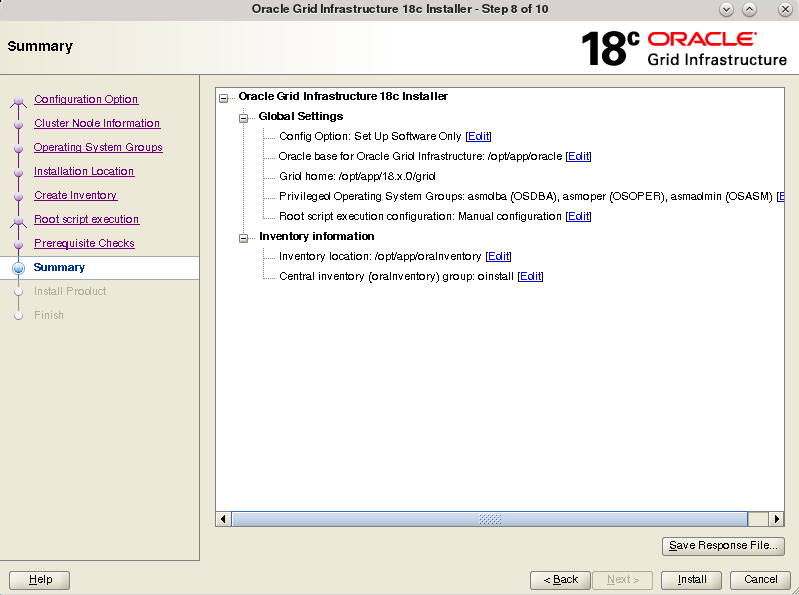
Summary of software only setup.
When prompted execute the root scripts.
Root script output is shown below.
# /opt/app/18.x.0/grid/root.sh
Performing root user operation.

The following environment variables are set as:
    ORACLE_OWNER= grid
    ORACLE_HOME=  /opt/app/18.x.0/grid

Creating /etc/oratab file...
Entries will be added to the /etc/oratab file as needed by
Database Configuration Assistant when a database is created
Finished running generic part of root script.
Now product-specific root actions will be performed.

To configure Grid Infrastructure for a Cluster or Grid Infrastructure for a Stand-Alone Server execute the following command as grid user:
/opt/app/18.x.0/grid/gridSetup.sh
This command launches the Grid Infrastructure Setup Wizard. The wizard also supports silent operation, and the parameters can be passed through the response file that is available in the installation media.
Complete the GI software only install.

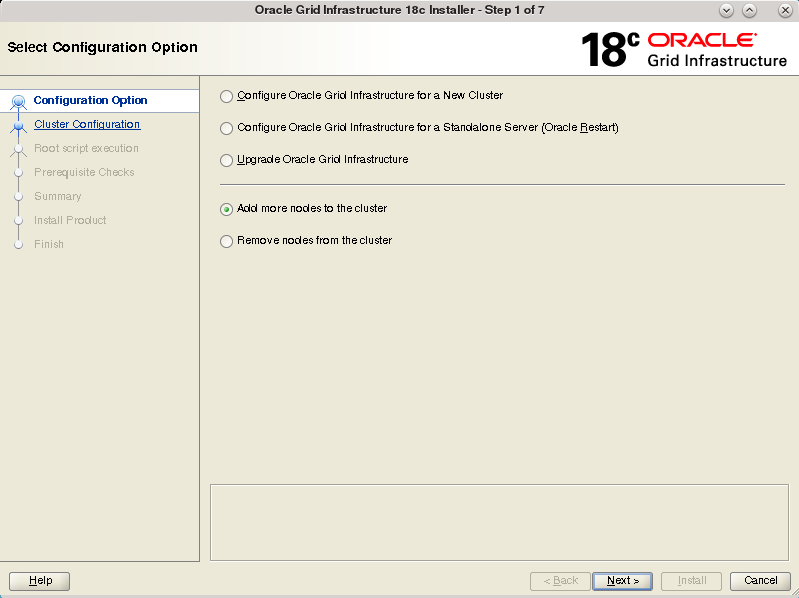
5. From an existing node run gridSetup with noCopy option and select add node.
on exisitng node run
gridsetup.sh -noCopy
The noCopy option will prevent GI binaries being copied to remote node being added, since it's already has software installed. Rest of the steps for adding the node is same as previous add node post.Run the root.sh on the new node when prompted. Output from root.sh on the new node is shown below.
# /opt/app/18.x.0/grid/root.sh
Performing root user operation.

The following environment variables are set as:
    ORACLE_OWNER= grid
    ORACLE_HOME=  /opt/app/18.x.0/grid

Enter the full pathname of the local bin directory: [/usr/local/bin]:
The contents of "dbhome" have not changed. No need to overwrite.
The contents of "oraenv" have not changed. No need to overwrite.
The contents of "coraenv" have not changed. No need to overwrite.

Entries will be added to the /etc/oratab file as needed by
Database Configuration Assistant when a database is created
Finished running generic part of root script.
Now product-specific root actions will be performed.
Relinking oracle with rac_on option
Using configuration parameter file: /opt/app/18.x.0/grid/crs/install/crsconfig_params
The log of current session can be found at:
  /opt/app/oracle/crsdata/rhel72/crsconfig/rootcrs_rhel72_2019-04-09_11-10-41AM.log
2019/04/09 11:10:51 CLSRSC-594: Executing installation step 1 of 20: 'SetupTFA'.
2019/04/09 11:10:51 CLSRSC-4001: Installing Oracle Trace File Analyzer (TFA) Collector.
2019/04/09 11:11:32 CLSRSC-4002: Successfully installed Oracle Trace File Analyzer (TFA) Collector.
2019/04/09 11:11:32 CLSRSC-594: Executing installation step 2 of 20: 'ValidateEnv'.
2019/04/09 11:11:43 CLSRSC-363: User ignored prerequisites during installation
2019/04/09 11:11:44 CLSRSC-594: Executing installation step 3 of 20: 'CheckFirstNode'.
2019/04/09 11:11:45 CLSRSC-594: Executing installation step 4 of 20: 'GenSiteGUIDs'.
2019/04/09 11:11:50 CLSRSC-594: Executing installation step 5 of 20: 'SaveParamFile'.
2019/04/09 11:11:57 CLSRSC-594: Executing installation step 6 of 20: 'SetupOSD'.
2019/04/09 11:11:57 CLSRSC-594: Executing installation step 7 of 20: 'CheckCRSConfig'.
2019/04/09 11:12:34 CLSRSC-17: Invalid GPnP setup
2019/04/09 11:12:43 CLSRSC-594: Executing installation step 8 of 20: 'SetupLocalGPNP'.
2019/04/09 11:12:45 CLSRSC-594: Executing installation step 9 of 20: 'CreateRootCert'.
2019/04/09 11:12:45 CLSRSC-594: Executing installation step 10 of 20: 'ConfigOLR'.
2019/04/09 11:12:56 CLSRSC-594: Executing installation step 11 of 20: 'ConfigCHMOS'.
2019/04/09 11:12:56 CLSRSC-594: Executing installation step 12 of 20: 'CreateOHASD'.
2019/04/09 11:12:59 CLSRSC-594: Executing installation step 13 of 20: 'ConfigOHASD'.
2019/04/09 11:12:59 CLSRSC-330: Adding Clusterware entries to file 'oracle-ohasd.service'
2019/04/09 11:14:46 CLSRSC-594: Executing installation step 14 of 20: 'InstallAFD'.
2019/04/09 11:14:50 CLSRSC-594: Executing installation step 15 of 20: 'InstallACFS'.
CRS-2791: Starting shutdown of Oracle High Availability Services-managed resources on 'rhel72'
CRS-2793: Shutdown of Oracle High Availability Services-managed resources on 'rhel72' has completed
CRS-4133: Oracle High Availability Services has been stopped.
CRS-4123: Oracle High Availability Services has been started.
2019/04/09 11:16:15 CLSRSC-594: Executing installation step 16 of 20: 'InstallKA'.
2019/04/09 11:16:17 CLSRSC-594: Executing installation step 17 of 20: 'InitConfig'.
CRS-2791: Starting shutdown of Oracle High Availability Services-managed resources on 'rhel72'
CRS-2793: Shutdown of Oracle High Availability Services-managed resources on 'rhel72' has completed
CRS-4133: Oracle High Availability Services has been stopped.
CRS-4123: Oracle High Availability Services has been started.
CRS-2791: Starting shutdown of Oracle High Availability Services-managed resources on 'rhel72'
CRS-2673: Attempting to stop 'ora.drivers.acfs' on 'rhel72'
CRS-2677: Stop of 'ora.drivers.acfs' on 'rhel72' succeeded
CRS-2793: Shutdown of Oracle High Availability Services-managed resources on 'rhel72' has completed
CRS-4133: Oracle High Availability Services has been stopped.
2019/04/09 11:16:31 CLSRSC-594: Executing installation step 18 of 20: 'StartCluster'.
CRS-4123: Starting Oracle High Availability Services-managed resources
CRS-2672: Attempting to start 'ora.mdnsd' on 'rhel72'
CRS-2672: Attempting to start 'ora.evmd' on 'rhel72'
CRS-2676: Start of 'ora.mdnsd' on 'rhel72' succeeded
CRS-2676: Start of 'ora.evmd' on 'rhel72' succeeded
CRS-2672: Attempting to start 'ora.gpnpd' on 'rhel72'
CRS-2676: Start of 'ora.gpnpd' on 'rhel72' succeeded
CRS-2672: Attempting to start 'ora.gipcd' on 'rhel72'
CRS-2676: Start of 'ora.gipcd' on 'rhel72' succeeded
CRS-2672: Attempting to start 'ora.crf' on 'rhel72'
CRS-2672: Attempting to start 'ora.cssdmonitor' on 'rhel72'
CRS-2676: Start of 'ora.cssdmonitor' on 'rhel72' succeeded
CRS-2672: Attempting to start 'ora.cssd' on 'rhel72'
CRS-2672: Attempting to start 'ora.diskmon' on 'rhel72'
CRS-2676: Start of 'ora.diskmon' on 'rhel72' succeeded
CRS-2676: Start of 'ora.crf' on 'rhel72' succeeded
CRS-2676: Start of 'ora.cssd' on 'rhel72' succeeded
CRS-2672: Attempting to start 'ora.cluster_interconnect.haip' on 'rhel72'
CRS-2672: Attempting to start 'ora.ctssd' on 'rhel72'
CRS-2676: Start of 'ora.ctssd' on 'rhel72' succeeded
CRS-2676: Start of 'ora.cluster_interconnect.haip' on 'rhel72' succeeded
CRS-2672: Attempting to start 'ora.asm' on 'rhel72'
CRS-2676: Start of 'ora.asm' on 'rhel72' succeeded
CRS-2672: Attempting to start 'ora.storage' on 'rhel72'
CRS-2676: Start of 'ora.storage' on 'rhel72' succeeded
CRS-2672: Attempting to start 'ora.crsd' on 'rhel72'
CRS-2676: Start of 'ora.crsd' on 'rhel72' succeeded
CRS-6017: Processing resource auto-start for servers: rhel72
CRS-2673: Attempting to stop 'ora.LISTENER_SCAN1.lsnr' on 'rhel71'
CRS-2672: Attempting to start 'ora.ASMNET1LSNR_ASM.lsnr' on 'rhel72'
CRS-2672: Attempting to start 'ora.ons' on 'rhel72'
CRS-2672: Attempting to start 'ora.chad' on 'rhel72'
CRS-2676: Start of 'ora.ASMNET1LSNR_ASM.lsnr' on 'rhel72' succeeded
CRS-2672: Attempting to start 'ora.asm' on 'rhel72'
CRS-2676: Start of 'ora.chad' on 'rhel72' succeeded
CRS-2677: Stop of 'ora.LISTENER_SCAN1.lsnr' on 'rhel71' succeeded
CRS-2673: Attempting to stop 'ora.scan1.vip' on 'rhel71'
CRS-2677: Stop of 'ora.scan1.vip' on 'rhel71' succeeded
CRS-2672: Attempting to start 'ora.scan1.vip' on 'rhel72'
CRS-2676: Start of 'ora.ons' on 'rhel72' succeeded
CRS-2676: Start of 'ora.scan1.vip' on 'rhel72' succeeded
CRS-2672: Attempting to start 'ora.LISTENER_SCAN1.lsnr' on 'rhel72'
CRS-2676: Start of 'ora.LISTENER_SCAN1.lsnr' on 'rhel72' succeeded
CRS-2676: Start of 'ora.asm' on 'rhel72' succeeded
CRS-2672: Attempting to start 'ora.DATA.dg' on 'rhel72'
CRS-2676: Start of 'ora.DATA.dg' on 'rhel72' succeeded
CRS-6016: Resource auto-start has completed for server rhel72
CRS-6024: Completed start of Oracle Cluster Ready Services-managed resources
CRS-4123: Oracle High Availability Services has been started.
2019/04/09 11:18:29 CLSRSC-343: Successfully started Oracle Clusterware stack
2019/04/09 11:18:29 CLSRSC-594: Executing installation step 19 of 20: 'ConfigNode'.
clscfg: EXISTING configuration version 5 detected.
clscfg: version 5 is 12c Release 2.
Successfully accumulated necessary OCR keys.
Creating OCR keys for user 'root', privgrp 'root'..
Operation successful.
2019/04/09 11:19:15 CLSRSC-594: Executing installation step 20 of 20: 'PostConfig'.
2019/04/09 11:19:28 CLSRSC-325: Configure Oracle Grid Infrastructure for a Cluster ... succeeded


6. Once the GI is cloned and node added, next is to clone the Oracle database software. For this too a gold image of the OH could be used.
7. Unzip the OH gold image on the new node following the same directory structure as existing nodes.
8. Run the clone script to configure and OH. On oracle documentation -noConfig is option is listed as part of the clone command. But on 18c this was not supported.
$ORACLE_HOME/perl/bin/perl clone.pl -silent -O 'CLUSTER_NODES={rhel71,rhel72}' -O LOCAL_NODE=rhel72 ORACLE_BASE=$ORACLE_BASE ORACLE_HOME=$ORACLE_HOME ORACLE_HOME_NAME=OraDB18Home1 -O -noConfig
Starting Oracle Universal Installer...

Checking Temp space: must be greater than 500 MB.   Actual 2595 MB    Passed
Checking swap space: must be greater than 500 MB.   Actual 3006 MB    Passed
Preparing to launch Oracle Universal Installer from /tmp/OraInstall2019-04-09_02-42-13PM. Please wait ...
[INS-04009] The argument [-noconfig] passed is not supported for the current context Clone
Run the clone command without the noConfig and cloning of OH completes without issue.
perl $ORACLE_HOME/clone/bin/clone.pl -silent ORACLE_HOME="/opt/app/oracle/product/18.x.0/dbhome_1"  ORACLE_HOME_NAME="OraDB18Home1" ORACLE_BASE="/opt/app/oracle" "CLUSTER_NODES={rhel71,rhel72}" LOCAL_NODE=rhel72
Starting Oracle Universal Installer...

Checking Temp space: must be greater than 500 MB.   Actual 3918 MB    Passed
Checking swap space: must be greater than 500 MB.   Actual 2974 MB    Passed
Preparing to launch Oracle Universal Installer from /tmp/OraInstall2019-04-09_03-26-55PM. Please wait ...You can find the log of this install session at:
 /opt/app/oraInventory/logs/cloneActions2019-04-09_03-26-55PM.log
..................................................   5% Done.
..................................................   10% Done.
..................................................   15% Done.
..................................................   20% Done.
..................................................   25% Done.
..................................................   30% Done.
..................................................   35% Done.
..................................................   40% Done.
..................................................   45% Done.
..................................................   50% Done.
..................................................   55% Done.
..................................................   60% Done.
..................................................   65% Done.
..................................................   70% Done.
..................................................   75% Done.
..................................................   80% Done.
..................................................   85% Done.
..........
Copy files in progress.

Copy files successful.

Link binaries in progress.
..........
Link binaries successful.

Setup files in progress.
..........
Setup files successful.

Setup Inventory in progress.

Setup Inventory successful.
..........
Finish Setup successful.
The cloning of OraDB18Home1 was successful.
Please check '/opt/app/oraInventory/logs/cloneActions2019-04-09_03-26-55PM.log' for more details.

Setup Oracle Base in progress.

Setup Oracle Base successful.
..................................................   95% Done.

As a root user, execute the following script(s):
        1. /opt/app/oracle/product/18.x.0/dbhome_1/root.sh

Execute /opt/app/oracle/product/18.x.0/dbhome_1/root.sh on the following nodes:
[rhel72]


..................................................   100% Done.

9. Run DBCA from an exiting node and select add instance option.

Friday, May 17, 2019

Adding a Node to 18c RAC

This post list the steps for adding a node to 18c RAC which is similar to that of adding a node to 12cR1 RAC. Node addition is done in three phases. Phase one is to add the clusterware to the new node. Second phase will add the database software and final phase will extend the database to the new node by creating a new instance for it.
The current cluster setup consists of a single node named rhel71 and a new node named rhel72 will be added to the cluster.
1. It is assumed that physical connections (shared storage connections, network) are made to the new node being added. The cluvfy tool could be used to check the pre-reqs for node addition are successful. In this case the failures relate to memory and shm mount point could be ignored as this is a test setup.
cluvfy stage -pre nodeadd -n rhel72

Verifying Physical Memory ...FAILED (PRVF-7530)
Verifying Available Physical Memory ...PASSED
Verifying Swap Size ...FAILED (PRVF-7573)
Verifying Free Space: rhel72:/usr,rhel72:/var,rhel72:/etc,rhel72:/opt/app/18.x.0/grid,rhel72:/sbin,rhel72:/tmp ...PASSED
Verifying Free Space: rhel71:/usr,rhel71:/var,rhel71:/etc,rhel71:/opt/app/18.x.0/grid,rhel71:/sbin,rhel71:/tmp ...FAILED (PRVF-7501)
Verifying User Existence: oracle ...
  Verifying Users With Same UID: 501 ...PASSED
Verifying User Existence: oracle ...PASSED
Verifying User Existence: grid ...
  Verifying Users With Same UID: 502 ...PASSED
Verifying User Existence: grid ...PASSED
Verifying User Existence: root ...
  Verifying Users With Same UID: 0 ...PASSED
Verifying User Existence: root ...PASSED
Verifying Group Existence: asmadmin ...PASSED
Verifying Group Existence: asmoper ...PASSED
Verifying Group Existence: asmdba ...PASSED
Verifying Group Existence: oinstall ...PASSED
Verifying Group Membership: oinstall ...PASSED
Verifying Group Membership: asmdba ...PASSED
Verifying Group Membership: asmadmin ...PASSED
Verifying Group Membership: asmoper ...PASSED
Verifying Run Level ...PASSED
Verifying Hard Limit: maximum open file descriptors ...PASSED
Verifying Soft Limit: maximum open file descriptors ...PASSED
Verifying Hard Limit: maximum user processes ...PASSED
Verifying Soft Limit: maximum user processes ...PASSED
Verifying Soft Limit: maximum stack size ...PASSED
Verifying Architecture ...PASSED
Verifying OS Kernel Version ...PASSED
Verifying OS Kernel Parameter: semmsl ...PASSED
Verifying OS Kernel Parameter: semmns ...PASSED
Verifying OS Kernel Parameter: semopm ...PASSED
Verifying OS Kernel Parameter: semmni ...PASSED
Verifying OS Kernel Parameter: shmmax ...PASSED
Verifying OS Kernel Parameter: shmmni ...PASSED
Verifying OS Kernel Parameter: shmall ...PASSED
Verifying OS Kernel Parameter: file-max ...PASSED
Verifying OS Kernel Parameter: ip_local_port_range ...PASSED
Verifying OS Kernel Parameter: rmem_default ...PASSED
Verifying OS Kernel Parameter: rmem_max ...PASSED
Verifying OS Kernel Parameter: wmem_default ...PASSED
Verifying OS Kernel Parameter: wmem_max ...PASSED
Verifying OS Kernel Parameter: aio-max-nr ...PASSED
Verifying Package: binutils-2.23.52.0.1 ...PASSED
Verifying Package: compat-libcap1-1.10 ...PASSED
Verifying Package: libgcc-4.8.2 (x86_64) ...PASSED
Verifying Package: libstdc++-4.8.2 (x86_64) ...PASSED
Verifying Package: libstdc++-devel-4.8.2 (x86_64) ...PASSED
Verifying Package: sysstat-10.1.5 ...PASSED
Verifying Package: gcc-c++-4.8.2 ...PASSED
Verifying Package: ksh ...PASSED
Verifying Package: make-3.82 ...PASSED
Verifying Package: glibc-2.17 (x86_64) ...PASSED
Verifying Package: glibc-devel-2.17 (x86_64) ...PASSED
Verifying Package: libaio-0.3.109 (x86_64) ...PASSED
Verifying Package: libaio-devel-0.3.109 (x86_64) ...PASSED
Verifying Package: nfs-utils-1.2.3-15 ...PASSED
Verifying Package: smartmontools-6.2-4 ...PASSED
Verifying Package: net-tools-2.0-0.17 ...PASSED
Verifying Package: compat-libstdc++-33-3.2.3 (x86_64) ...PASSED
Verifying Package: libxcb-1.11 (x86_64) ...PASSED
Verifying Package: libX11-1.6.3 (x86_64) ...PASSED
Verifying Package: libXau-1.0.8 (x86_64) ...PASSED
Verifying Package: libXi-1.7.4 (x86_64) ...PASSED
Verifying Package: libXtst-1.2.2 (x86_64) ...PASSED
Verifying Users With Same UID: 0 ...PASSED
Verifying Current Group ID ...PASSED
Verifying Root user consistency ...PASSED
Verifying Package: cvuqdisk-1.0.10-1 ...PASSED
Verifying Node Addition ...
  Verifying CRS Integrity ...PASSED
  Verifying Clusterware Version Consistency ...PASSED
  Verifying '/opt/app/18.x.0/grid' ...PASSED
Verifying Node Addition ...PASSED
Verifying Host name ...PASSED
Verifying Node Connectivity ...
  Verifying Hosts File ...PASSED
  Verifying Check that maximum (MTU) size packet goes through subnet ...PASSED
  Verifying subnet mask consistency for subnet "192.168.1.0" ...PASSED
  Verifying subnet mask consistency for subnet "192.168.0.0" ...PASSED
Verifying Node Connectivity ...PASSED
Verifying Multicast or broadcast check ...PASSED
Verifying ASM Integrity ...
  Verifying Node Connectivity ...
    Verifying Hosts File ...PASSED
    Verifying Check that maximum (MTU) size packet goes through subnet ...PASSED
    Verifying subnet mask consistency for subnet "192.168.1.0" ...PASSED
    Verifying subnet mask consistency for subnet "192.168.0.0" ...PASSED
  Verifying Node Connectivity ...PASSED
Verifying ASM Integrity ...PASSED
Verifying Device Checks for ASM ...
  Verifying Package: cvuqdisk-1.0.10-1 ...PASSED
  Verifying ASM device sharedness check ...
    Verifying Shared Storage Accessibility:/dev/oracleasm/data1,/dev/oracleasm/gimr,/dev/oracleasm/fra1,/dev/oracleasm/ocr1,/dev/oracleasm/ocr2,/dev/oracleasm/ocr3 ...PASSED
  Verifying ASM device sharedness check ...PASSED
  Verifying Access Control List check ...PASSED
Verifying Device Checks for ASM ...PASSED
Verifying Database home availability ...PASSED
Verifying OCR Integrity ...PASSED
Verifying Time zone consistency ...PASSED
Verifying Network Time Protocol (NTP) ...
  Verifying '/etc/ntp.conf' ...PASSED
  Verifying '/etc/chrony.conf' ...PASSED
  Verifying '/var/run/ntpd.pid' ...PASSED
  Verifying '/var/run/chronyd.pid' ...PASSED
Verifying Network Time Protocol (NTP) ...PASSED
Verifying User Not In Group "root": grid ...PASSED
Verifying resolv.conf Integrity ...PASSED
Verifying DNS/NIS name service ...PASSED
Verifying User Equivalence ...PASSED
Verifying /dev/shm mounted as temporary file system ...FAILED (PRVE-0421)
Verifying /boot mount ...PASSED
Verifying zeroconf check ...PASSED

Pre-check for node addition was unsuccessful on all the nodes.


Failures were encountered during execution of CVU verification request "stage -pre nodeadd".

Verifying Physical Memory ...FAILED
rhel72: PRVF-7530 : Sufficient physical memory is not available on node
        "rhel72" [Required physical memory = 8GB (8388608.0KB)]

rhel71: PRVF-7530 : Sufficient physical memory is not available on node
        "rhel71" [Required physical memory = 8GB (8388608.0KB)]

Verifying Swap Size ...FAILED
rhel72: PRVF-7573 : Sufficient swap size is not available on node "rhel72"
        [Required = 4.686GB (4913676.0KB) ; Found = 3.7246GB (3905532.0KB)]

rhel71: PRVF-7573 : Sufficient swap size is not available on node "rhel71"
        [Required = 4.686GB (4913676.0KB) ; Found = 3.7246GB (3905532.0KB)]

Verifying Free Space:
rhel71:/usr,rhel71:/var,rhel71:/etc,rhel71:/opt/app/18.x.0/grid,rhel71:/sbin,rhe
l71:/tmp ...FAILED
PRVF-7501 : Sufficient space is not available at location
"/opt/app/18.x.0/grid" on node "rhel71" [Required space = 6.9GB ; available
space = 6.0439GB ]
PRVF-7501 : Sufficient space is not available at location "/" on node "rhel71"
[Required space = [25MB (/usr) + 5MB (/var) + 25MB (/etc) + 6.9GB
(/opt/app/18.x.0/grid) + 10MB (/sbin) + 1GB (/tmp) = 7.9635GB ]; available
space = 6.0439GB ]

Verifying /dev/shm mounted as temporary file system ...FAILED
rhel72: PRVE-0421 : No entry exists in /etc/fstab for mounting /dev/shm


CVU operation performed:      stage -pre nodeadd
Date:                         04-Apr-2019 16:15:51
CVU home:                     /opt/app/18.x.0/grid/
User:                         grid

2. To extend the cluster by installing clusterware on the new node run the gridSetup.sh from an existing node and select add more nodes to cluster option.

3. Execute the root script when prompted.
# /opt/app/18.x.0/grid/root.sh
Performing root user operation.

The following environment variables are set as:
    ORACLE_OWNER= grid
    ORACLE_HOME=  /opt/app/18.x.0/grid

Enter the full pathname of the local bin directory: [/usr/local/bin]:
The contents of "dbhome" have not changed. No need to overwrite.
The contents of "oraenv" have not changed. No need to overwrite.
The contents of "coraenv" have not changed. No need to overwrite.


Creating /etc/oratab file...
Entries will be added to the /etc/oratab file as needed by
Database Configuration Assistant when a database is created
Finished running generic part of root script.
Now product-specific root actions will be performed.
Relinking oracle with rac_on option
Using configuration parameter file: /opt/app/18.x.0/grid/crs/install/crsconfig_params
The log of current session can be found at:
  /opt/app/oracle/crsdata/rhel72/crsconfig/rootcrs_rhel72_2019-04-08_11-08-58AM.log
2019/04/08 11:09:11 CLSRSC-594: Executing installation step 1 of 20: 'SetupTFA'.
2019/04/08 11:09:11 CLSRSC-4001: Installing Oracle Trace File Analyzer (TFA) Collector.
2019/04/08 11:09:57 CLSRSC-4002: Successfully installed Oracle Trace File Analyzer (TFA) Collector.
2019/04/08 11:09:57 CLSRSC-594: Executing installation step 2 of 20: 'ValidateEnv'.
2019/04/08 11:10:10 CLSRSC-363: User ignored prerequisites during installation
2019/04/08 11:10:10 CLSRSC-594: Executing installation step 3 of 20: 'CheckFirstNode'.
2019/04/08 11:10:11 CLSRSC-594: Executing installation step 4 of 20: 'GenSiteGUIDs'.
2019/04/08 11:10:17 CLSRSC-594: Executing installation step 5 of 20: 'SaveParamFile'.
2019/04/08 11:10:23 CLSRSC-594: Executing installation step 6 of 20: 'SetupOSD'.
2019/04/08 11:10:23 CLSRSC-594: Executing installation step 7 of 20: 'CheckCRSConfig'.
2019/04/08 11:10:32 CLSRSC-594: Executing installation step 8 of 20: 'SetupLocalGPNP'.
2019/04/08 11:10:35 CLSRSC-594: Executing installation step 9 of 20: 'CreateRootCert'.
2019/04/08 11:10:35 CLSRSC-594: Executing installation step 10 of 20: 'ConfigOLR'.
2019/04/08 11:10:45 CLSRSC-594: Executing installation step 11 of 20: 'ConfigCHMOS'.
2019/04/08 11:10:46 CLSRSC-594: Executing installation step 12 of 20: 'CreateOHASD'.
2019/04/08 11:10:48 CLSRSC-594: Executing installation step 13 of 20: 'ConfigOHASD'.
2019/04/08 11:10:49 CLSRSC-330: Adding Clusterware entries to file 'oracle-ohasd.service'
2019/04/08 11:12:25 CLSRSC-594: Executing installation step 14 of 20: 'InstallAFD'.
2019/04/08 11:12:29 CLSRSC-594: Executing installation step 15 of 20: 'InstallACFS'.
CRS-2791: Starting shutdown of Oracle High Availability Services-managed resources on 'rhel72'
CRS-2793: Shutdown of Oracle High Availability Services-managed resources on 'rhel72' has completed
CRS-4133: Oracle High Availability Services has been stopped.
CRS-4123: Oracle High Availability Services has been started.
2019/04/08 11:13:52 CLSRSC-594: Executing installation step 16 of 20: 'InstallKA'.
2019/04/08 11:13:55 CLSRSC-594: Executing installation step 17 of 20: 'InitConfig'.
CRS-2791: Starting shutdown of Oracle High Availability Services-managed resources on 'rhel72'
CRS-2793: Shutdown of Oracle High Availability Services-managed resources on 'rhel72' has completed
CRS-4133: Oracle High Availability Services has been stopped.
CRS-4123: Oracle High Availability Services has been started.
CRS-2791: Starting shutdown of Oracle High Availability Services-managed resources on 'rhel72'
CRS-2673: Attempting to stop 'ora.drivers.acfs' on 'rhel72'
CRS-2677: Stop of 'ora.drivers.acfs' on 'rhel72' succeeded
CRS-2793: Shutdown of Oracle High Availability Services-managed resources on 'rhel72' has completed
CRS-4133: Oracle High Availability Services has been stopped.
2019/04/08 11:14:10 CLSRSC-594: Executing installation step 18 of 20: 'StartCluster'.
CRS-4123: Starting Oracle High Availability Services-managed resources
CRS-2672: Attempting to start 'ora.mdnsd' on 'rhel72'
CRS-2672: Attempting to start 'ora.evmd' on 'rhel72'
CRS-2676: Start of 'ora.mdnsd' on 'rhel72' succeeded
CRS-2676: Start of 'ora.evmd' on 'rhel72' succeeded
CRS-2672: Attempting to start 'ora.gpnpd' on 'rhel72'
CRS-2676: Start of 'ora.gpnpd' on 'rhel72' succeeded
CRS-2672: Attempting to start 'ora.gipcd' on 'rhel72'
CRS-2676: Start of 'ora.gipcd' on 'rhel72' succeeded
CRS-2672: Attempting to start 'ora.crf' on 'rhel72'
CRS-2672: Attempting to start 'ora.cssdmonitor' on 'rhel72'
CRS-2676: Start of 'ora.cssdmonitor' on 'rhel72' succeeded
CRS-2672: Attempting to start 'ora.cssd' on 'rhel72'
CRS-2672: Attempting to start 'ora.diskmon' on 'rhel72'
CRS-2676: Start of 'ora.diskmon' on 'rhel72' succeeded
CRS-2676: Start of 'ora.crf' on 'rhel72' succeeded
CRS-2676: Start of 'ora.cssd' on 'rhel72' succeeded
CRS-2672: Attempting to start 'ora.cluster_interconnect.haip' on 'rhel72'
CRS-2672: Attempting to start 'ora.ctssd' on 'rhel72'
CRS-2676: Start of 'ora.ctssd' on 'rhel72' succeeded
CRS-2676: Start of 'ora.cluster_interconnect.haip' on 'rhel72' succeeded
CRS-2672: Attempting to start 'ora.asm' on 'rhel72'
CRS-2676: Start of 'ora.asm' on 'rhel72' succeeded
CRS-2672: Attempting to start 'ora.storage' on 'rhel72'
CRS-2676: Start of 'ora.storage' on 'rhel72' succeeded
CRS-2672: Attempting to start 'ora.crsd' on 'rhel72'
CRS-2676: Start of 'ora.crsd' on 'rhel72' succeeded
CRS-6017: Processing resource auto-start for servers: rhel72
CRS-2673: Attempting to stop 'ora.LISTENER_SCAN1.lsnr' on 'rhel71'
CRS-2672: Attempting to start 'ora.ASMNET1LSNR_ASM.lsnr' on 'rhel72'
CRS-2672: Attempting to start 'ora.ons' on 'rhel72'
CRS-2672: Attempting to start 'ora.chad' on 'rhel72'
CRS-2672: Attempting to start 'ora.qosmserver' on 'rhel72'
CRS-2677: Stop of 'ora.LISTENER_SCAN1.lsnr' on 'rhel71' succeeded
CRS-2673: Attempting to stop 'ora.scan1.vip' on 'rhel71'
CRS-2677: Stop of 'ora.scan1.vip' on 'rhel71' succeeded
CRS-2672: Attempting to start 'ora.scan1.vip' on 'rhel72'
CRS-2676: Start of 'ora.ASMNET1LSNR_ASM.lsnr' on 'rhel72' succeeded
CRS-2672: Attempting to start 'ora.asm' on 'rhel72'
CRS-2676: Start of 'ora.ons' on 'rhel72' succeeded
CRS-2676: Start of 'ora.chad' on 'rhel72' succeeded
CRS-2676: Start of 'ora.scan1.vip' on 'rhel72' succeeded
CRS-2672: Attempting to start 'ora.LISTENER_SCAN1.lsnr' on 'rhel72'
CRS-2676: Start of 'ora.LISTENER_SCAN1.lsnr' on 'rhel72' succeeded
CRS-2676: Start of 'ora.qosmserver' on 'rhel72' succeeded
CRS-2672: Attempting to start 'ora.chad' on 'rhel71'
CRS-2672: Attempting to start 'ora.ASMNET1LSNR_ASM.lsnr' on 'rhel71'
CRS-2676: Start of 'ora.ASMNET1LSNR_ASM.lsnr' on 'rhel71' succeeded
CRS-2676: Start of 'ora.asm' on 'rhel72' succeeded
CRS-2672: Attempting to start 'ora.DATA.dg' on 'rhel72'
CRS-2676: Start of 'ora.DATA.dg' on 'rhel72' succeeded
CRS-6016: Resource auto-start has completed for server rhel72
CRS-6024: Completed start of Oracle Cluster Ready Services-managed resources
CRS-4123: Oracle High Availability Services has been started.
2019/04/08 11:16:43 CLSRSC-343: Successfully started Oracle Clusterware stack
2019/04/08 11:16:43 CLSRSC-594: Executing installation step 19 of 20: 'ConfigNode'.
clscfg: EXISTING configuration version 5 detected.
clscfg: version 5 is 12c Release 2.
Successfully accumulated necessary OCR keys.
Creating OCR keys for user 'root', privgrp 'root'..
Operation successful.
2019/04/08 11:17:43 CLSRSC-594: Executing installation step 20 of 20: 'PostConfig'.
2019/04/08 11:17:57 CLSRSC-325: Configure Oracle Grid Infrastructure for a Cluster ... succeeded


4. Use cluvfy to verify node addition
cluvfy stage -post nodeadd -n rhel72

Verifying Node Connectivity ...
  Verifying Hosts File ...PASSED
  Verifying Check that maximum (MTU) size packet goes through subnet ...PASSED
  Verifying subnet mask consistency for subnet "192.168.1.0" ...PASSED
  Verifying subnet mask consistency for subnet "192.168.0.0" ...PASSED
Verifying Node Connectivity ...PASSED
Verifying Cluster Integrity ...PASSED
Verifying Node Addition ...
  Verifying CRS Integrity ...PASSED
  Verifying Clusterware Version Consistency ...PASSED
  Verifying '/opt/app/18.x.0/grid' ...PASSED
Verifying Node Addition ...PASSED
Verifying Multicast or broadcast check ...PASSED
Verifying Node Application Existence ...PASSED
Verifying Single Client Access Name (SCAN) ...
  Verifying DNS/NIS name service 'rac-scan.domain.net' ...
    Verifying Name Service Switch Configuration File Integrity ...PASSED
  Verifying DNS/NIS name service 'rac-scan.domain.net' ...PASSED
Verifying Single Client Access Name (SCAN) ...PASSED
Verifying User Not In Group "root": grid ...PASSED
Verifying Clock Synchronization ...PASSED

Post-check for node addition was successful.

CVU operation performed:      stage -post nodeadd
Date:                         08-Apr-2019 11:21:17
CVU home:                     /opt/app/18.x.0/grid/
User:                         grid
5. The next step is to extend the database software to new node. To add database software run addNode.sh from the $ORACLE_HOME/addnode directory as oracle user from an existing node.
cd $ORACLE_HOME/addnode
./addnode.sh "CLUSTER_NEW_NODES={rhel72}"
When the OUI starts the new node comes selected by default. When prompted run root.sh to complete the database software installation on the new node.

6. Before extending the database by adding a new instance change the permission on the admin folder on the new node.
cd $ORACLE_BASE
chmod 775 admin
7. Run DBCA and select RAC instance management and add an instance options.
Select the database to be extended to new node.
Specify new instance's details
6. Verify the database has been extended to include a new instance.
srvctl config database -d ent18c
Database unique name: ent18c
Database name: ent18c
Oracle home: /opt/app/oracle/product/18.x.0/dbhome_1
Oracle user: oracle
Spfile: +DATA/ENT18C/PARAMETERFILE/spfile.272.1003495623
Password file: +DATA/ENT18C/PASSWORD/pwdent18c.256.1003490291
Domain:
Start options: open
Stop options: immediate
Database role: PRIMARY
Management policy: AUTOMATIC
Server pools:
Disk Groups: DATA,FRA
Mount point paths:
Services: pdbsrv
Type: RAC
Start concurrency:
Stop concurrency:
OSDBA group: dba
OSOPER group: oper
Database instances: ent18c1,ent18c2
Configured nodes: rhel71,rhel72
CSS critical: no
CPU count: 0
Memory target: 0
Maximum memory: 0
Default network number for database services:
Database is administrator managed

SQL> select inst_id,instance_name,host_name from gv$instance;

   INST_ID INSTANCE_NAME    HOST_NAME
---------- ---------------- ----------------------
         1 ent18c1          rhel71.domain.net
         2 ent18c2          rhel72.domain.net
   
SQL>  select inst_id,con_id,name from gv$pdbs order by 1;

   INST_ID     CON_ID NAME
---------- ---------- --------------
         1          2 PDB$SEED
         1          3 PDB18C
         2          2 PDB$SEED
         2          3 PDB18C
7. Modify the service to include the new database instance.
srvctl modify service -db ent18c -pdb pdb18c -s pdbsrv -modifyconfig -preferred "ent18c1,ent18c2"
srvctl config service -db ent18c -service pdbsrv
Service name: pdbsrv
Server pool:
Cardinality: 2
Service role: PRIMARY
Management policy: AUTOMATIC
DTP transaction: false
AQ HA notifications: false
Global: false
Commit Outcome: false
Failover type:
Failover method:
Failover retries:
Failover delay:
Failover restore: NONE
Connection Load Balancing Goal: LONG
Runtime Load Balancing Goal: NONE
TAF policy specification: NONE
Edition:
Pluggable database name: pdb18c
Hub service:
Maximum lag time: ANY
SQL Translation Profile:
Retention: 86400 seconds
Replay Initiation Time: 300 seconds
Drain timeout:
Stop option:
Session State Consistency: DYNAMIC
GSM Flags: 0
Service is enabled
Preferred instances: ent18c1,ent18c2
Available instances:
CSS critical: no
This concludes the addition of a new node to 12cR1 RAC.

Related Posts
Adding a Node to 12cR1 RAC
Adding a Node to 11gR2 RAC
Adding a Node to 11gR1 RAC

Monday, April 14, 2014

Adding a Node to 12cR1 RAC

This post list the steps for adding a node to 12cR1 standard cluster (not to a flex cluster) which is similar to that of adding a node to 11gR2 RAC. Node addition is done in three phases. Phase one is to add the clusterware to the new node. Second phase will add the database software and final phase will extend the database to the new node by creating a new instance for it. It is possible to do the node additional in silent mode or in an interactive mode with the use of GUIs. This post uses the latter method (earlier post of 11gR2 used silent mode and steps for 12c are similar to that).
1. It is assumed that physical connections (shared storage connections, network) are made to the new node being added. The pre node add steps could be checked with cluvfy by executing the pre node add command from an existing node and passing the hostname of the new node (in this case rhel12c2 is the new node).
[grid@rhel12c1 ~]$ cluvfy stage -pre nodeadd -n rhel12c2

Performing pre-checks for node addition

Checking node reachability...
Node reachability check passed from node "rhel12c1"

Checking user equivalence...
User equivalence check passed for user "grid"
Package existence check passed for "cvuqdisk"

Checking CRS integrity...

CRS integrity check passed

Clusterware version consistency passed.

Checking shared resources...

Checking CRS home location...
Location check passed for: "/opt/app/12.1.0/grid"
Shared resources check for node addition passed

Checking node connectivity...

Checking hosts config file...

Verification of the hosts config file successful

Check: Node connectivity using interfaces on subnet "192.168.0.0"
Node connectivity passed for subnet "192.168.0.0" with node(s) rhel12c1,rhel12c2
TCP connectivity check passed for subnet "192.168.0.0"

Check: Node connectivity using interfaces on subnet "192.168.1.0"
Node connectivity passed for subnet "192.168.1.0" with node(s) rhel12c1,rhel12c2
TCP connectivity check passed for subnet "192.168.1.0"

Checking subnet mask consistency...
Subnet mask consistency check passed for subnet "192.168.0.0".
Subnet mask consistency check passed for subnet "192.168.1.0".
Subnet mask consistency check passed.

Node connectivity check passed

Checking multicast communication...

Checking subnet "192.168.1.0" for multicast communication with multicast group "224.0.0.251"...
Check of subnet "192.168.1.0" for multicast communication with multicast group "224.0.0.251" passed.

Check of multicast communication passed.
Total memory check passed
Available memory check passed
Swap space check passed
Free disk space check passed for "rhel12c2:/usr,rhel12c2:/var,rhel12c2:/etc,rhel12c2:/opt/app/12.1.0/grid,rhel12c2:/sbin,rhel12c2:/tmp"
Free disk space check passed for "rhel12c1:/usr,rhel12c1:/var,rhel12c1:/etc,rhel12c1:/opt/app/12.1.0/grid,rhel12c1:/sbin,rhel12c1:/tmp"
Check for multiple users with UID value 501 passed
User existence check passed for "grid"
Run level check passed
Hard limits check passed for "maximum open file descriptors"
Soft limits check passed for "maximum open file descriptors"
Hard limits check passed for "maximum user processes"
Soft limits check passed for "maximum user processes"
System architecture check passed
Kernel version check passed
Kernel parameter check passed for "semmsl"
Kernel parameter check passed for "semmns"
Kernel parameter check passed for "semopm"
Kernel parameter check passed for "semmni"
Kernel parameter check passed for "shmmax"
Kernel parameter check passed for "shmmni"
Kernel parameter check passed for "shmall"
Kernel parameter check passed for "file-max"
Kernel parameter check passed for "ip_local_port_range"
Kernel parameter check passed for "rmem_default"
Kernel parameter check passed for "rmem_max"
Kernel parameter check passed for "wmem_default"
Kernel parameter check passed for "wmem_max"
Kernel parameter check passed for "aio-max-nr"
Package existence check passed for "binutils"
Package existence check passed for "compat-libcap1"
Package existence check passed for "compat-libstdc++-33(x86_64)"
Package existence check passed for "libgcc(x86_64)"
Package existence check passed for "libstdc++(x86_64)"
Package existence check passed for "libstdc++-devel(x86_64)"
Package existence check passed for "sysstat"
Package existence check passed for "gcc"
Package existence check passed for "gcc-c++"
Package existence check passed for "ksh"
Package existence check passed for "make"
Package existence check passed for "glibc(x86_64)"
Package existence check passed for "glibc-devel(x86_64)"
Package existence check passed for "libaio(x86_64)"
Package existence check passed for "libaio-devel(x86_64)"
Package existence check passed for "nfs-utils"
Check for multiple users with UID value 0 passed
Current group ID check passed

Starting check for consistency of primary group of root user

Check for consistency of root user's primary group passed
Group existence check passed for "asmadmin"
Group existence check passed for "asmoper"
Group existence check passed for "asmdba"

Checking ASMLib configuration.
Check for ASMLib configuration passed.

Checking OCR integrity...

OCR integrity check passed

Checking Oracle Cluster Voting Disk configuration...

Oracle Cluster Voting Disk configuration check passed
Time zone consistency check passed

Starting Clock synchronization checks using Network Time Protocol(NTP)...

NTP Configuration file check started...
No NTP Daemons or Services were found to be running

Clock synchronization check using Network Time Protocol(NTP) passed

User "grid" is not part of "root" group. Check passed
Checking integrity of file "/etc/resolv.conf" across nodes

"domain" and "search" entries do not coexist in any  "/etc/resolv.conf" file
All nodes have same "search" order defined in file "/etc/resolv.conf"
The DNS response time for an unreachable node is within acceptable limit on all nodes

Check for integrity of file "/etc/resolv.conf" passed

Checking integrity of name service switch configuration file "/etc/nsswitch.conf" ...
Check for integrity of name service switch configuration file "/etc/nsswitch.conf" passed

Pre-check for node addition was successful.
2. To extend the cluster by installing clusterware on the new node run the addNode.sh in the $GI_HOME/addnode directory as grid user from an existing node. As mentioned earlier this post uses the interactive method to add the node.
Click add button and add the hostname and vip name of the new node

Fix any pre-req issues and click install to begin the GI installation on the new node.

Execute the root scripts on the new node

Output from root script execution
[root@rhel12c2 12.1.0]# /opt/app/12.1.0/grid/root.sh
Performing root user operation for Oracle 12c

The following environment variables are set as:
    ORACLE_OWNER= grid
    ORACLE_HOME=  /opt/app/12.1.0/grid

Enter the full pathname of the local bin directory: [/usr/local/bin]:
The contents of "dbhome" have not changed. No need to overwrite.
The contents of "oraenv" have not changed. No need to overwrite.
The contents of "coraenv" have not changed. No need to overwrite.


Creating /etc/oratab file...
Entries will be added to the /etc/oratab file as needed by
Database Configuration Assistant when a database is created
Finished running generic part of root script.
Now product-specific root actions will be performed.
Relinking oracle with rac_on option
Using configuration parameter file: /opt/app/12.1.0/grid/crs/install/crsconfig_params
2014/03/04 16:16:06 CLSRSC-363: User ignored prerequisites during installation

OLR initialization - successful
2014/03/04 16:16:43 CLSRSC-330: Adding Clusterware entries to file 'oracle-ohasd.conf'

CRS-4133: Oracle High Availability Services has been stopped.
CRS-4123: Oracle High Availability Services has been started.
CRS-4133: Oracle High Availability Services has been stopped.
CRS-4123: Oracle High Availability Services has been started.
CRS-2791: Starting shutdown of Oracle High Availability Services-managed resources on 'rhel12c2'
CRS-2673: Attempting to stop 'ora.drivers.acfs' on 'rhel12c2'
CRS-2677: Stop of 'ora.drivers.acfs' on 'rhel12c2' succeeded
CRS-2793: Shutdown of Oracle High Availability Services-managed resources on 'rhel12c2' has completed
CRS-4133: Oracle High Availability Services has been stopped.
CRS-4123: Starting Oracle High Availability Services-managed resources
CRS-2672: Attempting to start 'ora.mdnsd' on 'rhel12c2'
CRS-2672: Attempting to start 'ora.evmd' on 'rhel12c2'
CRS-2676: Start of 'ora.evmd' on 'rhel12c2' succeeded
CRS-2676: Start of 'ora.mdnsd' on 'rhel12c2' succeeded
CRS-2672: Attempting to start 'ora.gpnpd' on 'rhel12c2'
CRS-2676: Start of 'ora.gpnpd' on 'rhel12c2' succeeded
CRS-2672: Attempting to start 'ora.gipcd' on 'rhel12c2'
CRS-2676: Start of 'ora.gipcd' on 'rhel12c2' succeeded
CRS-2672: Attempting to start 'ora.cssdmonitor' on 'rhel12c2'
CRS-2676: Start of 'ora.cssdmonitor' on 'rhel12c2' succeeded
CRS-2672: Attempting to start 'ora.cssd' on 'rhel12c2'
CRS-2672: Attempting to start 'ora.diskmon' on 'rhel12c2'
CRS-2676: Start of 'ora.diskmon' on 'rhel12c2' succeeded
CRS-2789: Cannot stop resource 'ora.diskmon' as it is not running on server 'rhel12c2'
CRS-2676: Start of 'ora.cssd' on 'rhel12c2' succeeded
CRS-2672: Attempting to start 'ora.cluster_interconnect.haip' on 'rhel12c2'
CRS-2672: Attempting to start 'ora.ctssd' on 'rhel12c2'
CRS-2676: Start of 'ora.ctssd' on 'rhel12c2' succeeded
CRS-2676: Start of 'ora.cluster_interconnect.haip' on 'rhel12c2' succeeded
CRS-2672: Attempting to start 'ora.asm' on 'rhel12c2'
CRS-2676: Start of 'ora.asm' on 'rhel12c2' succeeded
CRS-2672: Attempting to start 'ora.storage' on 'rhel12c2'
CRS-2676: Start of 'ora.storage' on 'rhel12c2' succeeded
CRS-2672: Attempting to start 'ora.crsd' on 'rhel12c2'
CRS-2676: Start of 'ora.crsd' on 'rhel12c2' succeeded
CRS-6017: Processing resource auto-start for servers: rhel12c2
CRS-2672: Attempting to start 'ora.ons' on 'rhel12c2'
CRS-2676: Start of 'ora.ons' on 'rhel12c2' succeeded
CRS-6016: Resource auto-start has completed for server rhel12c2
CRS-6024: Completed start of Oracle Cluster Ready Services-managed resources
CRS-4123: Oracle High Availability Services has been started.
2014/03/04 16:22:11 CLSRSC-343: Successfully started Oracle clusterware stack

clscfg: EXISTING configuration version 5 detected.
clscfg: version 5 is 12c Release 1.
Successfully accumulated necessary OCR keys.
Creating OCR keys for user 'root', privgrp 'root'..
Operation successful.
2014/03/04 16:22:37 CLSRSC-325: Configure Oracle Grid Infrastructure for a Cluster ... succeeded
This conclude the phase one. Next phase is to add the database software to new node.


3. To add database software run addNode.sh in the $ORACLE_HOME/addnode directory as oracle user from an existing node. When the OUI starts the new node comes selected by default.

At the end of the database software installation message is shown to invoke DBCA to extend the database to new node.

This conclude phase two
4. Final phase is to extend the database to the new node. Before invoking DBCA change the permission on the directory $ORACLE_BASE/admin to include write permission for the oinstall group so that oracle user is able to write into the directory. After the database software is installed the permission on this directory was as follows
[oracle@rhel12c2 oracle]$ ls -l
drwxr-xr-x. 3 grid   oinstall 4096 Mar  4 16:21 admin
Since oracle user doesn't have write permission (as oinstall group doesn't have write permission) the DBCA fails with the following.
Change permissions with
chmod 775 admin
and invoke the DBCA.
5. Select instance management from DBCA and then add instance.
Select which database to extend (if there are multiple databases in the cluster and confirm the new instance details (comes auto populated)

6. Check the instance is visible on the cluster
[oracle@rhel12c1 addnode]$ srvctl config database -d cdb12c
Database unique name: cdb12c
Database name: cdb12c
Oracle home: /opt/app/oracle/product/12.1.0/dbhome_1
Oracle user: oracle
Spfile: +DATA/cdb12c/spfilecdb12c.ora
Password file: +DATA/cdb12c/orapwcdb12c
Domain:
Start options: open
Stop options: immediate
Database role: PRIMARY
Management policy: AUTOMATIC
Server pools: cdb12c
Database instances: cdb12c1,cdb12c2
Disk Groups: DATA,FLASH
Mount point paths:
Services: pdbsvc
Type: RAC
Start concurrency:
Stop concurrency:
Database is administrator managed

SQL> select inst_id,instance_name,host_name from gv$instance;

   INST_ID INSTANCE_NAME    HOST_NAME
---------- ---------------- -------------------
         1 cdb12c1          rhel12c1.domain.net
         2 cdb12c2          rhel12c2.domain.net


SQL> select con_id,name from gv$pdbs;

    CON_ID NAME
---------- ---------
         2 PDB$SEED
         3 PDB12C
         2 PDB$SEED
         3 PDB12C
The service created for this PDB is not yet available on the new node. As seen below only one instance appear as preferred instance and none on the available instance.
[oracle@rhel12c1 ~]$ srvctl config service -d cdb12c -s pdbsvc
Service name: pdbsvc
Service is enabled
Server pool: cdb12c_pdbsvc
Cardinality: 1
Disconnect: false
Service role: PRIMARY
Management policy: AUTOMATIC
DTP transaction: false
AQ HA notifications: false
Global: false
Commit Outcome: false
Failover type:
Failover method:
TAF failover retries:
TAF failover delay:
Connection Load Balancing Goal: LONG
Runtime Load Balancing Goal: NONE
TAF policy specification: NONE
Edition:
Pluggable database name: pdb12c
Maximum lag time: ANY
SQL Translation Profile:
Retention: 86400 seconds
Replay Initiation Time: 300 seconds
Session State Consistency:
Preferred instances: cdb12c1
Available instances:
Modify the service to include the instance on the newly added node as well
[oracle@rhel12c1 ~]$ srvctl modify service -db cdb12c -pdb pdb12c -s pdbsvc -modifyconfig -preferred "cdb12c1,cdb12c2"

[oracle@rhel12c1 ~]$ srvctl config service -d cdb12c -s pdbsvc
Service name: pdbsvc
Service is enabled
Server pool: cdb12c_pdbsvc
Cardinality: 2
Disconnect: false
Service role: PRIMARY
Management policy: AUTOMATIC
DTP transaction: false
AQ HA notifications: false
Global: false
Commit Outcome: false
Failover type:
Failover method:
TAF failover retries:
TAF failover delay:
Connection Load Balancing Goal: LONG
Runtime Load Balancing Goal: NONE
TAF policy specification: NONE
Edition:
Pluggable database name: pdb12c
Maximum lag time: ANY
SQL Translation Profile:
Retention: 86400 seconds
Replay Initiation Time: 300 seconds
Session State Consistency:
Preferred instances: cdb12c1,cdb12c2
Available instances:
7. Use cluvfy to perform the post node add checks
[grid@rhel12c1 ~]$ cluvfy stage -post nodeadd -n rhel12c2
With this concludes the addition of a new node to 12cR1 RAC.

Related Posts
Adding a Node to 11gR2 RAC
Adding a Node to 11gR1 RAC

Friday, February 11, 2011

Adding a Node to 11gR2 RAC

Steps to add a node to 11gR2 RAC is same as in 11gR1 RACFirst add the grid infrastructure then Oracle Home and finally extend the database by adding a new instance on the new node.
Cluster used here is the one used earlier on the node delete blog.

1. Check nodeapp setup is complete with cluvfy
cluvfy stage -pre nodeadd -n rac5
rac5 is the hostname of the new node that's being added. Output of the above command might have the following lines
ERROR:
PRVF-5449 : Check of Voting Disk location "ORCL:CLUS1(ORCL:CLUS1)" failed on the following nodes:
Check failed on nodes:
rac5
rac5:No such file or directory
ERROR:
PRVF-5449 : Check of Voting Disk location "ORCL:CLUS2(ORCL:CLUS2)" failed on the following nodes:
Check failed on nodes:
rac5
rac5:No such file or directory
ERROR:
PRVF-5449 : Check of Voting Disk location "ORCL:CLUS3(ORCL:CLUS3)" failed on the following nodes:
Check failed on nodes:
rac5
rac5:No such file or directory
PRVF-5431 : Oracle Cluster Voting Disk configuration check failed
Time zone consistency check passed
As for metalink note PRVF-5449 : Check of Voting Disk location "ORCL:(ORCL:)" failed [ID 1267569.1], this is a bug on cluvfy and is not fixed at the time of this blog.

Workaround is set
export IGNORE_PREADDNODE_CHECKS=Y
without it silent node add would fail without showing any errors.

2. Run addNode.sh in $CRS_HOME/oui/bin from an existing node
export IGNORE_PREADDNODE_CHECKS=Y
./addNode.sh "CLUSTER_NEW_NODES={rac5}" "CLUSTER_NEW_VIRTUAL_HOSTNAMES={rac5-vip}" -silent
Starting Oracle Universal Installer...

Checking swap space: must be greater than 500 MB.   Actual 3313 MB    Passed
Checking monitor: must be configured to display at least 256 colors.    Actual 65536    Passed
Oracle Universal Installer, Version 11.2.0.2.0 Production
Copyright (C) 1999, 2010, Oracle. All rights reserved.


Performing tests to see whether nodes rac5 are available
............................................................... 100% Done.

------------------------------------------------------------------------
Cluster Node Addition Summary
Global Settings
Source: /opt/app/11.2.0/grid
New Nodes
Space Requirements
New Nodes
rac5
/: Required 4.11GB : Available 10.33GB
Installed Products
Product Names
Oracle Grid Infrastructure 11.2.0.2.0
Sun JDK 1.5.0.24.08
Installer SDK Component 11.2.0.2.0
Oracle One-Off Patch Installer 11.2.0.0.2
Oracle Universal Installer 11.2.0.2.0
Oracle USM Deconfiguration 11.2.0.2.0
Oracle Configuration Manager Deconfiguration 10.3.1.0.0
Enterprise Manager Common Core Files 10.2.0.4.3
Oracle DBCA Deconfiguration 11.2.0.2.0
Oracle RAC Deconfiguration 11.2.0.2.0
Oracle Quality of Service Management (Server) 11.2.0.2.0
Installation Plugin Files 11.2.0.2.0
Universal Storage Manager Files 11.2.0.2.0
Oracle Text Required Support Files 11.2.0.2.0
Automatic Storage Management Assistant 11.2.0.2.0
Oracle Database 11g Multimedia Files 11.2.0.2.0
Oracle Multimedia Java Advanced Imaging 11.2.0.2.0
Oracle Globalization Support 11.2.0.2.0
Oracle Multimedia Locator RDBMS Files 11.2.0.2.0
Oracle Core Required Support Files 11.2.0.2.0
Bali Share 1.1.18.0.0
Oracle Database Deconfiguration 11.2.0.2.0
Oracle Quality of Service Management (Client) 11.2.0.2.0
Expat libraries 2.0.1.0.1
Oracle Containers for Java 11.2.0.2.0
Perl Modules 5.10.0.0.1
Secure Socket Layer 11.2.0.2.0
Oracle JDBC/OCI Instant Client 11.2.0.2.0
Oracle Multimedia Client Option 11.2.0.2.0
LDAP Required Support Files 11.2.0.2.0
Character Set Migration Utility 11.2.0.2.0
Perl Interpreter 5.10.0.0.1
PL/SQL Embedded Gateway 11.2.0.2.0
OLAP SQL Scripts 11.2.0.2.0
Database SQL Scripts 11.2.0.2.0
Oracle Extended Windowing Toolkit 3.4.47.0.0
SSL Required Support Files for InstantClient 11.2.0.2.0
SQL*Plus Files for Instant Client 11.2.0.2.0
Oracle Net Required Support Files 11.2.0.2.0
Oracle Database User Interface 2.2.13.0.0
RDBMS Required Support Files for Instant Client 11.2.0.2.0
RDBMS Required Support Files Runtime 11.2.0.2.0
XML Parser for Java 11.2.0.2.0
Oracle Security Developer Tools 11.2.0.2.0
Oracle Wallet Manager 11.2.0.2.0
Enterprise Manager plugin Common Files 11.2.0.2.0
Platform Required Support Files 11.2.0.2.0
Oracle JFC Extended Windowing Toolkit 4.2.36.0.0
RDBMS Required Support Files 11.2.0.2.0
Oracle Ice Browser 5.2.3.6.0
Oracle Help For Java 4.2.9.0.0
Enterprise Manager Common Files 10.2.0.4.3
Deinstallation Tool 11.2.0.2.0
Oracle Java Client 11.2.0.2.0
Cluster Verification Utility Files 11.2.0.2.0
Oracle Notification Service (eONS) 11.2.0.2.0
Oracle LDAP administration 11.2.0.2.0
Cluster Verification Utility Common Files 11.2.0.2.0
Oracle Clusterware RDBMS Files 11.2.0.2.0
Oracle Locale Builder 11.2.0.2.0
Oracle Globalization Support 11.2.0.2.0
Buildtools Common Files 11.2.0.2.0
Oracle RAC Required Support Files-HAS 11.2.0.2.0
SQL*Plus Required Support Files 11.2.0.2.0
XDK Required Support Files 11.2.0.2.0
Agent Required Support Files 10.2.0.4.3
Parser Generator Required Support Files 11.2.0.2.0
Precompiler Required Support Files 11.2.0.2.0
Installation Common Files 11.2.0.2.0
Required Support Files 11.2.0.2.0
Oracle JDBC/THIN Interfaces 11.2.0.2.0
Oracle Multimedia Locator 11.2.0.2.0
Oracle Multimedia 11.2.0.2.0
HAS Common Files 11.2.0.2.0
Assistant Common Files 11.2.0.2.0
PL/SQL 11.2.0.2.0
HAS Files for DB 11.2.0.2.0
Oracle Recovery Manager 11.2.0.2.0
Oracle Database Utilities 11.2.0.2.0
Oracle Notification Service 11.2.0.2.0
SQL*Plus 11.2.0.2.0
Oracle Netca Client 11.2.0.2.0
Oracle Net 11.2.0.2.0
Oracle JVM 11.2.0.2.0
Oracle Internet Directory Client 11.2.0.2.0
Oracle Net Listener 11.2.0.2.0
Cluster Ready Services Files 11.2.0.2.0
Oracle Database 11g 11.2.0.2.0
-----------------------------------------------------------------------------


Instantiating scripts for add node (Thursday, February 10, 2011 2:46:24 PM GMT)
.                                                                 1% Done.
Instantiation of add node scripts complete

Copying to remote nodes (Thursday, February 10, 2011 2:46:29 PM GMT)
.......................................................................          96% Done.
Home copied to new nodes

Saving inventory on nodes (Thursday, February 10, 2011 2:50:43 PM GMT)
.                                                               100% Done.
Save inventory complete
WARNING:
The following configuration scripts need to be executed as the "root" user in each cluster node.
/opt/app/11.2.0/grid/root.sh #On nodes rac5
To execute the configuration scripts:
1. Open a terminal window
2. Log in as "root"
3. Run the scripts in each cluster node

The Cluster Node Addition of /opt/app/11.2.0/grid was successful.
Please check '/tmp/silentInstall.log' for more details.
3. Run root.sh on the new node
./root.sh
Running Oracle 11g root script...

The following environment variables are set as:
ORACLE_OWNER= oracle
ORACLE_HOME=  /opt/app/11.2.0/grid

Enter the full pathname of the local bin directory: [/usr/local/bin]:
The contents of "dbhome" have not changed. No need to overwrite.
The contents of "oraenv" have not changed. No need to overwrite.
The contents of "coraenv" have not changed. No need to overwrite.


Creating /etc/oratab file...
Entries will be added to the /etc/oratab file as needed by
Database Configuration Assistant when a database is created
Finished running generic part of root script.
Now product-specific root actions will be performed.
Using configuration parameter file: /opt/app/11.2.0/grid/crs/install/crsconfig_params
Creating trace directory
LOCAL ADD MODE
Creating OCR keys for user 'root', privgrp 'root'..
Operation successful.
OLR initialization - successful
Adding daemon to inittab
ACFS-9200: Supported
ACFS-9300: ADVM/ACFS distribution files found.
ACFS-9307: Installing requested ADVM/ACFS software.
ACFS-9308: Loading installed ADVM/ACFS drivers.
ACFS-9321: Creating udev for ADVM/ACFS.
ACFS-9323: Creating module dependencies - this may take some time.
ACFS-9327: Verifying ADVM/ACFS devices.
ACFS-9309: ADVM/ACFS installation correctness verified.
CRS-4402: The CSS daemon was started in exclusive mode but found an active CSS daemon on node rac4, number 1, and is terminating
An active cluster was found during exclusive startup, restarting to join the cluster
clscfg: EXISTING configuration version 5 detected.
clscfg: version 5 is 11g Release 2.
Successfully accumulated necessary OCR keys.
Creating OCR keys for user 'root', privgrp 'root'..
Operation successful.
Preparing packages for installation...
cvuqdisk-1.0.9-1
Configure Oracle Grid Infrastructure for a Cluster ... succeeded
At the end of this inventory.xml is updated on all nodes to reflect the newly added node
<HOME NAME="Ora11g_gridinfrahome1" LOC="/opt/app/11.2.0/grid" TYPE="O" IDX="1" CRS="true">
<NODE_LIST>
<NODE NAME="rac4"/>
<NODE NAME="rac5"/>
</NODE_LIST>
</HOME>
4. Use
cluvfy stage -post nodeadd -n rac5
to verify node addition and that cluster is not divided into two seperate parts.This may give the following error
Checking name resolution setup for "rac-scan"...

ERROR:
PRVF-4664 : Found inconsistent name resolution entries for SCAN name "rac-scan"
ERROR:
PRVF-4657 : Name resolution setup check for "rac-scan" (IP address: 192.168.0.91) failed
ERROR:
PRVF-4664 : Found inconsistent name resolution entries for SCAN name "rac-scan"
Verification of SCAN VIP and Listener setup failed
Reasons are explained in metalink note PRVF-4664 PRVF-4657: Found inconsistent name resolution entries for SCAN name [ID 887471.1]In this case it was because the scan ip was listed on host file. This concludes the first phase of adding a node. Next is to add the oracle home to the new node.


5. To extend the ORACLE_HOME (RAC) run addNode.sh from $ORACLE_HOME/oui/bin
./addNode.sh -silent "CLUSTER_NEW_NODES={rac5}"
Starting Oracle Universal Installer...

Checking swap space: must be greater than 500 MB.   Actual 3758 MB    Passed
Oracle Universal Installer, Version 11.2.0.2.0 Production
Copyright (C) 1999, 2010, Oracle. All rights reserved.


Performing tests to see whether nodes rac5 are available
............................................................... 100% Done.
-----------------------------------------------------------------------------
Cluster Node Addition Summary
Global Settings
Source: /opt/app/oracle/product/11.2.0/db_1
New Nodes
Space Requirements
New Nodes
rac5
/opt/app/oracle/product/11.2.0/db_1: Required 4.56GB : Available 5.06GB
Installed Products
Product Names
Oracle Database 11g 11.2.0.2.0
Sun JDK 1.5.0.24.08
Installer SDK Component 11.2.0.2.0
Oracle One-Off Patch Installer 11.2.0.0.2
Oracle Universal Installer 11.2.0.2.0
Oracle USM Deconfiguration 11.2.0.2.0
Oracle Configuration Manager Deconfiguration 10.3.1.0.0
Oracle DBCA Deconfiguration 11.2.0.2.0
Oracle RAC Deconfiguration 11.2.0.2.0
Oracle Database Deconfiguration 11.2.0.2.0
Oracle Configuration Manager Client 10.3.2.1.0
Oracle Configuration Manager 10.3.3.1.1
Oracle ODBC Driverfor Instant Client 11.2.0.2.0
LDAP Required Support Files 11.2.0.2.0
SSL Required Support Files for InstantClient 11.2.0.2.0
Bali Share 1.1.18.0.0
Oracle Extended Windowing Toolkit 3.4.47.0.0
Oracle JFC Extended Windowing Toolkit 4.2.36.0.0
Oracle Real Application Testing 11.2.0.2.0
Oracle Database Vault J2EE Application 11.2.0.2.0
Oracle Label Security 11.2.0.2.0
Oracle Data Mining RDBMS Files 11.2.0.2.0
Oracle OLAP RDBMS Files 11.2.0.2.0
Oracle OLAP API 11.2.0.2.0
Platform Required Support Files 11.2.0.2.0
Oracle Database Vault option 11.2.0.2.0
Oracle RAC Required Support Files-HAS 11.2.0.2.0
SQL*Plus Required Support Files 11.2.0.2.0
Oracle Display Fonts 9.0.2.0.0
Oracle Ice Browser 5.2.3.6.0
Oracle JDBC Server Support Package 11.2.0.2.0
Oracle SQL Developer 11.2.0.2.0
Oracle Application Express 11.2.0.2.0
XDK Required Support Files 11.2.0.2.0
RDBMS Required Support Files for Instant Client 11.2.0.2.0
SQLJ Runtime 11.2.0.2.0
Database Workspace Manager 11.2.0.2.0
RDBMS Required Support Files Runtime 11.2.0.2.0
Oracle Globalization Support 11.2.0.2.0
Exadata Storage Server 11.2.0.1.0
Provisioning Advisor Framework 10.2.0.4.3
Enterprise Manager Database Plugin -- Repository Support 11.2.0.2.0
Enterprise Manager Repository Core Files 10.2.0.4.3
Enterprise Manager Database Plugin -- Agent Support 11.2.0.2.0
Enterprise Manager Grid Control Core Files 10.2.0.4.3
Enterprise Manager Common Core Files 10.2.0.4.3
Enterprise Manager Agent Core Files 10.2.0.4.3
RDBMS Required Support Files 11.2.0.2.0
regexp 2.1.9.0.0
Agent Required Support Files 10.2.0.4.3
Oracle 11g Warehouse Builder Required Files 11.2.0.2.0
Oracle Notification Service (eONS) 11.2.0.2.0
Oracle Text Required Support Files 11.2.0.2.0
Parser Generator Required Support Files 11.2.0.2.0
Oracle Database 11g Multimedia Files 11.2.0.2.0
Oracle Multimedia Java Advanced Imaging 11.2.0.2.0
Oracle Multimedia Annotator 11.2.0.2.0
Oracle JDBC/OCI Instant Client 11.2.0.2.0
Oracle Multimedia Locator RDBMS Files 11.2.0.2.0
Precompiler Required Support Files 11.2.0.2.0
Oracle Core Required Support Files 11.2.0.2.0
Sample Schema Data 11.2.0.2.0
Oracle Starter Database 11.2.0.2.0
Oracle Message Gateway Common Files 11.2.0.2.0
Oracle XML Query 11.2.0.2.0
XML Parser for Oracle JVM 11.2.0.2.0
Oracle Help For Java 4.2.9.0.0
Installation Plugin Files 11.2.0.2.0
Enterprise Manager Common Files 10.2.0.4.3
Expat libraries 2.0.1.0.1
Deinstallation Tool 11.2.0.2.0
Oracle Quality of Service Management (Client) 11.2.0.2.0
Perl Modules 5.10.0.0.1
JAccelerator (COMPANION) 11.2.0.2.0
Oracle Containers for Java 11.2.0.2.0
Perl Interpreter 5.10.0.0.1
Oracle Net Required Support Files 11.2.0.2.0
Secure Socket Layer 11.2.0.2.0
Oracle Universal Connection Pool 11.2.0.2.0
Oracle JDBC/THIN Interfaces 11.2.0.2.0
Oracle Multimedia Client Option 11.2.0.2.0
Oracle Java Client 11.2.0.2.0
Character Set Migration Utility 11.2.0.2.0
Oracle Code Editor 1.2.1.0.0I
PL/SQL Embedded Gateway 11.2.0.2.0
OLAP SQL Scripts 11.2.0.2.0
Database SQL Scripts 11.2.0.2.0
Oracle Locale Builder 11.2.0.2.0
Oracle Globalization Support 11.2.0.2.0
SQL*Plus Files for Instant Client 11.2.0.2.0
Required Support Files 11.2.0.2.0
Oracle Database User Interface 2.2.13.0.0
Oracle ODBC Driver 11.2.0.2.0
Oracle Notification Service 11.2.0.2.0
XML Parser for Java 11.2.0.2.0
Oracle Security Developer Tools 11.2.0.2.0
Oracle Wallet Manager 11.2.0.2.0
Cluster Verification Utility Common Files 11.2.0.2.0
Oracle Clusterware RDBMS Files 11.2.0.2.0
Oracle UIX 2.2.24.6.0
Enterprise Manager plugin Common Files 11.2.0.2.0
HAS Common Files 11.2.0.2.0
Precompiler Common Files 11.2.0.2.0
Installation Common Files 11.2.0.2.0
Oracle Help for the  Web 2.0.14.0.0
Oracle LDAP administration 11.2.0.2.0
Buildtools Common Files 11.2.0.2.0
Assistant Common Files 11.2.0.2.0
Oracle Recovery Manager 11.2.0.2.0
PL/SQL 11.2.0.2.0
Generic Connectivity Common Files 11.2.0.2.0
Oracle Database Gateway for ODBC 11.2.0.2.0
Oracle Programmer 11.2.0.2.0
Oracle Database Utilities 11.2.0.2.0
Enterprise Manager Agent 10.2.0.4.3
SQL*Plus 11.2.0.2.0
Oracle Netca Client 11.2.0.2.0
Oracle Multimedia Locator 11.2.0.2.0
Oracle Call Interface (OCI) 11.2.0.2.0
Oracle Multimedia 11.2.0.2.0
Oracle Net 11.2.0.2.0
Oracle XML Development Kit 11.2.0.2.0
Database Configuration and Upgrade Assistants 11.2.0.2.0
Oracle JVM 11.2.0.2.0
Oracle Advanced Security 11.2.0.2.0
Oracle Internet Directory Client 11.2.0.2.0
Oracle Enterprise Manager Console DB 11.2.0.2.0
HAS Files for DB 11.2.0.2.0
Oracle Net Listener 11.2.0.2.0
Oracle Text 11.2.0.2.0
Oracle Net Services 11.2.0.2.0
Oracle Database 11g 11.2.0.2.0
Oracle OLAP 11.2.0.2.0
Oracle Spatial 11.2.0.2.0
Oracle Partitioning 11.2.0.2.0
Enterprise Edition Options 11.2.0.2.0
-----------------------------------------------------------------------------


Instantiating scripts for add node (Thursday, February 10, 2011 4:38:33 PM GMT)
.                                                                 1% Done.
Instantiation of add node scripts complete
Copying to remote nodes (Thursday, February 10, 2011 4:38:41 PM GMT)
.......................................................................      96% Done.
Home copied to new nodes

Saving inventory on nodes (Thursday, February 10, 2011 4:46:43 PM GMT)
.                                                               100% Done.
Save inventory complete
WARNING:
The following configuration scripts need to be executed as the "root" user in each cluster node.
/opt/app/oracle/product/11.2.0/db_1/root.sh #On nodes rac5
To execute the configuration scripts:
1. Open a terminal window
2. Log in as "root"
3. Run the scripts in each cluster node

The Cluster Node Addition of /opt/app/oracle/product/11.2.0/db_1 was successful.
Please check '/tmp/silentInstall.log' for more details.
Run root.sh on the new node. This concludes the second phase. Final phase is to add an instance on the new node.

6. Use DBAC to add a instance to the new node via instance management

7. Check addition of the new node with cluvfy
cluvfy comp admprv -o db_config -d $ORACLE_HOME -n rac4,rac5

Verifying administrative privileges

Checking user equivalence...
User equivalence check passed for user "oracle"

Checking administrative privileges...
Check for multiple users with UID value 500 passed
User existence check passed for "oracle"
Group existence check passed for "oinstall"
Membership check for user "oracle" in group "oinstall" [as Primary] passed
Group existence check passed for "dba"
Membership check for user "oracle" in group "dba" passed

Administrative privileges check passed

Verification of administrative privileges was successful.
This concludes the addition of node to 11gR2 RAC.

Related Post
Adding a Node to 11gR1 RAC

Tuesday, December 7, 2010

Adding a Node to 11gR1 RAC

This post only focus on adding the Oracle components into the new node. It is assumed other pre-reqs such as installing Oracle, configuring NIC, creating Oracle user and establishing user equivalence is done. Similar to deleting a node adding a node is also done in phases. First phase includes adding clusterware, and in second phase Oracle Database Software is added and finally the database and ASM instances are extended to the new node.

Both silent and interactive options could be used for this. Here for most of the commands silent option has been selected.

0. Backup vote disk and ocr

1. To add the clusterware to new node, run addNode.sh on an existing node. In the interactive mode this would open a GUI similar to below were public, vip and private interconnect information is entered. Same could be achieved running the addNode.sh in silent mode as below
$CRS_HOME/oui/bin/addNode.sh -silent "CLUSTER_NEW_NODES={rac2}" "CLUSTER_NEW_PRIVATE_NODE_NAMES={rac2-pvt}" "CLUSTER_NEW_VIRTUAL_HOSTNAMES={rac2-vip}"
Starting Oracle Universal Installer...

Checking swap space: must be greater than 500 MB. Actual 4094 MB Passed
Oracle Universal Installer, Version 11.1.0.7.0 Production
Copyright (C) 1999, 2008, Oracle. All rights reserved.


Performing tests to see whether nodes rac2 are available
......................................................... 100% Done.

-------------------------------------------------------------------
Cluster Node Addition Summary
Global Settings
Source: /opt/crs/oracle/product/11.1.0/crs
New Nodes
Space Requirements
New Nodes
rac2
/: Required 3.45GB : Available 10.48GB
Installed Products
Product Names
Oracle Database 10g Release 2 Patch Set 4 11.1.0.5.0
Oracle Clusterware 11.1.0.6.0
Oracle Database 11g Patch Set 1 11.1.0.7.0
Bali Share 1.1.18.0.0
Oracle Ice Browser 5.2.3.6.0
Bali Share 1.1.19.0.0
Buildtools Common Files 11.1.0.5.0
Enterprise Manager Minimal Integration 11.1.0.5.0
SSL Required Support Files for InstantClient Patch 11.1.0.5.0
DBJAVA Required Support Files Patch 11.1.0.5.0
Agent Required Support Files Patch 11.1.0.5.0
Sun JDK 1.5.0.11.0
Cluster Verification Utility Files 11.1.0.6.0
Oracle Required Support Files 32 bit 11.1.0.6.0
Cluster Verification Utility Common Files 11.1.0.6.0
Oracle Clusterware RDBMS Files 11.1.0.6.0
Oracle Extended Windowing Toolkit 3.4.47.0.0
Buildtools Common Files 11.1.0.6.0
Oracle Notification Service 11.1.0.5.0
Oracle RAC Required Support Files-HAS 11.1.0.6.0
SQL*Plus Required Support Files 11.1.0.6.0
XDK Required Support Files 11.1.0.6.0
Agent Required Support Files 11.1.0.3.1
Parser Generator Required Support Files 11.1.0.6.0
Precompiler Required Support Files 11.1.0.6.0
Platform Required Support Files 11.1.0.6.0
Oracle Core Required Support Files 11.1.0.6.0
Oracle Globalization Support 11.1.0.6.0
Perl Interpreter 5.8.3.0.4
Oracle JFC Extended Windowing Toolkit 4.2.36.0.0
Oracle Help For Java 4.2.9.0.0
LDAP Required Support Files 11.1.0.6.0
SSL Required Support Files for InstantClient 11.1.0.6.0
Oracle Net Required Support Files 11.1.0.6.0
RDBMS Required Support Files for Instant Client 11.1.0.6.0
RDBMS Required Support Files 11.1.0.6.0
Enterprise Manager Minimal Integration 11.1.0.6.0
Oracle Locale Builder 11.1.0.6.0
Oracle Globalization Support 11.1.0.6.0
HAS Common Files 11.1.0.6.0
Cluster Ready Services Files 11.1.0.6.0
Required Support Files 11.1.0.6.0
Installer SDK Component 11.1.0.7.0
Oracle One-Off Patch Installer 11.1.0.7.0
Oracle Universal Installer 11.1.0.7.0
Oracle Notification Service Patch 11.1.0.7.0
Required Support Files Patch 11.1.0.7.0
Perl Interpreter Patch 5.8.3.0.4p
Oracle Required Support Files 32 bit Patch 11.1.0.7.0
Oracle Clusterware RDBMS Files Patch 11.1.0.7.0
Precompiler Required Support Files Patch 11.1.0.7.0
RDBMS Required Support Files for Instant Client Patch 11.1.0.7.0
XDK Required Support Files Patch 11.1.0.7.0
SQL*Plus Required Support Files Patch 11.1.0.7.0
Parser Generator Required Support Files Patch 11.1.0.7.0
Oracle Core Required Support Files Patch 11.1.0.7.0
Oracle Locale Builder Patch 11.1.0.7.0
Oracle Globalization Support Patch 11.1.0.7.0
Oracle Net Required Support Files Patch 11.1.0.7.0
RDBMS Required Support Files Patch 11.1.0.7.0
SSL Required Support Files for InstantClient Patch 11.1.0.7.0
LDAP Required Support Files Patch 11.1.0.7.0
Oracle RAC Required Support Files-HAS Patch 11.1.0.7.0
Cluster Verification Utility Files Patch 11.1.0.7.0
Cluster Ready Services Files Patch 11.1.0.7.0
Cluster Verification Utility Common Files Patch 11.1.0.7.0
HAS Common Files Patch 11.1.0.7.0
Oracle Clusterware Patch 11.1.0.7.0
Platform Required Support Files Patch 11.1.0.7.0
-------------------------------------------------------------------


Instantiating scripts for add node (Monday, December 6, 2010 1:02:44 PM GMT) 1% Done.
Instantiation of add node scripts complete

Copying to remote nodes (Monday, December 6, 2010 1:02:49 PM GMT)
........................................................ 96% Done.
Home copied to new nodes

Saving inventory on nodes (Monday, December 6, 2010 1:08:05 PM GMT) 100% Done.
Save inventory complete
WARNING:
The following configuration scripts need to be executed as the "root" user in each cluster node.
#!/bin/sh
#Root script to run
/opt/crs/oracle/product/11.1.0/crs/install/rootaddnode.sh #On nodes rac1
/opt/crs/oracle/product/11.1.0/crs/root.sh #On nodes rac2
To execute the configuration scripts:
1. Open a terminal window
2. Log in as "root"
3. Run the scripts in each cluster node

The Cluster Node Addition of /opt/crs/oracle/product/11.1.0/crs was successful.
Please check '/tmp/silentInstall.log' for more details.
As mentioned in the output above run the two scripts as root on the respective nodes. On rac1
# /opt/crs/oracle/product/11.1.0/crs/install/rootaddnode.sh
clscfg: EXISTING configuration version 4 detected.
clscfg: version 4 is 11 Release 1.
Attempting to add 1 new nodes to the configuration
Using ports: CSS=49895 CRS=49896 EVMC=49898 and EVMR=49897.
node :
node 2: rac2 rac2-pvt rac2
Creating OCR keys for user 'root', privgrp 'root'..
Operation successful.
/opt/crs/oracle/product/11.1.0/crs/bin/srvctl add nodeapps -n rac2 -A rac2-vip/255.255.255.0/eth0
On the new node rac2
/opt/crs/oracle/product/11.1.0/crs/root.sh
No need to validate voting disks
Checking to see if Oracle CRS stack is already configured
OCR LOCATIONS = /dev/raw/raw1
OCR backup directory '/opt/crs/oracle/product/11.1.0/crs/cdata/mycluster' does not exist. Creating now
Setting the permissions on OCR backup directory
Setting up Network socket directories
Oracle Cluster Registry configuration upgraded successfully
clscfg: EXISTING configuration version 4 detected.
clscfg: version 4 is 11 Release 1.
Successfully accumulated necessary OCR keys.
Using ports: CSS=49895 CRS=49896 EVMC=49898 and EVMR=49897.
node :
node 1: rac1 rac1-pvt rac1
clscfg: Arguments check out successfully.

NO KEYS WERE WRITTEN. Supply -force parameter to override.
-force is destructive and will destroy any previous cluster
configuration.
Oracle Cluster Registry for cluster has already been initialized
Startup will be queued to init within 30 seconds.
Adding daemons to inittab
Expecting the CRS daemons to be up within 600 seconds.
Cluster Synchronization Services is active on these nodes.
rac1
rac2
Cluster Synchronization Services is active on all the nodes.
Waiting for the Oracle CRSD and EVMD to start
Oracle CRS stack installed and running under init(1M)
2. Running the above scripts would have created the nodeapps on rac2 (new node). But there's a problem with ONS on 11gR1. Therefore ONS may not be up and running on the new node
crs_stat -t
Name Type Target State Host
------------------------------------------------------------
ora....SM1.asm application ONLINE ONLINE rac1
ora....C1.lsnr application ONLINE ONLINE rac1
ora.rac1.gsd application ONLINE ONLINE rac1
ora.rac1.ons application ONLINE ONLINE rac1
ora.rac1.vip application ONLINE ONLINE rac1
ora.rac2.gsd application ONLINE ONLINE rac2
ora.rac2.ons application ONLINE OFFLINE
ora.rac2.vip application ONLINE ONLINE rac2
ora.racdb.db application ONLINE ONLINE rac1
ora....b1.inst application ONLINE ONLINE rac1
Tring to start will throw the following error
srvctl stop nodeapps -n rac2
srvctl start nodeapps -n rac2
rac2:ora.rac2.ons:Number of onsconfiguration retrieved, numcfg = 1
rac2:ora.rac2.ons:onscfg[0]
rac2:ora.rac2.ons: {node = rac1.domain.net, port = 6200}
rac2:ora.rac2.ons:Adding remote host rac1.domain.net:6200
rac2:ora.rac2.ons:Number of onsconfiguration retrieved, numcfg = 1
rac2:ora.rac2.ons:onscfg[0]
rac2:ora.rac2.ons: {node = rac1.domain.net, port = 6200}
rac2:ora.rac2.ons:Adding remote host rac1.domain.net:6200
rac2:ora.rac2.ons:onsctl: ons failed to start
rac2:ora.rac2.ons:Number of onsconfiguration retrieved, numcfg = 1
rac2:ora.rac2.ons:onscfg[0]
rac2:ora.rac2.ons: {node = rac1.domain.net, port = 6200}
rac2:ora.rac2.ons:Adding remote host rac1.domain.net:6200
rac2:ora.rac2.ons:ons is not running ...
CRS-0215: Could not start resource 'ora.rac2.ons'.
Remove the existing ONS configuration and add a new configuration with the full host name
racgons add_config rac2.domain.net:6200
srvctl start nodeapps -n rac2

crs_stat -t
Name Type Target State Host
------------------------------------------------------------
ora....SM1.asm application ONLINE ONLINE rac1
ora....C1.lsnr application ONLINE ONLINE rac1
ora.rac1.gsd application ONLINE ONLINE rac1
ora.rac1.ons application ONLINE ONLINE rac1
ora.rac1.vip application ONLINE ONLINE rac1
ora.rac2.gsd application ONLINE ONLINE rac2
ora.rac2.ons application ONLINE ONLINE rac2
ora.rac2.vip application ONLINE ONLINE rac2
ora.racdb.db application ONLINE ONLINE rac1
ora....b1.inst application ONLINE ONLINE rac1
This concludes the phase one.


3. To add the Oracle Database software to new node run the $ORACLE_HOME/oui/bin/addNode.sh on an existing node.
$ORACLE_HOME/oui/bin/addNode.sh -silent "CLUSTER_NEW_NODES={rac2}"
Starting Oracle Universal Installer...

Checking swap space: must be greater than 500 MB. Actual 3812 MB Passed
Oracle Universal Installer, Version 11.1.0.7.0 Production
Copyright (C) 1999, 2008, Oracle. All rights reserved.


Performing tests to see whether nodes rac2 are available
............................................................... 100% Done.

-----------------------------------------------------------------------------
Cluster Node Addition Summary
Global Settings
Source: /opt/app/oracle/product/11.1.0/db_1
New Nodes
Space Requirements
New Nodes
rac2
/: Required 4.92GB : Available 7.77GB
Installed Products
Product Names
Oracle Database 11g 11.1.0.6.0
Oracle Database 11g Patch Set 1 11.1.0.7.0
Sun JDK 1.5.0.11.0
Oracle ODBC Driverfor Instant Client 11.1.0.6.0
LDAP Required Support Files 11.1.0.6.0
SSL Required Support Files for InstantClient 11.1.0.6.0
Oracle Net Required Support Files 11.1.0.6.0
Buildtools Common Files 11.1.0.6.0
Bali Share 1.1.18.0.0
Oracle Real Application Testing 11.1.0.6.0
Oracle Data Mining RDBMS Files 11.1.0.6.0
Oracle OLAP RDBMS Files 11.1.0.6.0
Oracle OLAP API 11.1.0.6.0
Oracle Extended Windowing Toolkit 3.4.47.0.0
Oracle JFC Extended Windowing Toolkit 4.2.36.0.0
SQL*Plus Required Support Files 11.1.0.6.0
Oracle RAC Required Support Files-HAS 11.1.0.6.0
XDK Required Support Files 11.1.0.6.0
Provisioning Advisor Framework 11.1.0.3.1
Enterprise Manager Database Plugin -- Repository Support 11.1.0.5.0
Enterprise Manager Repository Core Files 11.1.0.3.1
Enterprise Manager Database Plugin -- Management Service Support 11.1.0.5.0
Enterprise Manager Database Plugin -- Agent Support 11.1.0.5.0
Enterprise Manager Grid Control Core Files 11.1.0.3.1
Enterprise Manager Common Core Files 11.1.0.3.1
Enterprise Manager Agent Core Files 11.1.0.3.1
RDBMS Required Support Files for Instant Client 11.1.0.6.0
Oracle Display Fonts 9.0.2.0.0
RDBMS Required Support Files 11.1.0.6.0
Perl Interpreter 5.8.3.0.4
Oracle Ultra Search Common Files 11.1.0.6.0
Oracle Ultra Search Middle-Tier 11.1.0.6.0
Oracle Ultra Search Server 11.1.0.6.0
Oracle 11g Warehouse Builder Server 11.1.0.6.0
Agent Required Support Files 11.1.0.3.1
Oracle Database 11g Multimedia Files 11.1.0.6.0
Oracle Multimedia Java Advanced Imaging 11.1.0.6.0
Oracle Multimedia Annotator 11.1.0.6.0
Oracle Globalization Support 11.1.0.6.0
Oracle Multimedia Locator RDBMS Files 11.1.0.6.0
Parser Generator Required Support Files 11.1.0.6.0
Precompiler Required Support Files 11.1.0.6.0
Sample Schema Data 11.1.0.6.0
Oracle Starter Database 11.1.0.6.0
Oracle Message Gateway Common Files 11.1.0.6.0
Oracle XML Query 11.1.0.6.0
XML Parser for Oracle JVM 11.1.0.6.0
Oracle JDBC/OCI Instant Client 11.1.0.6.0
Installation Plugin Files 11.1.0.6.0
Enterprise Manager Common Files 11.1.0.3.1
regexp 2.1.9.0.0
Oracle JDBC Server Support Package 11.1.0.6.0
Oracle SQL Developer 11.1.0.6.0
Oracle Application Express 11.1.0.6.0
Oracle Ice Browser 5.2.3.6.0
Platform Required Support Files 11.1.0.6.0
Oracle Core Required Support Files 11.1.0.6.0
SQLJ Runtime 11.1.0.6.0
Database Workspace Manager 11.1.0.6.0
JAccelerator (COMPANION) 11.1.0.6.0
Oracle Containers for Java 11.1.0.6.0
Oracle Help For Java 4.2.9.0.0
Oracle Ultra Search Server Rdbms 11.1.0.6.0
Oracle Code Editor 1.2.1.0.0I
Oracle Required Support Files 32 bit 11.1.0.6.0
Oracle Universal Connection Pool 11.1.0.6.0
Oracle Multimedia Client Option 11.1.0.6.0
Oracle JDBC/THIN Interfaces 11.1.0.6.0
Oracle Java Client 11.1.0.6.0
Secure Socket Layer 11.1.0.6.0
Oracle Locale Builder 11.1.0.6.0
Character Set Migration Utility 11.1.0.6.0
Oracle Globalization Support 11.1.0.6.0
PL/SQL Embedded Gateway 11.1.0.6.0
OLAP SQL Scripts 11.1.0.6.0
Database SQL Scripts 11.1.0.6.0
Required Support Files 11.1.0.6.0
Oracle ODBC Driver 11.1.0.6.0
SQL*Plus Files for Instant Client 11.1.0.6.0
Oracle Database User Interface 2.2.13.0.0
Enterprise Manager Minimal Integration 11.1.0.6.0
XML Parser for Java 11.1.0.6.0
Oracle Security Developer Tools 11.1.0.6.0
Oracle Wallet Manager 11.1.0.6.0
Cluster Verification Utility Common Files 11.1.0.6.0
Oracle Clusterware RDBMS Files 11.1.0.6.0
Precompiler Common Files 11.1.0.6.0
Oracle UIX 2.2.20.0.0
Oracle Help for the Web 2.0.14.0.0
HAS Common Files 11.1.0.6.0
SQL*Plus 11.1.0.6.0
Oracle LDAP administration 11.1.0.6.0
Enterprise Manager plugin Common Files 11.1.0.5.0
Installation Common Files 11.1.0.6.0
Assistant Common Files 11.1.0.6.0
Oracle Notification Service 11.1.0.5.0
Oracle Net 11.1.0.6.0
Oracle Recovery Manager 11.1.0.6.0
PL/SQL 11.1.0.6.0
Secure Socket Layer 11.1.0.6.0
Oracle Database Utilities 11.1.0.6.0
Oracle Internet Directory Client 11.1.0.6.0
Oracle Multimedia Locator 11.1.0.6.0
Oracle Multimedia 11.1.0.6.0
Generic Connectivity Common Files 11.1.0.6.0
Oracle XML Development Kit 11.1.0.6.0
Database Configuration and Upgrade Assistants 11.1.0.6.0
Oracle JVM 11.1.0.6.0
Oracle Advanced Security 11.1.0.6.0
Oracle Database Gateway for ODBC 11.1.0.6.0
Oracle Programmer 11.1.0.6.0
Enterprise Manager Agent 11.1.0.3.1
Oracle Call Interface (OCI) 11.1.0.6.0
HAS Files for DB 11.1.0.6.0
Oracle Net Listener 11.1.0.6.0
Oracle Enterprise Manager Console DB 11.1.0.5.0
Oracle Net Services 11.1.0.6.0
Oracle Text 11.1.0.6.0
Oracle Database 11g 11.1.0.6.0
Oracle OLAP 11.1.0.6.0
Oracle Spatial 11.1.0.6.0
Oracle Partitioning 11.1.0.6.0
Enterprise Edition Options 11.1.0.6.0
Installer SDK Component 11.1.0.7.0
Oracle One-Off Patch Installer 11.1.0.7.0
Oracle Universal Installer 11.1.0.7.0
Oracle Warehouse Builder Required Support Files 11.1.0.7.0
Oracle Configuration Manager 10.3.0.1.0
Oracle Notification Service Patch 11.1.0.7.0
Required Support Files Patch 11.1.0.7.0
Oracle 11g Warehouse Builder Server 11.1.0.7.0
Enterprise Manager Repository Core Files 11.1.0.4.1
Enterprise Manager Common Core Files Patch 11.1.0.4.1
Enterprise Manager Agent Core Files Patch 11.1.0.4.1
Enterprise Manager Grid Control Core Files Patch 11.1.0.4.1
Provisioning Advisor Framework Patch 11.1.0.4.1
Enterprise Manager Common Files Patch 11.1.0.4.1
Enterprise Manager Agent Patch 11.1.0.4.1
Enterprise Manager Database Plugin -- Agent Support Patch 11.1.0.7.0
Enterprise Manager Database Plugin -- Repository Support Patch 11.1.0.7.0
Enterprise Manager plugin Common Files Patch 11.1.0.7.0
Oracle Enterprise Manager Database Console Patch 11.1.0.7.0
Perl Interpreter Patch 5.8.3.0.4p
Oracle Net Listener Patch 11.1.0.7.0
Oracle Required Support Files 32 bit Patch 11.1.0.7.0
Secure Socket Layer Patch 11.1.0.7.0
Oracle Partitioning Patch 11.1.0.7.0
Oracle Multimedia Locator RDBMS Files Patch 11.1.0.7.0
Oracle Clusterware RDBMS Files Patch 11.1.0.7.0
Oracle Database 11g Multimedia Files Patch 11.1.0.7.0
Oracle Real Application Testing Patch 11.1.0.7.0
PL/SQL Patch 11.1.0.7.0
Oracle OLAP RDBMS Files Patch 11.1.0.7.0
Oracle Data Mining RDBMS Files Patch 11.1.0.7.0
Precompiler Required Support Files Patch 11.1.0.7.0
Oracle Multimedia Annotator Patch 11.1.0.7.0
JAccelerator (COMPANION) Patch 11.1.0.7.0
Oracle ODBC Driver Patch 11.1.0.7.0
Oracle Call Interface (OCI) Patch 11.1.0.7.0
RDBMS Required Support Files for Instant Client Patch 11.1.0.7.0
PL/SQL Embedded Gateway Patch 11.1.0.7.0
Oracle Advanced Security Patch 11.1.0.7.0
Oracle JDBC/THIN Interfaces Patch 11.1.0.7.0
Installation Plugin Files Patch 11.1.0.7.0
Oracle LDAP administration Patch 11.1.0.7.0
Oracle Ultra Search Server Rdbms Patch 11.1.0.7.0
Oracle Universal Connection Pool Patch 11.1.0.7.0
Oracle XML Development Kit Patch 11.1.0.7.0
Oracle XML Query Patch 11.1.0.7.0
XDK Required Support Files Patch 11.1.0.7.0
XML Parser for Java Patch 11.1.0.7.0
SQL*Plus Patch 11.1.0.7.0
SQL*Plus Required Support Files Patch 11.1.0.7.0
SQL*Plus Files for Instant Client Patch 11.1.0.7.0
SQLJ Runtime Patch 11.1.0.7.0
Parser Generator Required Support Files Patch 11.1.0.7.0
Oracle Database 11g Patch 11.1.0.7.0
Oracle Spatial Patch 11.1.0.7.0
Oracle Multimedia Locator Patch 11.1.0.7.0
Oracle Database 11g Patch 11.1.0.7.0
Oracle Database Utilities Patch 11.1.0.7.0
Installation Common Files Patch 11.1.0.7.0
Oracle Recovery Manager Patch 11.1.0.7.0
Oracle Starter Database Patch 11.1.0.7.0
Sample Schema Data Patch 11.1.0.7.0
Oracle Database Gateway for ODBC Patch 11.1.0.7.0
Generic Connectivity Common Files Patch 11.1.0.7.0
Database SQL Scripts Patch 11.1.0.7.0
Precompiler Common Files Patch 11.1.0.7.0
Database Workspace Manager Patch 11.1.0.7.0
Oracle Multimedia Patch 11.1.0.7.0
Oracle Multimedia Java Advanced Imaging Patch 11.1.0.7.0
Oracle Multimedia Client Option Patch 11.1.0.7.0
OLAP SQL Scripts Patch 11.1.0.7.0
Oracle OLAP API Patch 11.1.0.7.0
Oracle OLAP Patch 11.1.0.7.0
Oracle Core Required Support Files Patch 11.1.0.7.0
Oracle ODBC Driverfor Instant Client Patch 11.1.0.7.0
Oracle Locale Builder Patch 11.1.0.7.0
Oracle Globalization Support Patch 11.1.0.7.0
Secure Socket Layer Patch 11.1.0.7.0
Oracle Net Required Support Files Patch 11.1.0.7.0
Oracle Net Patch 11.1.0.7.0
RDBMS Required Support Files Patch 11.1.0.7.0
Oracle Message Gateway Common Files Patch 11.1.0.7.0
Oracle Application Express Patch 11.1.0.7.0
Oracle Security Developer Tools Patch 11.1.0.7.0
SSL Required Support Files for InstantClient Patch 11.1.0.7.0
LDAP Required Support Files Patch 11.1.0.7.0
Oracle Wallet Manager Patch 11.1.0.7.0
Oracle Internet Directory Client Patch 11.1.0.7.0
Oracle Containers for Java Patch 11.1.0.7.0
Oracle Java Client Patch 11.1.0.7.0
Oracle JVM Patch 11.1.0.7.0
Oracle Ultra Search Server Patch 11.1.0.7.0
Oracle Ultra Search Common Files Patch 11.1.0.7.0
Oracle Ultra Search Middle-Tier Patch 11.1.0.7.0
Oracle RAC Required Support Files-HAS Patch 11.1.0.7.0
HAS Files for DB Patch 11.1.0.7.0
Cluster Verification Utility Common Files Patch 11.1.0.7.0
HAS Common Files Patch 11.1.0.7.0
Oracle JDBC/OCI Instant Client Patch 11.1.0.7.0
Oracle SQL Developer Patch 11.1.0.7.0
Oracle Text Patch 11.1.0.7.0
Character Set Migration Utility Patch 11.1.0.7.0
Platform Required Support Files Patch 11.1.0.7.0
Database Configuration and Upgrade Assistants Patch 11.1.0.7.0
Assistant Common Files Patch 11.1.0.7.0
-----------------------------------------------------------------------------


Instantiating scripts for add node (Monday, December 6, 2010 2:01:19 PM GMT) 1% Done.
Instantiation of add node scripts complete

Copying to remote nodes (Monday, December 6, 2010 2:01:47 PM GMT)
.......................................................... 96% Done.
Home copied to new nodes

Saving inventory on nodes (Monday, December 6, 2010 2:13:10 PM GMT) 100% Done.
Save inventory complete
WARNING:
The following configuration scripts need to be executed as the "root" user in each cluster node.
#!/bin/sh
#Root script to run
/opt/app/oracle/product/11.1.0/db_1/root.sh #On nodes rac2
To execute the configuration scripts:
1. Open a terminal window
2. Log in as "root"
3. Run the scripts in each cluster node

The Cluster Node Addition of /opt/app/oracle/product/11.1.0/db_1 was successful.
Please check '/tmp/silentInstall.log' for more details.
Run the above mentioned root script.

This concludes phase two.

4. On the new node run the Net Configuration Assistant (NETCA) to add a listener, select only the new node from the node selection list. Alternately could select reconfigure option which will reconfigure listeners for the entire RAC. After the reconfiguration listeners must be manually started on all nodes, this may not be desireable for a production system.

5. From an exisitng node run dbca to extend the database to the new node. This process will add a new node to the cluster. From the options on dbca select instance managment and add instance option and select the new node and proceed to completion.

While extending the database instance ASM will also be extended if the existing nodes also use ASM. Following message could be seen in these situations.End of this operation also concludes the addition of the new node.

Related Post
Adding a Node to 11gR2 RAC