Friday, June 21, 2019

Adding a Node to 18c RAC Using Cloning

This post shows steps of adding a node by way of cloning on 18c. On 19c, extending RAC by way of cloning is depreciated. However, the steps are still listed on 19c clusterware.
The post assumes all other pre-reqs related to adding a node have been completed. The new node is called rhel72.
1. As the first step create an image from an existing node. Steps in creating a gold image could be used for this.
2. Unzip gold image in the new node on the same directory structure as existing nodes.
3. Removing following files from the new node.
rm -rf $GI_HOME/network/admin/*.ora
rm -rf $GI_HOMEroot.sh*
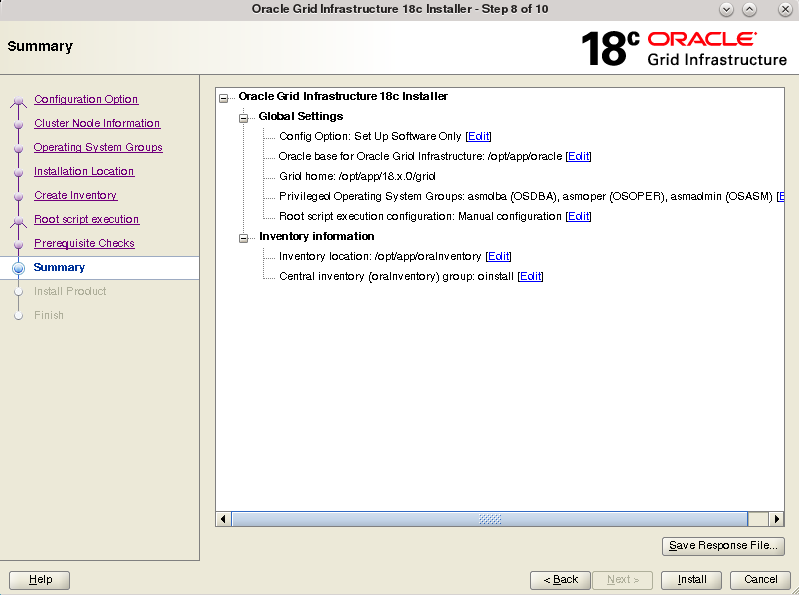
4. Run gridsetup and select software only option.
Following is promoted about missing root.sh files. Ignore and click yes to continue.
Summary of software only setup.
When prompted execute the root scripts.
Root script output is shown below.
# /opt/app/18.x.0/grid/root.sh
Performing root user operation.

The following environment variables are set as:
    ORACLE_OWNER= grid
    ORACLE_HOME=  /opt/app/18.x.0/grid

Creating /etc/oratab file...
Entries will be added to the /etc/oratab file as needed by
Database Configuration Assistant when a database is created
Finished running generic part of root script.
Now product-specific root actions will be performed.

To configure Grid Infrastructure for a Cluster or Grid Infrastructure for a Stand-Alone Server execute the following command as grid user:
/opt/app/18.x.0/grid/gridSetup.sh
This command launches the Grid Infrastructure Setup Wizard. The wizard also supports silent operation, and the parameters can be passed through the response file that is available in the installation media.
Complete the GI software only install.

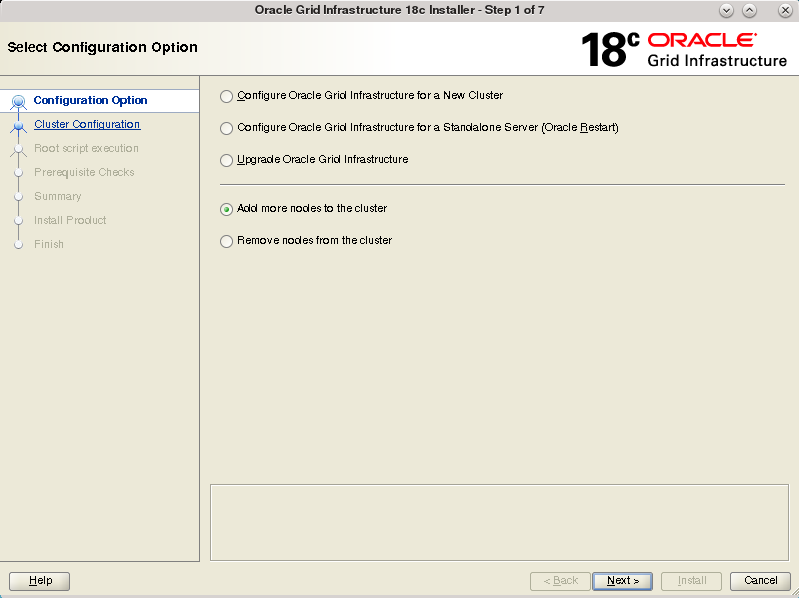
5. From an existing node run gridSetup with noCopy option and select add node.
on exisitng node run
gridsetup.sh -noCopy
The noCopy option will prevent GI binaries being copied to remote node being added, since it's already has software installed. Rest of the steps for adding the node is same as previous add node post.Run the root.sh on the new node when prompted. Output from root.sh on the new node is shown below.
# /opt/app/18.x.0/grid/root.sh
Performing root user operation.

The following environment variables are set as:
    ORACLE_OWNER= grid
    ORACLE_HOME=  /opt/app/18.x.0/grid

Enter the full pathname of the local bin directory: [/usr/local/bin]:
The contents of "dbhome" have not changed. No need to overwrite.
The contents of "oraenv" have not changed. No need to overwrite.
The contents of "coraenv" have not changed. No need to overwrite.

Entries will be added to the /etc/oratab file as needed by
Database Configuration Assistant when a database is created
Finished running generic part of root script.
Now product-specific root actions will be performed.
Relinking oracle with rac_on option
Using configuration parameter file: /opt/app/18.x.0/grid/crs/install/crsconfig_params
The log of current session can be found at:
  /opt/app/oracle/crsdata/rhel72/crsconfig/rootcrs_rhel72_2019-04-09_11-10-41AM.log
2019/04/09 11:10:51 CLSRSC-594: Executing installation step 1 of 20: 'SetupTFA'.
2019/04/09 11:10:51 CLSRSC-4001: Installing Oracle Trace File Analyzer (TFA) Collector.
2019/04/09 11:11:32 CLSRSC-4002: Successfully installed Oracle Trace File Analyzer (TFA) Collector.
2019/04/09 11:11:32 CLSRSC-594: Executing installation step 2 of 20: 'ValidateEnv'.
2019/04/09 11:11:43 CLSRSC-363: User ignored prerequisites during installation
2019/04/09 11:11:44 CLSRSC-594: Executing installation step 3 of 20: 'CheckFirstNode'.
2019/04/09 11:11:45 CLSRSC-594: Executing installation step 4 of 20: 'GenSiteGUIDs'.
2019/04/09 11:11:50 CLSRSC-594: Executing installation step 5 of 20: 'SaveParamFile'.
2019/04/09 11:11:57 CLSRSC-594: Executing installation step 6 of 20: 'SetupOSD'.
2019/04/09 11:11:57 CLSRSC-594: Executing installation step 7 of 20: 'CheckCRSConfig'.
2019/04/09 11:12:34 CLSRSC-17: Invalid GPnP setup
2019/04/09 11:12:43 CLSRSC-594: Executing installation step 8 of 20: 'SetupLocalGPNP'.
2019/04/09 11:12:45 CLSRSC-594: Executing installation step 9 of 20: 'CreateRootCert'.
2019/04/09 11:12:45 CLSRSC-594: Executing installation step 10 of 20: 'ConfigOLR'.
2019/04/09 11:12:56 CLSRSC-594: Executing installation step 11 of 20: 'ConfigCHMOS'.
2019/04/09 11:12:56 CLSRSC-594: Executing installation step 12 of 20: 'CreateOHASD'.
2019/04/09 11:12:59 CLSRSC-594: Executing installation step 13 of 20: 'ConfigOHASD'.
2019/04/09 11:12:59 CLSRSC-330: Adding Clusterware entries to file 'oracle-ohasd.service'
2019/04/09 11:14:46 CLSRSC-594: Executing installation step 14 of 20: 'InstallAFD'.
2019/04/09 11:14:50 CLSRSC-594: Executing installation step 15 of 20: 'InstallACFS'.
CRS-2791: Starting shutdown of Oracle High Availability Services-managed resources on 'rhel72'
CRS-2793: Shutdown of Oracle High Availability Services-managed resources on 'rhel72' has completed
CRS-4133: Oracle High Availability Services has been stopped.
CRS-4123: Oracle High Availability Services has been started.
2019/04/09 11:16:15 CLSRSC-594: Executing installation step 16 of 20: 'InstallKA'.
2019/04/09 11:16:17 CLSRSC-594: Executing installation step 17 of 20: 'InitConfig'.
CRS-2791: Starting shutdown of Oracle High Availability Services-managed resources on 'rhel72'
CRS-2793: Shutdown of Oracle High Availability Services-managed resources on 'rhel72' has completed
CRS-4133: Oracle High Availability Services has been stopped.
CRS-4123: Oracle High Availability Services has been started.
CRS-2791: Starting shutdown of Oracle High Availability Services-managed resources on 'rhel72'
CRS-2673: Attempting to stop 'ora.drivers.acfs' on 'rhel72'
CRS-2677: Stop of 'ora.drivers.acfs' on 'rhel72' succeeded
CRS-2793: Shutdown of Oracle High Availability Services-managed resources on 'rhel72' has completed
CRS-4133: Oracle High Availability Services has been stopped.
2019/04/09 11:16:31 CLSRSC-594: Executing installation step 18 of 20: 'StartCluster'.
CRS-4123: Starting Oracle High Availability Services-managed resources
CRS-2672: Attempting to start 'ora.mdnsd' on 'rhel72'
CRS-2672: Attempting to start 'ora.evmd' on 'rhel72'
CRS-2676: Start of 'ora.mdnsd' on 'rhel72' succeeded
CRS-2676: Start of 'ora.evmd' on 'rhel72' succeeded
CRS-2672: Attempting to start 'ora.gpnpd' on 'rhel72'
CRS-2676: Start of 'ora.gpnpd' on 'rhel72' succeeded
CRS-2672: Attempting to start 'ora.gipcd' on 'rhel72'
CRS-2676: Start of 'ora.gipcd' on 'rhel72' succeeded
CRS-2672: Attempting to start 'ora.crf' on 'rhel72'
CRS-2672: Attempting to start 'ora.cssdmonitor' on 'rhel72'
CRS-2676: Start of 'ora.cssdmonitor' on 'rhel72' succeeded
CRS-2672: Attempting to start 'ora.cssd' on 'rhel72'
CRS-2672: Attempting to start 'ora.diskmon' on 'rhel72'
CRS-2676: Start of 'ora.diskmon' on 'rhel72' succeeded
CRS-2676: Start of 'ora.crf' on 'rhel72' succeeded
CRS-2676: Start of 'ora.cssd' on 'rhel72' succeeded
CRS-2672: Attempting to start 'ora.cluster_interconnect.haip' on 'rhel72'
CRS-2672: Attempting to start 'ora.ctssd' on 'rhel72'
CRS-2676: Start of 'ora.ctssd' on 'rhel72' succeeded
CRS-2676: Start of 'ora.cluster_interconnect.haip' on 'rhel72' succeeded
CRS-2672: Attempting to start 'ora.asm' on 'rhel72'
CRS-2676: Start of 'ora.asm' on 'rhel72' succeeded
CRS-2672: Attempting to start 'ora.storage' on 'rhel72'
CRS-2676: Start of 'ora.storage' on 'rhel72' succeeded
CRS-2672: Attempting to start 'ora.crsd' on 'rhel72'
CRS-2676: Start of 'ora.crsd' on 'rhel72' succeeded
CRS-6017: Processing resource auto-start for servers: rhel72
CRS-2673: Attempting to stop 'ora.LISTENER_SCAN1.lsnr' on 'rhel71'
CRS-2672: Attempting to start 'ora.ASMNET1LSNR_ASM.lsnr' on 'rhel72'
CRS-2672: Attempting to start 'ora.ons' on 'rhel72'
CRS-2672: Attempting to start 'ora.chad' on 'rhel72'
CRS-2676: Start of 'ora.ASMNET1LSNR_ASM.lsnr' on 'rhel72' succeeded
CRS-2672: Attempting to start 'ora.asm' on 'rhel72'
CRS-2676: Start of 'ora.chad' on 'rhel72' succeeded
CRS-2677: Stop of 'ora.LISTENER_SCAN1.lsnr' on 'rhel71' succeeded
CRS-2673: Attempting to stop 'ora.scan1.vip' on 'rhel71'
CRS-2677: Stop of 'ora.scan1.vip' on 'rhel71' succeeded
CRS-2672: Attempting to start 'ora.scan1.vip' on 'rhel72'
CRS-2676: Start of 'ora.ons' on 'rhel72' succeeded
CRS-2676: Start of 'ora.scan1.vip' on 'rhel72' succeeded
CRS-2672: Attempting to start 'ora.LISTENER_SCAN1.lsnr' on 'rhel72'
CRS-2676: Start of 'ora.LISTENER_SCAN1.lsnr' on 'rhel72' succeeded
CRS-2676: Start of 'ora.asm' on 'rhel72' succeeded
CRS-2672: Attempting to start 'ora.DATA.dg' on 'rhel72'
CRS-2676: Start of 'ora.DATA.dg' on 'rhel72' succeeded
CRS-6016: Resource auto-start has completed for server rhel72
CRS-6024: Completed start of Oracle Cluster Ready Services-managed resources
CRS-4123: Oracle High Availability Services has been started.
2019/04/09 11:18:29 CLSRSC-343: Successfully started Oracle Clusterware stack
2019/04/09 11:18:29 CLSRSC-594: Executing installation step 19 of 20: 'ConfigNode'.
clscfg: EXISTING configuration version 5 detected.
clscfg: version 5 is 12c Release 2.
Successfully accumulated necessary OCR keys.
Creating OCR keys for user 'root', privgrp 'root'..
Operation successful.
2019/04/09 11:19:15 CLSRSC-594: Executing installation step 20 of 20: 'PostConfig'.
2019/04/09 11:19:28 CLSRSC-325: Configure Oracle Grid Infrastructure for a Cluster ... succeeded


6. Once the GI is cloned and node added, next is to clone the Oracle database software. For this too a gold image of the OH could be used.
7. Unzip the OH gold image on the new node following the same directory structure as existing nodes.
8. Run the clone script to configure and OH. On oracle documentation -noConfig is option is listed as part of the clone command. But on 18c this was not supported.
$ORACLE_HOME/perl/bin/perl clone.pl -silent -O 'CLUSTER_NODES={rhel71,rhel72}' -O LOCAL_NODE=rhel72 ORACLE_BASE=$ORACLE_BASE ORACLE_HOME=$ORACLE_HOME ORACLE_HOME_NAME=OraDB18Home1 -O -noConfig
Starting Oracle Universal Installer...

Checking Temp space: must be greater than 500 MB.   Actual 2595 MB    Passed
Checking swap space: must be greater than 500 MB.   Actual 3006 MB    Passed
Preparing to launch Oracle Universal Installer from /tmp/OraInstall2019-04-09_02-42-13PM. Please wait ...
[INS-04009] The argument [-noconfig] passed is not supported for the current context Clone
Run the clone command without the noConfig and cloning of OH completes without issue.
perl $ORACLE_HOME/clone/bin/clone.pl -silent ORACLE_HOME="/opt/app/oracle/product/18.x.0/dbhome_1"  ORACLE_HOME_NAME="OraDB18Home1" ORACLE_BASE="/opt/app/oracle" "CLUSTER_NODES={rhel71,rhel72}" LOCAL_NODE=rhel72
Starting Oracle Universal Installer...

Checking Temp space: must be greater than 500 MB.   Actual 3918 MB    Passed
Checking swap space: must be greater than 500 MB.   Actual 2974 MB    Passed
Preparing to launch Oracle Universal Installer from /tmp/OraInstall2019-04-09_03-26-55PM. Please wait ...You can find the log of this install session at:
 /opt/app/oraInventory/logs/cloneActions2019-04-09_03-26-55PM.log
..................................................   5% Done.
..................................................   10% Done.
..................................................   15% Done.
..................................................   20% Done.
..................................................   25% Done.
..................................................   30% Done.
..................................................   35% Done.
..................................................   40% Done.
..................................................   45% Done.
..................................................   50% Done.
..................................................   55% Done.
..................................................   60% Done.
..................................................   65% Done.
..................................................   70% Done.
..................................................   75% Done.
..................................................   80% Done.
..................................................   85% Done.
..........
Copy files in progress.

Copy files successful.

Link binaries in progress.
..........
Link binaries successful.

Setup files in progress.
..........
Setup files successful.

Setup Inventory in progress.

Setup Inventory successful.
..........
Finish Setup successful.
The cloning of OraDB18Home1 was successful.
Please check '/opt/app/oraInventory/logs/cloneActions2019-04-09_03-26-55PM.log' for more details.

Setup Oracle Base in progress.

Setup Oracle Base successful.
..................................................   95% Done.

As a root user, execute the following script(s):
        1. /opt/app/oracle/product/18.x.0/dbhome_1/root.sh

Execute /opt/app/oracle/product/18.x.0/dbhome_1/root.sh on the following nodes:
[rhel72]


..................................................   100% Done.

9. Run DBCA from an exiting node and select add instance option.

Friday, June 14, 2019

ORA-03186: Cannot start Oracle ADG recovery on a non-Oracle Cloud database on a server that is not a primary server

ORA-03186 occurs on a data guard configuration if the standby (or one of the standbys in a multiple standby configuration) was open for read only when the primary is restarted (or switchover happens between primary and another standby in a multiple standby configuration).
The setup is same setup used in postupgrading from 12.2 to 18c. The exact version of 18c is 18.6. All the servers are hosted on AWS. The current setup is as follows.
DGMGRL> show configuration

Configuration - dg12c2

  Protection Mode: MaxAvailability
  Members:
  colombo - Primary database
    london  - Physical standby database

Fast-Start Failover: DISABLED

Configuration Status:
SUCCESS   (status updated 51 seconds ago)
When the primary is restarted
[oracle@ip-172-31-20-117 trace]$ srvctl stop database -d colombo
[oracle@ip-172-31-20-117 trace]$ srvctl start database -d colombo
redo shipping to standby stops.
Following message could be seen on the alert log of the standby instance (instance open in read only mode, london).
2019-05-29T05:38:20.414031-04:00
 rfs (PID:9340): Client is running on host ip-172-31-20-117.eu-west-1.compute.internal, not the current host ip-172-31-15-199.eu-west-1.compute.internal
2019-05-29T05:38:21.974469-04:00
 rfs (PID:9348): Client is running on host ip-172-31-20-117.eu-west-1.compute.internal, not the current host ip-172-31-15-199.eu-west-1.compute.internal
On the alert log of the primary (colombo) following could be seen.
 2019-05-29T05:38:22.283282-04:00
Errors in file /opt/app/oracle/diag/rdbms/colombo/colombo/trace/colombo_tt00_10673.trc:
ORA-03186: Cannot start Oracle ADG recovery on a non-Oracle Cloud database on a server that is not a primary server.
If the error message shown is
ORA-03816: Message 3816 not found;  product=RDBMS; facility=ORA
then apply patch 27539475 (on 18c) to get the above error message.
Inside the trace file following lines shows that attempts were made to ship redo to the instance open in read only mode.
*** 2019-05-29T05:38:22.282064-04:00
krsu_upi_status: Error 3186 attaching RFS server to standby instance at host 'londontns'
krsi_verify_network: Error 3186 attaching to LOG_ARCHIVE_DEST_2 standby host londontns
 at 0x7fffa4dc23c8 placed krsg.c@4998
ORA-03186: Cannot start Oracle ADG recovery on a non-Oracle Cloud database on a server that is not a primary server.
Data guard configuration shows error status
DGMGRL> show configuration

Configuration - dg12c2

  Protection Mode: MaxAvailability
  Members:
  colombo - Primary database
    Error: ORA-16810: multiple errors or warnings detected for the member

    london  - Physical standby database

Fast-Start Failover: DISABLED

Configuration Status:
ERROR   (status updated 10 seconds ago)
Primary database configuration and status is shown below.
DGMGRL> show database verbose colombo

Database - colombo

  Role:               PRIMARY
  Intended State:     TRANSPORT-ON
  Instance(s):
    colombo
      Error: ORA-16737: the redo transport service for member "london" has an error

  Database Warning(s):
    ORA-16629: database reports a different protection level from the protection mode

  Properties:
    DGConnectIdentifier             = 'colombotns'
    ObserverConnectIdentifier       = ''
    LogXptMode                      = 'SYNC'
    RedoRoutes                      = ''
    DelayMins                       = '0'
    Binding                         = 'optional'
    MaxFailure                      = '0'
    MaxConnections                  = '1'
    ReopenSecs                      = '300'
    NetTimeout                      = '30'
    RedoCompression                 = 'DISABLE'
    LogShipping                     = 'ON'
    PreferredApplyInstance          = ''
    ApplyInstanceTimeout            = '0'
    ApplyLagThreshold               = '30'
    TransportLagThreshold           = '30'
    TransportDisconnectedThreshold  = '30'
    ApplyParallel                   = 'AUTO'
    ApplyInstances                  = '0'
    StandbyFileManagement           = 'AUTO'
    ArchiveLagTarget                = '0'
    LogArchiveMaxProcesses          = '10'
    LogArchiveMinSucceedDest        = '1'
    DataGuardSyncLatency            = '0'
    DbFileNameConvert               = '/london/, /colombo/'
    LogFileNameConvert              = '/london/, /colombo/'
    FastStartFailoverTarget         = ''
    InconsistentProperties          = '(monitor)'
    InconsistentLogXptProps         = '(monitor)'
    SendQEntries                    = '(monitor)'
    LogXptStatus                    = '(monitor)'
    RecvQEntries                    = '(monitor)'
    PreferredObserverHosts          = ''
    HostName                        = 'ip-172-31-20-117.eu-west-1.compute.internal'
    StaticConnectIdentifier         = '(DESCRIPTION=(ADDRESS=(PROTOCOL=TCP)(HOST=ip-172-31-20-117.eu-west-1.compute.internal)(PORT=1521))(CONNECT_DATA=(SERVICE_NAME=colombo_DGMGRL.domain.net)(INSTANCE_NAME=colombo)(SERVER=DEDICATED)))'
    OnlineArchiveLocation           = ''
    OnlineAlternateLocation         = ''
    StandbyArchiveLocation          = ''
    StandbyAlternateLocation        = ''
    LogArchiveTrace                 = '2049'
    LogArchiveFormat                = '%t_%s_%r.dbf'
    TopWaitEvents                   = '(monitor)'
    SidName                         = '(monitor)'

  Log file locations:
    Alert log               : /opt/app/oracle/diag/rdbms/colombo/colombo/trace/alert_colombo.log
    Data Guard Broker log   : /opt/app/oracle/diag/rdbms/colombo/colombo/trace/drccolombo.log

Database Status:
ERROR
Standby database configuration
DGMGRL> show database verbose london

Database - london

  Role:               PHYSICAL STANDBY
  Intended State:     APPLY-ON
  Transport Lag:      0 seconds (computed 203 seconds ago)
  Apply Lag:          0 seconds (computed 203 seconds ago)
  Average Apply Rate: 62.00 KByte/s
  Active Apply Rate:  0 Byte/s
  Maximum Apply Rate: 0 Byte/s
  Real Time Query:    ON
  Instance(s):
    london

  Database Warning(s):
    ORA-16857: member disconnected from redo source for longer than specified threshold

  Properties:
    DGConnectIdentifier             = 'londontns'
    ObserverConnectIdentifier       = ''
    LogXptMode                      = 'SYNC'
    RedoRoutes                      = ''
    DelayMins                       = '0'
    Binding                         = 'OPTIONAL'
    MaxFailure                      = '0'
    MaxConnections                  = '1'
    ReopenSecs                      = '300'
    NetTimeout                      = '30'
    RedoCompression                 = 'DISABLE'
    LogShipping                     = 'ON'
    PreferredApplyInstance          = ''
    ApplyInstanceTimeout            = '0'
    ApplyLagThreshold               = '30'
    TransportLagThreshold           = '30'
    TransportDisconnectedThreshold  = '30'
    ApplyParallel                   = 'AUTO'
    ApplyInstances                  = '0'
    StandbyFileManagement           = 'AUTO'
    ArchiveLagTarget                = '0'
    LogArchiveMaxProcesses          = '10'
    LogArchiveMinSucceedDest        = '1'
    DataGuardSyncLatency            = '0'
    DbFileNameConvert               = '/colombo/, /london/'
    LogFileNameConvert              = '/colombo/, /london/'
    FastStartFailoverTarget         = ''
    InconsistentProperties          = '(monitor)'
    InconsistentLogXptProps         = '(monitor)'
    SendQEntries                    = '(monitor)'
    LogXptStatus                    = '(monitor)'
    RecvQEntries                    = '(monitor)'
    PreferredObserverHosts          = ''
    HostName                        = 'ip-172-31-15-199.eu-west-1.compute.internal'
    StaticConnectIdentifier         = '(DESCRIPTION=(ADDRESS=(PROTOCOL=TCP)(HOST=ip-172-31-15-199.eu-west-1.compute.internal)(PORT=1521))(CONNECT_DATA=(SERVICE_NAME=london_DGMGRL.domain.net)(INSTANCE_NAME=london)(SERVER=DEDICATED)))'
    OnlineArchiveLocation           = ''
    OnlineAlternateLocation         = ''
    StandbyArchiveLocation          = ''
    StandbyAlternateLocation        = ''
    LogArchiveTrace                 = '2049'
    LogArchiveFormat                = '%t_%s_%r.dbf'
    TopWaitEvents                   = '(monitor)'
    SidName                         = '(monitor)'

  Log file locations:
    Alert log               : /opt/app/oracle/diag/rdbms/london/london/trace/alert_london.log
    Data Guard Broker log   : /opt/app/oracle/diag/rdbms/london/london/trace/drclondon.log

Database Status:
WARNING


There are no inconsistent properties in any of the databases.
DGMGRL> show database colombo 'InconsistentProperties';
INCONSISTENT PROPERTIES
   INSTANCE_NAME        PROPERTY_NAME         MEMORY_VALUE         SPFILE_VALUE         BROKER_VALUE

DGMGRL>  show database london  'InconsistentProperties';
INCONSISTENT PROPERTIES
   INSTANCE_NAME        PROPERTY_NAME         MEMORY_VALUE         SPFILE_VALUE         BROKER_VALUE
The archive dest status on the primary shows the same error as alert log.
SQL> select dest_id id,dest_name name, status, database_mode db_mode,recovery_mode,         protection_mode,standby_logfile_count "SRLs",        standby_logfile_active ACTIVE,         archived_seq#,error  from v$archive_dest_status where dest_id=2;

        ID NAME                 STATUS    DB_MODE         RECOVERY_MODE                      PROTECTION_MODE            SRLs     ACTIVE ARCHIVED_SEQ# ERROR
---------- -------------------- --------- --------------- ---------------------------------- -------------------- ---------- ---------- ------------- ----------------------------------------
         2 LOG_ARCHIVE_DEST_2   ERROR     UNKNOWN         IDLE                               RESYNCHRONIZATION             0          0             0 ORA-03186: Cannot start Oracle ADG
                                                                                                                                                      recovery on a non-Oracle Cloud database
                                                                                                                                                      on a server that is not a primary
                                                                                                                                                      server.

To resolve the redo shipping issue, restart the instance open in read only mode.
[oracle@ip-172-31-15-199 trace]$ srvctl stop database -d london
[oracle@ip-172-31-15-199 trace]$ srvctl start database -d london
Once it is started the redo shipping begins and log archive dest error clears.
DGMGRL> show configuration

Configuration - dg12c2

  Protection Mode: MaxAvailability
  Members:
  colombo - Primary database
    london  - Physical standby database

Fast-Start Failover: DISABLED

Configuration Status:
SUCCESS   (status updated 11 seconds ago)

The other workaround is to put the read only instance into mount mode before the primary is stopped or switchover happens and open it in read only mode afterwards. Either method would result in clients being disconnected to from the read only instance.
The same issue was observed on a 19c multiple data guard configuration hosted on AWS.
DGMGRL> show configuration
Configuration - fcdg
Protection Mode: MaxPerformance
Members:
gold - Primary database
silver - Physical standby database
bronze - Physical standby database

Fast-Start Failover: DISABLED

Configuration Status:
SUCCESS. 
The silver instance is in mount only mode and bronze is open read only mode. When there was a switchover to between gold and silver, redo transport to bronze stopped from the new primary (silver) with the same error as in 18c. Only way to resolve the issue was to restart the instance open in read only mode.
However, 11.2.0.4 data guard configuration hosted on AWS did not have this issue. The redo shipping was working fine across primary restarts when the standby was open in read only mode. Seems whatever issue or removal of capabilities on non-oracle clouds happened in later versions.

Update on 2019-09-24
The issue is fixed with 18.7 RU and for 19c with the 19.4 RU. For other versions apply patch 30289758 ( 30289758: MERGE ON DATABASE RU 18.5.0.0.0 OF 27539475 29430524 ) if available.

Friday, May 17, 2019

Adding a Node to 18c RAC

This post list the steps for adding a node to 18c RAC which is similar to that of adding a node to 12cR1 RAC. Node addition is done in three phases. Phase one is to add the clusterware to the new node. Second phase will add the database software and final phase will extend the database to the new node by creating a new instance for it.
The current cluster setup consists of a single node named rhel71 and a new node named rhel72 will be added to the cluster.
1. It is assumed that physical connections (shared storage connections, network) are made to the new node being added. The cluvfy tool could be used to check the pre-reqs for node addition are successful. In this case the failures relate to memory and shm mount point could be ignored as this is a test setup.
cluvfy stage -pre nodeadd -n rhel72

Verifying Physical Memory ...FAILED (PRVF-7530)
Verifying Available Physical Memory ...PASSED
Verifying Swap Size ...FAILED (PRVF-7573)
Verifying Free Space: rhel72:/usr,rhel72:/var,rhel72:/etc,rhel72:/opt/app/18.x.0/grid,rhel72:/sbin,rhel72:/tmp ...PASSED
Verifying Free Space: rhel71:/usr,rhel71:/var,rhel71:/etc,rhel71:/opt/app/18.x.0/grid,rhel71:/sbin,rhel71:/tmp ...FAILED (PRVF-7501)
Verifying User Existence: oracle ...
  Verifying Users With Same UID: 501 ...PASSED
Verifying User Existence: oracle ...PASSED
Verifying User Existence: grid ...
  Verifying Users With Same UID: 502 ...PASSED
Verifying User Existence: grid ...PASSED
Verifying User Existence: root ...
  Verifying Users With Same UID: 0 ...PASSED
Verifying User Existence: root ...PASSED
Verifying Group Existence: asmadmin ...PASSED
Verifying Group Existence: asmoper ...PASSED
Verifying Group Existence: asmdba ...PASSED
Verifying Group Existence: oinstall ...PASSED
Verifying Group Membership: oinstall ...PASSED
Verifying Group Membership: asmdba ...PASSED
Verifying Group Membership: asmadmin ...PASSED
Verifying Group Membership: asmoper ...PASSED
Verifying Run Level ...PASSED
Verifying Hard Limit: maximum open file descriptors ...PASSED
Verifying Soft Limit: maximum open file descriptors ...PASSED
Verifying Hard Limit: maximum user processes ...PASSED
Verifying Soft Limit: maximum user processes ...PASSED
Verifying Soft Limit: maximum stack size ...PASSED
Verifying Architecture ...PASSED
Verifying OS Kernel Version ...PASSED
Verifying OS Kernel Parameter: semmsl ...PASSED
Verifying OS Kernel Parameter: semmns ...PASSED
Verifying OS Kernel Parameter: semopm ...PASSED
Verifying OS Kernel Parameter: semmni ...PASSED
Verifying OS Kernel Parameter: shmmax ...PASSED
Verifying OS Kernel Parameter: shmmni ...PASSED
Verifying OS Kernel Parameter: shmall ...PASSED
Verifying OS Kernel Parameter: file-max ...PASSED
Verifying OS Kernel Parameter: ip_local_port_range ...PASSED
Verifying OS Kernel Parameter: rmem_default ...PASSED
Verifying OS Kernel Parameter: rmem_max ...PASSED
Verifying OS Kernel Parameter: wmem_default ...PASSED
Verifying OS Kernel Parameter: wmem_max ...PASSED
Verifying OS Kernel Parameter: aio-max-nr ...PASSED
Verifying Package: binutils-2.23.52.0.1 ...PASSED
Verifying Package: compat-libcap1-1.10 ...PASSED
Verifying Package: libgcc-4.8.2 (x86_64) ...PASSED
Verifying Package: libstdc++-4.8.2 (x86_64) ...PASSED
Verifying Package: libstdc++-devel-4.8.2 (x86_64) ...PASSED
Verifying Package: sysstat-10.1.5 ...PASSED
Verifying Package: gcc-c++-4.8.2 ...PASSED
Verifying Package: ksh ...PASSED
Verifying Package: make-3.82 ...PASSED
Verifying Package: glibc-2.17 (x86_64) ...PASSED
Verifying Package: glibc-devel-2.17 (x86_64) ...PASSED
Verifying Package: libaio-0.3.109 (x86_64) ...PASSED
Verifying Package: libaio-devel-0.3.109 (x86_64) ...PASSED
Verifying Package: nfs-utils-1.2.3-15 ...PASSED
Verifying Package: smartmontools-6.2-4 ...PASSED
Verifying Package: net-tools-2.0-0.17 ...PASSED
Verifying Package: compat-libstdc++-33-3.2.3 (x86_64) ...PASSED
Verifying Package: libxcb-1.11 (x86_64) ...PASSED
Verifying Package: libX11-1.6.3 (x86_64) ...PASSED
Verifying Package: libXau-1.0.8 (x86_64) ...PASSED
Verifying Package: libXi-1.7.4 (x86_64) ...PASSED
Verifying Package: libXtst-1.2.2 (x86_64) ...PASSED
Verifying Users With Same UID: 0 ...PASSED
Verifying Current Group ID ...PASSED
Verifying Root user consistency ...PASSED
Verifying Package: cvuqdisk-1.0.10-1 ...PASSED
Verifying Node Addition ...
  Verifying CRS Integrity ...PASSED
  Verifying Clusterware Version Consistency ...PASSED
  Verifying '/opt/app/18.x.0/grid' ...PASSED
Verifying Node Addition ...PASSED
Verifying Host name ...PASSED
Verifying Node Connectivity ...
  Verifying Hosts File ...PASSED
  Verifying Check that maximum (MTU) size packet goes through subnet ...PASSED
  Verifying subnet mask consistency for subnet "192.168.1.0" ...PASSED
  Verifying subnet mask consistency for subnet "192.168.0.0" ...PASSED
Verifying Node Connectivity ...PASSED
Verifying Multicast or broadcast check ...PASSED
Verifying ASM Integrity ...
  Verifying Node Connectivity ...
    Verifying Hosts File ...PASSED
    Verifying Check that maximum (MTU) size packet goes through subnet ...PASSED
    Verifying subnet mask consistency for subnet "192.168.1.0" ...PASSED
    Verifying subnet mask consistency for subnet "192.168.0.0" ...PASSED
  Verifying Node Connectivity ...PASSED
Verifying ASM Integrity ...PASSED
Verifying Device Checks for ASM ...
  Verifying Package: cvuqdisk-1.0.10-1 ...PASSED
  Verifying ASM device sharedness check ...
    Verifying Shared Storage Accessibility:/dev/oracleasm/data1,/dev/oracleasm/gimr,/dev/oracleasm/fra1,/dev/oracleasm/ocr1,/dev/oracleasm/ocr2,/dev/oracleasm/ocr3 ...PASSED
  Verifying ASM device sharedness check ...PASSED
  Verifying Access Control List check ...PASSED
Verifying Device Checks for ASM ...PASSED
Verifying Database home availability ...PASSED
Verifying OCR Integrity ...PASSED
Verifying Time zone consistency ...PASSED
Verifying Network Time Protocol (NTP) ...
  Verifying '/etc/ntp.conf' ...PASSED
  Verifying '/etc/chrony.conf' ...PASSED
  Verifying '/var/run/ntpd.pid' ...PASSED
  Verifying '/var/run/chronyd.pid' ...PASSED
Verifying Network Time Protocol (NTP) ...PASSED
Verifying User Not In Group "root": grid ...PASSED
Verifying resolv.conf Integrity ...PASSED
Verifying DNS/NIS name service ...PASSED
Verifying User Equivalence ...PASSED
Verifying /dev/shm mounted as temporary file system ...FAILED (PRVE-0421)
Verifying /boot mount ...PASSED
Verifying zeroconf check ...PASSED

Pre-check for node addition was unsuccessful on all the nodes.


Failures were encountered during execution of CVU verification request "stage -pre nodeadd".

Verifying Physical Memory ...FAILED
rhel72: PRVF-7530 : Sufficient physical memory is not available on node
        "rhel72" [Required physical memory = 8GB (8388608.0KB)]

rhel71: PRVF-7530 : Sufficient physical memory is not available on node
        "rhel71" [Required physical memory = 8GB (8388608.0KB)]

Verifying Swap Size ...FAILED
rhel72: PRVF-7573 : Sufficient swap size is not available on node "rhel72"
        [Required = 4.686GB (4913676.0KB) ; Found = 3.7246GB (3905532.0KB)]

rhel71: PRVF-7573 : Sufficient swap size is not available on node "rhel71"
        [Required = 4.686GB (4913676.0KB) ; Found = 3.7246GB (3905532.0KB)]

Verifying Free Space:
rhel71:/usr,rhel71:/var,rhel71:/etc,rhel71:/opt/app/18.x.0/grid,rhel71:/sbin,rhe
l71:/tmp ...FAILED
PRVF-7501 : Sufficient space is not available at location
"/opt/app/18.x.0/grid" on node "rhel71" [Required space = 6.9GB ; available
space = 6.0439GB ]
PRVF-7501 : Sufficient space is not available at location "/" on node "rhel71"
[Required space = [25MB (/usr) + 5MB (/var) + 25MB (/etc) + 6.9GB
(/opt/app/18.x.0/grid) + 10MB (/sbin) + 1GB (/tmp) = 7.9635GB ]; available
space = 6.0439GB ]

Verifying /dev/shm mounted as temporary file system ...FAILED
rhel72: PRVE-0421 : No entry exists in /etc/fstab for mounting /dev/shm


CVU operation performed:      stage -pre nodeadd
Date:                         04-Apr-2019 16:15:51
CVU home:                     /opt/app/18.x.0/grid/
User:                         grid

2. To extend the cluster by installing clusterware on the new node run the gridSetup.sh from an existing node and select add more nodes to cluster option.

3. Execute the root script when prompted.
# /opt/app/18.x.0/grid/root.sh
Performing root user operation.

The following environment variables are set as:
    ORACLE_OWNER= grid
    ORACLE_HOME=  /opt/app/18.x.0/grid

Enter the full pathname of the local bin directory: [/usr/local/bin]:
The contents of "dbhome" have not changed. No need to overwrite.
The contents of "oraenv" have not changed. No need to overwrite.
The contents of "coraenv" have not changed. No need to overwrite.


Creating /etc/oratab file...
Entries will be added to the /etc/oratab file as needed by
Database Configuration Assistant when a database is created
Finished running generic part of root script.
Now product-specific root actions will be performed.
Relinking oracle with rac_on option
Using configuration parameter file: /opt/app/18.x.0/grid/crs/install/crsconfig_params
The log of current session can be found at:
  /opt/app/oracle/crsdata/rhel72/crsconfig/rootcrs_rhel72_2019-04-08_11-08-58AM.log
2019/04/08 11:09:11 CLSRSC-594: Executing installation step 1 of 20: 'SetupTFA'.
2019/04/08 11:09:11 CLSRSC-4001: Installing Oracle Trace File Analyzer (TFA) Collector.
2019/04/08 11:09:57 CLSRSC-4002: Successfully installed Oracle Trace File Analyzer (TFA) Collector.
2019/04/08 11:09:57 CLSRSC-594: Executing installation step 2 of 20: 'ValidateEnv'.
2019/04/08 11:10:10 CLSRSC-363: User ignored prerequisites during installation
2019/04/08 11:10:10 CLSRSC-594: Executing installation step 3 of 20: 'CheckFirstNode'.
2019/04/08 11:10:11 CLSRSC-594: Executing installation step 4 of 20: 'GenSiteGUIDs'.
2019/04/08 11:10:17 CLSRSC-594: Executing installation step 5 of 20: 'SaveParamFile'.
2019/04/08 11:10:23 CLSRSC-594: Executing installation step 6 of 20: 'SetupOSD'.
2019/04/08 11:10:23 CLSRSC-594: Executing installation step 7 of 20: 'CheckCRSConfig'.
2019/04/08 11:10:32 CLSRSC-594: Executing installation step 8 of 20: 'SetupLocalGPNP'.
2019/04/08 11:10:35 CLSRSC-594: Executing installation step 9 of 20: 'CreateRootCert'.
2019/04/08 11:10:35 CLSRSC-594: Executing installation step 10 of 20: 'ConfigOLR'.
2019/04/08 11:10:45 CLSRSC-594: Executing installation step 11 of 20: 'ConfigCHMOS'.
2019/04/08 11:10:46 CLSRSC-594: Executing installation step 12 of 20: 'CreateOHASD'.
2019/04/08 11:10:48 CLSRSC-594: Executing installation step 13 of 20: 'ConfigOHASD'.
2019/04/08 11:10:49 CLSRSC-330: Adding Clusterware entries to file 'oracle-ohasd.service'
2019/04/08 11:12:25 CLSRSC-594: Executing installation step 14 of 20: 'InstallAFD'.
2019/04/08 11:12:29 CLSRSC-594: Executing installation step 15 of 20: 'InstallACFS'.
CRS-2791: Starting shutdown of Oracle High Availability Services-managed resources on 'rhel72'
CRS-2793: Shutdown of Oracle High Availability Services-managed resources on 'rhel72' has completed
CRS-4133: Oracle High Availability Services has been stopped.
CRS-4123: Oracle High Availability Services has been started.
2019/04/08 11:13:52 CLSRSC-594: Executing installation step 16 of 20: 'InstallKA'.
2019/04/08 11:13:55 CLSRSC-594: Executing installation step 17 of 20: 'InitConfig'.
CRS-2791: Starting shutdown of Oracle High Availability Services-managed resources on 'rhel72'
CRS-2793: Shutdown of Oracle High Availability Services-managed resources on 'rhel72' has completed
CRS-4133: Oracle High Availability Services has been stopped.
CRS-4123: Oracle High Availability Services has been started.
CRS-2791: Starting shutdown of Oracle High Availability Services-managed resources on 'rhel72'
CRS-2673: Attempting to stop 'ora.drivers.acfs' on 'rhel72'
CRS-2677: Stop of 'ora.drivers.acfs' on 'rhel72' succeeded
CRS-2793: Shutdown of Oracle High Availability Services-managed resources on 'rhel72' has completed
CRS-4133: Oracle High Availability Services has been stopped.
2019/04/08 11:14:10 CLSRSC-594: Executing installation step 18 of 20: 'StartCluster'.
CRS-4123: Starting Oracle High Availability Services-managed resources
CRS-2672: Attempting to start 'ora.mdnsd' on 'rhel72'
CRS-2672: Attempting to start 'ora.evmd' on 'rhel72'
CRS-2676: Start of 'ora.mdnsd' on 'rhel72' succeeded
CRS-2676: Start of 'ora.evmd' on 'rhel72' succeeded
CRS-2672: Attempting to start 'ora.gpnpd' on 'rhel72'
CRS-2676: Start of 'ora.gpnpd' on 'rhel72' succeeded
CRS-2672: Attempting to start 'ora.gipcd' on 'rhel72'
CRS-2676: Start of 'ora.gipcd' on 'rhel72' succeeded
CRS-2672: Attempting to start 'ora.crf' on 'rhel72'
CRS-2672: Attempting to start 'ora.cssdmonitor' on 'rhel72'
CRS-2676: Start of 'ora.cssdmonitor' on 'rhel72' succeeded
CRS-2672: Attempting to start 'ora.cssd' on 'rhel72'
CRS-2672: Attempting to start 'ora.diskmon' on 'rhel72'
CRS-2676: Start of 'ora.diskmon' on 'rhel72' succeeded
CRS-2676: Start of 'ora.crf' on 'rhel72' succeeded
CRS-2676: Start of 'ora.cssd' on 'rhel72' succeeded
CRS-2672: Attempting to start 'ora.cluster_interconnect.haip' on 'rhel72'
CRS-2672: Attempting to start 'ora.ctssd' on 'rhel72'
CRS-2676: Start of 'ora.ctssd' on 'rhel72' succeeded
CRS-2676: Start of 'ora.cluster_interconnect.haip' on 'rhel72' succeeded
CRS-2672: Attempting to start 'ora.asm' on 'rhel72'
CRS-2676: Start of 'ora.asm' on 'rhel72' succeeded
CRS-2672: Attempting to start 'ora.storage' on 'rhel72'
CRS-2676: Start of 'ora.storage' on 'rhel72' succeeded
CRS-2672: Attempting to start 'ora.crsd' on 'rhel72'
CRS-2676: Start of 'ora.crsd' on 'rhel72' succeeded
CRS-6017: Processing resource auto-start for servers: rhel72
CRS-2673: Attempting to stop 'ora.LISTENER_SCAN1.lsnr' on 'rhel71'
CRS-2672: Attempting to start 'ora.ASMNET1LSNR_ASM.lsnr' on 'rhel72'
CRS-2672: Attempting to start 'ora.ons' on 'rhel72'
CRS-2672: Attempting to start 'ora.chad' on 'rhel72'
CRS-2672: Attempting to start 'ora.qosmserver' on 'rhel72'
CRS-2677: Stop of 'ora.LISTENER_SCAN1.lsnr' on 'rhel71' succeeded
CRS-2673: Attempting to stop 'ora.scan1.vip' on 'rhel71'
CRS-2677: Stop of 'ora.scan1.vip' on 'rhel71' succeeded
CRS-2672: Attempting to start 'ora.scan1.vip' on 'rhel72'
CRS-2676: Start of 'ora.ASMNET1LSNR_ASM.lsnr' on 'rhel72' succeeded
CRS-2672: Attempting to start 'ora.asm' on 'rhel72'
CRS-2676: Start of 'ora.ons' on 'rhel72' succeeded
CRS-2676: Start of 'ora.chad' on 'rhel72' succeeded
CRS-2676: Start of 'ora.scan1.vip' on 'rhel72' succeeded
CRS-2672: Attempting to start 'ora.LISTENER_SCAN1.lsnr' on 'rhel72'
CRS-2676: Start of 'ora.LISTENER_SCAN1.lsnr' on 'rhel72' succeeded
CRS-2676: Start of 'ora.qosmserver' on 'rhel72' succeeded
CRS-2672: Attempting to start 'ora.chad' on 'rhel71'
CRS-2672: Attempting to start 'ora.ASMNET1LSNR_ASM.lsnr' on 'rhel71'
CRS-2676: Start of 'ora.ASMNET1LSNR_ASM.lsnr' on 'rhel71' succeeded
CRS-2676: Start of 'ora.asm' on 'rhel72' succeeded
CRS-2672: Attempting to start 'ora.DATA.dg' on 'rhel72'
CRS-2676: Start of 'ora.DATA.dg' on 'rhel72' succeeded
CRS-6016: Resource auto-start has completed for server rhel72
CRS-6024: Completed start of Oracle Cluster Ready Services-managed resources
CRS-4123: Oracle High Availability Services has been started.
2019/04/08 11:16:43 CLSRSC-343: Successfully started Oracle Clusterware stack
2019/04/08 11:16:43 CLSRSC-594: Executing installation step 19 of 20: 'ConfigNode'.
clscfg: EXISTING configuration version 5 detected.
clscfg: version 5 is 12c Release 2.
Successfully accumulated necessary OCR keys.
Creating OCR keys for user 'root', privgrp 'root'..
Operation successful.
2019/04/08 11:17:43 CLSRSC-594: Executing installation step 20 of 20: 'PostConfig'.
2019/04/08 11:17:57 CLSRSC-325: Configure Oracle Grid Infrastructure for a Cluster ... succeeded


4. Use cluvfy to verify node addition
cluvfy stage -post nodeadd -n rhel72

Verifying Node Connectivity ...
  Verifying Hosts File ...PASSED
  Verifying Check that maximum (MTU) size packet goes through subnet ...PASSED
  Verifying subnet mask consistency for subnet "192.168.1.0" ...PASSED
  Verifying subnet mask consistency for subnet "192.168.0.0" ...PASSED
Verifying Node Connectivity ...PASSED
Verifying Cluster Integrity ...PASSED
Verifying Node Addition ...
  Verifying CRS Integrity ...PASSED
  Verifying Clusterware Version Consistency ...PASSED
  Verifying '/opt/app/18.x.0/grid' ...PASSED
Verifying Node Addition ...PASSED
Verifying Multicast or broadcast check ...PASSED
Verifying Node Application Existence ...PASSED
Verifying Single Client Access Name (SCAN) ...
  Verifying DNS/NIS name service 'rac-scan.domain.net' ...
    Verifying Name Service Switch Configuration File Integrity ...PASSED
  Verifying DNS/NIS name service 'rac-scan.domain.net' ...PASSED
Verifying Single Client Access Name (SCAN) ...PASSED
Verifying User Not In Group "root": grid ...PASSED
Verifying Clock Synchronization ...PASSED

Post-check for node addition was successful.

CVU operation performed:      stage -post nodeadd
Date:                         08-Apr-2019 11:21:17
CVU home:                     /opt/app/18.x.0/grid/
User:                         grid
5. The next step is to extend the database software to new node. To add database software run addNode.sh from the $ORACLE_HOME/addnode directory as oracle user from an existing node.
cd $ORACLE_HOME/addnode
./addnode.sh "CLUSTER_NEW_NODES={rhel72}"
When the OUI starts the new node comes selected by default. When prompted run root.sh to complete the database software installation on the new node.

6. Before extending the database by adding a new instance change the permission on the admin folder on the new node.
cd $ORACLE_BASE
chmod 775 admin
7. Run DBCA and select RAC instance management and add an instance options.
Select the database to be extended to new node.
Specify new instance's details
6. Verify the database has been extended to include a new instance.
srvctl config database -d ent18c
Database unique name: ent18c
Database name: ent18c
Oracle home: /opt/app/oracle/product/18.x.0/dbhome_1
Oracle user: oracle
Spfile: +DATA/ENT18C/PARAMETERFILE/spfile.272.1003495623
Password file: +DATA/ENT18C/PASSWORD/pwdent18c.256.1003490291
Domain:
Start options: open
Stop options: immediate
Database role: PRIMARY
Management policy: AUTOMATIC
Server pools:
Disk Groups: DATA,FRA
Mount point paths:
Services: pdbsrv
Type: RAC
Start concurrency:
Stop concurrency:
OSDBA group: dba
OSOPER group: oper
Database instances: ent18c1,ent18c2
Configured nodes: rhel71,rhel72
CSS critical: no
CPU count: 0
Memory target: 0
Maximum memory: 0
Default network number for database services:
Database is administrator managed

SQL> select inst_id,instance_name,host_name from gv$instance;

   INST_ID INSTANCE_NAME    HOST_NAME
---------- ---------------- ----------------------
         1 ent18c1          rhel71.domain.net
         2 ent18c2          rhel72.domain.net
   
SQL>  select inst_id,con_id,name from gv$pdbs order by 1;

   INST_ID     CON_ID NAME
---------- ---------- --------------
         1          2 PDB$SEED
         1          3 PDB18C
         2          2 PDB$SEED
         2          3 PDB18C
7. Modify the service to include the new database instance.
srvctl modify service -db ent18c -pdb pdb18c -s pdbsrv -modifyconfig -preferred "ent18c1,ent18c2"
srvctl config service -db ent18c -service pdbsrv
Service name: pdbsrv
Server pool:
Cardinality: 2
Service role: PRIMARY
Management policy: AUTOMATIC
DTP transaction: false
AQ HA notifications: false
Global: false
Commit Outcome: false
Failover type:
Failover method:
Failover retries:
Failover delay:
Failover restore: NONE
Connection Load Balancing Goal: LONG
Runtime Load Balancing Goal: NONE
TAF policy specification: NONE
Edition:
Pluggable database name: pdb18c
Hub service:
Maximum lag time: ANY
SQL Translation Profile:
Retention: 86400 seconds
Replay Initiation Time: 300 seconds
Drain timeout:
Stop option:
Session State Consistency: DYNAMIC
GSM Flags: 0
Service is enabled
Preferred instances: ent18c1,ent18c2
Available instances:
CSS critical: no
This concludes the addition of a new node to 12cR1 RAC.

Related Posts
Adding a Node to 12cR1 RAC
Adding a Node to 11gR2 RAC
Adding a Node to 11gR1 RAC