There are various jre that could be used on Nokia N900's Maemo OS to run java applications. All of them have pros and cons.
Jalimo and
Sun's own jre are few that could be used.
Here is a Jalimo exampleThis blog is about running a simple JAX-WS client.
Several application should be downloaded and installed from the
meamo web site which makes things much easier. Below is the list of applications needed (give list is the name of the application)
1. Update the OS to Maemo 5.
2.
rootsh (allows to gain root access)
3. Install OpenSSH Server and OpenSSH Client
4. Personal IP Address
Once the above applications are installed download Java SE for Embedded 6u10 (Build 39) Early Access. The link is given above. Need to do some registering beforehand.
When the registration is completed and confirmation email is received, download the headful version 10 ARMv6 Linux. Full name given on the download page
Java SE for Embedded 6.0 Update 10 ARMv6 Linux (Build 39) Early Access - Headful, EABI, glibc 2.5, Hard Float (VFP), Little Endian
(Not sure if headless version would have a problem with JAX-WS but it had some problems when it came to running swing applications).
Using the X Terminal on the phone gain access to the linux shell on the N900. simply type root on the shell to gain root access. (need the rootsh application installed).
If not already started, then start the SSH server with the following
/etc/init.d/ssh start
Create an additional user and give a password. Use this additional user to sftp the download jre into the phone. Find out the phone's IP with the personal IP Address widget.
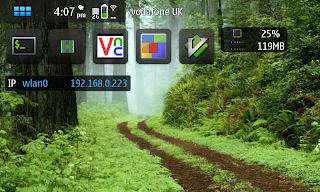
Other folders may have restrictions so ftp might only work on /home/user/MyDocs.
Once ftp has finished as root user copy the gzip file into /home/user and unzip.
Create a symbolic link in /usr/bin to /home/user/ejre1.6.0_10/bin/java
cd /usr/bin
ln -s /home/user/ejre1.6.0_10/bin/java java
run java version command to verify installation is successfull.
java -version
java version "1.6.0_10-ea"
Java(TM) 2 Runtime Environment, Standard Edition for Embedded (build 1.6.0_10-ea-b39)
Java HotSpot(TM) Client VM (build 11.0-b15, mixed mode)
Evaluation version, 84 days remain in evaluation period
Copy the following .jar files into the lib directory of the jre installation (ejre1.6.0_10/lib)
FastInfoset.jar
activation.jar
http.jar
javaee.jar
jaxb-api.jar
jaxb-impl.jar
jaxb-xjc.jar
jaxws-api.jar
jaxws-rt.jar
jaxws-tools.jar
jsr173_api.jar
jsr181-api.jar
jsr250-api.jar
mimepull.jar
saaj-api.jar
saaj-impl.jar
sjsxp.jar
stax-ex.jar
streambuffer.jar
That's it!.
Since there's no javac compile the java application and scp the client code or application jar into the phone and run it as a normal java application from the command shell.
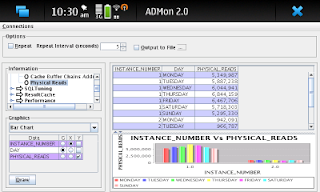
Swing application that were developed desktop environment will also run as it is with Sun jre, whereas Jalimo only support SWT.
Screenshot of
ADMon 2.0 on Nokia N900
Below is sample java code for testing.
Service class. (Bundle it and deploy into application container)
import javax.jws.WebMethod;
import javax.jws.WebService;


@WebService
public class MoJAXWS {


    @WebMethod
    public String helloFromServer(String name){

        return "Hello "+name;
    }

}
Client class (compile this and copy the class file into the phone and run from there)
import java.net.MalformedURLException;
import java.net.URL;
import java.util.logging.Level;
import java.util.logging.Logger;
import javax.xml.namespace.QName;
import mojax.MoJAXWS;
import mojax.MoJAXWSService;


public class Client {

    public static void main(String[] args) {
        try {
            MoJAXWSService service = new MoJAXWSService(new URL("http://serverIP:8080/MobileJAXWS/MoJAXWSService"), new QName("http://mojax/", "MoJAXWSService"));
            MoJAXWS port =  service.getMoJAXWSPort();
            System.out.println(port.helloFromServer("World"));
        } catch (MalformedURLException ex) {
            Logger.getLogger(Client.class.getName()).log(Level.SEVERE, null, ex);
        }


    }

}





