Tuesday, July 2, 2013

Installing Oracle 12c Database on RHEL 6

Oracle has released the 12c database software and could be downloaded from https://edelivery.oracle.com/. This blog post goes through the installation of 12c in RHEL 6 and highlights any differences to that of installing 11gR2 in RHEL 6
The linux system used in this case is 2.6.32-358.el6.x86_64. The minimum requirements for installing 12c on RHEL 6 could be found on Oracle documentation. However the issue of database software not recognizing the environment (issue that was there when installing 11gR2 on RHEL 6) is still there on 12c as well. After step 2 has passed the OUI complains system doesn't meet the minimum requirements and prompt to exit. This could be ignored and continued but then prerequisite checks are not carried out. Following text could be seen in the error log
ID: oracle.install.commons.util.exception.DefaultErrorAdvisor:389
oracle.cluster.verification.PreReqNotSupportedException: Reference data is not available for verifying 
prerequisites on this operating system distribution
Changing the cvu_config file entry CV_ASSUME_DISTID value to OEL6 resolved this issue (same as in installing 11gR2 on RHEL 6)(update 15/07/2013 Oracle has a note on this 1567127.1)
Once this is done execute runInstaller to start the installation process.

Installing of software steps are similar to previous versions of Oracle. Pre-installation tasks are not shown here.

With 12c Oracle has introduce extended user groups for job role separation. These groups are OSBAKCUPDBA group (created in linux as backupdba) which is to manage backup and recovery jobs. OSDGDBA group to administer and monitor data guard broker (on linux dgdba group) and finally group for key management called OSKMDBA (created on linux as kmdba).

Prerequisite Checks

Summary page and beginning of the installation.

Once the software installation is complete create a listener using NETCA similar to previous versions of Oracle.


One of the key features of 12c is the mulch-tenancy databases where one container database (CDB) can hold multiple pluggable databases (PDB). However it is still possible to create non container databases with 12c. The database created here is a non-container database.

With 12c the Enterprise Manager Database Control is deprecated and Enterprise Manager Database Express 12c has been introduced instead.
If a listener was not created using NETCA a new listener could be created using DBCA.

Starting with 12c Oracle Label Security and Database Vault are installed by default and could be enabled or disabled during the database creation or afterwards using SQL.

From the DBCA itself the alert log could be viewed while the database is being created.
EM Express URL is listed similar to EM Console URL at the end of the installation.

Few sample pages from Database Express 12c


Update 15 July 2013
Useful metalink notes
Requirements for Installing Oracle Database 12.1 on RHEL6 or OL6 64-bit (x86-64) [ID 1529864.1]
Requirements for Installing Oracle Database 12.1 on RHEL5 or OL5 64-bit (x86-64) [ID 1529433.1]
Master Note For Oracle Database 12c Release 1 (12.1) Database/Client Installation/Upgrade/Migration Standalone Environment (Non-RAC) [ID 1520299.1]
RHEL6: 12c CVU Fails: Reference data is not available for verifying prerequisites on this operating system distribution [ID 1567127.1]

Related Posts
Installing 12c (12.1.0.1) RAC on RHEL 6 with Role Separation - Clusterware
Installing 12c (12.1.0.1) RAC on RHEL 6 with Role Separation - Database Software
Installing 12c (12.1.0.1) RAC on RHEL 6 with Role Separation - Creating CDB & PDB
Installing Oracle Database 12.1.0.2 on RHEL 7

Monday, July 1, 2013

DB CPU Greater Than DB Time

According to Oracle documentation DB CPU is a child of DB Time. The document says that parent child relationship of these values is for containment only and child may not add up to the parent. But can the opposite happen? Child values exceed the parent value?
That's what has been happening on several 11gR2 Standard Edition RACs. (with PSU 11.2.0.3.4 and 11.2.0.3.5 applied). The statspack reports shows DB CPU greater than DB Time.
Example 1: 
Time Model System Stats  DB/Inst: GRAVEL/gravel1  Snaps: 1735-1746
-> Ordered by % of DB time desc, Statistic name

Statistic                                       Time (s) % DB time
----------------------------------- -------------------- ---------
DB CPU                                              72.3     116.3
sql execute elapsed time                            30.4      48.9
connection management call elapsed                   7.7      12.4
parse time elapsed                                   1.5       2.4
PL/SQL execution elapsed time                        0.8       1.3
hard parse elapsed time                              0.3        .5
hard parse (sharing criteria) elaps                  0.1        .1
sequence load elapsed time                           0.1        .1
hard parse (bind mismatch) elapsed                   0.0        .0
repeated bind elapsed time                           0.0        .0
DB time                                             62.2
background elapsed time                             81.7
background cpu time                                 21.9
          -------------------------------------------------------------

Example 2:
Time Model System Stats  DB/Inst: GRAVEL/gravel1  Snaps: 1969-1970
-> Ordered by % of DB time desc, Statistic name

Statistic                                       Time (s) % DB time
----------------------------------- -------------------- ---------
DB CPU                                             109.3     104.6
sql execute elapsed time                            58.5      56.0
connection management call elapsed                   7.3       7.0
parse time elapsed                                   3.8       3.6
PL/SQL execution elapsed time                        2.4       2.3
hard parse elapsed time                              1.3       1.2
hard parse (sharing criteria) elaps                  1.3       1.2
sequence load elapsed time                           0.2        .2
PL/SQL compilation elapsed time                      0.0        .0
repeated bind elapsed time                           0.0        .0
hard parse (bind mismatch) elapsed                   0.0        .0
DB time                                            104.5
background elapsed time                             95.3
background cpu time                                 26.2
          -------------------------------------------------------------
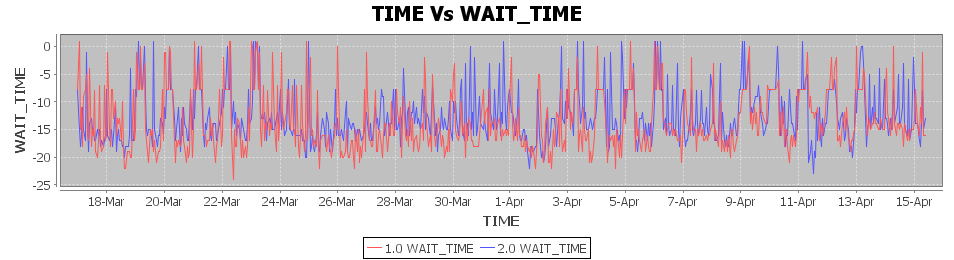
DB CPU exceeding DB Time has been happening intermittently for while. Following graphs show the different between DB CPU and DB Time and values below 0 indicate instances where DB CPU greater than DB Time.

After raising a SR Oracle has created "Bug 16300155 STATSPACK REPORTS SHOW DB CPU GREATER THAN DB TIME" and still investigating.


Similar observation was also made on a Enterprise Edition RAC as well.

This had been known to Oracle and already had a bug number (Bug 12713813: DB CPU LOOKS OVER-ESTIMATED) assigned to investigating this. However it was mentioned by Oracle that this bug hasn't been progressed because Oracle couldn't reproduce the issue. For the observed values it was said that DB Time is too little and to raise a SR (for awr related issue) if it's observed again at higher DB Times, although the Oracle engineer agreed that this an oddity and impossibility (that DB CPU is greater than DB Time no matter how small the observed values are).

Update 05 July 2013
AWR related SR was reopened as DB CPU higher than DB Time was observed during high activity time.


Update 18 July 2013
New bug has been created with regard to this issue. Bug 17181272 - AWR REPORTS DB CPU GREATER THAN DB TIME ON RAC DATABASE. Current status is development working.

Monday, June 3, 2013

Migrating Stored Outlines

11gR2 provides a function to migrate stored outline in to SQL plan baselines. In 1359841.1 oracle says stored outline "will be desupported in a future release in favor of SQL plan management" but (still) outline migration only works with enterprise edition (what will happen to standard edition systems?). This post list steps to migrate stored outlines created in earlier posts.

Current outlines
SQL> select name,sql_text,migrated from  user_outlines;
NAME            SQL_TEXT                                               MIGRATED
------------    ------------------------------------------------------ -------------
WITH_INDEX      select count(*) from big_table where p_id=:"SYS_B_0"   NOT-MIGRATED
JDBC_OUTLINE    select count(*) from big_table where p_id=:1           NOT-MIGRATED
Execute DBMS_SPM.MIGRATE_STORED_OUTLINE function to migrate a particular outline
var migrate_output clob
SQL> exec :migrate_output := dbms_spm.MIGRATE_STORED_OUTLINE(attribute_name => 'outline_name',
                                                             attribute_value => 'JDBC_OUTLINE',
                                                             fixed => 'NO');
PL/SQL procedure successfully completed.
Once migrated the outline view shows plant status as migrated
SQL> select name,sql_text,migrated from  user_outlines;
NAME            SQL_TEXT                                               MIGRATED
------------    ------------------------------------------------------ -------------
WITH_INDEX      select count(*) from big_table where p_id=:"SYS_B_0"   NOT-MIGRATED
JDBC_OUTLINE    select count(*) from big_table where p_id=:1           MIGRATED
Query plan base line view to verify outline is migrated into a SQL plan base line.
SQL> select sql_handle,sql_text,plan_name,origin,enabled,accepted from dba_sql_plan_baselines;

SQL_HANDLE           SQL_TEXT                                      PLAN_NAME     ORIGIN         ENA ACC
-------------------- --------------------------------------------- ------------- -------------- --- ----
SQL_fcd5bfb6b7986086 select count(*) from big_table where p_id=:1  JDBC_OUTLINE  STORED-OUTLINE YES YES
Origin column indicates that plan baseline was created from a stored outline. Run the SQL query if plan base line is used
SQL> select * from table(dbms_xplan.display_cursor('4x4krrt8vq3js',0,'ALLSTATS OUTLINE'));
SQL_ID  4x4krrt8vq3js, child number 0
-------------------------------------
select count(*) from big_table where p_id=:1

Plan hash value: 3425075646

---------------------------------------------------------
| Id  | Operation          | Name              | E-Rows |
---------------------------------------------------------
|   0 | SELECT STATEMENT   |                   |        |
|   1 |  SORT AGGREGATE    |                   |      1 |
|*  2 |   TABLE ACCESS FULL| big_table |  21352 |
---------------------------------------------------------

Outline Data
-------------

  /*+
      BEGIN_OUTLINE_DATA
      IGNORE_OPTIM_EMBEDDED_HINTS
      OPTIMIZER_FEATURES_ENABLE('11.2.0.3')
      DB_VERSION('11.2.0.3')
      OPT_PARAM('optimizer_index_cost_adj' 25)
      OPT_PARAM('optimizer_index_caching' 90)
      FIRST_ROWS(1000)
      OUTLINE_LEAF(@"SEL$1")
      FULL(@"SEL$1" "big_table"@"SEL$1")
      END_OUTLINE_DATA
  */

Predicate Information (identified by operation id):
---------------------------------------------------

   2 - filter("p_id"=:1)

Note
-----
   - SQL plan baseline JDBC_OUTLINE used for this statement
   - Warning: basic plan statistics not available. These are only collected when:
       * hint 'gather_plan_statistics' is used for the statement or
       * parameter 'statistics_level' is set to 'ALL', at session or system level


Outline takes precedence over plan baseline (see 1524658.1 for more). Once migrated outline is not use even though the enabled column says "ENABLED" in the outline view. But if the outline was to be recreated again then instead of SQL plan baseline , the stored outline will be used. To recreate the outline that was migrated create a private outline and refresh from it.
SQL> create private outline myjdbc from jdbc_outline;
Outline created.

SQL> execute dbms_outln_edit.refresh_private_outline('MYJDBC');
PL/SQL procedure successfully completed.

SQL> create or replace outline jdbc_outline from private MYJDBC;
Outline created.
After this the migrated status would be changed to not-migrated
SQL> select name,sql_text,migrated from  user_outlines;
NAME            SQL_TEXT                                               MIGRATED
------------    ------------------------------------------------------ -------------
WITH_INDEX      select count(*) from big_table where p_id=:"SYS_B_0"   NOT-MIGRATED
JDBC_OUTLINE    select count(*) from big_table where p_id=:1           NOT-MIGRATED
and outline will take precedence over the existing plan baseline.

Related Posts
Changing Execution Plan Using Stored Outline
Moving Stored Outlines From One Database To Another