Sunday, March 14, 2021

Creating Manual Backups on Autonomous Transaction Processing DB

Autonomous Transaction Processing (ATP) DB is not configured for manual backup right after provisioning.


The manual backups are written to an object storage bucket. Cretain configuration tasks must be done before hand so that ATP is able to identify and write the backup to the pre configured object storage bucket. The actual backup tasks is simple as clicking the "create manaul backup" button.
1. As the first step of the configuration identify the object storage name space for the tenancy. This could be done either with oci cli as
$ oci os ns get
{
  "data": "namespace is shown here"
}
or from the OCI console (administration -> tenancy details).

2. Get the ATP name not the display name of the ATP. This inforamtion is available on the ATP detail page.

3. Create an object storage bucket to hold the manual backups. The bucket name must follow a certain format. It must be prefixed with word "backup" and followed by an underscore (backup_). After the underscore specify the ATP name. In this case the ATP name is "testatp". As such the bucket name should be "backup_testatp".

If the bucket name doesn't follow this format then the ATP would be unable to identify that configuration needed for manaul backup has been done.

Update 28/09/2021
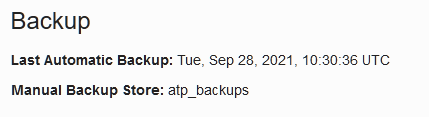
The naming convention is no longer needed. Any valid bucket name could be used for manual backup storage. Once all configuration steps are done ATP will identify the bucket designated for backups. Below is an example of such bucket name being detected by ATP as a location for manual backups.


4. Once the bucket is created, as the admin user set the default_bucket property for the database using the swift format. Do not include the bucket name in the end. The URL should end with the namespace identified in step 1.
ALTER DATABASE PROPERTY SET default_bucket='https://swiftobjectstorage.#region#.oraclecloud.com/v1/#NAMESPACE#';
Update 11/09/2021
In the new documentation the property has been renamed to default_backup_bucket. The new documentation states set the database property DEFAULT_BACKUP_BUCKET to identify the manual backup bucket in your Oracle Cloud Infrastructure Object Storage. Also the URI used with default backup bucket contain the bucket name. Considering the earlier shown bucket name, the URI for the default backup bucket is specified as
ALTER DATABASE PROPERTY SET default_backup_bucket
='https://swiftobjectstorage.#region#.oraclecloud.com/v1/#namespace#/atp_backups';

5. Generate an auth token for a OCI user that has access to the bucket created. (this step is similar to earlier post on import/export on ATP).

At minimum the user must belong to a group that as following permission on the compartment where the bucket resides
allow group #usergroup#  to read buckets in compartment #bucketCompartment#
allow group #usergroup#  to manage objects in compartment #bucketCompartment#
6. Create a crednetail using the auth token
BEGIN
DBMS_CLOUD.CREATE_CREDENTIAL(
credential_name => 'backup_cred',
username => '#user#',
password => 'token generated above'
);
END;
/
7. Set the created credentail as the default credentail.
ALTER DATABASE PROPERTY SET DEFAULT_CREDENTIAL ='ADMIN.BACKUP_CRED';
8. Check the default properties for manual backup is set.
SELECT PROPERTY_NAME,PROPERTY_VALUE FROM DATABASE_PROPERTIES WHERE PROPERTY_NAME IN ('DEFAULT_BUCKET','DEFAULT_CREDENTIAL');

PROPERTY_NAME        PROPERTY_VALUE
-------------------- ----------------------------------------------------------------------------------------------------
DEFAULT_BUCKET       https://swiftobjectstorage.#region#.oraclecloud.com/v1/#namespace#   
DEFAULT_CREDENTIAL   ADMIN.BACKUP_CRED
Another way to verify that all is working as it should is to upload a dummy file to the bucket created earlier and query the content of the bucket specifying the credentail. In this case the URL to bucket must be given.
select object_name, bytes from 
dbms_cloud.list_objects('BACKUP_CRED','https://swiftobjectstorage.#region#.oraclecloud.com/v1/#namespace#/backup_testatp/');

OBJECT_NAME                         BYTES
------------------------------ ----------
exports_options.txt                   428
9. When the configuration is done refresh the ATP details page. If ATP is able to detect the manaul configuration has been done the bucket name will be listed as the manual backup store.

Anything else listed under manual backup store, such as the namespace or "not configured" means manual backup configuration is not complete and any attempt to run a manual backup will fail.

10. Final step is to execute the manual backup. On the ATP details page select backup and click on create manual backup button and give the manual backup a name.

At times while the backup is in progress the manual backup store on ATP detail page goes back to "not configured". If this happens ignore it and wait until backup finishes. If all is correct inspite of this backup will successfully complete. If backup fails (even though at step 9 ATP discovered the bucket) then it means at run time ATP encountered an error and manual backup configuration is not correct (most likely a permission issue such as able to view the bucket but cannot write to it).

The work request will show the backup job progress.

The bucket will show the backup files being created.

When the backup end it will show the backup details.


Useful metalink note
How To Take Manual Backup Of ATP/ADW [ID 2518388.1]

Sunday, March 7, 2021

Import and Export Data Using Data Pump on Autonomous Transaction Processing DB

This post shows the steps for importing and exporting data using data dump on autonomous transaction processing (ATP) DB. The ATP used in this case is on shared exadata infrastructure and 19c (19.5).
1. As the first step create the user for import (or export). Admin user (a user created automatically in ATP) could be used for import and export but as admin user has higher privilges it may not be a good idea. The user craetion below is bare minimum to do an import. It has privilges to connect to the ATP DB with quota unlimited on default "data" tablespace. Also it has read,write privilges on the data_pump_dir where the log files would be created. Finally execute privilege on dbms_cloud to create the credentail. This is needed only for the duration of the import or export. Afterwards could be revoked from the user if deemed unnecessary. Puting it altogether the user creation looks like as follows.
create user asanga identified by password quota unlimited on data;
grant connect to asanga;
grant create table to asanga;
grant read,write on directory DATA_PUMP_DIR to asanga; 
grant execute on dbms_cloud to asanga;
2. Create a bucket on the OCI to hold the dump files. The impdp/expdp will access this bucket to get the necessary dump files.

3. Upload the dump files to the object storage bucket created earlier.

4. Get the URI of the dump file in the bucket selecting view object details.

5. Generate an auth token for an OCI user who has access to the bucket created in step 2. Navigate through Identity -> users and select the user to get to user details. Then generate an auth code (make note of the code generated).

Another way to get to auth tokens is via profile -> user setting.

6. Setup an enviornment to login and execute expdp/impdp on the ATP. For this an Oracle client installation is needed that has access to the ATP. Easiest way to acheive this is to create a temporary VM in the same network as ATP (this ATP was using private endpoints) and allow access for this VM to the ATP via NSG. On the VM (if using Oracle Linux) install instant-client, sqlplus and tools from the yum repository (use yum list | grep instant-client to identify the exact versions). This would have installed sqlplus, expdp and impdp binaries in the VM. This is the minimum needed to do the import and export

7. Download the ATP wallet from the console into the VM created in step 6 (or to where impdp/expdp would be executed). Copy the cwallet.sso, ewallet.p12, sqlnet.ora and tnsnames.ora files to a temporary location (eg /home/opc/atp). Edit the sqlnet.ora to reflect the wallet location.
At the same time set the TNS_ADMIN variable to the location where wallet file resides.
export TNS_ADMIN=/home/opc/atp
These files could be removed once the impdp/expdp is done.

8. If step 6 and 7 are done correctly it would be possible to login to the ATP now. Login to the ATP as the user created in step 1 and create a credential.
sqlplus asanga@testatp_tpurgent

BEGIN
  DBMS_CLOUD.CREATE_CREDENTIAL(
    credential_name => 'ATP_CRED_NAME',
    username => 'user@email.com',
    password => 'auth token created before'
  );
END;
/
To check if user can access the bucket using the crednetail use the following SQL. If use has the permission then this will list the contents of the bucket.
select object_name, bytes from dbms_cloud.list_objects('ATP_CRED_NAME','https://objectstorage.#region#.oraclecloud.com/n/#tenancy namespace#/b/dumps');

If using swiftobject format then use
select object_name, bytes from dbms_cloud.list_objects('ATP_CRED_NAME','https://swiftobjectstorage.#region#.oraclecloud.com/v1/#tenancy namespace#/dumps');

As the client used in this case 19c no other steps are needed after creating the credentail. But if it is 12.2 client used for export/import then set the default credentail property.

9. Run the import data pump command by specify the storage bucket object URI as the dump file. In the shared ATP there's a single default tablespace called data and a remap tablespace must be used if the system exporting data had data residing in other tablespaces. Beside the username and the password for the DB user the credentail name (created in step 8) must also be specified.
impdp asanga@atpfree_tp 
directory=data_pump_dir 
credential=ATP_CRED_NAME 
dumpfile=https://objectstorage.#region#.oraclecloud.com/n/#tenancy namespace#/b/dumps/o/asanga.dmp  
remap_tablespace=users:data 
exclude=role_grant,SYSTEM_GRANT,DEFAULT_ROLE,TABLESPACE_QUOTA,user

Import: Release 19.0.0.0.0 - Production on Thu Aug 20 16:48:44 2020
Version 19.8.0.0.0

Copyright (c) 1982, 2019, Oracle and/or its affiliates.  All rights reserved.
Password:

Connected to: Oracle Database 19c Enterprise Edition Release 19.0.0.0.0 - Production
Master table "ASANGA"."SYS_IMPORT_FULL_01" successfully loaded/unloaded
Starting "ASANGA"."SYS_IMPORT_FULL_01":  asanga/********@atpfree_tp directory=data_pump_dir credential=ATP_CRED_NAME dumpfile=https://objectstorage.#region#.oraclecloud.com/n/#tenancy namespace#/b/dumps/o/asanga.dmp remap_tablespace=users:data exclude=role_grant,SYSTEM_GRANT,DEFAULT_ROLE,TABLESPACE_QUOTA,user
Processing object type SCHEMA_EXPORT/PRE_SCHEMA/PROCACT_SCHEMA
Processing object type SCHEMA_EXPORT/TABLE/TABLE
Processing object type SCHEMA_EXPORT/TABLE/TABLE_DATA
. . imported "ASANGA"."TEST"                             2.406 MB   19862 rows
. . imported "ASANGA"."DATETEST"                           5.5 KB       1 rows
. . imported "ASANGA"."UCPTEST"                          5.484 KB       2 rows
Processing object type SCHEMA_EXPORT/TABLE/CONSTRAINT/CONSTRAINT
Processing object type SCHEMA_EXPORT/TABLE/INDEX/STATISTICS/INDEX_STATISTICS
Processing object type SCHEMA_EXPORT/TABLE/STATISTICS/TABLE_STATISTICS
Processing object type SCHEMA_EXPORT/STATISTICS/MARKER
Job "ASANGA"."SYS_IMPORT_FULL_01" successfully completed at Thu Aug 20 11:19:18 2020 elapsed 0 00:00:17

The ATP (shared) documentation mentions using transform parameters such as segment_attributes:N but using any of the following transform parameters
TRANSFORM=LOB_STORAGE:SECUREFILE,DISABLE_ARCHIVE_LOGGING:Y,constraint_use_default_index:Y,segment_attributes:N
resulted in import job failing with
UDI-00942: operation generated ORACLE error 942
ORA-00942: table or view does not exist
This was the case even when the import job was run as admin user.

10. Once the import job is done the log file could be viewd with the following.
sqlplus asanga@testatp_tpurgent
col CHECKSUM format a10
set line 1000
col OBJECT_NAME format a30
SELECT * FROM DBMS_CLOUD.LIST_FILES('DATA_PUMP_DIR');
The log file could be copied out of ATP host to the bucket created to hold dump file with the following (imp.log is the log file name).
exec DBMS_CLOUD.PUT_OBJECT(credential_name => 'ATP_CRED_NAME',
object_uri => 'https://objectstorage.#region#.oraclecloud.com/n/#tenancy namespace#/b/dumps/o/imp.log',
directory_name => 'DATA_PUMP_DIR',
file_name => 'imp.log');
Log file could be removed with
exec dbms_cloud.DELETE_FILE('DATA_PUMP_DIR','imp.log');
Finally if credentail is nolonger needed it could be dropped with
exec dbms_cloud.DROP_CREDENTIAL('ATP_CRED_NAME');


Similar to importing directly from a object storage bucket, exporting to object storage bucket could be done as well. Following example shows exporting two tables into object storage bucket.
expdp asanga@testatp_tpurgent 
dumpfile=https://objectstorage.#region#.oraclecloud.com/n/#tenancy namespace#/b/dumpbucket/o/configs.dmp 
logfile=configimp.log 
parallel=6 
tables=CONFIG,CONFIG_PARAMETER 
directory=data_pump_dir 
credential=ATP_CRED_NAME 
logtime=all metrics=yes


Export: Release 21.0.0.0.0 - Production on Tue Feb 23 13:31:14 2021
Version 21.1.0.0.0

Copyright (c) 1982, 2020, Oracle and/or its affiliates.  All rights reserved.
Password:

Connected to: Oracle Database 19c Enterprise Edition Release 19.0.0.0.0 - Production
23-FEB-21 13:31:31.786: Starting "ASANGA"."SYS_EXPORT_TABLE_01":  asanga/********@testatp_tpurgent dumpfile=https://objectstorage.#region#.oraclecloud.com/n/#tenancy namespace#/b/dumpbucket/o/configs.dmp  logfile=admconfigimp.log parallel=6 tables=CONFIG,CONFIG_PARAMETER directory=data_pump_dir credential=ATP_CRED_NAME logtime=all metrics=yes
23-FEB-21 13:31:33.289: W-1 Startup on instance 3 took 2 seconds
23-FEB-21 13:31:35.670: W-2 Startup on instance 3 took 0 seconds
23-FEB-21 13:31:37.252: W-3 Startup on instance 3 took 1 seconds
23-FEB-21 13:31:37.262: W-4 Startup on instance 3 took 1 seconds
23-FEB-21 13:31:37.276: W-5 Startup on instance 3 took 1 seconds
23-FEB-21 13:31:38.534: W-6 Startup on instance 3 took 2 seconds
23-FEB-21 13:31:39.605: W-4 Processing object type TABLE_EXPORT/TABLE/INDEX/STATISTICS/INDEX_STATISTICS
23-FEB-21 13:31:40.643: W-6 Processing object type TABLE_EXPORT/TABLE/STATISTICS/TABLE_STATISTICS
23-FEB-21 13:31:41.711: W-4      Completed 4 INDEX_STATISTICS objects in 3 seconds
23-FEB-21 13:31:42.072: W-1 Processing object type TABLE_EXPORT/TABLE/TABLE_DATA
23-FEB-21 13:31:42.236: W-6      Completed 2 TABLE_STATISTICS objects in 3 seconds
23-FEB-21 13:31:42.852: W-5 Processing object type TABLE_EXPORT/TABLE/COMMENT
23-FEB-21 13:31:43.211: W-2 Processing object type TABLE_EXPORT/TABLE/GRANT/OWNER_GRANT/OBJECT_GRANT
23-FEB-21 13:31:46.866: W-3 Processing object type TABLE_EXPORT/TABLE/TABLE
23-FEB-21 13:31:48.604: W-6 Processing object type TABLE_EXPORT/TABLE/INDEX/INDEX
23-FEB-21 13:31:48.610: W-3      Completed 2 TABLE objects in 9 seconds
23-FEB-21 13:31:49.579: W-6      Completed 4 INDEX objects in 7 seconds
23-FEB-21 13:31:50.627: W-1 Processing object type TABLE_EXPORT/TABLE/CONSTRAINT/CONSTRAINT
23-FEB-21 13:31:50.636: W-3 Processing object type TABLE_EXPORT/TABLE/CONSTRAINT/REF_CONSTRAINT
23-FEB-21 13:31:50.925: W-5      Completed 14 COMMENT objects in 9 seconds
23-FEB-21 13:31:52.100: W-2      Completed 2 OBJECT_GRANT objects in 12 seconds
23-FEB-21 13:31:53.086: W-1      Completed 2 CONSTRAINT objects in 10 seconds
23-FEB-21 13:31:53.398: W-3      Completed 3 REF_CONSTRAINT objects in 5 seconds
23-FEB-21 13:31:54.387: W-5 . . exported "ASANGA"."CONFIG"                          235.8 KB    3856 rows in 2 seconds using direct_path
23-FEB-21 13:31:54.606: W-5 . . exported "ASANGA"."CONFIG_PARAMETER"                137.8 KB    1351 rows in 0 seconds using direct_path
23-FEB-21 13:32:00.680: W-6 Processing object type TABLE_EXPORT/TABLE/TRIGGER
23-FEB-21 13:32:00.948: W-6      Completed 5 TRIGGER objects in 10 seconds
23-FEB-21 13:32:05.097: W-4 Processing object type TABLE_EXPORT/TABLE/STATISTICS/MARKER
23-FEB-21 13:32:05.443: W-4      Completed 1 MARKER objects in 23 seconds
23-FEB-21 13:32:05.565: ORA-39173: Encrypted data has been stored unencrypted in dump file set.
23-FEB-21 13:32:05.710: W-1      Completed 2 TABLE_EXPORT/TABLE/TABLE_DATA objects in 2 seconds
23-FEB-21 13:32:08.028: W-1 Master table "ASANGA"."SYS_EXPORT_TABLE_01" successfully loaded/unloaded
23-FEB-21 13:32:08.032: ******************************************************************************
23-FEB-21 13:32:08.033: Dump file set for ASANGA.SYS_EXPORT_TABLE_01 is:
23-FEB-21 13:32:08.037:   https://objectstorage.#region#.oraclecloud.com/n/#tenancy namespace#/b/dumpbucket/o/configs.dmp


Related Posts
JDBC Thin Connections to Autonomous Transaction Processing DB

Monday, March 1, 2021

Plugging in non-CDB to CDB and reusing the non-CDB Datafiles in Standby

This post shows how the use of STANDBY_PDB_SOURCE_FILE_DIRECTORY parameter could help in reusing data file in the standby when a non-CDB is plugged in as a PDB to CDB that is also in a data guard configuration.
The MOS docs on the matter (2273304.1) creating aliases when ASM is used for storage. Another MOS note (2274735.1) shows using the above parameter when cloning PDBs.
This post shows the steps for plugging in a non-CDB in data gaurd configuration and resuing the standby data files of the non-CDB with the help of STANDBY_PDB_SOURCE_FILE_DIRECTORY parameter. The database reference documentation states
the STANDBY_PDB_SOURCE_FILE_DIRECTORY specifies a directory location on the standby where source datafiles for instantiating the PDB may be found. If the datafiles are not found there, an attempt will be made to locate them in the OMF location on the standby. This parameter can also be used to try to copy files in cases where the source PDB's files are not present on the standby.
Some information on the setup, both non-CDB and CDB are running same version (19.10 in this case). Two cases are shown in this post are one using file system with OMF and another where ASM is used for storage. TDE is not used in this configuration nor on the CDB where non-CDB is plugged in.
The non-CDB data guard configuration is as follows.
DGMGRL> show configuration;

Configuration - noncdb_dg

  Protection Mode: MaxAvailability
  Members:
  noncdb  - Primary database
    noncdb2 - Physical standby database

Fast-Start Failover:  Disabled

Configuration Status:
SUCCESS   (status updated 50 seconds ago)
If upgrading from a lower version this could be thought of as a data guard configuration that is already upgraded (with dbms_rolling, transient logical standby or traditional method with down time) to 19c.
The steps for plugging in the non-CDB as a PDB on primary is same as without data guard (however, autoupgrade was not used for this and non-CDB was plugged in manually). But there are few key things to make a note of. When the primary non-CDB is open in read only mode to create the descriptor file make sure that checkpoint_change# on primary and standby datafiles match.
On primary non-CDB
shutdown imemdiate;
startup mount;
alter database open read only;

select CHECKPOINT_CHANGE#,name from v$datafile;

CHECKPOINT_CHANGE# NAME
------------------ -------------------------------------------------------
            858807 /opt/data/NONCDB/datafile/o1_mf_system_j2tgk6do_.dbf
            858807 /opt/data/NONCDB/datafile/o1_mf_sysaux_j2tgkgg8_.dbf
            858807 /opt/data/NONCDB/datafile/o1_mf_undotbs1_j2tgklqr_.dbf
            858807 /opt/data/NONCDB/datafile/o1_mf_users_j2tgl0j3_.dbf
Check the same on standby non-CDB
select CHECKPOINT_CHANGE#,name from v$datafile;
            
            CHECKPOINT_CHANGE# NAME
------------------ --------------------------------------------------------
            858807 /opt/data/NONCDB2/datafile/o1_mf_system_09vne4sm_.dbf
            858807 /opt/data/NONCDB2/datafile/o1_mf_sysaux_0avne4t5_.dbf
            858807 /opt/data/NONCDB2/datafile/o1_mf_undotbs1_0bvne4tk_.dbf
            858807 /opt/data/NONCDB2/datafile/o1_mf_users_0cvne4tr_.dbf
In this case a simple clean shutdown was enough to make both sets of data files to have same checkpoint change number (the fact protection mode being max availability mode may have something to do with this). If the checkpoint change numbers are different then follow 2273304.1 to flush redo and recover the standby non-CDB data files to the same checkpoint change number as the primary non-CDB data files.
Create the non-CDB descriptor file and shutdown both primary and standby non-CDB databases.
On primary
exec dbms_pdb.describe(pdb_descr_file=>'/home/oracle/noncdb.xml');

PL/SQL procedure successfully completed.

SQL> shutdown immediate;
On standby
SQL> shutdown immediate;


The CDB data guard configuration details are as follows
DGMGRL> show configuration

Configuration - dg_19c_fs

  Protection Mode: MaxAvailability
  Members:
  testfs  - Primary database
    testfs2 - Physical standby database

Fast-Start Failover:  Disabled

Configuration Status:
SUCCESS   (status updated 59 seconds ago)
Run the compatability check on the primary CDB.
set serveroutput on
declare
    compa boolean;
    begin
    compa := dbms_pdb.CHECK_PLUG_COMPATIBILITY(pdb_descr_file=>'/home/oracle/noncdb.xml');
 if compa = true then
      dbms_output.put_line('compatible');
 else
    dbms_output.put_line('not compatible');
 end if;
end;
/

compatible
Before creating the PDB set the standby_pdb_source_file_directory on the standby CDB to the location where data files of the non-CDB standby resides. If the data files of the non-CDB are on the file system (with OMF) then set the standby_pdb_source_file_directory similar to
SQL> alter system set standby_pdb_source_file_directory='/opt/data/NONCDB2/datafile' scope=both;

System altered.
If standby non-CDB was using ASM then set similar to below.
SQL> alter system set standby_pdb_source_file_directory='+DATA/NONCDB2/DATAFILE' scope=both;

System altered.
Once the standby_pdb_source_file_directory are set then plug in the non-CDB as a PDB on the primary.
CREATE PLUGGABLE DATABASE noncdbaspdb USING '/home/oracle/noncdb.xml' copy;
While plug in is happening the standby alert log will show files being copied from the standby_pdb_source_file_directory location to the OMF locations. Following is from standby alert log when file system is used.
2021-02-17T17:23:25.952694+00:00
Recovery created pluggable database NONCDBASPDB
Recovery attempting to copy datafiles for pdb-NONCDBASPDB from           source dir-/opt/data/NONCDB2/datafile
2021-02-17T17:23:30.951094+00:00
Recovery copied files for tablespace SYSTEM
Recovery successfully copied file /opt/data/TESTFS2/BB6378EF1A471937E053F00C1FAC6AAD/datafile/o1_mf_system_j2tn81ol_.dbf from /opt/data/NONCDB2/datafile/o1_mf_system_09vne4sm_.dbf
NONCDBASPDB(4):Datafile 98 added to flashback set
NONCDBASPDB(4):Successfully added datafile 98 to media recovery
NONCDBASPDB(4):Datafile #98: '/opt/data/TESTFS2/BB6378EF1A471937E053F00C1FAC6AAD/datafile/o1_mf_system_j2tn81ol_.dbf'
2021-02-17T17:23:35.458745+00:00
Recovery copied files for tablespace SYSAUX
Recovery successfully copied file /opt/data/TESTFS2/BB8B1CFF497166F8E053F00C1FACF64E/datafile/o1_mf_sysaux_j2tn81ox_.dbf from /opt/data/NONCDB2/datafile/o1_mf_sysaux_0avne4t5_.dbf
NONCDBASPDB(4):Datafile 99 added to flashback set
NONCDBASPDB(4):Successfully added datafile 99 to media recovery
NONCDBASPDB(4):Datafile #99: '/opt/data/TESTFS2/BB8B1CFF497166F8E053F00C1FACF64E/datafile/o1_mf_sysaux_j2tn81ox_.dbf'
2021-02-17T17:23:37.428931+00:00
Recovery copied files for tablespace UNDOTBS1
Recovery successfully copied file /opt/data/TESTFS2/BB8B1CFF497166F8E053F00C1FACF64E/datafile/o1_mf_undotbs1_j2tn81oz_.dbf from /opt/data/NONCDB2/datafile/o1_mf_undotbs1_0bvne4tk_.dbf
NONCDBASPDB(4):Datafile 100 added to flashback set
NONCDBASPDB(4):Successfully added datafile 100 to media recovery
NONCDBASPDB(4):Datafile #100: '/opt/data/TESTFS2/BB8B1CFF497166F8E053F00C1FACF64E/datafile/o1_mf_undotbs1_j2tn81oz_.dbf'
Recovery copied files for tablespace USERS
Recovery successfully copied file /opt/data/TESTFS2/BB8B1CFF497166F8E053F00C1FACF64E/datafile/o1_mf_users_j2tn81p0_.dbf from /opt/data/NONCDB2/datafile/o1_mf_users_0cvne4tr_.dbf
NONCDBASPDB(4):Datafile 101 added to flashback set
NONCDBASPDB(4):Successfully added datafile 101 to media recovery
NONCDBASPDB(4):Datafile #101: '/opt/data/TESTFS2/BB8B1CFF497166F8E053F00C1FACF64E/datafile/o1_mf_users_j2tn81p0_.dbf'


On the otherhand if ASM is used expect something similar to below on the alert log.
2021-02-18T13:06:46.114728+00:00
Recovery created pluggable database NONCDBASPDB
Recovery attempting to copy datafiles for pdb-NONCDBASPDB from           source dir-+DATA/NONCDB2/DATAFILE
2021-02-18T13:06:46.240880+00:00
NOTE: dependency between database testfs2 and diskgroup resource ora.DATA.dg is established
2021-02-18T13:06:55.953110+00:00
Recovery copied files for tablespace SYSTEM
Recovery successfully copied file +DATA/TESTFS2/BB6378EF1A471937E053F00C1FAC6AAD/DATAFILE/system.262.1064840807 from +DATA/NONCDB2/DATAFILE/system.256.1064839675
NONCDBASPDB(5):Datafile 111 added to flashback set
NONCDBASPDB(5):Successfully added datafile 111 to media recovery
NONCDBASPDB(5):Datafile #111: '+DATA/TESTFS2/BB6378EF1A471937E053F00C1FAC6AAD/DATAFILE/system.262.1064840807'
2021-02-18T13:07:04.357805+00:00
Recovery copied files for tablespace SYSAUX
Recovery successfully copied file +DATA/TESTFS2/BB8B1CFF497166F8E053F00C1FACF64E/DATAFILE/sysaux.265.1064840817 from +DATA/NONCDB2/DATAFILE/sysaux.257.1064839687
NONCDBASPDB(5):Datafile 112 added to flashback set
NONCDBASPDB(5):Successfully added datafile 112 to media recovery
NONCDBASPDB(5):Datafile #112: '+DATA/TESTFS2/BB8B1CFF497166F8E053F00C1FACF64E/DATAFILE/sysaux.265.1064840817'
2021-02-18T13:07:08.042371+00:00
Recovery copied files for tablespace UNDOTBS1
Recovery successfully copied file +DATA/TESTFS2/BB8B1CFF497166F8E053F00C1FACF64E/DATAFILE/undotbs1.263.1064840825 from +DATA/NONCDB2/DATAFILE/undotbs1.258.1064839695
NONCDBASPDB(5):Datafile 113 added to flashback set
NONCDBASPDB(5):Successfully added datafile 113 to media recovery
NONCDBASPDB(5):Datafile #113: '+DATA/TESTFS2/BB8B1CFF497166F8E053F00C1FACF64E/DATAFILE/undotbs1.263.1064840825'
Recovery copied files for tablespace USERS
Recovery successfully copied file +DATA/TESTFS2/BB8B1CFF497166F8E053F00C1FACF64E/DATAFILE/users.275.1064840829 from +DATA/NONCDB2/DATAFILE/users.259.1064839697
NONCDBASPDB(5):Datafile 114 added to flashback set
NONCDBASPDB(5):Successfully added datafile 114 to media recovery
NONCDBASPDB(5):Datafile #114: '+DATA/TESTFS2/BB8B1CFF497166F8E053F00C1FACF64E/DATAFILE/users.275.1064840829'
Recovery copied files for tablespace TEST
Recovery successfully copied file +DATA/TESTFS2/BB8B1CFF497166F8E053F00C1FACF64E/DATAFILE/test.276.1064840829 from +DATA/NONCDB2/DATAFILE/test.260.1064839883
NONCDBASPDB(5):Datafile 115 added to flashback set
NONCDBASPDB(5):Successfully added datafile 115 to media recovery
NONCDBASPDB(5):Datafile #115: '+DATA/TESTFS2/BB8B1CFF497166F8E053F00C1FACF64E/DATAFILE/test.276.1064840829'


Complete the non-CDB plug in by running noncdb_to_pdb script.
SQL> alter session set container=NONCDBASPDB;

Session altered.

SQL> @?/rdbms/admin/noncdb_to_pdb.sql

on primary 

SQL> show pdbs

    CON_ID CON_NAME                       OPEN MODE  RESTRICTED
---------- ------------------------------ ---------- ----------
         4 NONCDBASPDB                    MOUNTED

SQL> alter pluggable database open;

Pluggable database altered.

SQL> show pdbs

    CON_ID CON_NAME                       OPEN MODE  RESTRICTED
---------- ------------------------------ ---------- ----------
         4 NONCDBASPDB                    READ WRITE NO
On the standby the new PDB will be in mount state.
SQL> show pdbs

    CON_ID CON_NAME                       OPEN MODE  RESTRICTED
---------- ------------------------------ ---------- ----------
         2 PDB$SEED                       MOUNTED
         3 TESTPDB                        MOUNTED
         4 NONCDBASPDB                    MOUNTED
To test if all is working fine, create a test tablespace on the PDB. First identify the GUID of the newly created PDB.
SQL> select guid,name from v$pdbs;

GUID                             NAME
-------------------------------- -------------
BB8B1CFF497166F8E053F00C1FACF64E NONCDBASPDB
Create a tablespace on the primary.
SQL> create tablespace test datafile size 10m;

Tablespace created.
Check the standby alert log for the corresponding datafile being created inside the same GUID.
2021-02-17T17:29:28.946404+00:00
(4):Resize operation completed for file# 100, old size 424960K, new size 430080K
2021-02-17T17:32:20.962105+00:00
(4):Datafile 102 added to flashback set
(4):Successfully added datafile 102 to media recovery
(4):Datafile #102: '/opt/data/TESTFS2/BB8B1CFF497166F8E053F00C1FACF64E/datafile/o1_mf_test_j2tns4w1_.dbf'
If possible do a switchover and open the newly created PDB in read-write mode.
DGMGRL> switchover to testfs2;
Performing switchover NOW, please wait...
Operation requires a connection to database "testfs2"
Connecting ...
Connected to "testfs2"
Connected as SYSDBA.
New primary database "testfs2" is opening...
Oracle Clusterware is restarting database "testfs" ...
Connected to "testfs"
Switchover succeeded, new primary is "testfs2"

DGMGRL> show configuration

Configuration - dg_19c_fs

  Protection Mode: MaxAvailability
  Members:
  testfs2 - Primary database
    testfs  - Physical standby database

Fast-Start Failover:  Disabled

Configuration Status:
SUCCESS   (status updated 60 seconds ago)
PDB status on old standby (new primary)
SQL> show pdbs

    CON_ID CON_NAME                       OPEN MODE  RESTRICTED
---------- ------------------------------ ---------- ----------
         2 PDB$SEED                       READ ONLY  NO
         3 TESTPDB                        READ WRITE NO
         4 NONCDBASPDB                    READ WRITE NO

This post has shown how standby_pdb_source_file_directory could be used to specify the location of the data files in standby and reuse them. It also showed when ASM is used no need to create aliases anymore.

Related Posts
Plugging non-CDB as a PDB - Manual vs Autoupgrade
Plugging non-CDB as a PDB into a CDB in the Same Host
Creating a PDB in a Data Guard Configuration

Useful metalink notes
Reusing the Source Standby Database Files When Plugging a non-CDB as a PDB into the Primary Database of a Data Guard Configuration [ID 2273304.1]
Using standby_pdb_source_file_dblink and standby_pdb_source_file_directory to Maintain Standby Databases when Performing PDB Remote Clones or Plugins [ID 2274735.1]